1. Okwu mmalite
This manual provides essential instructions for the safe operation and maintenance of your VTech Advanced HD Plus 5.5" HD 1 Cam Video Baby Monitor. Please read this manual thoroughly before using the product to ensure proper setup and functionality. Keep this guide for future reference.

Image 1.1: The VTech Advanced HD Plus 5.5" HD 1 Cam Video Baby Monitor, featuring the parent unit and baby unit.
2. Atụmatụ igodo
The VTech Advanced HD Plus Video Baby Monitor is designed to provide reliable monitoring of your baby. Key features include:
- 5.5" HD IPS LCD Screen: Offers clear 720p video resolution with wide viewing angles and enhanced color accuracy.
- Ogologo ndụ batrị: Up to 13 hours of continuous video streaming or 19 hours of audio-only streaming on a single charge.
- Pan-Tilt-Zoom Camera: Remote control for 360-degree panoramic view, 122-degree vertical view, and 4x digital zoom.
- Obosara akụkụ View: A 110-degree wide-angle lens captures more of the nursery.
- Adaptive Night Light: Touch-controlled, dimmable 7-color night light to create a soothing environment.
- Mkparịta ụka Ụzọ Abụọ: Allows communication with your baby from the parent unit.
- Ụda Ụda na Ụda Na-eme Ka Obi Dajụọ: Five calming melodies and five ambient sounds to help soothe your baby.
- Nyochaa okpomọkụ: Displays the nursery's ambient temperature on the parent unit.
- Mkpu ngagharị na ụda: Notifies you of activity in the baby's room.
- Automatic Infrared Night Vision: Provides clear video in low-light conditions.
- Secure 2.4GHz Wireless Connection: Ensures a private and interference-free connection up to 1,000 feet. No Wi-Fi required.

Image 2.1: Visual representation of the monitor's main features.
3. Ihe ngwugwu
Gbaa mbọ hụ na ihe niile dị na ngwugwu gị:
- Ngalaba nne ma ọ bụ nna
- Ngalaba ụmụaka (igwefoto)
- 2 AC Adapters (one for Parent Unit, one for Baby Unit)
- Ntuziaka mmalite ngwa ngwa
4. Nhazi ntuziaka
4.1. Ịchaji Ngalaba Nne na Nna
- Connect the small end of the parent unit power adapter to the power jack on the side of the parent unit.
- Plug the large end of the power adapter into a wall outlet.
- Charge the parent unit for at least 12 hours before initial use. The battery icon will indicate charging status.
4.2. Powering the Baby Unit (Camera)
- Connect the small end of the baby unit power adapter to the power jack on the back of the baby unit.
- Plug the large end of the power adapter into a wall outlet.
- The baby unit will power on automatically once connected to power.
4.3. Ịhazi ihe dị n'ime ụlọ nwa ahụ
Place the baby unit in a location that provides a clear view of your baby in their crib or play area. For optimal performance:
- Place the baby unit at least 3 feet (1 meter) away from your baby to avoid potential hazards.
- Ensure the baby unit is on a flat, stable surface or securely mounted to a wall (mounting hardware not included).
- Avoid placing the baby unit near other electronic devices that may cause interference.
- Keep the power cords out of reach of children.
5. Ntuziaka ọrụ
5.1. Parent Unit Controls
Familiarize yourself with the buttons on your parent unit:
- NHỌRỌ/HỤRỤ: Press to open the menu or confirm a selection.
- Arrow Buttons (Up, Down, Left, Right): Navigate menu options and control camera pan/tilt.
- VOL +/VOL -: Gbanwee olu ege ntị.
- KWURU: Press and hold to speak to your baby through the baby unit.
- LCD GBANYE/ Gbanyụọ: Press to turn the screen on or off while audio monitoring continues.
- Mbugharị: Press to zoom in or out on the video feed.
- Bọtịnụ ike: Pịa ma jide ka ịgbanwuo ma ọ bụ gbanyụọ ngalaba nne na nna.
5.2. Video Monitoring
Once both units are powered on and linked, the parent unit will automatically display live video from the baby unit. The 5.5" IPS screen provides a clear view.
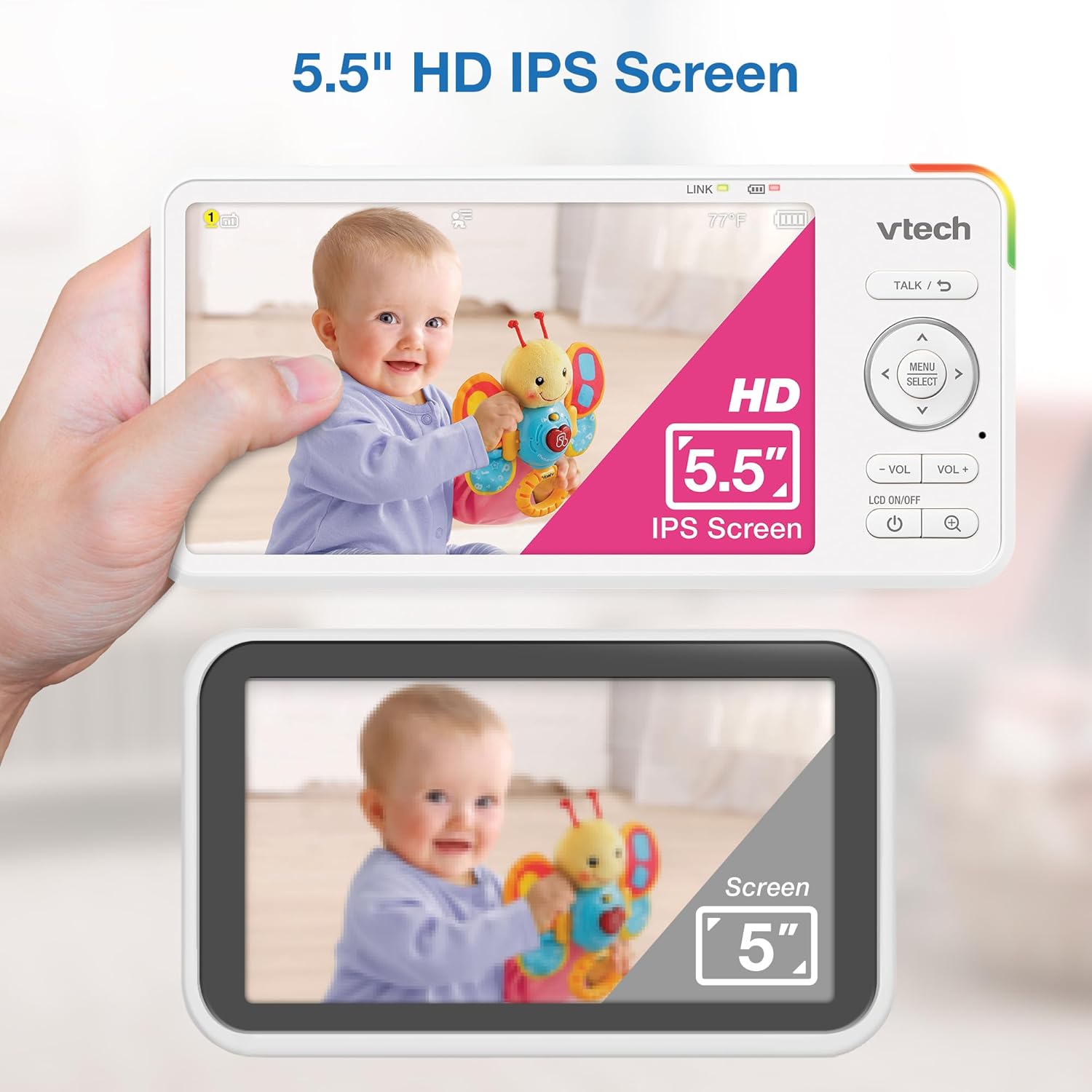
Image 5.1: The 5.5" HD IPS screen offers a larger and clearer view compared to standard screens.
5.3. Pịpụ, Tilt, na Zoom
Use the arrow buttons on the parent unit to remotely adjust the camera's view:
- Pịa Elu/ala arrows to tilt the camera vertically (122-degree vertical view).
- Pịa Aka ekpe/aka nri arrows to pan the camera horizontally (360-degree panoramic view).
- Pịa ZOOM button to activate the 4x digital zoom for a closer look.

Image 5.2: Remote pan, tilt, and 4x zoom functionality for comprehensive nursery coverage.
5.4. Okwu Abụọ
To speak to your baby, press and hold the KWURU button on the parent unit. Release the button to stop talking and resume listening.

Image 5.3: Using the two-way talk feature to communicate with your baby.
5.5. Night Light, Lullabies, and Soothing Sounds
Access these features through the parent unit's menu:
- Ìhè abalị: Select the night light option to choose from 7 colors or adjust brightness. The adaptive feature adjusts to nursery brightness.
- Ụda Ụda na Ụda Na-eme Ka Obi Dajụọ: Choose from five melodies and five ambient sounds to play through the baby unit.
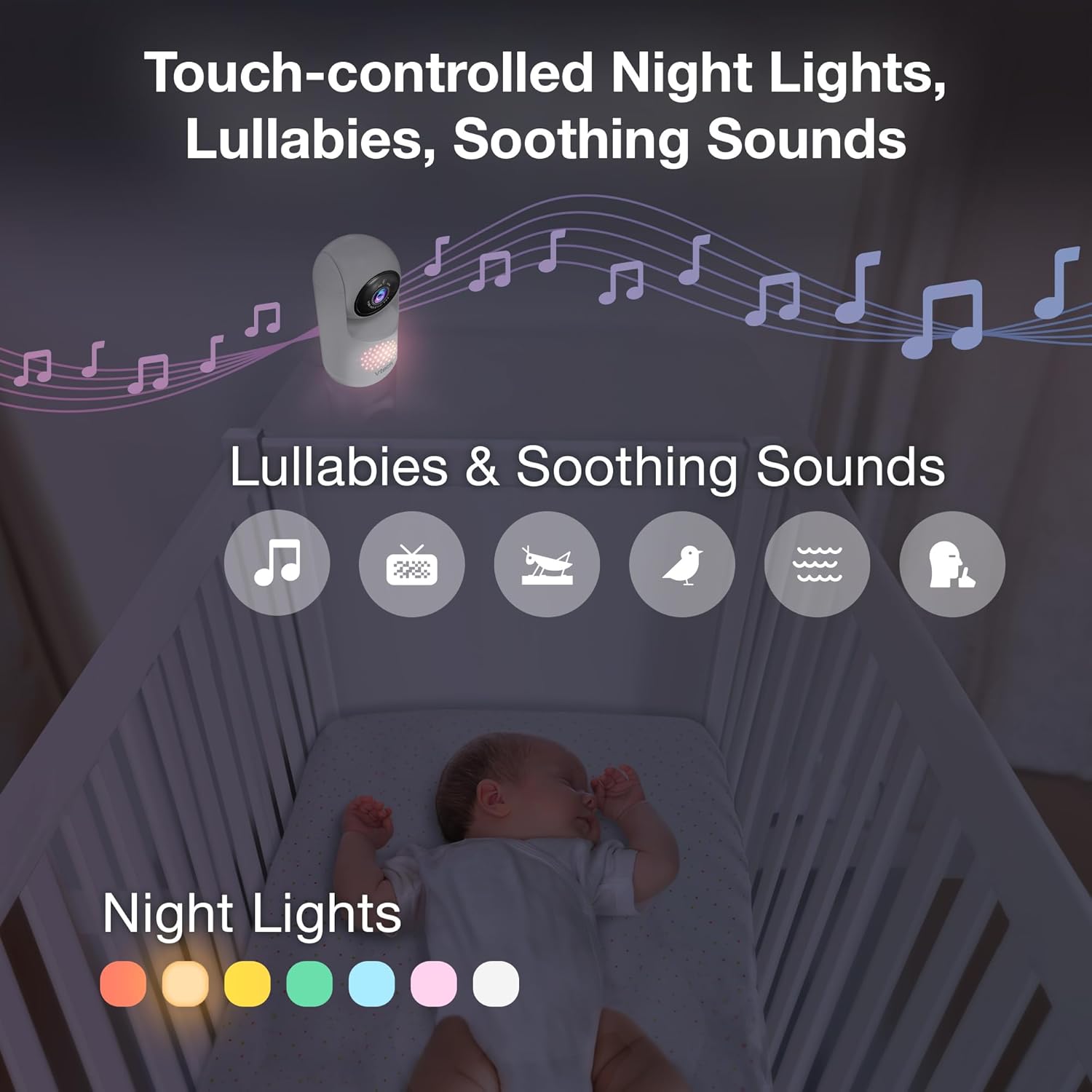
Image 5.4: The camera unit provides touch-controlled night lights, lullabies, and soothing sounds.
5.6. Nlekọta okpomọkụ
The parent unit displays the current temperature of the baby's room, measured by the baby unit. This helps ensure a comfortable environment for your baby.
5.7. Motion and Sound Alerts
The monitor is equipped with motion and sound detection. When activity is detected, the parent unit will provide an alert. You can adjust the sensitivity settings in the menu.

Image 5.5: Motion and temperature alerts displayed on the parent unit.
5.8. Ọhụụ abalị
The baby unit automatically activates infrared night vision in low-light conditions, providing a clear black-and-white image on the parent unit.

Image 5.6: Automatic infrared night vision for clear monitoring in the dark.
6. Nlekọta
6.1. Nhicha
- Clean the monitor units with a soft, damp akwa .
- Ejila sprays ihicha ma ọ bụ ihe nhicha mmiri mmiri.
- Ensure units are unplugged before cleaning.
6.2. Nlekọta batrị
- To prolong battery life, fully charge the parent unit before first use.
- Avoid extreme temperatures, which can affect battery performance.
- If storing the unit for an extended period, charge the battery periodically.

Image 6.1: The 5,000mAh rechargeable battery provides extended monitoring time.
7. Nchọpụta nsogbu
If you experience issues with your VTech Advanced HD Plus monitor, refer to the following common solutions:
| Nsogbu | Ngwọta enwere ike |
|---|---|
| No link / Poor connection |
|
| Enweghị foto / Ihuenyo ojii |
|
| No sound / Low volume |
|
| Batrị na-agbapụ ngwa ngwa |
|
If the problem persists after trying these solutions, please contact VTech customer support.
8. Nkọwapụta
| Njirimara | Nkọwa |
|---|---|
| Aha Nlereanya | Advanced HD Plus |
| Nha ihuenyo | 5.5 inch IPS LCD |
| Mkpebi vidiyo | 720p |
| Teknụzụ Njikọta | 2.4G FHSS Wireless (No Wi-Fi) |
| Oke | Ruo 1,000 ụkwụ (akara anya) |
| Ike batrị | 5000 mAh |
| Battery Life (Video Streaming) | Ruo awa iri abụọ |
| Battery Life (Audio-only) | Ruo awa iri abụọ |
| Pan n'akuku | 360 degrees panoramic |
| Tilt Angle | 122 degrees vertical |
| Bugharịa | 4x Dijitalụ |
| Obosara akụkụ View | ogo 110 |
| Ọhụụ abalị | Automatic Infrared |
| Ụdị Ịdọ Aka Ná Ntị | Audio na Motion |
| Isi Iyi Ike | Igwe ọkụ eletrik (5V, 7.5W) |
| Dimensions (Parent Unit) | 6.58 x 3.23 x 0.71 sentimita asatọ |
| Ibu Ibu | 1.6 pound (0.73 n'arọ) |
| UPC | 735078058157 |
9. Nkwado na akwụkwọ ikike
For technical support, product registration, or warranty information, please visit the official VTech websaịtị ma ọ bụ kọntaktị ndị ahịa:
- Websaịtị: www.vtechbabycare.com
- Email: support@vtechbabycare.com
Please refer to your product packaging or the VTech website for specific warranty details applicable to your region.


