1. Okwu mmalite
Thank you for choosing the InMotion ANC True Wireless Earbuds. This manual provides essential information for setting up, operating, and maintaining your earbuds to ensure optimal performance and longevity. Please read this manual thoroughly before use.
These earbuds feature Active Noise Cancelling (ANC) for an immersive audio experience, true wireless connectivity for freedom of movement, and intuitive touch controls. They are designed for comfort with suction tips and offer up to 6 hours of use on a single charge.
Ozi nchekwa
- Ekpughela ihe mkpuchi ntị ma ọ bụ ihe mkpuchi chaja n'ebe okpomọkụ dị oke elu, iru mmiri, ma ọ bụ mmiri mmiri dị.
- Zere idobe ma ọ bụ idobe ngwaọrụ ahụ na mmetụta siri ike.
- Do not attempt to disassemble or modify the earbuds or charging case.
- Debe ebe ụmụaka na-apụghị iru.
- Jiri naanị eriri nchaji enyere ma ọ bụ ihe dabara adabara.
2. Kedu ihe dị na Igbe ahụ
Chọpụta na ihe niile dị na ngwugwu gị:
- InMotion ANC True Wireless Earbuds (Left and Right)
- Charging Carry Case
- USB-C eriri USB
- Akwụkwọ ntuziaka (akwụkwọ a)

Image: The InMotion ANC True Wireless Earbuds resting inside their open charging case, showcasing nhazi mara mma na ihe ngosi chaja.
3. Nhazi
3.1 Ịchaji ntị na akpa
Tupu ojiji nke mbụ, chajie nke ọma ekwe ntị na akpa nchaji.
- Tinye ekwe ntị n'ime akpa chaja, hụ na ha nọdụrụ nke ọma.
- Connect the USB-C charging cable to the charging port on the case and the other end to a USB power source (e.g., wall adapter, computer USB port).
- Ọkụ ihe ngosi dị na akpa ahụ ga-egosi ọnọdụ chajị. Ozugbo chajịchara ya nke ọma, ọkụ ndị ahụ ga-egosi na emechara ma ọ bụ gbanyụọ ya.
A full charge provides up to 6 hours of earbud use. The charging case provides multiple additional charges.
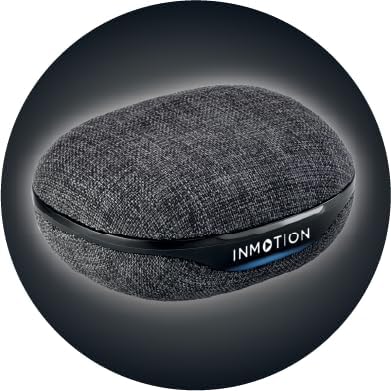
Foto: N'ihu view of the InMotion ANC True Wireless Earbuds charging case, highlighting the charging port and indicator lights.
3.2 Pairing with Your Device (One-Step Pairing)
The InMotion ANC True Wireless Earbuds feature one-step pairing for quick and easy connection.
- Gbaa mbọ hụ na a na-akwụ ụgwọ ekwe ntị yana n'ime igbe nchaji.
- Mepee mkpuchi nke akpa chaja. Ekwe ntị ndị a ga-abanye na ọnọdụ njikọta na akpaghị aka.
- Na ngwaọrụ gị (smartphone, tabletị, laptọọpụ), gaa na ntọala Bluetooth wee gbanye Bluetooth.
- Chọọ maka "InMotion ANC Earbuds" (or similar name) in the list of available devices.
- Select the earbuds to connect. Once connected, you will hear an audible confirmation, and the indicator lights on the earbuds may change.
Ekwe ntị ndị a ga-ejikọghachi na ngwaọrụ ikpeazụ ejikọtara na akpa ahụ ozugbo ewepụrụ ha na akpa ahụ, ọ bụrụ na Bluetooth agbanyere na ngwaọrụ ahụ.
4. Ntuziaka ọrụ
4.1 Njikwa mmetụ
The earbuds are equipped with intuitive touch controls on each earbud. Specific functions may vary slightly by device, but common controls include:
- Gwuo/kwụsịtụ: Otu mgbata na ntị ntị.
- Track na-esote: Pịa bọtịnụ ntị aka nri ugboro abụọ.
- Gara aga Track: Kpatụ ntị ugboro abụọ n'akụkụ aka ekpe.
- Azịza/Kwụsị Oku: Naanị otu ọpịpị na ntị ntị n'oge oku mbata.
- Jụ oku: Pịa ma jide na ntị ntị n'oge oku mbata.
- Mee ka onye enyemaka olu rụọ ọrụ: Pịa ugboro atọ na ntị ntị.
- Toggle ANC/Transparency Mode: Press and hold on either earbud (duration may vary, refer to specific product details if available).

Foto: Akụkụ view of a single InMotion ANC True Wireless Earbud, illustrating its ergonomic design and the touch-sensitive area.
4.2 Mkpọtụ Na-arụ Ọrụ (ANC)
The Active Noise Cancelling feature reduces ambient noise, allowing for a more immersive listening experience. To activate or deactivate ANC, use the designated touch control gesture (typically a press and hold). Some models may also feature a Transparency Mode, which allows you to hear your surroundings while still enjoying your audio.
5. Nlekọta
Proper maintenance ensures the longevity and performance of your InMotion ANC True Wireless Earbuds.
5.1 Nhicha
- Jiri nwayọ hichaa ntị ntị na chaja na akwa dị nro, kpọrọ nkụ, enweghị akwa.
- Ejila ihe mkpocha abrasive, mmanya, ma ọ bụ ihe mgbaze kemịkal.
- Carefully remove any earwax or debris from the ear tips and speaker mesh using a small, soft brush or cotton swab.
5.2 Nchekwa
When not in use, store the earbuds in their charging case to protect them from dust, dirt, and damage. Store the case in a cool, dry place away from direct sunlight and extreme temperatures.

Foto: Azụ view of the InMotion ANC True Wireless Earbuds charging case, showing its compact and portable design.
6. Nchọpụta nsogbu
Ọ bụrụ na ị hụ nsogbu na ntị ntị gị, gbalịa ngwọta ndị a:
| Nsogbu | Ngwọta |
|---|---|
| Igwe ntị anaghị ejikọta/ejikọta. |
|
| Enweghị ụda sitere na otu ntị ma ọ bụ abụọ. |
|
| Nchaji anaghị akwụ ụgwọ. |
|
| ANC anaghị arụ ọrụ nke ọma. |
|
7. Nkọwapụta
| Njirimara | Nkọwa |
|---|---|
| Aha Nlereanya | Igwe isi ekwe ntị ikuku nke ANC |
| Njikwa mkpọtụ | Nkagbu mkpọtụ na-eme mgbanwe |
| Teknụzụ Njikọta | Ikuku (Bluetooth) |
| Ngwa gụnyere | Nchaji ebu akpa |
| Ngwa dakọtara | Laptops, Smartphone, Tablets |
| Usoro njikwa | Metụ aka |
| Ụdị ọkwọ ụgbọ ala ọdịyo | Ọkwọ ụgbọala dị ike |
| Njirimara Pụrụ Iche | Oku azaa |
| Onye nrụpụta | InMotion |
| Ibu Ibu | 3.2 ounces |
| Agba | Nwa |
| Ntinye ntị | Na Ntị |
| Ụdị Ihe | Na Ntị |
| Mgbochi | 16 Ohm |
| Ndụ batrị (Earbuds) | Ruo awa iri abụọ |
| Oge Nchaji | Approx. 1.5 hours (for earbuds and case) |
8. Akwụkwọ ikike na nkwado
InMotion products are manufactured with high-quality standards. For warranty information and customer support, please refer to the warranty card included with your product or visit the official InMotion website. You can also contact InMotion customer service through their Amazon store page:
Visit the InMotion Store on Amazon
InMotion is committed to providing excellent customer service and support for their products.