1. Ngwaahịa gafereview
The GRAUGEAR M.2 SSD Heatsink with Heat Pipe is specifically designed to enhance the cooling performance of NVMe M.2 SSDs installed in PlayStation 5 Pro and PlayStation 5 Slim consoles. This integrated cooling solution features a copper heat pipe and high-density aluminum fins to efficiently dissipate heat, ensuring stable and optimal SSD performance during intense gaming sessions.

Image: GRAUGEAR PS5 Pro/Slim M.2 SSD Heatsink with Heat Pipe, showing its design for M.2 SSD cooling.
Akụkụ ndị bụ isi:
- Custom Design for PS5 Pro/Slim: Perfectly fits the internal M.2 SSD slot of PS5 Pro and PS5 Slim consoles for easy installation without console modification.
- Hybrid Cooling System (Copper + Aluminum): Features a high-performance copper heat pipe for rapid heat transfer and high-density aluminum fins for efficient heat dissipation, keeping the SSD cool under heavy loads.
- Optimized Gaming Stability and Speed: Reduces SSD temperature by up to 30°C, maintaining optimal read/write speeds and mitigating the risk of thermal throttling during demanding game sessions.
- Integrated Design for Superior Efficiency: Unlike separate heatsinks, this all-in-one structure ensures direct thermal conduction from the SSD to the fins, achieving faster and more stable heat exhaust.
- Complete Kit, Simple Setup: Includes high-quality thermal pads and screw set. Easy to install; no special tools or modifications required. Plug and play functionality.
2. Ihe ngwugwu
Biko chọpụta na ihe niile dị na ọnọdụ dị mma mgbe imepe ngwugwu ahụ.

Image: Diagram showing the contents of the GRAUGEAR PS5 Pro/Slim M.2 SSD Heatsink package, including the heatsink, thermal pads, EVA pad, SSD mounting screw, screwdriver, user manual, and service card.
- GRAUGEAR G-PS5HS04 Heatsink Unit
- Thermal Pad (T=1.0mm, 4.8W/m-k)
- Thermal Pad (T=1.5mm, 3.6W/m-k)
- Akpa EVA
- SSD Mounting Screw
- Screwdriver
- Akwụkwọ ntuziaka onye ọrụ
- Kaadị ọrụ
3. Ndakọrịta
This heatsink is compatible with single-sided and double-sided M.2 NVMe SSDs in sizes 2230, 2242, 2260, 2280, and 22110.

Image: Diagram illustrating compatibility with various M.2 NVMe SSD sizes and highlighting the need to remove any pre-installed heatsinks from the SSD before installation.
Ihe dị mkpa: This heatsink is designed for the PlayStation 5 Pro and PlayStation 5 Slim consoles. It is Ọ BỤGHỊ compatible with the original PlayStation 5 (CFI-1000 / CFI-1100 / CFI-1200 models).

Image: Visual guide showing compatibility with PS5 Slim (CFI-2000 / CFI-2xxx) and PS5 Pro (CFI-7000) consoles, and incompatibility with the original PS5 (CFI-1000 / CFI-1100 / CFI-1200).
If your M.2 SSD comes with a pre-installed heatsink, it must be removed before installing the GRAUGEAR heatsink to ensure proper contact and cooling efficiency.
4. Ntuziaka nwụnye
Follow these steps carefully to install your GRAUGEAR M.2 SSD heatsink into your PlayStation 5 Pro or Slim console.
Video Installation Guide:
Video: GRAUGEAR PS5 M.2 2280 NVMe SSD Heatsink installation guide, demonstrating the unboxing and step-by-step assembly process.
Video: GRAUGEAR PS5 Pro/Slim M.2 2280 NVMe SSD Heatsink installation guide, showing the process of attaching the heatsink to the SSD and installing it into the console.
Nwụnye nzọụkwụ site na nzọụkwụ:
- Prepare your PS5 Console:
- Power off your PlayStation 5 console completely and disconnect all cables.
- Place the console on a clean, flat surface.
- Carefully remove the faceplate of your PS5 Pro or PS5 Slim console to access the M.2 SSD expansion slot.
- Prepare the M.2 SSD:
- If your M.2 SSD has a pre-installed heatsink, remove it.
- Place the supportive EVA Pad into the M.2 NVMe SSD slot on the console.
- Insert your M.2 NVMe SSD into the SSD slot of the PS5 and fix it with the provided screw.
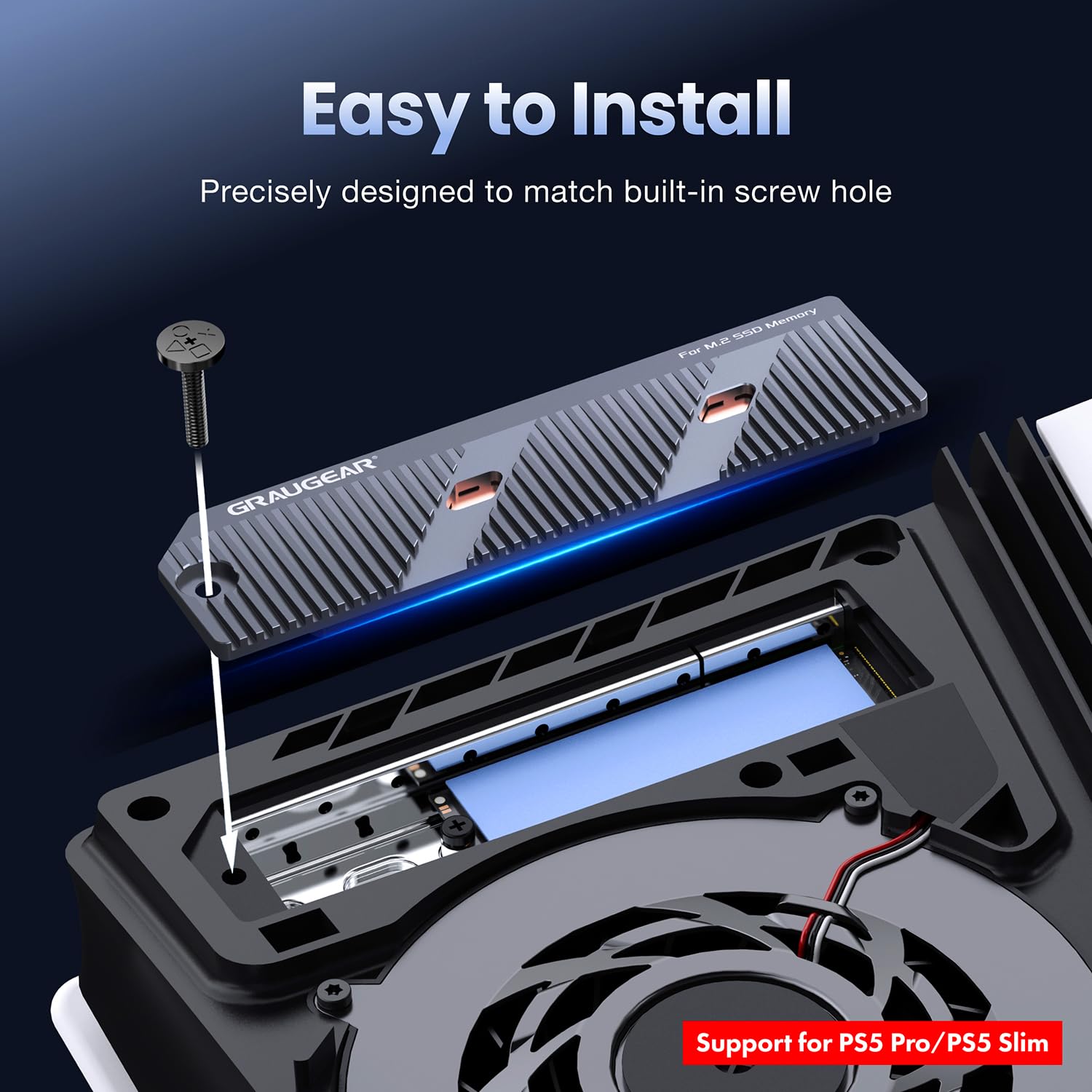
Image: Step-by-step visual guide for installing the M.2 SSD into the PS5 slot, including placing the EVA pad and securing the SSD.
- Attach the Thermal Pad:
- Select the appropriate thermal pad (1.0mm or 1.5mm) based on your SSD's thickness.
- Carefully peel off the protective films from both sides of the thermal pad.
- Attach the thermal pad directly onto the M.2 SSD, ensuring full coverage.
- Install the Heatsink:
- Align the GRAUGEAR heatsink (G-PS5HS04) over the SSD and thermal pad.
- Gently press down to ensure good contact between the heatsink, thermal pad, and SSD.
- Secure the heatsink unit into the PS5 using the original screw.
- Reassemble the Console:
- Replace the PS5 console faceplate, ensuring it clicks securely into place.
- Reconnect all cables and power on your console.
5. Ntuziaka ọrụ
Once installed, the GRAUGEAR M.2 SSD heatsink operates passively, continuously working to dissipate heat from your NVMe SSD. No additional software or configuration is required.
Arụmọrụ jụrụ oyi:
The hybrid design, combining a copper heat pipe and aluminum fins, maximizes heat transfer and airflow, leading to a significant reduction in SSD operating temperatures (up to 30°C). This ensures consistent high performance and extends the lifespan of your SSD.

Image: Illustration demonstrating the heatsink's ability to cool down the SSD by 15-25°C, preventing thermal throttling and maximizing performance.

Foto: Zuru ezu view of the direct contact heat pipe mechanism, showing how heat is efficiently transferred from the SSD to the aluminum structure through a groove structure and copper powder inside the heat pipe.

Image: Depiction of revolutionary cooling, where the aluminum heatsink dissipates heat and the PS5 Pro/PS5 Slim cooling system ensures fresh airflow over the heatsink for improved cooling.
6. Nlekọta
To ensure optimal performance and longevity of your GRAUGEAR heatsink and M.2 SSD, follow these simple maintenance guidelines:
- Nhicha mgbe niile: Periodically clean the exterior of your PS5 console and the heatsink's exposed fins to prevent dust buildup, which can impede airflow and reduce cooling efficiency. Use a soft brush or compressed air.
- Zenarị ihe mgbochi: Ensure that the ventilation areas of your PS5 console are not blocked by objects, as this can restrict airflow to the heatsink.
- Thermal Pad Integrity: The thermal pads are designed for long-term use. However, if you ever need to remove and reinstall the heatsink, it is recommended to replace the thermal pads to ensure optimal thermal contact.
7. Nchọpụta nsogbu
If you encounter any issues with your GRAUGEAR M.2 SSD heatsink, please refer to the following common troubleshooting steps:
- Achọpụtaghị SSD:
- Ensure the M.2 SSD is fully seated in its slot.
- Verify that the SSD mounting screw is securely fastened.
- Check PS5 system settings to ensure the SSD is properly formatted and recognized.
- Nchegbu ekpo oke ọkụ:
- Confirm that the thermal pads are correctly applied and making full contact with both the SSD and the heatsink.
- Ensure no pre-installed heatsink was left on the M.2 SSD.
- Check for any obstructions around the PS5's ventilation ports.
- Ensure the console is in a well-ventilated area.
- Heatsink Not Fitting Properly:
- Double-check that you have a PS5 Pro or PS5 Slim model. This heatsink is not compatible with the original PS5.
- Ensure the SSD is correctly positioned in the slot before attempting to install the heatsink.
If these steps do not resolve your issue, please contact GRAUGEAR customer support for further assistance.
8. Nkọwapụta
| Njirimara | Nkọwa |
|---|---|
| Onye nrụpụta | GRAUGEAR |
| Nọmba akụkụ | G-PS5HS04 |
| Ibu ngwaahịa | 100 g |
| Akụkụ ngwaahịa (LxWxH) | 12.7 x 3.3 x 1.02 cm |
| Agba | Oghere isi awọ |
| Ụdị | PS5 Pro/PS5 Slim |
| Ihe onwunwe | Copper + Aluminum |
| Heatsink Compatibility | PS5 Pro/Slim M.2 NVMe SSD |
| Ụdị nkwụnye | Ugwu Panel |
9. Akwụkwọ ikike na nkwado
GRAUGEAR products are designed for reliability and performance. This product comes with a standard warranty against manufacturing defects. Please refer to the included Service Card for specific warranty terms and conditions.
Nkwado ndị ahịa:
For technical support, warranty claims, or any questions regarding your GRAUGEAR M.2 SSD heatsink, please contact our customer service team:
- Email: support@graugear.de
- Websaịtị: www.graugear.de
Please have your product model (G-PS5HS04) and purchase information ready when contacting support.


