Okwu mmalite

Image: Hamilton 1.1 cu ft Countertop Touchscreen Microwave Oven.
This manual provides essential information for the safe and efficient operation of your Hamilton 1.1 Cu. Ft. Countertop Touchscreen Microwave Oven. Please read this manual thoroughly before use and retain it for future reference.
Ntuziaka nchekwa dị mkpa
Mgbe ị na-eji ngwa eletriki, ekwesịrị ịgbaso usoro nchekwa nchekwa bụ isi mgbe niile iji belata ihe egwu ọkụ, ujo eletrik na mmerụ ahụ n'ahụ mmadụ, gụnyere ihe ndị a:
- Gụọ ntuziaka niile tupu i jiri ngwa.
- Ejila oven rụọ ọrụ ma ọ bụrụ na emebiwo ụzọ ma ọ bụ akara ọnụ ụzọ.
- Ejila mmiri ọkụ ma ọ bụ ihe oriri ndị ọzọ ọkụ n'ime arịa ejiri mechiri emechi ebe ọ bụ na ha nwere ike ịgbawa.
- Naanị hapụ ụmụaka ka ha jiri oven na-enweghị nlekọta mgbe enyerela ntụziaka zuru oke ka nwatakịrị ahụ nwee ike iji oven n'ụzọ dị nchebe ma ghọta ihe ize ndụ nke iji na-ekwesịghị ekwesị.
- Refer to the "Child Safety Lock" section for specific instructions on this feature.
Njirimara ngwaahịa
- Powerful 1000W output for efficient cooking.
- 10 adjustable power levels for versatile cooking and reheating.
- User-friendly touchscreen control panel with LED display.
- Convenience cooking controls for popular foods (e.g., potatoes, popcorn, frozen dinners, pizza, beverages).
- 8 Smart Sensor auto cooking menus for precise results.
- Integrated child safety lock for enhanced security.
- Sleek white finish with stainless-steel accents.
Nkọwapụta
| Njirimara | Nkọwa |
|---|---|
| Ụdị | Hamilton |
| Nọmba nlereanya | HB8436193153-02 |
| Ike | 1.1 Cubic ụkwụ |
| Wattage | 1000 watt |
| Voltage | 120 volts (AC) |
| Akụkụ (D x W x H) | 21" x 12" x 19" |
| Ụdị nwụnye | Countertop |
| Ihe (Mpụta) | Igwe igwe |
| Ihe (ime ime) | Igwe anaghị agba nchara |
| Ngwa gụnyere | Igwe na-atụgharị |
Melite
- Iwepu: Carefully remove the microwave oven and all packing materials from the carton. Check for any damage, such as dents or a misaligned door. Do not operate if damaged.
- Nkwanye: Place the microwave on a flat, stable surface that can support its weight. Ensure adequate ventilation by leaving at least 4 inches of space around the sides, back, and top of the oven. Do not block air vents.
- Nwụnye ntụgharị: Place the turntable ring in the center of the oven cavity. Then, place the glass turntable securely on top of the turntable ring. Ensure it rotates freely.
- Njikọ ike: Plug the microwave oven into a grounded 120V AC electrical outlet.

Foto: Ime view of the Hamilton microwave, highlighting the removable glass turntable for easy cleaning.
Ntuziaka ọrụ
Isi ọrụ
- Ịtọ elekere:
- Pịa EGE bọtịnụ.
- Jiri paadị nọmba tinye oge dị ugbu a.
- Pịa EGE bọtịnụ ọzọ iji gosi.
- Isi nri Microwave:
- Tinye nri n'ime ngwa ngwa ngwa ngwa ndakwa nri n'elu igwe ntụgharị iko.
- Mechie ụzọ ahụ nke ọma.
- Enter the desired cooking time using the number pads.
- Pịa Ọkwa IKE button to adjust power if needed (default is 100%). Use number pads to select power level (1-10).
- Pịa Mmalite/+30SEC malite isi nri.
- Express Cook: For quick cooking, simply press the Nkeji 1, Nkeji 2, ma ọ bụ Nkeji 3 buttons for instant cooking at full power. Press Kwụsị/Kwụsị to stop or clear settings. Press + 30 SEC to add 30 seconds to cooking time.
- Na-ekpochapu:
- Pịa EKWU ALA or OGE AKWEFKWỌ bọtịnụ.
- Follow the prompts on the LED display to enter weight or time.
- Pịa Mmalite/+30SEC.
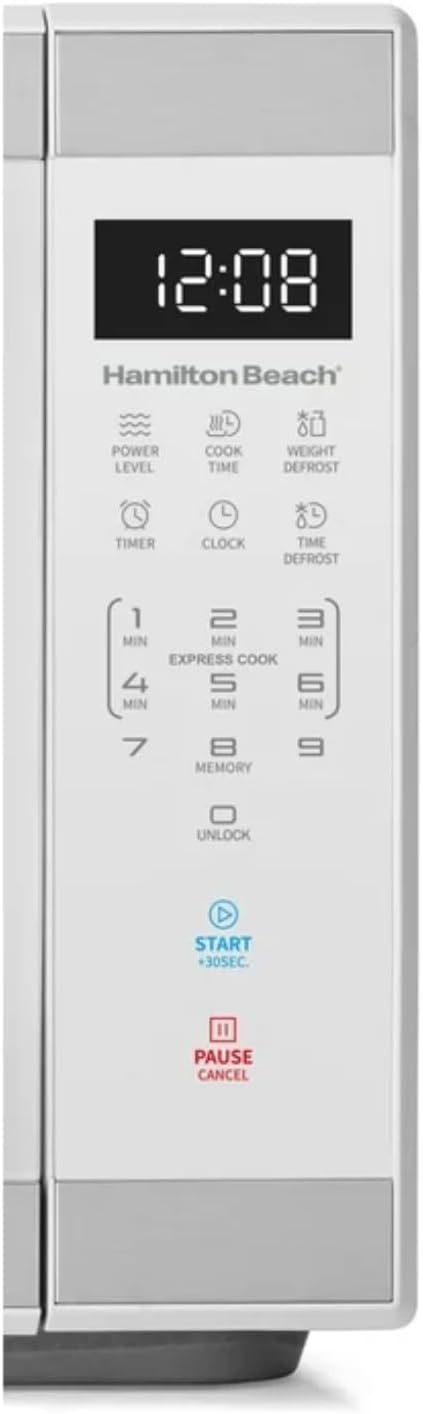
Foto: Zuru ezu view of the intuitive touchscreen control panel and LED display.
Mkpọchi nchekwa ụmụaka
This microwave features a child safety lock to prevent unintended operation. The door automatically locks when cooking starts.
To Open Microwave During or After Use:
- Pịa 0/Mkpọghe or Kwụsị/Kwụsị mpe mpe akwa.
- Grasp the handle and open the door.
To Deactivate the Child Safety Lock:
- Pịa 0/Mkpọghe pad for 3 seconds. The display will indicate "Loc".
- Pịa 7 mpe mpe akwa.
- Pịa 9 pad. The display will show "ULoc".
To re-activate the child safety lock, repeat the above steps.
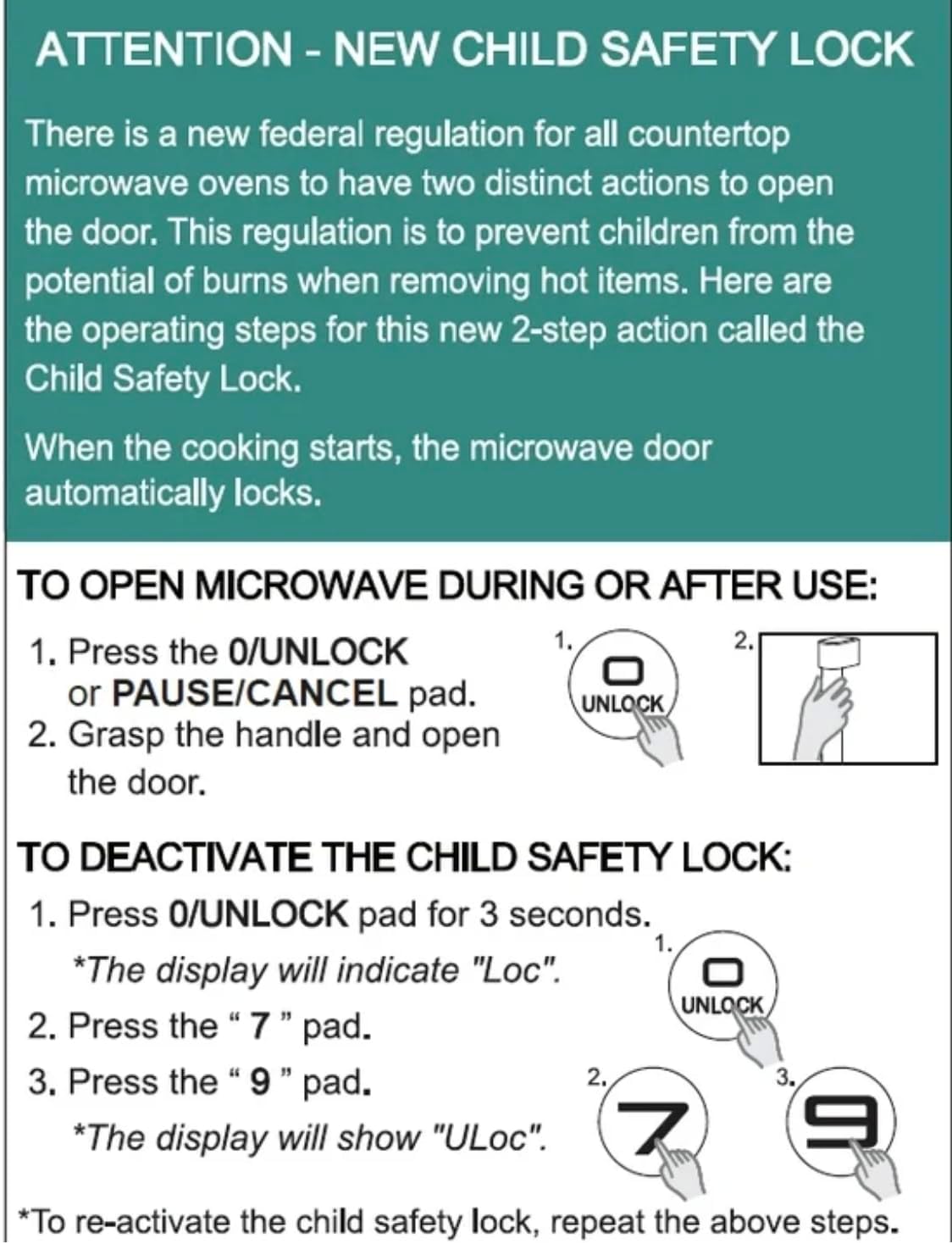
Image: Instructions for the new child safety lock feature, including how to open the door and deactivate the lock.
Nlekọta na nhicha
- Ime nhicha: Jiri mgbasa ozi hichaa ime ovenamp cloth after each use. For stubborn stains, use a mild detergent. Ensure the interior is dry before next use.
- Nchacha mpụta: Jiri nwayọ hichaa elu mpụta, damp akwa . Ejila ihe nchacha abrasive ma ọ bụ kemịkalụ siri ike.
- Nhicha Turntable: The glass turntable and turntable ring can be removed for cleaning. They are dishwasher safe or can be hand-washed with warm, soapy water.
- Akara ọnụ ụzọ: Regularly inspect the door seals and surrounding areas for any damage or food residue. Clean as needed to ensure proper sealing.
Nchọpụta nsogbu
| Nsogbu | Ihe kpatara/ Ngwọta nwere ike ime |
|---|---|
| Igwe ọkụ agaghị amalite. |
|
| A naghị esi nri nke ọma. |
|
| Light bulb is out. | Contact customer support for bulb replacement. Do not attempt to replace it yourself. |
| Display shows "Loc". | Child safety lock is activated. Follow instructions in the "Child Safety Lock" section to deactivate. |
Akwụkwọ ikike na nkwado
For warranty information or technical support, please refer to the warranty card included with your purchase or contact Hamilton customer service. Keep your proof of purchase for warranty claims.
Ndị ọrụ nlekọta ndị ahịa: Please visit the manufacturer's website or refer to your product packaging for contact details.


