1. Okwu mmalite
The HTVRONT Phone Case Heat Press Machine is an advanced auto 3D vacuum heat press designed for sublimation printing on various items, including phone cases, badges, and coasters. It features precise temperature control and a universal mold compatible with popular iPhone models, ensuring high-quality, full-surface transfers with vibrant colors.
This manual provides detailed instructions for the safe and effective use of your HTVRONT heat press machine. Please read it thoroughly before operation.

Image: The HTVRONT Phone Case Heat Press Machine in lavender purple, shown with included accessories such as a phone case fixture, heat-resistant gloves, and sublimation film.
2. Ozi nchekwa
Na-edebe ihe nchekwa nchekwa ndị a mgbe niile iji gbochie mmerụ ahụ ma ọ bụ mebie igwe:
- Keep hands and fingers away from the heating plates during operation. The plates reach high temperatures.
- Use heat-resistant gloves when handling hot items or components.
- Gbaa mbọ hụ na etinye igwe ahụ n'elu ebe kwụsiri ike, nke na-eguzogide okpomọkụ.
- Ejila igwe arụ ọrụ n'akụkụ ihe ọkụ ọkụ.
- Kwupu igwe n'igwe ọkụ mgbe anaghị eji ya ma ọ bụ tupu ihicha.
- Ejila igwe n'ime mmiri ma ọ bụ mmiri mmiri ọ bụla ọzọ.
- Debe ebe ụmụaka na-apụghị iru.
- Only use the machine for its intended purpose as described in this manual.
3. Ngwa ngwaahịa
The HTVRONT Phone Case Heat Press Kit includes the following items:
- HTVRONT H17 Phone Case Heat Press (x1)
- Phone Case Fixture Set (x1)
- Badge Fixture Set (x1)
- Sublimation Film (A4) (x5)
- Heat-resistant Gloves (x1 pair)
- Sublimation Badge (58 mm) (x3)
- Tweezers (x1)
- Heat-resistant Tape (x1)

Image: A visual representation of all components included in the HTVRONT Phone Case Heat Press Kit, neatly arranged with quantities.
4. Nhazi
Soro usoro ndị a iji wụnye igwe nkụnye ọkụ gị:
- Ịkwapu: Jiri nlezianya wepụ ihe niile dị na nkwakọ ngwaahịa. Jido nkwakọ ngwaahịa maka nchekwa ma ọ bụ mbugharị n'ọdịnihu.
- Nkwanye: Place the heat press machine on a flat, stable, and heat-resistant surface. Ensure there is adequate ventilation around the machine.
- Njikọ ike: Tinye eriri ọkụ n'ime oghere eletrik gbadoro ụkwụ. Gbaa mbọ hụ na voltage dakọtara ihe igwe chọrọ.
- Nyocha mbụ: Before first use, inspect the machine for any visible damage. Do not operate if damage is present.
5. Ntuziaka ọrụ
5.1 Basic Operation (Quick Start Guide)
The HTVRONT heat press is designed for ease of use, even for beginners. Follow these general steps for heat transfer:
- Power On and Set Parameters: Turn on the machine and use the control panel to set the desired temperature and time according to your material's requirements.
- Preheat and Mount: Place the appropriate fixture (e.g., phone case fixture) into the device. Allow the machine to preheat. Once preheated, mount the item (e.g., phone case) onto the fixture.
- Apply Sublimation Film: Carefully place the printed sublimation film with your design onto the item. Ensure proper alignment.
- Begin Transfer: Close the lid to initiate the heat transfer process. The machine will automatically apply 3D vacuum pressure.
- Completion and Peel: Once the transfer is complete, the machine will signal. Open the lid and carefully peel off the sublimation film while the item is still hot, using heat-resistant gloves.

Image: A visual guide illustrating the four key steps of the 6-minute heat press process, from setting parameters to peeling the film.
5.2 Material-Specific Settings (Quick Reference Chart)
Refer to the table below for recommended temperature and time settings for common sublimation materials:
| Mkpụrụ | Ihe onwunwe | Ngwá ọrụ | Upper Heat Plate Temp | Lower Heat Plate Temp | Oge ibuo ọkụ | Oge mbufe | Peeling Method |
|---|---|---|---|---|---|---|---|
| Akpa ekwentị | TPU/PC | Universal phone case fixture set | 135°C/275°F | 135°C/275°F | 2-10s | 300-350s | bee na-ekpo ọkụ |
| baajị | Ọla | Badge fixture set | 140°C/285°F | 140°C/285°F | 2-10s | 330s | bee na-ekpo ọkụ |
| Efere seramiiki | Ceramic | Base efere | 140°C/285°F | 140°C/285°F | 2-10s | 300s | bee na-ekpo ọkụ |
| Coaster | Akpụkpọ anụ | Base efere | 135°C/275°F | 125°C/255°F | 2-10s | 300s | bee na-ekpo ọkụ |
| Keychain | MDF | Base efere | 135°C/275°F | 135°C/275°F | 2-10s | 300s | bee na-ekpo ọkụ |
Table: Quick Reference Chart for recommended heat press settings based on substrate material.
5.3 Universal Mold and Compatibility
The HTVRONT H17 features an adjustable phone case mold designed for compatibility with a wide range of iPhone models (iPhone 12 and above). This single fixture reduces the need for multiple molds.

Image: Illustration showing the heat press's universal adaptation for different iPhone models, highlighting its versatility.
The phone case fixture set includes a main fixture, lens pads, and filler blocks to ensure a snug fit for various phone sizes. Refer to the Model Compatibility Chart for specific recommendations:
| Nlereanya | Lens Pad | Ihe nkpuchi | Nlereanya | Lens Pad | Ihe nkpuchi |
|---|---|---|---|---|---|
| iPhone 16 | I-9 | ② + ③ | iPhone 14 Pro | I-4 | ② + ③ |
| iPhone 16 Plus | I-9 | ① + ② + ③ + ④ + ⑤ | iPhone 14 Pro Max | I-4 | ① + ② + ③ + ④ + ⑤ |
| iPhone 16 Pro | I-8 | ② + ③ | iPhone 13 | I-2 | ② + ③ |
| iPhone 16 Pro Max | I-8 | ① + ② + ③ + ④ + ⑤ | iPhone 13 Pro | I-3 | ② + ③ |
| iPhone 15 | I-6 | ② + ③ | iPhone 13 Pro Max | I-3 | ① + ② + ③ + ④ + ⑤ |
| iPhone 15 Plus | I-6 | ① + ② + ③ + ④ + ⑤ | iPhone 12 | \ | ② + ③ |
| iPhone 15 Pro | I-7 | ② + ③ | iPhone 12 Pro | I-1 | ② + ③ |
| iPhone 15 Pro Max | I-7 | ① + ② + ③ + ④ + ⑤ | iPhone 12 Pro Max | I-1 | ① + ② + ③ + ④ + ⑤ |
| iPhone 14 | I-5 | ② + ③ | |||
| iPhone 14 Plus | I-5 | ① + ② + ③ + ④ + ⑤ |
Table: Model Compatibility Chart for iPhone models, indicating recommended Lens Pad and Filler Block combinations.
5.4 Smart Alignment Feature
The machine is equipped with phone-specific templates and pattern adjustment tools within its software. This feature ensures perfect alignment and complete coverage of your design, significantly improving the accuracy and efficiency of your creative process.
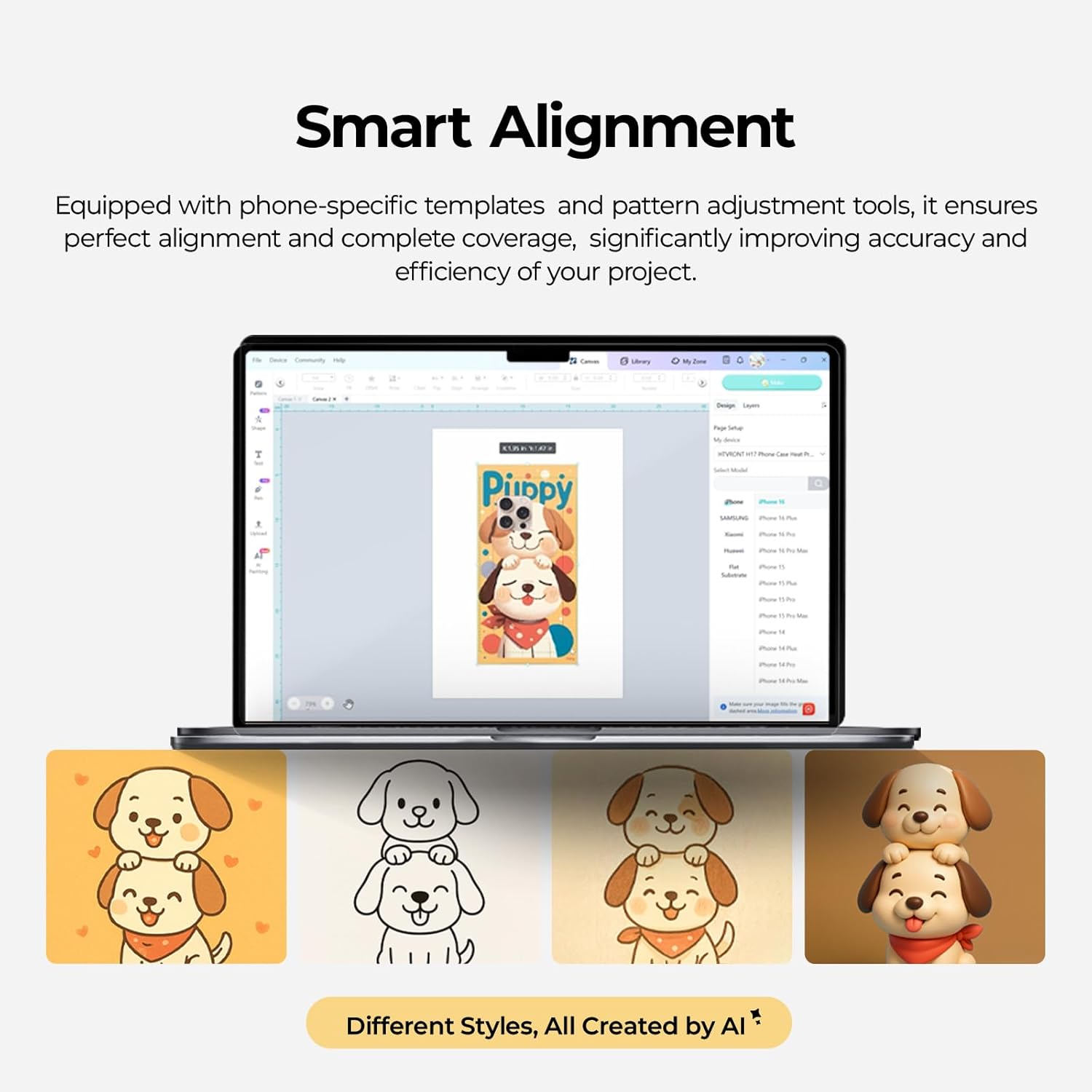
Image: A screenshot of the Smart Alignment software interface, demonstrating how users can adjust pattern size and position for perfect alignment on phone cases.
6. Nlekọta
Proper maintenance ensures the longevity and optimal performance of your HTVRONT heat press machine:
- Nhicha: After each use, allow the machine to cool completely. Wipe down the heating plates and exterior with a soft, damp akwa . Ejila ihe nchacha abrasive ma ọ bụ ihe mgbaze.
- Nlekọta ihe ndozi: Clean the phone case and badge fixtures regularly to prevent residue buildup.
- Nchekwa: Store the machine in a dry, dust-free environment when not in use. Keep it in its original packaging if possible to protect it from damage.
- Nyocha: Periodically check the power cord for any signs of damage. If damaged, contact customer support for assistance.
7. Nchọpụta nsogbu
Akụkụ a na-ekwu maka nsogbu ndị ị nwere ike izute. Maka nsogbu edepụtaghị ebe a, biko kpọtụrụ nkwado ndị ahịa.
- Igwe anaghị agba ọkụ:
- Ensure the power cord is securely plugged into both the machine and a working electrical outlet.
- Check if the power switch is in the 'On' position.
- Chọpụta na oghere eletrik na-arụ ọrụ site na ịtinye ngwaọrụ ọzọ.
- Uneven Heat Transfer/Faded Design:
- Confirm that the temperature and time settings are correct for your specific material (refer to the Quick Reference Chart).
- Ensure the sublimation film is properly aligned and securely taped to the item.
- Check that the item is placed correctly and snugly within the fixture.
- Ensure the item has a sublimation coating, as this machine is only suitable for such items.
- Igwe anaghị akpọ oku:
- Verify the temperature setting is not at 0 or minimum.
- Allow sufficient time for the machine to preheat to the set temperature.
- Ọ bụrụ na nsogbu ahụ ka dị, kpọtụrụ nkwado ndị ahịa.
- Oke mkpọtụ:
- The machine operates quietly, typically below 65 dB. If unusual loud noises occur, discontinue use and contact support.
8. Nkọwapụta
- Nọmba nlereanya: RY-SJKJ-0651-US
- Akara: HTVRONT
- Ihe: Ọla
- Agba: Lavender Purple
- Ibu ihe: 15.22 pound (ihe dị ka 6.9 n'arọ)
- Akụkụ ngwaahịa: 1.2"L x 1"W x 0.8"H
- Ọkwa mkpọtụ: <65 dB (Quiet Operation)
- Eji akwadoro: Sublimation Phone Cases, Badges, Coasters, Keychains, Slates
- Teknụzụ: Auto 3D Vacuum Heat Press
- Njikwa okpomọkụ: Precise digital control
- ndakọrịta: Universal mold for iPhone 12 and above models
9. Akwụkwọ ikike na nkwado
HTVRONT is committed to providing excellent customer service. If you have any questions or require assistance with your Phone Case Heat Press Machine, please do not hesitate to contact us.
- Nkwado ndị ahịa: We provide 24/7 customer support to assist with any issues or inquiries.
- Ozi akwụkwọ ikike: For detailed warranty terms and conditions, please refer to the warranty card included with your product or contact HTVRONT customer service directly.
Thank you for choosing HTVRONT. We hope you enjoy creating with your new heat press machine!