1. Okwu mmalite
The SUPERONE Bluetooth 5.3 Audio Adapter is a versatile 2-in-1 device functioning as both a transmitter (TX) and a receiver (RX). It enables wireless audio connectivity for a wide range of devices, from non-Bluetooth TVs and airplane entertainment systems to older speakers and car stereos. Featuring Bluetooth 5.3 technology, it ensures stable, low-latency audio transmission and reception, supporting universal compatibility with various Bluetooth versions.
This adapter includes an intuitive HD display for real-time battery and connection status, simplifying user interaction. It also supports dual pairing, allowing two Bluetooth headphones or AirPods to connect simultaneously for shared listening experiences.
2. Ngwaahịa gafereview
2.1 Atụmatụ
- Ọrụ 2-na-1: Ọ na-arụ ọrụ dịka Bluetooth Transmitter (TX) na Receiver (RX).
- Nkà na ụzụ Bluetooth 5.3: Provides stable, low-latency, and high-quality audio. Backward compatible with Bluetooth 5.2/5.0/4.2 and earlier.
- Ngosipụta HD: Shows real-time battery charge and connection status.
- Mmakọ abụọ: Connects to two Bluetooth headphones or AirPods simultaneously in TX mode.
- Ogologo ndụ batrị: Up to 20 hours in Transmitter mode, over 17 hours in Receiver mode.
- Nchaji ngwa ngwa: Fully charges in approximately 2 hours via USB-C.
- Ndakọrịta Universal: 3.5mm Aux audio jack for wide device support.
Ihe ngwugwu 2.2
Biko hụ na ihe niile dị:
- SUPERONE Bluetooth 5.3 Audio Adapter
- USB-C eriri USB
- Akwụkwọ ntuziaka (akwụkwọ a)

Image: The SUPERONE Bluetooth 5.3 Audio Adapter, shown with its integrated 3.5mm audio jack and USB-C charging port.
3. Ozi nchekwa
- Ijikwa batrị: Keep the battery out of reach of children. Do not expose the device to excessive heat or humidity. Dispose of the battery and device in accordance with local regulations.
- Interference Warning: This device may interfere with other wireless devices. Follow instructions to minimize potential interference.
- General Nlekọta: Jiri nlezianya jikwaa ngwaọrụ ahụ. Zere idobe ma ọ bụ idobe ya na mmetụta siri ike.
4. Nhazi
4.1 Transmitter (TX) Mode Setup
Use TX mode to send audio from non-Bluetooth devices (e.g., airplane entertainment, TV, computer) to Bluetooth headphones or speakers.
- Slide the TX/RX switch on the adapter to the TX ọnọdụ.
- Press and hold the central button (play/pause/pairing) on the adapter for a few seconds until the display turns on and the headphone icons blink, indicating pairing mode.
- Put your Bluetooth headphones or AirPods into their pairing mode. The adapter will automatically search for and connect to nearby Bluetooth devices. The headphone icon will stop blinking when connected.
- Insert the adapter's 3.5mm audio jack into the audio output port of your source device (e.g., airplane seat audio jack, TV headphone jack).

Image: Visual guide for setting up the adapter in Transmitter (TX) mode, demonstrating connection to an airplane audio jack and AirPods.
4.2 Receiver (RX) Mode Setup
Use RX mode to receive audio from Bluetooth-enabled devices (e.g., smartphone, tablet) and play it through non-Bluetooth audio systems (e.g., car stereo, home speakers).
- Slide the TX/RX switch on the adapter to the RX ọnọdụ.
- Press and hold the central button on the adapter for a few seconds until the display turns on and the headphone icons blink, indicating pairing mode.
- On your Bluetooth-enabled device (e.g., smartphone), go to Bluetooth settings and select the SUPERONE adapter from the list of available devices to pair. The headphone icon will stop blinking when connected.
- Insert the adapter's 3.5mm audio jack into the AUX-IN port of your audio system (e.g., car stereo, home speaker).

Image: Visual guide for setting up the adapter in Receiver (RX) mode, demonstrating connection to a smartphone and a car's AUX-IN port.
5. Ntuziaka ọrụ
5.1 Gbanyụọ ma ọ bụ gbanyụọ
- Iji gbanye: Press and hold the central button (play/pause/pairing) for approximately 2 seconds until the display illuminates.
- Iji gbanyụọ: Press and hold the central button for approximately 3-5 seconds until the display turns off.
5.2 Pairing Additional Devices (Dual Pairing in TX Mode)
In TX mode, the adapter can connect to two Bluetooth headphones simultaneously.
- Ensure the first pair of headphones is already connected.
- Press the central button briefly. A second headphone icon on the display will begin blinking.
- Put the second pair of Bluetooth headphones into their pairing mode. The adapter will connect to them. The second headphone icon will stop blinking once connected.

Image: Illustration of dual pairing, showing two individuals listening to audio from a laptop via the adapter and two separate Bluetooth headphones.
5.3 Ngbanwe ọnọdụ
To switch between Transmitter (TX) and Receiver (RX) modes, use the physical TX/RX switch located on the side of the adapter.
5.4 Ozi ngosi
The HD display provides the following information:
- Batrị Percentage: Indicates the current charge level.
- Ọnọdụ njikọ: Headphone icons (1 and 2) indicate connected devices. Blinking icons signify pairing mode.
- Nchaji Status: A charging icon appears when the device is connected to power.
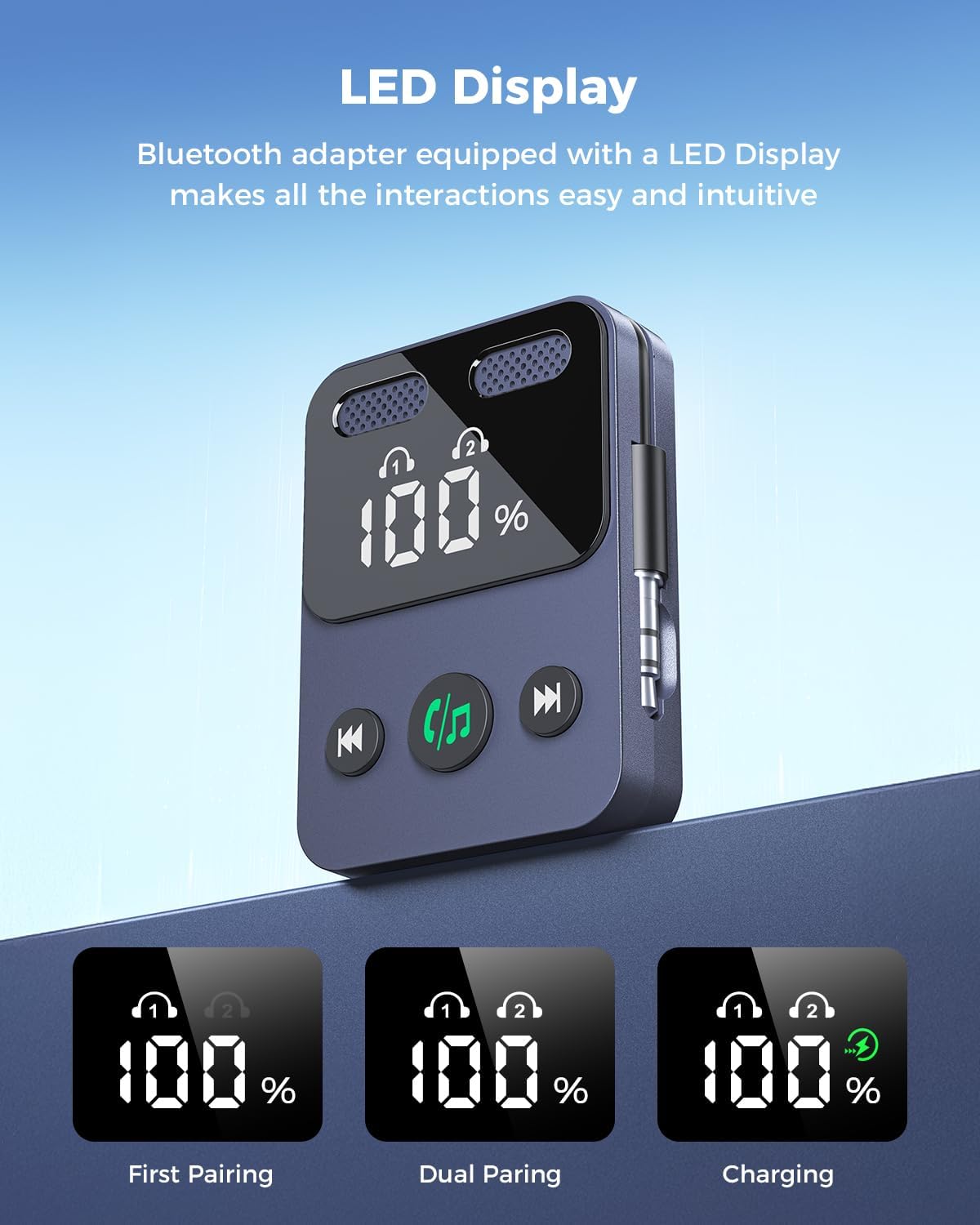
Image: The adapter's LED display, illustrating battery percentage and connection indicators for single and dual pairing, as well as charging status.
5.5 Batrị na Nchaji
The adapter features a built-in rechargeable battery.
- Ndụ batrị: Up to 20 hours in TX mode, over 17 hours in RX mode.
- Ịchaji: Connect the included USB-C cable to the adapter and a compatible USB power source (e.g., phone charger, computer USB port). A full charge takes approximately 2 hours.
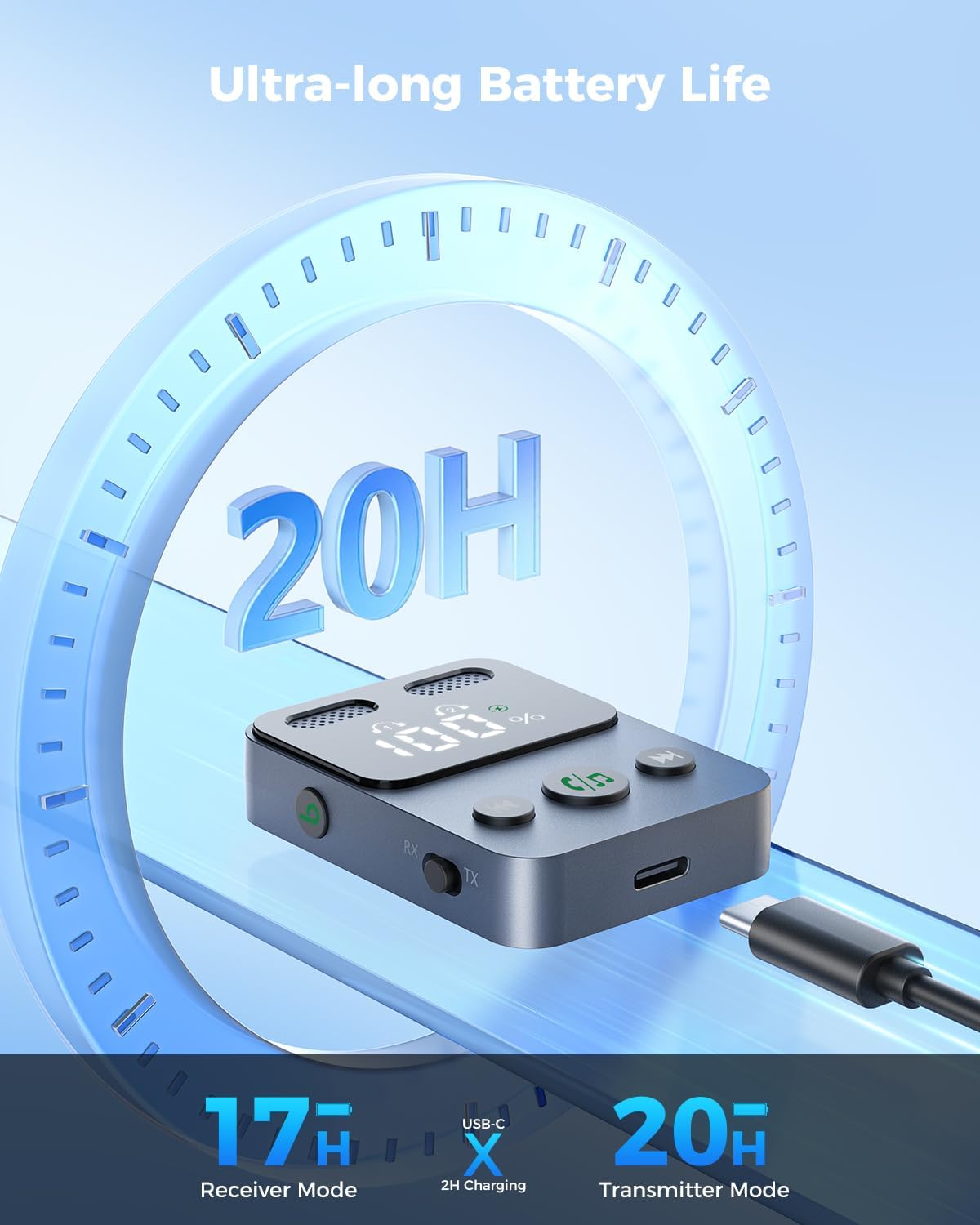
Image: The adapter connected to a USB-C charging cable, highlighting its long battery life and quick charging capability.
6. Nlekọta
- Nhicha: Jiri ákwà dị nro ma kpọọ nkụ hichaa ngwaọrụ ahụ. Zere iji kemịkalụ siri ike ma ọ bụ ihe ndị na-emebi ihe.
- Nchekwa: Chekwaa ihe nkwụnye ọkụ n'ebe dị jụụ, kpọrọ nkụ pụọ na ìhè anyanwụ kpọmkwem na oke okpomọkụ.
- Ijikwa: The device is lightweight; handle it with care to prevent damage from drops or impacts.
7. Nchọpụta nsogbu
| Nsogbu | Ihe nwere ike ime | Ngwọta |
|---|---|---|
| Ngwaọrụ anaghị agbanwu ọkụ. | Batrị dị ala. | Jiri eriri USB-C chajie ngwaọrụ ahụ. |
| Cannot pair with headphones/speakers. | Incorrect mode (TX/RX), device not in pairing mode, or out of range. | Ensure the adapter is in the correct TX or RX mode. Press the central button to enter pairing mode (blinking headphone icons). Move devices closer together. Try restarting both the adapter and the Bluetooth device. |
| Enweghị ụda ma ọ bụ ụda olu adịghị mma. | Incorrect cable connection, low volume, or interference. | Ensure the 3.5mm audio jack is fully inserted into the correct port. Check volume levels on both the adapter and connected devices. Reduce distance between devices and avoid obstacles. |
| Battery life shorter than expected. | Usage patterns, environmental factors. | Battery life can vary based on volume levels and usage. Ensure the device is fully charged before use. |
8. Nkọwapụta
- Ụdị: B0F6TYHCSD
- Akara: Super
- Ụdị Bluetooth: 5.3
- Njikọta: 3.5mm AUX/2RCA (via adapter, if applicable)
- Ụdị arụ ọrụ: Nyefe (TX) na onye nnata (RX)
- Atụmatụ pụrụ iche: HD Display, Low Latency, Simple Setup, Quick Pairing, Volume Control, Built-in Rechargeable Battery, Dual Pairing
- TX Mode Playtime: Ruo awa iri abụọ
- RX Mode Playtime: Ihe karịrị awa 17
- Oge nchaji: Approximately 2 hours (via USB-C)
- Isi mmalite ike: Igwe ọkụ eletrik (maka ịchaji)
- Ibu ihe: 1.76 ounces
- Akụkụ ngwugwu: 3.82 x 2.72 x 0.67 sentimita asatọ
9. Akwụkwọ ikike na nkwado
SUPERONE provides a hassle-free Akwụkwọ ikike nke ọnwa 18 for the Bluetooth 5.3 Audio Adapter. Additionally, lifetime technical support is available.
For any questions, concerns, or technical assistance, please contact the SUPERONE customer service team. They provide 24/7 support to address any issues you may encounter.
Ozi mkpọtụrụ: Please refer to the product packaging or the official SUPERONE websaịtị maka nkọwa kọntaktị kachasị ugbu a.


