Okwu mmalite
This manual provides detailed instructions for the Mesqool CR1030 Solar Hand-Crank AM/FM Radio. Please read this manual thoroughly before using the device to ensure proper operation and to maximize its features. This versatile radio is designed for emergency preparedness, outdoor activities, and daily use, offering multiple power sources and essential functions.
Ngwaahịa gafereview
The Mesqool CR1030 is a multi-functional emergency radio equipped with AM/FM reception, a powerful 12000mAh power bank, various charging methods, a bright flashlight, a reading light, and an SOS alarm. Its robust design ensures reliability in diverse environments.

Foto: N'ihu view of the Mesqool CR1030 radio, showing the solar panel, flashlight, control knobs, and a smartphone connected for charging.
Akụkụ ndị bụ isi:
- AM/FM Radio Reception: Wide frequency range for reliable signal acquisition.
- Ụlọ Nchekwa Ike 12000mAh: High-capacity battery for charging external devices.
- Five Charging Methods: Type-C USB, Solar Panel, Hand-Crank, Built-in Battery, AAA Batteries (not included).
- Ngwakọta ọkụ: 5W LED flashlight and 12-LED reading light with adjustable brightness.
- Mkpu SOS: Loud siren and flashing light for emergency signaling.
- Nhazi na-adịgide adịgide: IPX6 waterproof and IPX4 dustproof rating with a robust ABS shell.
- Ọdịda dị oke mma: 57mm full-range speaker and 3.5mm headphone jack.
Melite
Ebube mbụ:
Before first use, it is recommended to fully charge the radio's internal 12000mAh battery using the Type-C USB cable. Connect the Type-C cable to the radio's input port and the other end to a standard USB power adapter (not included). A full charge typically takes 5-6 hours.
Battery Installation (Optional):
The radio can also operate on 3 AAA batteries (not included) as an alternative power source. Open the battery compartment, insert the AAA batteries according to the polarity indicators, and close the compartment securely.
Ntuziaka ọrụ
Ọrụ redio:
- Gbanyụọ/ Gbanyụọ: Rotate the "VOLUME" knob clockwise to turn the radio on and adjust the volume. Rotate counter-clockwise to turn off.
- Họrọ Eriri: Use the "BAND" switch to select between FM, AM, or Weather Band (if available on your model).
- Tune Frequency: Extend the telescopic antenna for better reception. Rotate the "TUNING" knob to scan for radio stations. The frequency display will show the current station.
- Eji ekweisi: Tinye ekweisi 3.5mm n'ime ihe mkpuchi ekweisi maka ige ntị nkeonwe.

Image: A person sitting outdoors, listening to the Mesqool radio with its telescopic antenna extended for optimal signal reception.
Charging the Radio (5 Methods):

Image: A collage illustrating the five different charging methods for the Mesqool CR1030 radio: hand-crank, built-in battery, Type-C charging, solar panel, and AAA battery compartment.
- Ụdị-C USB Nchaji: Connect the provided Type-C cable to the radio's input port and a USB power source. This is the fastest and most efficient charging method.
- Nchaji ogwe anyanwụ: Place the radio with the solar panel facing direct sunlight. The solar panel (8500mm²) will convert sunlight into energy to charge the internal battery. This method is ideal for maintaining charge or slow charging in outdoor conditions.
- Nchaji aka-crank: Unfold the hand-crank handle and rotate it clockwise or counter-clockwise at a steady pace (approximately 130-150 RPM). Cranking for 1 minute can provide several minutes of radio operation or flashlight use.
- Batrị 12000mAh arụnyere n'ime ya: The radio comes with a large capacity internal battery that powers all functions.
- AAA Battery Power: Insert 3 AAA batteries (not included) into the designated compartment. This serves as an additional backup power source.

Image: The Mesqool CR1030 radio highlighting its 8500mm² monocrystalline solar panel and product dimensions.
Ọrụ ọkụ:

Image: Top panel shows the 5W LED flashlight beam illuminating a tent in the dark. Bottom panel shows a child reading a book under the soft light of the 12-LED reading lamp.
- Igwe ọkụ: Press the "FLASHLIGHT" button to turn on the 5W LED flashlight. Press again to turn off.
- Ìhè Ọgụgụ: Lift the solar panel to reveal the 12-LED reading light. Press the dedicated reading light button to turn it on. Some models may offer two brightness levels; press again to cycle through them.
Mkpu SOS:
In an emergency, press the "SOS" button. The radio will emit a loud 120dB siren and activate a flashing light to attract attention. Press the "SOS" button again to deactivate the alarm.
Ọrụ Bank Power:
The built-in 12000mAh battery can be used to charge external devices such as smartphones. Connect your device to the radio's USB or Type-C output port using an appropriate charging cable. The radio will automatically begin charging your device.

Image: The Mesqool CR1030 radio simultaneously charging a smartphone via its USB port and connected to headphones via the 3.5mm jack.
Nlekọta
- Nhicha: Jiri nwayọ hichaa redio, damp akwa . Ejila kemịkalụ siri ike ma ọ bụ ihe mkpocha abrasive.
- Nchekwa: Store the radio in a cool, dry place away from direct sunlight and extreme temperatures. If storing for extended periods, ensure the internal battery is charged to approximately 50-70% and recharge every 3-6 months to prolong battery life.
- Nguzogide mmiri: The radio is IPX6 waterproof, meaning it can withstand strong jets of water. However, it is not designed for submersion. Ensure all port covers are securely closed to maintain water resistance.
- Nguzogide uzuzu: The radio is IPX4 dustproof, offering protection against solid objects larger than 1mm.
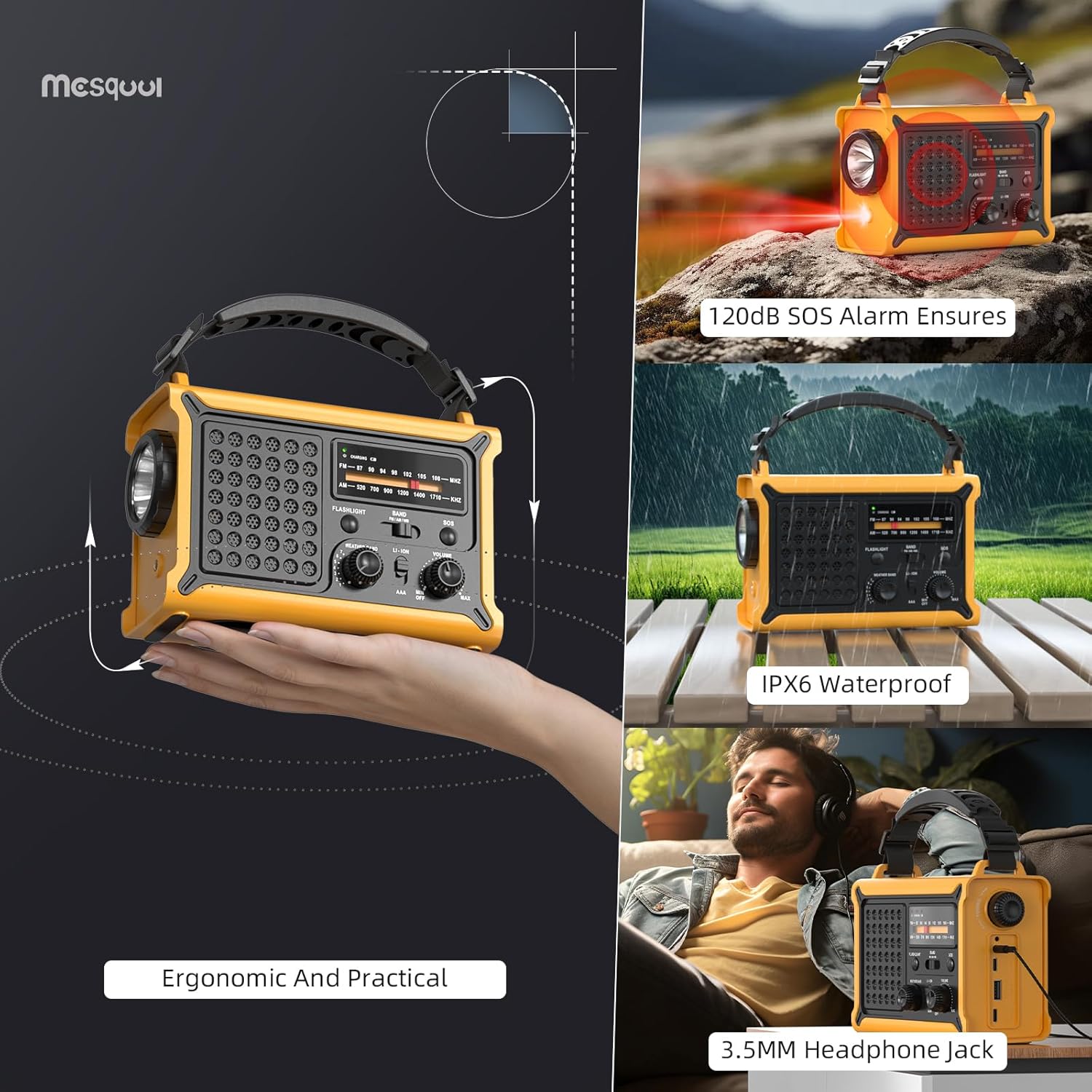
Image: A composite image demonstrating the ergonomic design of the Mesqool radio, its 120dB SOS alarm, IPX6 waterproof rating, and the 3.5mm headphone jack.
Nchọpụta nsogbu
| Nsogbu | Ihe nwere ike ime | Ngwọta |
|---|---|---|
| Redio anaghị agba. | Battery is depleted; volume knob is off. | Charge the radio using Type-C, solar, or hand-crank. Ensure the volume knob is turned clockwise. Check AAA batteries if installed. |
| Nnabata redio adịghị mma. | Antenna not extended; weak signal area; interference. | Fully extend the telescopic antenna. Adjust the radio's position. Try tuning slowly. |
| Flashlight/Reading light not working. | Battery is low; light button not pressed correctly. | Charge the radio. Ensure the respective light button is pressed firmly. |
| External device not charging. | Radio battery is low; incorrect cable; device not compatible. | Ensure the radio's internal battery is sufficiently charged. Use a compatible USB/Type-C cable. Verify device compatibility. |
| Hand-crank is stiff or not charging. | Mechanism obstruction; insufficient rotation speed. | Ensure no debris is obstructing the crank. Rotate at a consistent speed of 130-150 RPM. |
Nkọwapụta
- Ụdị: CR1030
- Akara: Mesqool
- Otu egwu redio: AM (520-1710 KHz), FM (87-108 MHz)
- Batrị dị n'ime: 12000mAh (nwere ike ibugharị)
- External Battery Option: Batrị 3 x AAA (anaghị etinye ya)
- Ụzọ nchaji: Type-C USB, Solar Panel, Hand-Crank, Internal Battery, AAA Batteries
- Nha panel anyanwụ: 8500mm²
- Igwe ọkụ: 5W LED
- Ìhè Ọgụgụ: 12-LED (5W)
- Mkpu SOS: 120dB
- Ọkà okwu: 57mm Full-Range
- Njikọta: USB (output), Type-C (input/output), 3.5mm Headphone Jack
- Nguzogide mmiri: IPX6
- Nguzogide uzuzu: IPX4
- Akụkụ: 17.3 cm (L) x 12.1 cm (W) x 7.4 cm (H)
- Ihe: ABS Hard Shell
Akwụkwọ ikike na nkwado
The Mesqool CR1030 radio comes with an Akwụkwọ ikike nke onye nrụpụta ọnwa iri na abụọ. This warranty covers defects in materials and workmanship under normal use. It does not cover damage caused by misuse, accidents, unauthorized modifications, or natural disasters.
For warranty claims, technical support, or any inquiries regarding your product, please contact Mesqool customer service through the retailer's platform or the official Mesqool website. Please have your purchase receipt and product model number (CR1030) available when contacting support.


