Okwu mmalite
Daalụ maka ịzụrụasing the Supersonic SC-1425WSW 2.1 Channel Bluetooth Soundbar with Wireless Subwoofer. This manual provides important information regarding the setup, operation, and maintenance of your new audio system. Please read it thoroughly before use and retain it for future reference.
Ihe ngwugwu
Please ensure all items listed below are included in your package. If any items are missing or damaged, contact your retailer for assistance.
- Supersonic SC-1425WSW Soundbar
- Subwoofer ikuku
- Njikwa anya
- Ihe nkwụnye ọkụ
- Igwe USB USB
- Akwụkwọ ntuziaka onye ọrụ
Ngwaahịa gafereview
The Supersonic SC-1425WSW is a 2.1 channel soundbar system designed to enhance your audio experience. It features a sleek, low-profile soundbar and a powerful wireless subwoofer for deep, rich bass.
Soundbar na Ikuku Subwoofer
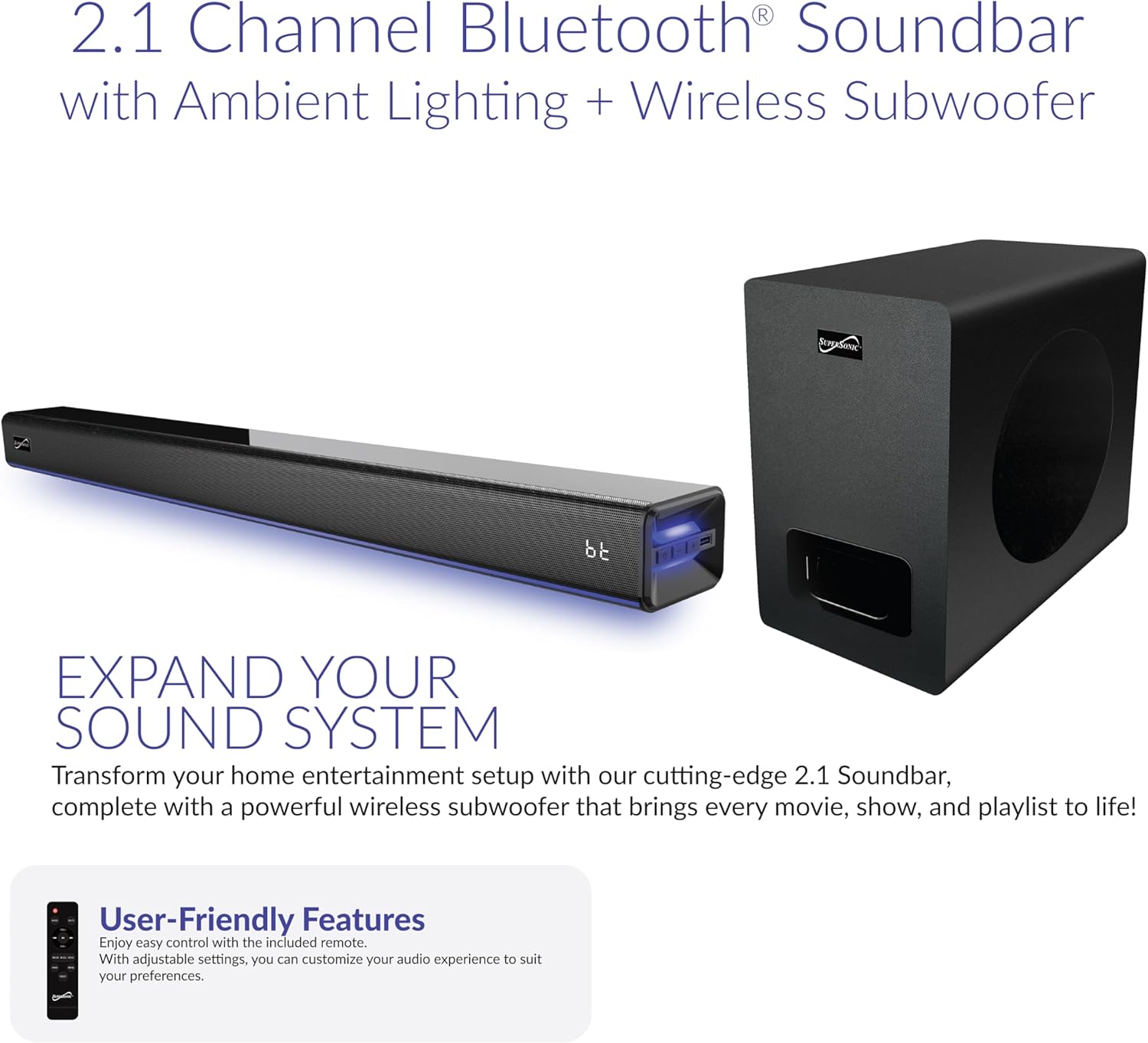
Image: The soundbar and wireless subwoofer, showcasing ha kọmpat imewe.
The soundbar houses dual 2"x2.95" drivers, delivering clear highs and mids. The dedicated 5.25" wireless subwoofer provides powerful bass, creating an immersive soundstage. The soundbar's slim design (31.49" x 3.62" x 2.67") allows it to fit seamlessly in front of most TVs without obstructing the screen.
Njikwa na Ngosipụta

Image: A close-up of the soundbar's front panel, highlighting the LED display and control buttons.
The soundbar features a large LED display that shows current settings, source selection, and volume levels. Integrated control buttons on the unit allow for basic operations such as power, volume, and input selection. The soundbar also includes ambient lighting with 7 dynamic color modes, which can be turned off if desired.
Ntinye ọdụ ụgbọ mmiri
The rear of the soundbar provides various input options for versatile connectivity:
- HDMI AKA: For high-quality audio connection with compatible TVs.
- Ngwa anya: Digital audio input for clear sound.
- USB: For playing audio from USB storage devices.
- AUX n'ime: 3.5mm analog audio input for general devices.
- DC na: Ntinye ike.
Melite
Ọnyịnye Nhọrọ

Foto: Examples of soundbar placement, including on an entertainment center and wall-mounted below a television.
The soundbar can be placed on a flat surface, such as an entertainment center, or wall-mounted. Ensure the soundbar is positioned centrally below your TV for optimal sound distribution. The wireless subwoofer can be placed anywhere in the room, ideally within 10 meters of the soundbar, for best performance.
Ijikọ Ike
- Connect the power adapter to the DC IN port on the soundbar.
- Tinye nkwụnye ọkụ n'ime oghere mgbidi.
- The wireless subwoofer will automatically pair with the soundbar once both units are powered on.
Jikọọ na TV gị
Choose one of the following connection methods based on your TV's available ports:
- HDMI ARC (A kwadoro): Connect an HDMI cable from the soundbar's HDMI ARC port to your TV's HDMI ARC port. This allows for audio return channel functionality, simplifying control.
- Ngwa anya: Connect an optical cable from the soundbar's OPTICAL port to your TV's optical output port.
- AUX: Connect a 3.5mm audio cable from the soundbar's AUX IN port to your TV's audio output (headphone jack or dedicated AUX out).
Mara: After connecting, you may need to adjust your TV's audio settings to output sound through the external speaker (soundbar) and disable Dolby/DTS if experiencing silent or noisy output. Refer to your TV's manual for specific audio output settings.
Ntuziaka ọrụ
Gbanyụọ/ Gbanyụọ
Pịa IKE button on the remote control or the soundbar to turn the unit on or off.
Nhọrọ ntinye

Image: The soundbar displaying 'bt' for Bluetooth, with icons for HDMI, Optical, USB, and AUX inputs.
Pịa Ntinye button on the remote control or the soundbar to cycle through available input sources: Bluetooth (BT), Optical (OPT), USB, AUX, HDMI ARC (HD), and FM Radio (FM).
Njikwa olu
Jiri ihe VOL+ na Vol- buttons on the remote control or the soundbar to adjust the volume. The soundbar features 32-point precision volume control.
Njikọ Bluetooth
- Select Bluetooth (BT) input on the soundbar. The LED display will show "BT" and flash, indicating it's in pairing mode.
- Na ekwentị mkpanaaka gị, gbanye Bluetooth wee chọọ ngwaọrụ dị.
- Select "SC-1425WSW" from the list of devices. Once connected, the soundbar will emit a confirmation tone, and "BT" on the display will stop flashing.
- You can now stream audio wirelessly from your device within a 10-meter range.
EQ esdị
The soundbar offers 3 preset EQ modes to optimize your listening experience:
- Egwu: Ebuliri maka ịkpọghachi egwu.
- Ihe nkiri: Enhanced for cinematic audio.
- Mkparịta ụka: Improves vocal clarity for TV shows and news.
Press the corresponding button on the remote control to select your desired EQ mode.
Ambient ọkụ
The soundbar features 7 dynamic ambient color modes. Use the dedicated button on the remote control to cycle through the colors or turn the lighting off.
Redio FM
Select FM input. Use the PREV/ỌZỌ buttons on the remote to tune to different stations. The soundbar will automatically scan and save available stations.
Nlekọta
Iji hụ na ogologo ndụ na arụmọrụ kacha mma nke sistemụ ụda ụda gị, soro ntuziaka mmezi ndị a:
- Nhicha: Use a soft, dry cloth to clean the surfaces of the soundbar and subwoofer. Do not use liquid cleaners, aerosols, or abrasive materials, as they may damage the finish.
- Igwe ikuku: Hụ na ikuku dị mma gburugburu ngwaọrụ ndị ahụ. Ekpuchila oghere ikuku ọ bụla.
- gburugburu: Avoid exposing the soundbar and subwoofer to extreme temperatures, humidity, direct sunlight, or dusty environments.
- Ike: Disconnect the power adapter from the wall outlet if the unit will not be used for an extended period.
Nchọpụta nsogbu
If you encounter any issues with your soundbar system, refer to the following common problems and solutions:
| Nsogbu | Ngwọta enwere ike |
|---|---|
| Enweghị ike | Ensure the power adapter is securely connected to both the soundbar and a working wall outlet. |
| Enweghị ụda | Check the input source selected on the soundbar matches the connection to your TV. Verify TV audio output settings are configured for external speakers. Ensure volume is not muted or too low. |
| Bluetooth anaghị ejikọ | Ensure the soundbar is in Bluetooth pairing mode (BT flashing). Make sure your device's Bluetooth is enabled and within range (10 meters). Try unpairing and re-pairing the device. |
| Njikwa anya anaghị arụ ọrụ | Check the battery in the remote control and replace if necessary. Ensure there are no obstructions between the remote and the soundbar's sensor. |
| Subwoofer anaghị emepụta bass | Ensure the subwoofer is powered on and within range of the soundbar. The subwoofer should automatically pair; if not, refer to the full manual for manual pairing instructions. |
Nkọwapụta
| Njirimara | Nkọwa |
|---|---|
| Aha Nlereanya | SC-1425WSW |
| Ụdị | Supersonic |
| Ụdị Ọkà Okwu | 2.1 Ọwa Soundbar nwere Ikuku Subwoofer |
| Teknụzụ Njikọta | Bluetooth 5.3, HDMI ARC, Optical, USB, AUX |
| Ike Nwepu kacha elu | 80W RMS (Combined) |
| Nzaghachi ugboro ugboro | 45Hz - 20kHz |
| Oke mgbama-na- mkpọtụ (S/N) | 86dB |
| Oke Bluetooth | Ruo mita 10 |
| Soundbar Dimensions (L x W x H) | 31.49" x 3.62" x 2.67" |
| Akụkụ Subwoofer (L x W x H) | 7.08" x 11.61" x 11.02" |
| EQ esdị | 3 (Music, Movie, Dialogue) |
| Ambient ọkụ | 7 dynamic color modes |
| Isi Iyi Ike | Ada Ada AC |
| UPC | 639131214255 |
Akwụkwọ ikike na nkwado
Supersonic products are designed and manufactured to the highest quality standards. For detailed warranty information, please refer to the warranty card included in your package or visit the official Supersonic website. If you require technical assistance or have questions about your product, please contact Supersonic customer support through their official channels.
Maka enyemaka ọzọ, biko gaa na Ụlọ ahịa Supersonic dị na Amazon.


