1. Okwu mmalite
Thank you for choosing the GOBOULT Astra Neo Bluetooth In-Ear Earbuds. This manual provides essential information for setting up, operating, and maintaining your earbuds to ensure optimal performance and longevity. Please read this manual thoroughly before use.
2. Ozi nchekwa
- Ekpughela ihe mkpuchi ntị ma ọ bụ ihe mkpuchi chaja n'ebe okpomọkụ dị oke elu, iru mmiri, ma ọ bụ mmiri mmiri dị.
- Zere ịda, ime ka ihe ghara ịdị mma, ma ọ bụ ịgbasa ngwaọrụ ahụ.
- Jiri naanị eriri chaja enyere maọbụ eriri Type-C nke akwadoro maka chaja.
- Gee ntị n'ogo olu na-agafeghị oke iji gbochie mmebi ntị.
- Debe ebe ụmụaka na anụ ụlọ na-apụghị iru.
3. Ihe ngwugwu
Chọpụta na ihe niile dị na ngwugwu gị:
- GOBOULT Astra Neo Earbuds (Left and Right)
- Nchaji case
- -Dị-C Nchaji USB
- Nkịta ntị (nha dị iche iche)
- Akwụkwọ ntuziaka onye ọrụ
- Akwụkwọ ikike kaadị
4. Ngwaahịa gafereview
The GOBOULT Astra Neo earbuds feature a sleek design with touch controls and a compact charging case. The case includes breathing LED lights for status indication.

Image: GOBOULT Astra Neo Earbuds and Charging Case. The image displays the black earbuds removed from their charging case, which features a glowing blue LED strip.

Image: GOBOULT Astra Neo Comfort Grip Case and Earbuds. This image highlights the textured surface of the charging case and earbuds, along with the breathing case lights.
5. Nhazi
5.1 Ịchaji ntị na akpa
Tupu ojiji nke mbụ, chajie nke ọma ntị na akpa nchaji.
- Tinye ntị ntị n'ime akpa nchaji. Gbaa mbọ hụ na ha nọ ọdụ nke ọma.
- Jikọọ eriri chaja Type-C na ọdụ chaja dị na akpa ahụ na isi iyi ike.
- The LED indicator on the case will illuminate during charging and turn off or change color when fully charged.
A 10-minute charge provides approximately 100 minutes of playtime.

Image: GOBOULT Astra Neo Fast Charging Feature. This image illustrates the 70-hour playtime and the fast charging capability: 10 minutes of charge equals 100 minutes of playtime.
5.2 Pairing with a Device (Bluetooth 5.4)
The Astra Neo uses Bluetooth 5.4 with Blink & Pair technology for quick and stable connections.
- Mepee igbe nchaji. Igwe ntị ga-abanye na ọnọdụ njikọta na-akpaghị aka.
- Na ngwaọrụ gị (smartphone, mbadamba, laptọọpụ), gbanye Bluetooth.
- Chọọ maka available Bluetooth devices and select "GOBOULT Astra Neo" from the list.
- Ozugbo ejikọtara ya, ụda olu ga-akwado ijikọ na-aga nke ọma.

Image: GOBOULT Astra Neo Bluetooth 5.4 Pairing. This image shows a smartphone screen displaying a successful Bluetooth 5.4 connection to 'Astra Neo', emphasizing power efficiency and stable connection.
6. Ntuziaka ọrụ
6.1 Njikwa mmetụ
The Astra Neo earbuds feature intuitive touch controls on each earbud:
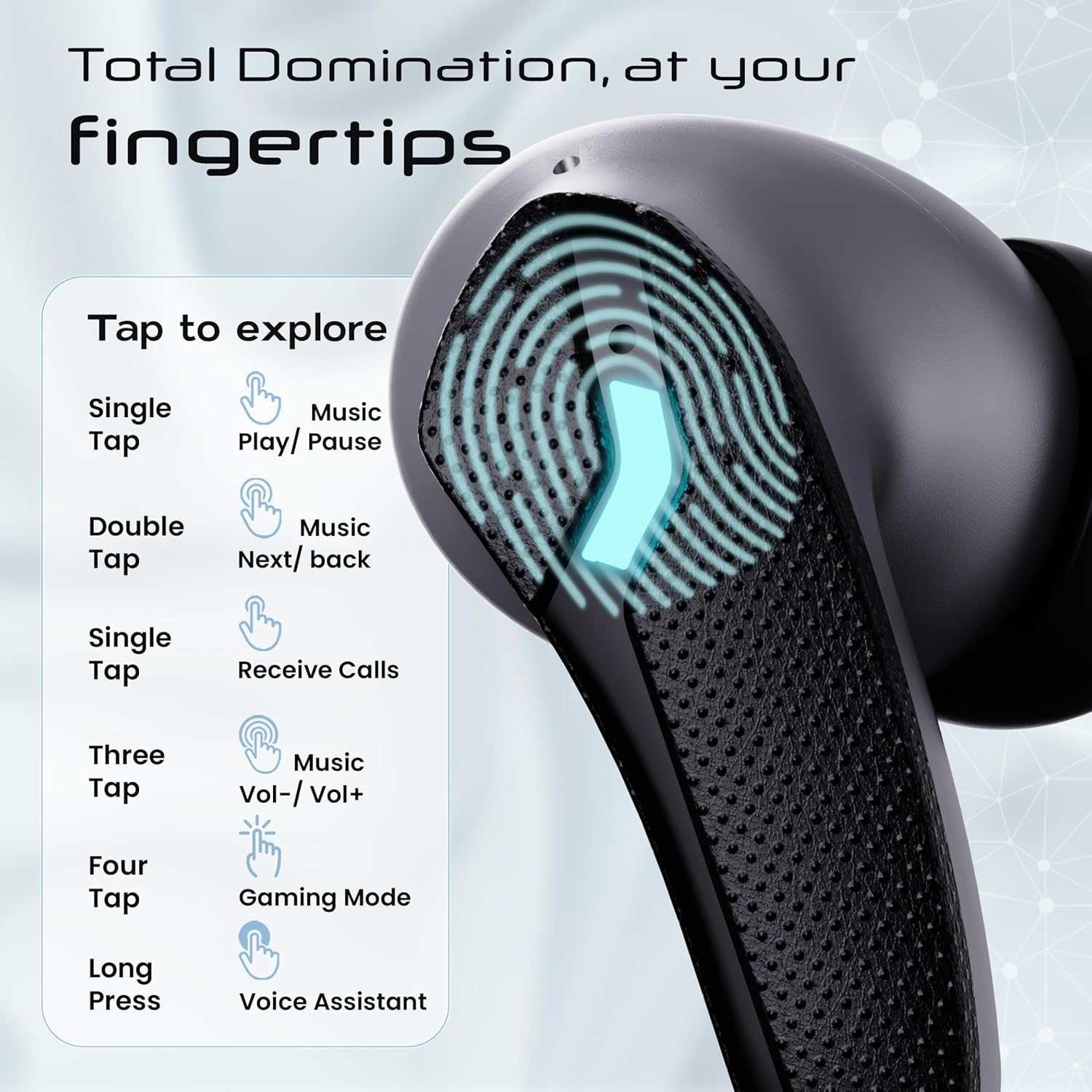
Image: GOBOULT Astra Neo Touch Controls Guide. This graphic details the various touch gestures for controlling music, calls, gaming mode, and voice assistant.
- Single Mgbata: Play/Pause music, Receive Calls.
- Ugboro abụọ Mgbata: Music Next/Back (specific earbud for each function).
- Three Tap: Music Volume Up/Down (specific earbud for each function).
- Four Tap: Activate Gaming Mode.
- Ogologo Pịa: Activate Voice Assistant (Google Assistant/Siri).
6.2 Gaming Mode (40ms Low Latency)
Activate Gaming Mode for a synchronized audio experience during gameplay, reducing audio delay to 40ms.
- To activate: Four tap on either earbud.
- To deactivate: Four tap again on either earbud.

Image: GOBOULT Astra Neo Gaming Mode with 40ms Low Latency. This image depicts a user playing a mobile game with the earbuds, highlighting the ultra-low latency feature for an immersive gaming experience.
6.3 ZEN Quad Mic ENC for Calls
The ZEN Quad Mic Environmental Noise Cancellation (ENC) system ensures clear voice calls by filtering out background noise.

Image: GOBOULT Astra Neo ZEN Quad Mic ENC Technology. This image illustrates the internal components and the function of the 4 microphones for clear in-game communication and crystal-clear calling with Acoustic Echo Cancellation (AEC).
Ụdị EQ 6.4
The Astra Neo earbuds support 4 EQ modes for customized audio experiences. Refer to the product packaging or official GOBOULT website for specific instructions on how to switch between these modes, as this functionality is typically managed via a companion app or specific touch gestures not detailed here.
7. Nlekọta
7.1 Nhicha
- Jiri nwayọ hichaa ntị ntị na chaja na akwa dị nro, kpọrọ nkụ, enweghị akwa.
- Ejila kemịkalụ siri ike, ihe mgbaze, ma ọ bụ ncha siri ike.
- Na-ehicha kọntaktị nchaji na ma ntị ntị na akpa ahụ mgbe niile iji hụ na chaja kwesịrị ekwesị.
7.2 Mgbochi mmiri (IPX5)
The Astra Neo earbuds are IPX5 water-resistant, meaning they are protected against sweat, rain, and splashes. They are not designed for submersion in water.
- Etinyela ntị ntị n'ime mmiri n'amaghị ama.
- If exposed to sweat or rain, wipe them dry before placing them back in the charging case.

Image: GOBOULT Astra Neo IPX5 Water Resistance and Voice Assistant. This image highlights the earbuds' sweatproof, rainproof, and splashproof capabilities, along with compatibility with Google Assistant and Hey Siri.
7.3 Nchekwa
Mgbe ejighị ya, chekwaa earbuds n'ime akpa nchaji ha iji chebe ha ma debe ha ebubo.
8. Nchọpụta nsogbu
- Igwe ntị anaghị ejikọta: Hụ na ekweisi abụọ ahụ dị n'ime akpa chaja, wee mepee mkpuchi ahụ ka ịbanye ọzọ n'ụdị njikọta. Lelee ntọala Bluetooth nke ngwaọrụ gị wee gbalịa ijikọghachi.
- Naanị otu earbud na-arụ ọrụ: Tinye ihe ntị ntị abụọ ahụ n'ime igbe ahụ, mechie mkpuchi, chere sekọnd ole na ole, wee mepee ya ọzọ. Nke a na-emekarị ka ha mekọrịta ọzọ.
- Enweghị ụda: Lelee ọkwa olu dị na ngwaọrụ gị na ekweisi gị. Hụ na ejikọrọ ekweisi gị nke ọma na ngwaọrụ gị.
- Nsogbu ịchaji: Clean the charging contacts on the earbuds and inside the case. Ensure the charging cable is securely connected and the power source is active.
- Ogo oku na-adịghị mma: Ensure the microphones are not obstructed. Try moving to a quieter environment.
9. Nkọwapụta
Key technical specifications for the GOBOULT Astra Neo Earbuds:
| Njirimara | Nkọwapụta |
|---|---|
| Aha Nlereanya | Astra Neo |
| Ụdị Bluetooth | 5.4 |
| Oge egwuregwu | Ruo awa 70 (ya na akpa chaja) |
| Nchaji ngwa ngwa | 10 mins charge = 100 mins playtime |
| Ọdịda ala | 40ms (Ụdị egwuregwu) |
| Nha ọkwọ ụgbọ ala | 13mm BoomX Drivers |
| Igwe okwu | ZEN Quad Mic ENC |
| Mmiri Nguzogide | IPX5 |
| Usoro njikwa | Metụ aka |
| Teknụzụ Njikọta | Bluetooth, Ikuku |
| Jack ekweisi | Type-C Fast Charging Jack |
| Ibu Ibu | 47 grams |
| Akụkụ ngwaahịa | 6.2 x 5.3 x 3.2 cm |
| Ụdị batrị | Lithium polymer |
| Oke Bluetooth | 10 mita |
| Mgbochi | 32 Ohm |

Image: GOBOULT Astra Neo 13mm BoomX Drivers. This image highlights the 13mm BoomX drivers, emphasizing crystal clear sound and support for MSBC, SBC, and AAC codecs.
10. Akwụkwọ ikike na nkwado
The GOBOULT Astra Neo Earbuds come with a 1-afọ emeputa akwụkwọ ikike from the date of purchase. This warranty covers manufacturing defects. For warranty claims or technical support, please refer to the contact information provided on your warranty card or visit the official GOBOULT websaịtị.


