Okwu mmalite
This manual provides comprehensive instructions for the OMAIC EN2Q36H replacement remote control, designed for Hisense Smart TVs. It covers essential information regarding setup, operation, and maintenance to ensure optimal performance and user experience. This remote offers a direct replacement solution without the need for complex programming.
Melite
The OMAIC EN2Q36H remote control is designed for immediate use with compatible Hisense Smart TVs. No programming or pairing is required.
Ntinye batrị
- Chọta ebe batrị dị n'azụ nke njikwa anya.
- Mee ka mkpuchi batrị ahụ gbadaa ala ma ọ bụ n'akụkụ nke akụ ahụ gosiri iji mepee ya.
- Tinye batrị alkaline AAA abụọ (anaghị etinye ya na ya), hụ na njedebe ndị dị mma (+) na nke na-adịghị mma (-) kwekọrọ na akara ndị dị n'ime ngalaba ahụ.
- Dochie mkpuchi batrị ahụ site n'ịdọghachi ya n'ọnọdụ ya ruo mgbe ọ pịrị aka nke ọma.
Once batteries are installed, the remote is ready to operate your Hisense Smart TV.

Ntuziaka ọrụ
This remote control utilizes infrared (IR) technology for communication with your Hisense Smart TV. Ensure a clear line of sight between the remote and the TV's IR receiver for optimal performance.
Atụmatụ igodo
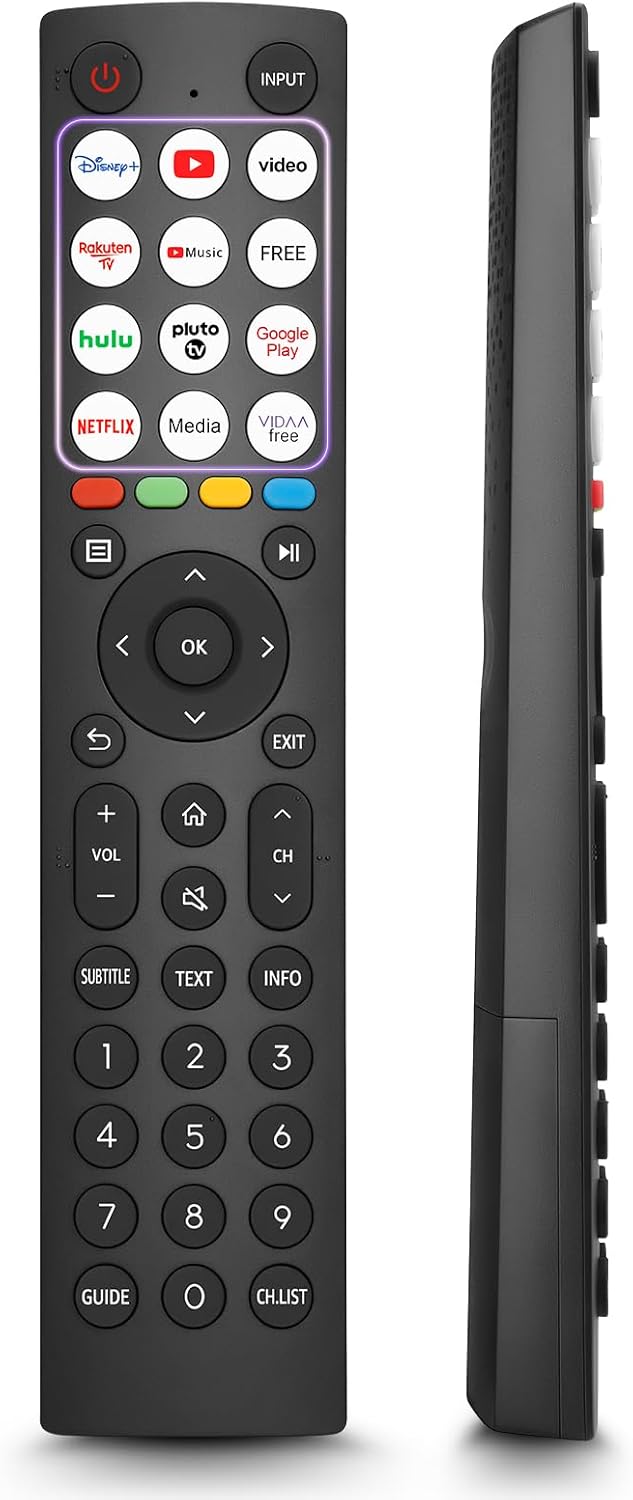
- 12 Shortcut Buttons: Quickly access popular streaming services and applications with dedicated buttons.
- Strong IR Signal: Provides a longer transmission distance and quick response without noticeable delay.
- Ihe owuwu na-adịgide adịgide: Made from high-quality ABS and silicone materials for extended lifespan.

Ọrụ bọtịnụ
Familiarize yourself with the functions of each button on your OMAIC EN2Q36H remote control:
| Bọtịnụ | Ọrụ |
|---|---|
| IKE | Switches the TV on or into standby mode. |
| Ntinye | Na-ahọrọ isi mmalite ntinye (HDMI, AV, wdg). |
| APP Buttons | Quick access buttons for specific applications (e.g., Disney+, Netflix, YouTube). |
| MENU | Displays the Quick Setup menu. |
| Njikwa mgbasa ozi | Buttons for Play, Pause, Stop, Fast Forward, Rewind. |
| Navigation (Up/Down/Left/Right) | Navigates on-screen menus and adjusts system settings. |
| OK | Confirms selection in on-screen menus. |
| Azụ | Na -alaghachị na nchịkọta nhọrọ. |
| ỤZỌ ỌPỤPỤ | Wepụ na menu ugbu a. |
| Vol +/- | Na-edozi ọkwa olu. |
| ỤLỌ | Enters the Home screen. |
| MUTU | Mebie ma ọ bụ weghachi ụda TV. |
| CH ^/v | Switches channels. |
| Isi okwu | Activates or deactivates subtitle mode. |
| AKWỤKWỌ | Turns teletext function on and off. |
| Ozi | Na-egosi ozi mmemme dị ugbu a. |
| NUMBER Buttons (0-9) | Direct channel selection or number input. |
| NDỤMỌDỤ | Displays the Electronic Programme Guide (DTV input). |
| Ndepụta | Displays the Channel List on the screen. |

Compatible Hisense TV Models
The OMAIC EN2Q36H replacement remote control is compatible with the following Hisense VIDAA 4K HDTV Smart TV series:
- 32A4K, 40A4K, 43A4K
- 32A5KQ, 40A5KQ
- 43A6K, 50A6K, 55A6K, 58A6K, 65A6K, 70A6K, 75A6K, 85A6K
- 55U6KQ, 65U6KQ
- 43A7KQ, 50A7KQ, 55A7KQ, 65A7KQ, 75A7KQ
- 43E7KQ, 50E7KQ, 55E7KQ, 65E7KQ, 75E7KQ
Nlekọta
Iji hụ na njikwa remote gị dị ogologo ma rụọ ọrụ nke ọma, soro ntuziaka mmezi ndị a:
- Nhicha: Use a soft, dry cloth to clean the remote. Avoid using liquid cleaners or abrasive materials, as they may damage the surface or internal components.
- Ngbanwe batrị: Replace batteries when the remote's response becomes sluggish or stops working. Always replace both batteries at the same time with new ones of the same type (AAA alkaline).
- Nchekwa: Chekwaa ebe dịpụrụ adịpụ n'ebe dị jụụ, kpọrọ nkụ na-adịghị na ìhè anyanwụ kpọmkwem, oke okpomọkụ, na oke iru mmiri.
- Zere mbelata: Protect the remote from physical impact, as drops can damage internal circuitry.
Nchọpụta nsogbu
If you encounter issues with your remote control, refer to the following troubleshooting steps:
| Nsogbu | Ihe nwere ike ime | Ngwọta |
|---|---|---|
| Remote anaghị aza | Ịtinye batrị nwụrụ anwụ ma ọ bụ na-ezighi ezi. | Jiri batrị AAA alkaline ọhụrụ dochie batrị ndị ahụ, hụ na ha nwere polarity ziri ezi. |
| Remote anaghị aza | Ihe mgbochi dị n'etiti remote na TV. | Ensure a clear line of sight to the TV's IR receiver. Remove any objects blocking the path. |
| Remote anaghị aza | Remote is too far from the TV. | Move closer to the TV. The remote has an extended range, but extreme distances may affect performance. |
| Bọtịnụ ndị nnyapade ma ọ bụ anaghị anabata ya | Unyi ma ọ bụ irighiri ihe n'okpuru bọtịnụ. | Gently clean around the buttons with a soft, dry cloth. Avoid liquids. |
| Specific functions not working | TV model incompatibility (rare). | Verify your Hisense TV model is listed in the 'Compatible Hisense TV Models' section. |
Nkọwapụta
| Njirimara | Nkọwa |
|---|---|
| Aha Nlereanya | EN2Q36H |
| Ụdị | OMAIC |
| Ngwa dakọtara | Hisense Smart TVs |
| Teknụzụ Njikọta | Infrared (IR) |
| Ọnụọgụ bọtịnụ | 48 |
| Ụdị njikwa | Njikwa bọtịnụ |
| Atụmatụ pụrụ iche | Universal, Comfortable |
| Agba | Nwa |
| Nkọwa batrị | AAA (Alkaline) |
| Supported Devices (Max) | 1 |
| Akụkụ ngwaahịa (ihe dị ka) | 34.7 x 24.7 x 2.2 cm |
| Ibu ngwaahịa (ihe dị ka) | 80 grams |

Akwụkwọ ikike na nkwado
OMAIC is committed to the quality and compatibility of its replacement remote controls. We provide professional after-sales support to ensure customer satisfaction.
If you have any questions or concerns regarding your OMAIC EN2Q36H remote control or your order, please contact us directly. Our support team aims to respond to inquiries within 12 working hours.