1. Ngwaahịa gafereview
The SPYPOINT Force 24 is a non-cellular trail camera designed for capturing high-quality images and videos of wildlife and for security monitoring in areas without cellular coverage. It records 2K video with sound and captures 24-megapixel still photos. The camera features a fast 0.5-second trigger speed, a 70-foot detection range, and low-glow infrared LEDs for clear day and night captures without disturbing subjects. Footage is saved directly to an SD card, eliminating the need for data plans or subscriptions.

Foto 1: N'ihu view of the SPYPOINT Force 24 Trail Camera.
2. Ihe ngwugwu
Gbaa mbọ hụ na ihe niile dị tupu ị malite nhazi:
- SPYPOINT Force 24 Trail Camera
- Eriri mgbakwasị
- Akwụkwọ ntuziaka (akwụkwọ a)
3. Nhazi
3.1. Ntinye batrị
The Force 24 camera requires 8 AA batteries. For optimal performance and extended battery life, lithium or high-quality alkaline batteries are recommended. Rechargeable batteries can also be used.
- Open the camera latch on the side to access the internal compartment.
- Chọta ebe batrị.
- Fanye batrị AA 8, na-eme ka polarity ziri ezi (+/-) dị ka egosiri n'ime ụlọ.
- Mechie oghere batrị ahụ nke ọma.
3.2. Ntinye kaadị SD
A MicroSD card (not included) is required to store photos and videos. The camera supports cards up to 32 GB.
- With the camera open, locate the SD card slot.
- Insert a formatted MicroSD card into the slot until it clicks into place. Ensure the card is inserted in the correct orientation.
- It is recommended to format the SD card using the camera's menu before first use.
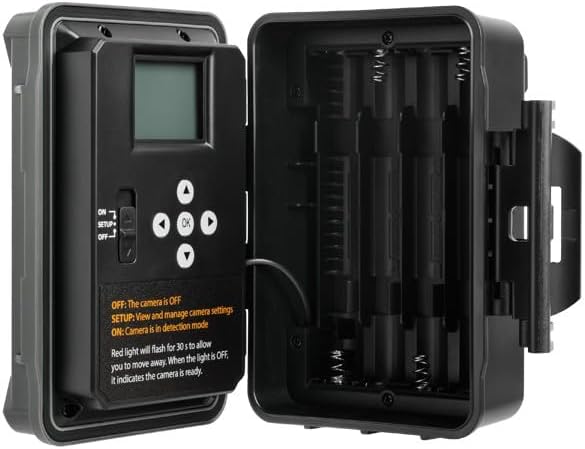
Ọgụgụ 2: Ime view of the camera showing the control panel and battery compartment.
4. Ụdị arụ ọrụ
The SPYPOINT Force 24 offers four versatile operating modes:
- Foto mode: Na-ese foto ndị na-adịghị arụ ọrụ.
- Ụdị vidiyo: Records video clips with sound.
- Ụdị nkwụsị oge: Captures images at set intervals over a period.
- Time-Lapse Plus Mode: Combines time-lapse photography with motion-triggered captures.
4.1. Ịhọrọ ọnọdụ
Use the camera's internal control panel to navigate through the menu and select your desired operating mode. Refer to the on-screen instructions for specific settings within each mode.
4.2. Nchọpụta mmegharị na ọsọ mkpali
The camera features a 0.5-second trigger speed and a 70-foot detection range to ensure quick capture of moving subjects. The low-glow infrared LEDs provide discreet illumination for night captures.
5. Camera Interface and Controls
The camera's internal display and buttons allow for easy configuration and review of captured media.
- ON/SETUP/OFF Switch: Controls the camera's power and enters setup mode.
- Bọtịnụ igodo nsoroụzọ: Used to move through menu options and review onyonyo/ihe onyonyo.
- OK bọtịnụ: Na-akwado nhọrọ.
- Bọtịnụ menu: Na-abanye na menu ntọala isi.
When in SETUP mode, the red light will flash for 30 seconds, allowing you time to move away before the camera enters detection mode. When the light is OFF, the camera is ready.
6. Nlekọta
- Ngbanwe batrị: Replace batteries when the low battery indicator appears on the screen or in the app.
- Njikwa kaadị SD: Regularly check the SD card capacity. Transfer important files to a computer and format the card periodically to maintain optimal performance.
- Nhicha: Keep the camera lens, PIR sensor, and infrared LEDs clean from dirt, dust, and debris using a soft, dry cloth.
- Nchekwa gburugburu: Ensure the camera is securely mounted and latches are closed to protect against weather elements.
7. Nchọpụta nsogbu
- Igwefoto anaghị agbanwu: Lelee nrụnye batrị ma hụ na batrị dị ọhụrụ.
- No Photos/Videos Captured: Verify the SD card is inserted correctly and has sufficient space. Check motion detection settings and ensure the camera is in ON mode.
- Ogo onyonyo adịghị mma: Clean the camera lens and ensure there are no obstructions. Check the camera's position relative to the subject and lighting conditions.
- Ndụ obere batrị: Ensure high-quality batteries are used. Adjust camera settings such as detection delay and video length to conserve power.
8. Nkọwapụta
- Ụdị: MGBE-24
- Mkpebi foto: 24 megapixels
- Mkpebi vidiyo: 2K with Sound
- Ọsọ mkpata: 0.5 sekọnd
- Oke nchọpụta: 70 ụkwụ
- Oke ọkụ: 70 feet (Low Glow IR)
- Isi mmalite ike: Batrị 8 AA (anaghị etinye ya)
- Nchekwa: MicroSD Card (up to 32 GB, not included)
- Akụkụ: 8 x 4 x 3 sentimita asatọ
- Ibu ihe: 1 pound
9. Akwụkwọ ikike na nkwado
The SPYPOINT Force 24 trail camera comes with a two-year warranty, ensuring reliable performance. For technical assistance, troubleshooting, or warranty claims, please refer to the official SPYPOINT support channels or visit their websaịtị.
Maka ozi ndị ọzọ na akụrụngwa, gaa na SPYPOINT Store.


