Okwu mmalite
Welcome to the user manual for your new VAIO SX-R Laptop. This document provides essential information to help you set up, operate, maintain, and troubleshoot your device. Please read this manual thoroughly to ensure optimal performance and longevity of your laptop.
Ngwaahịa gafereview
The VAIO SX-R is a high-performance laptop designed for productivity and creative tasks. It features an Intel Core Ultra 7 processor, a vibrant 14-inch WQXGA Touch Display, ample memory, and fast storage.
Atụmatụ igodo
- Ihe nhazi: Intel Core Ultra 7 (16-Core, AI-Boosted) for enhanced speed and responsiveness.
- Ngosipụta: 14-inch WQXGA Touch Display (2560x1600) offering high resolution and wide color gamut.
- Ebe nchekwa: 32GB LPDDR5 RAM for superior multitasking.
- Nchekwa: 1TB PCIe NVMe SSD for fast data access and ample nchekwa.
- Sistemụ nrụọrụ: Windows 11 Pro with enterprise-grade security and productivity features.
- Nchekwa: Integrated IR Camera and Fingerprint Reader for secure login.
- Chassis: Durable Carbon Fiber construction.
Laptop Components and Ports

Figure 1: VAIO SX-R Laptop, illustrating the overall design.
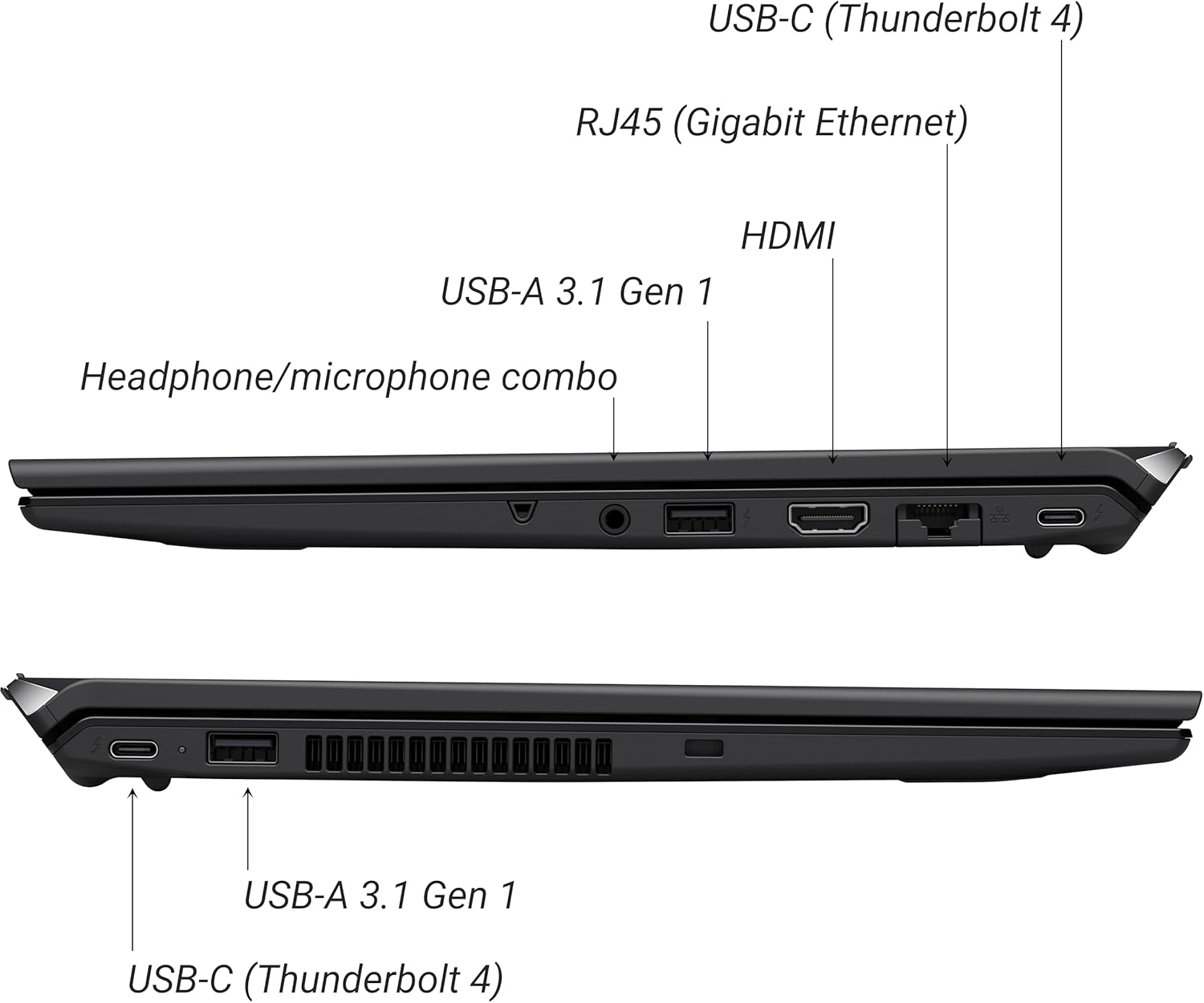
Figure 2: Port layout of the VAIO SX-R Laptop. The left side includes a headphone/microphone combo jack, USB-A 3.1 Gen 1, HDMI, RJ45 (Gigabit Ethernet), and USB-C (Thunderbolt 4). The right side features another USB-C (Thunderbolt 4) and USB-A 3.1 Gen 1 port.
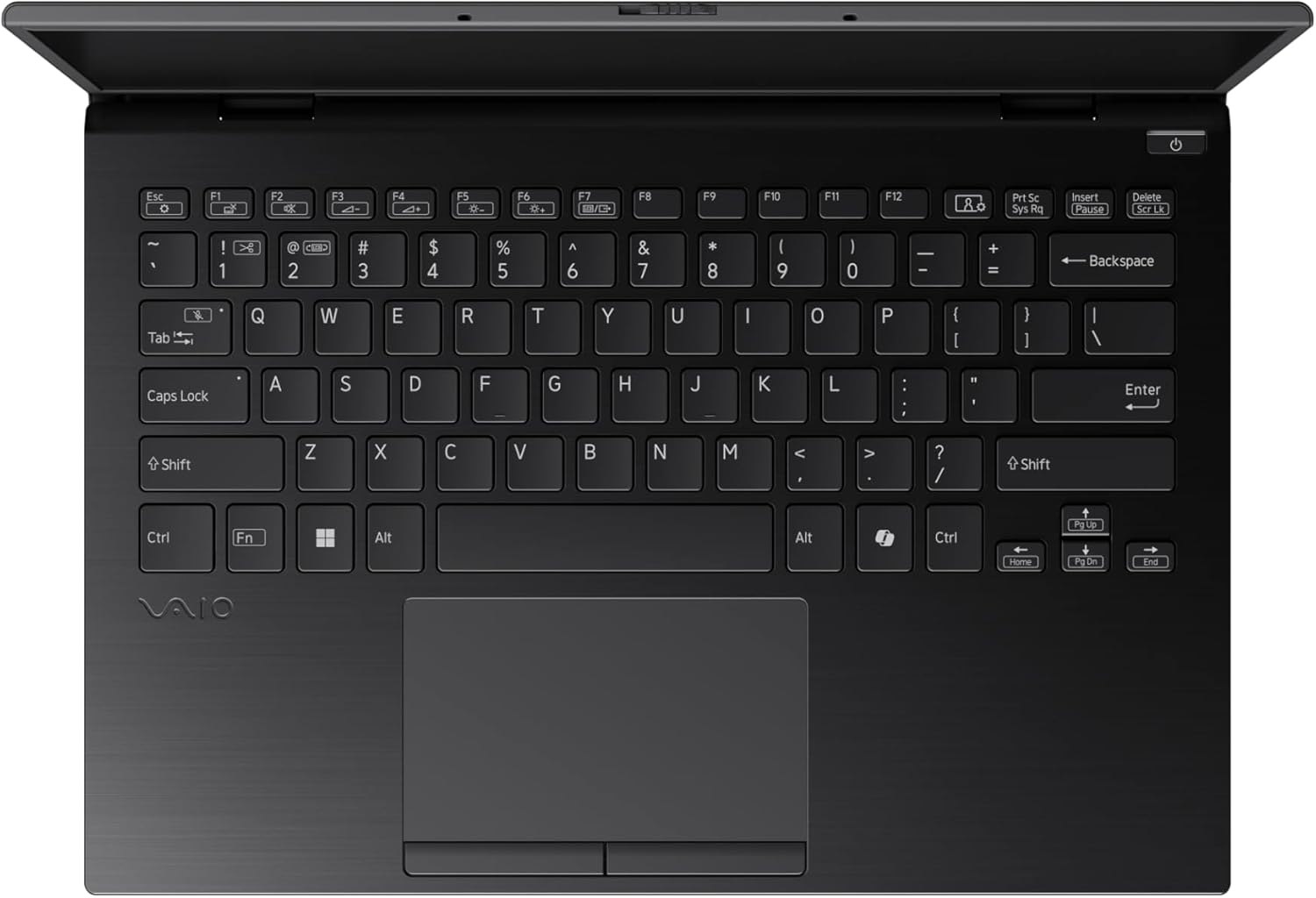
Figure 3: The VAIO SX-R Laptop keyboard and touchpad, featuring a backlit keyboard and integrated fingerprint sensor.
Melite
1. Ike izizi
- Njikọ Ike: Tinye ihe nkwụnye AC n'ime ọdụ ụgbọ mmiri nke laptọọpụ wee banye n'ime oghere mgbidi.
- Mepee Laptọọpụ: Mepee mkpuchi laptọọpụ ahụ nke ọma.
- Ike Na: Press the power button, typically located on the top right of the keyboard deck. The power indicator light will illuminate.
2. Ntọala Windows 11 Pro
Follow the on-screen instructions to complete the initial Windows 11 Pro setup. This includes:
- Ịhọrọ mpaghara gị na nhazi ahụigodo gị.
- Jikọọ na netwọk Wi-Fi.
- Accepting the license agreement.
- Creating or logging in with a Microsoft account.
- Setting up your PIN, fingerprint, or facial recognition (IR Camera).
3. Njikọ Peripherals
You can connect external devices such as mice, keyboards, external monitors, and USB drives to the available ports as shown in Figure 2.
Na-arụ ọrụ
1. Isi ojiji
- Ahụigodo: Use the integrated backlit keyboard for typing. Function keys (F1-F12) often have secondary functions accessible via the 'Fn' key.
- Mpempe aka: Nchikota aka ziri ezi na-akwado mmegharị aka dị iche iche maka ịnyagharịa.
- Ihuenyo mmetụ aka: Interact directly with the 14-inch WQXGA display using touch gestures.
2. Nchekwa atụmatụ
- Ọgụgụ mkpịsị aka: Enroll your fingerprints through Windows Settings > Accounts > Sign-in options for quick and secure login.
- IR Camera: Utilize Windows Hello facial recognition for convenient and secure access. Set this up in Windows Settings > Accounts > Sign-in options.
3. Njikwa Ike
- Modera Modera: Close the lid or press the power button briefly to put the laptop to sleep.
- Mechie: Go to Start > Power > Shut down to turn off the laptop completely.
- Malitegharịa: Go to Start > Power > Restart to reboot the system.
Nlekọta
1. Nhicha
- Ihuenyo: Jiri akwa dị nro na-enweghị ntụpọ dampjiri mmiri ma ọ bụ ihe nhicha ihuenyo kpuchie ya. Zere kemịkalụ siri ike.
- Ahụigodo na chassis: Jiri ákwà dị nro. Maka unyi siri ike, jiri obere damp A pụrụ iji ákwà nwere ncha dị nro mee ihe, na-eme ka mmiri ghara ịbanye n'ime oghere.
- ọdụ ụgbọ mmiri: Jiri ikuku a na-eme ka ọ dị nro wepụ uzuzu n'ọdụ ụgbọ mmiri.

Figure 4: The VAIO SX-R features a water-resistant keyboard, designed to withstand minor spills.
2. Mmelite ngwanrọ
Regularly update your Windows operating system and device drivers to ensure optimal performance, security, and compatibility. Access updates via Windows Settings > Windows Update.
3. Nlekọta batrị
- Zere oke okpomọkụ.
- Akwụsịla batrị kpamkpam ugboro ugboro.
- Maka nchekwa ogologo oge, chajịa batrị ahụ ruo ihe dịka 50-60%.
Nchọpụta nsogbu
Akụkụ a na-ekwu maka nsogbu ndị ị nwere ike izute.
1. Laptọọpụ anaghị agba ọkụ
- Gbaa mbọ hụ na ejikọrọ ihe nkwụnye ọkụ AC na kọmpụta ahụ yana ebe ọkụ na-arụ ọrụ.
- Lelee ma oghere ọkụ na-arụ ọrụ site na nkwụnye na ngwaọrụ ọzọ.
- Ọ bụrụ na batrị agbachapụ kpamkpam, hapụ ya ka ọ chajị opekata mpe nkeji iri atọ tupu ị nwaa ịgbanye.
2. Ngosipụta Okwu
- Enweghị Ngosipụta: Connect an external monitor to the HDMI port to check if the issue is with the laptop's internal display.
- Flickering/Distorted Display: Update your graphics drivers. Adjust display resolution and refresh rate in Windows Settings > System > Display.
3. Wi-Fi Connectivity Problems
- Ensure Wi-Fi is enabled in Windows Settings > Network & internet > Wi-Fi.
- Malitegharịa ekwentị gị na modem gị.
- Gbaa Windows Network Troubleshooter.
4. Ịrụ ngwa ngwa
- Mechie ngwa na-adịghị mkpa na-agba n'azụ.
- Check Task Manager (Ctrl+Shift+Esc) for resource-intensive processes.
- Ensure your system is up to date and free from malware.
Nkọwapụta
Below are the detailed specifications for the VAIO SX-R Laptop (Model: VJS4R1X0511B).
| Njirimara | Nkọwapụta |
|---|---|
| Ụdị | VAIO |
| Aha Nlereanya | VAIO SX-R |
| Nọmba Nlereanya ihe | VJS4R1X0511B |
| Sistemụ nrụọrụ | Windows 11 Pro |
| Nhazi | Intel Core Ultra 7 (1.4 GHz) |
| Ebe nchekwa RAM | 32 GB LPDDR5 |
| Draịvụ ike | 1 TB PCIe NVMe SSD |
| Nha ihuenyo | 14 sentimita asatọ |
| Mkpebi ihuenyo | 2560 x 1600 pikselụ (WQXGA) |
| Kaadị eserese | Ihe eserese Intel agbakwunyere |
| Ụdị ikuku | 802.11bgn |
| USB 3.0 ọdụ ụgbọ mmiri | 3 |
| Nkezi Ndụ batrị | Awa 10 |
| Ibu Ibu | 3.1 pound |
| Akụkụ ngwaahịa | 14.2 x 15 x 3.3 sentimita asatọ |
| Atụmatụ pụrụ iche | Backlit Keyboard, Fingerprint Reader, HD Audio, Memory Card Slot, Webcam |
Akwụkwọ ikike na nkwado
1. Akwụkwọ ikike Ozi
Your VAIO SX-R Laptop is covered by a manufacturer's warranty. Please refer to the warranty card included with your product packaging for specific terms, conditions, and duration. Keep your proof of purchase for warranty claims.
2. Nkwado nka na ụzụ
For technical assistance, troubleshooting beyond this manual, or service inquiries, please contact VAIO customer support. You can typically find contact information on the official VAIO websaịtị ma ọ bụ n'akwụkwọ enyere na laptọọpụ gị.
- Nkwado n'ịntanetị: Visit the official VAIO support website for FAQs, driver downloads, and contact options.
- Nkwado ekwentị: Refer to your product documentation for regional support phone numbers.


