1. Okwu mmalite
This manual provides essential information for the proper use and maintenance of your HOTWAV R9 Pro Rugged Tablet. Please read it thoroughly before operating the device to ensure optimal performance and longevity.

Foto: ihu na azụ view of the HOTWAV R9 Pro Rugged Tablet, highlighting its robust design and 11-inch display.
2. Kedu ihe dị na Igbe ahụ
Chọpụta na ihe niile dị na nkwakọ ngwaahịa:
- 1x HOTWAV R9 Pro Rugged Tablet
- 1x Manual (this document)
- 1x igbe nkwakọ ngwaahịa
- 1x Explosion-proof Film
- 1 x eriri USB Type-C
- 1x OTG Cable
3. Ngwaahịa gafereview na Njirimara igodo
3.1. Rugged Design and Durability
The HOTWAV R9 Pro is engineered for extreme environments, featuring IP68/IP69K waterproof and dustproof ratings, and MIL-STD-810H certification for shock resistance. Its construction includes a double-shot TPU+PC+glass fiber back cover for enhanced protection.

Image: Visual representation of the tablet's ruggedness, showing it submerged in water, covered in dust, and surviving a drop, alongside its LED camping light in use.
3.2. Batrị na Nchaji
Equipped with a large 20080mAh battery, the R9 Pro offers extended usage times. It supports 20W fast charging to quickly replenish power.

Image: Diagram illustrating the 20080mAh battery capacity and 20W fast charging capability of the tablet.
3.3. Ngosipụta
The tablet features an 11-inch FHD+ display with a resolution of 1200x1920 pixels and 450cd/m² brightness. It is protected by Corning Glass 3 and supports glove touch functionality, making it suitable for outdoor use.

Image: The tablet's 11-inch display showing various applications, alongside icons indicating FHD+ resolution, 60Hz refresh rate, and dual SIM support.
3.4. Arụmọrụ na Nchekwa
Powered by an Octa-Core Unisoc T606 processor, the R9 Pro includes 20GB RAM (6GB physical + 14GB virtual) and 256GB internal storage. Storage can be expanded up to 2TB using a T-flash card.

Image: A visual representation of the Unisoc T606 octa-core chipset, detailing 20GB RAM and 256GB ROM with 2TB expandable memory.
3.5. Sistemụ igwefoto
The tablet features a 64MP rear camera with PDAF and f/1.8 aperture, and a 16MP front camera for photography and video calls.

Foto: Examples of photos taken with the 64MP rear camera and the 16MP front camera, demonstrating their capabilities.
3.6. Integrated Campna -enwu
A unique 6W camping light with 350 lumens and 246 LEDs is integrated into the tablet, providing illumination for various outdoor activities or emergencies.
4. Nhazi
4.1. Ịchaji mbadamba nkume
Before first use, fully charge the tablet using the provided USB Type-C cable and a compatible 20W power adapter (not included). Connect the cable to the tablet's USB-C port and the adapter to a power outlet. The charging indicator will show the charging status.
4.2. Installing SIM and T-flash Cards
The tablet supports dual SIM cards and a T-flash (microSD) card for expandable storage.
- Locate the SIM/SD card tray on the side of the tablet.
- Jiri ngwaọrụ ejector SIM enyere ka imepe traị.
- Carefully place your Nano-SIM cards and/or T-flash card into the designated slots. Ensure correct orientation.
- Jiri nwayọọ pịa tray ahụ n'ime mbadamba ahụ ruo mgbe ọ pịrị aka n'ebe ọ nọ.
4.3. Ịgbanye / gbanyụọ
- Iji gbanye: Press and hold the Power button until the HOTWAV logo appears.
- Iji gbanyụọ: Press and hold the Power button until the power options menu appears, then select "Power Off".
- Ka Malitegharịa ekwentị: Pịa ma jide bọtịnụ Ike ruo mgbe menu nhọrọ ike pụtara, wee họrọ "Malitegharịa".
5. Ntuziaka ọrụ
5.1. Sistemụ arụmọrụ Android 14
The HOTWAV R9 Pro runs on Android 14, offering a user-friendly interface and access to a wide range of applications via the Google Play Store.
5.2. Ntugharị
Navigate the tablet using touch gestures:
- Kpatụ: Họrọ otu ihe.
- Mịpụta: Pịgharịa gaa na ihuenyo ma ọ bụ ndepụta.
- Tuo: Bugharịa ma ọ bụ pụta na onyonyo na web ibe.
- Ogologo Pịa: Nweta menu onodu okirikiri ma ọ bụ bugharịa akara ngosi.
5.3. Glove Touch Mode
The display supports glove touch, allowing you to operate the tablet while wearing gloves. This feature is automatically enabled.
5.4. Face Unlock
For convenient and secure unlocking, set up Face Unlock:
- Gaa na Ntọala > Nchekwa & nzuzo > Mkpọghe ihu.
- Soro ntuziaka na ihuenyo ka ịdebanye aha gị.
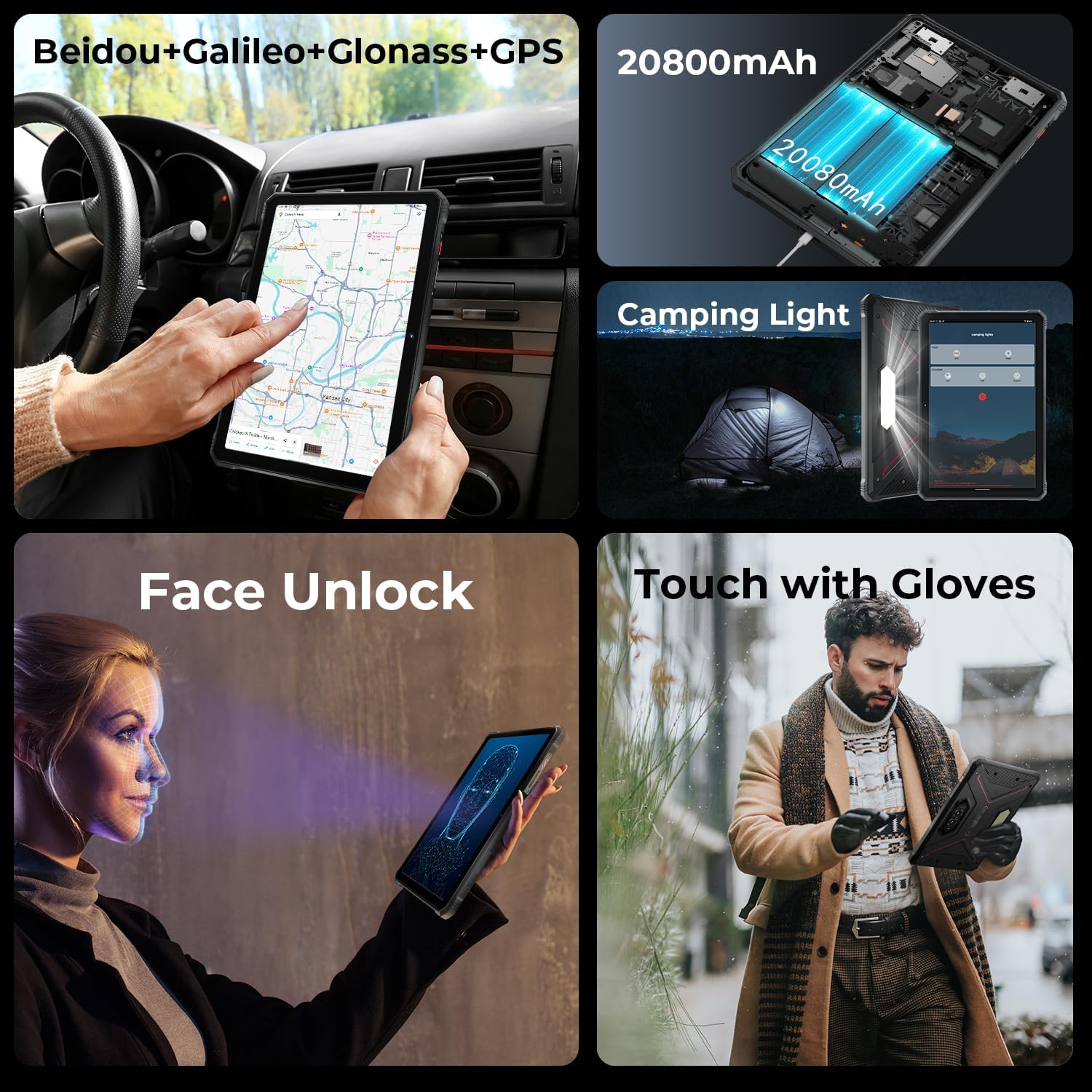
Image: A collage showing the tablet's GPS navigation, camping light in action, face unlock in progress, and a user operating the tablet with gloves.
5.5. Dual SIM Functionality
The tablet supports two SIM cards, allowing you to manage two different phone numbers or network providers simultaneously. You can configure preferred SIM for calls, messages, and data in Ntọala > Netwọk & ịntanetị > SIM.
6. Ojiji igwefoto
The HOTWAV R9 Pro is equipped with a 64MP rear camera and a 16MP front camera.
- Imepe Igwefoto: Tap the Camera icon on the home screen or app drawer.
- Igwefoto na-agbanwe: Pịa akara ngosi mgbanwe igwefoto iji gbanwee n'etiti igwefoto n'ihu na n'azụ.
- Na-ewere Foto: Pịa bọtịnụ mkpuchi ka ịse foto.
- Ndekọ vidiyo: Switch to video mode and tap the record button to start/stop recording.
- Ntọala igwefoto: Access various settings like resolution, flash, and modes from within the camera app.
7.Camping Light Functionality
The integrated 6W camping light provides powerful illumination.
- Activating the Light: Ihe camping light can typically be activated via a dedicated button (if present) or through a quick settings toggle in the notification panel.
- Adjusting Brightness/Modes: Some models may offer adjustable brightness levels or different lighting modes. Refer to the on-screen controls once the light is activated.
8. Njikọta
- Wi-Fi: Jikọọ na netwọk ikuku site na Ntọala > Netwọk & ịntanetị > Ịntanetị.
- Bluetooth: Pair with Bluetooth devices (headphones, speakers) via Ntọala > Ngwa ejikọrọ > Mmasị njikọ > Bluetooth.
- GPS: The tablet supports Beidou, Galileo, Glonass, and GPS for accurate location services. Ensure location services are enabled in Ntọala > Ebe.
9. Nlekọta
- Nhicha: Jiri nwayọọ, damp cloth to clean the tablet's surface. Avoid harsh chemicals or abrasive materials.
- Mkpughe mmiri: While waterproof, ensure all ports are securely closed before exposing the tablet to water. After water exposure, dry the tablet thoroughly, especially the charging port, before charging.
- Okpomọkụ: Avoid exposing the tablet to extreme temperatures (hot or cold) for prolonged periods.
- Nchekwa: Mgbe a naghị eji ya ruo ogologo oge, debe mbadamba ahụ n'ebe dị jụụ ma kpọọ nkụ.
10. Nchọpụta nsogbu
| Nsogbu | Ngwọta enwere ike |
|---|---|
| Mbadamba anaghị agba ọkụ. | Ensure the battery is charged. Connect to a charger for at least 30 minutes. If still unresponsive, perform a forced restart by holding the Power button for 10-15 seconds. |
| Ịrụ ọrụ nwayọ. | Close unused applications. Clear cache regularly. Consider uninstalling unnecessary apps. Restart the tablet. |
| Nsogbu njikọ Wi-Fi. | Toggle Wi-Fi off and on. Restart your router. Forget the network and reconnect. |
| Batrị na-agbapụ ngwa ngwa. | Reduce screen brightness. Close background apps. Disable unused features like GPS, Bluetooth, or Wi-Fi when not needed. Check battery usage in settings to identify power-hungry apps. |
| Igwefoto anaghị arụ ọrụ. | Ensure the camera app has necessary permissions. Restart the tablet. Clear the camera app's cache and data in Ntọala > Ngwa. |
11. Nkọwapụta
| Njirimara | Nkọwa |
|---|---|
| Nlereanya | R9 Pro |
| Sistemụ nrụọrụ | Android 14 |
| Ngosipụta nha | 11 sentimita asatọ |
| Mkpebi ihuenyo | 1200 x 1920 pikselụ (FHD+) |
| Nhazi | Unisoc T606 Octa-Core (1.6 GHz) |
| Ihe eserese eserese | Mali G57 MP1@650MHz |
| RAM | 20GB (6GB anụ ahụ + 14GB mebere emebere) |
| Nchekwa nke ime | 256GB |
| Nchekwa enwere ike ịgbasa | Up to 2TB (T-flash card) |
| Igwefoto azụ | 64MP (PDAF, f/1.8 aperture) |
| Igwefoto ihu | 16MP |
| Ike batrị | 20080mAh |
| Ịchaji | 20W Nchaji ngwa ngwa |
| Obi mgbawa | IP68/IP69K Waterproof & Dustproof, MIL-STD-810H |
| Njikọta | Dual SIM, Wi-Fi, Bluetooth, GPS (Beidou, Galileo, Glonass) |
| Campna -enwu | 6W (350 lumens, 246 LEDs) |
| Akụkụ (LxWxH) | 10.61 x 0.7 x 7.16 sentimita asatọ |
| Ibu | 2.35 pound |
12. Akwụkwọ ikike na nkwado
HOTWAV offers comprehensive after-sales service for the R9 Pro Rugged Tablet:
- Iwu nloghachi: 30-day no-reason return.
- Akwụkwọ ikike: Akwụkwọ ikike afọ 2 n'efu.
- Nkwado ndị teknuzu: Nkwado teknụzụ ndụ oge niile.
- Ọrụ ịntanetị: 24/7 ọrụ ndị ahịa n'ịntanetị.
For support, please contact HOTWAV customer service through their official channels or visit their websaịtị.


