1. Ngwaahịa gafereview
The iHome Plug-in LED Night Lights provide convenient and energy-efficient illumination for various areas of your home. This 4-pack includes two white and two red lights, each equipped with a smart dusk-to-dawn sensor for automatic operation. Designed to emit a soft 3000K warm glow, these lights create a calming environment without the need for switches, batteries, or complex wiring.
- Smart Dusk-to-Dawn Sensor: Automatically turns on at night and off at dawn, providing light only when needed.
- Sleep-Friendly 3000K Warm Glow: Emits a soft, warm light conducive to a restful sleep environment.
- Nkwụnye na-adị mma: Simple operation; just plug into any standard outlet.
- Imepụta ike dị mma: Utilizes minimal electricity, contributing to energy savings.
- Versatile 4-Pack: Ideal for hallways, kitchens, pantries, bathrooms, kids’ rooms, and stairways.
2. Nhazi
Setting up your iHome LED Night Lights is quick and easy. No assembly or special tools are required.
- Ịkwapu: Jiri nlezianya wepụ ọkụ abalị na nkwakọ ngwaahịa ha.
- Họrọ ebe: Choose a standard electrical outlet in an area where you desire ambient lighting during low-light conditions. Ensure the sensor on the top of the night light is not obstructed.
- Tinye: Insert the night light directly into the electrical outlet. Ensure it is securely plugged in.

Image: A white iHome LED Night Light plugged into a wall outlet, illuminating a set of wooden stairs. This demonstrates the plug-and-play convenience and ideal placement for safe nighttime navigation.

Image: A white iHome LED Night Light plugged into a bathroom outlet above a sink, casting a soft glow. This highlights its suitability for various home environments.
3. Ntuziaka ọrụ
The iHome LED Night Lights are designed for automatic, hands-free operation.
- Akpaghị aka ebighị: The integrated dusk-to-dawn sensor detects ambient light levels. When the surrounding area becomes dark (e.g., at dusk or in a dimly lit room), the night light will automatically turn on.
- Agbanyụọ akpaaka: As ambient light increases (e.g., at dawn or when room lights are turned on), the sensor will detect the change, and the night light will automatically turn off.
- Consistent Glow: Each night light provides a consistent 3000K warm white or red glow, as per the specific light. This model does not feature adjustable brightness or color-changing options.
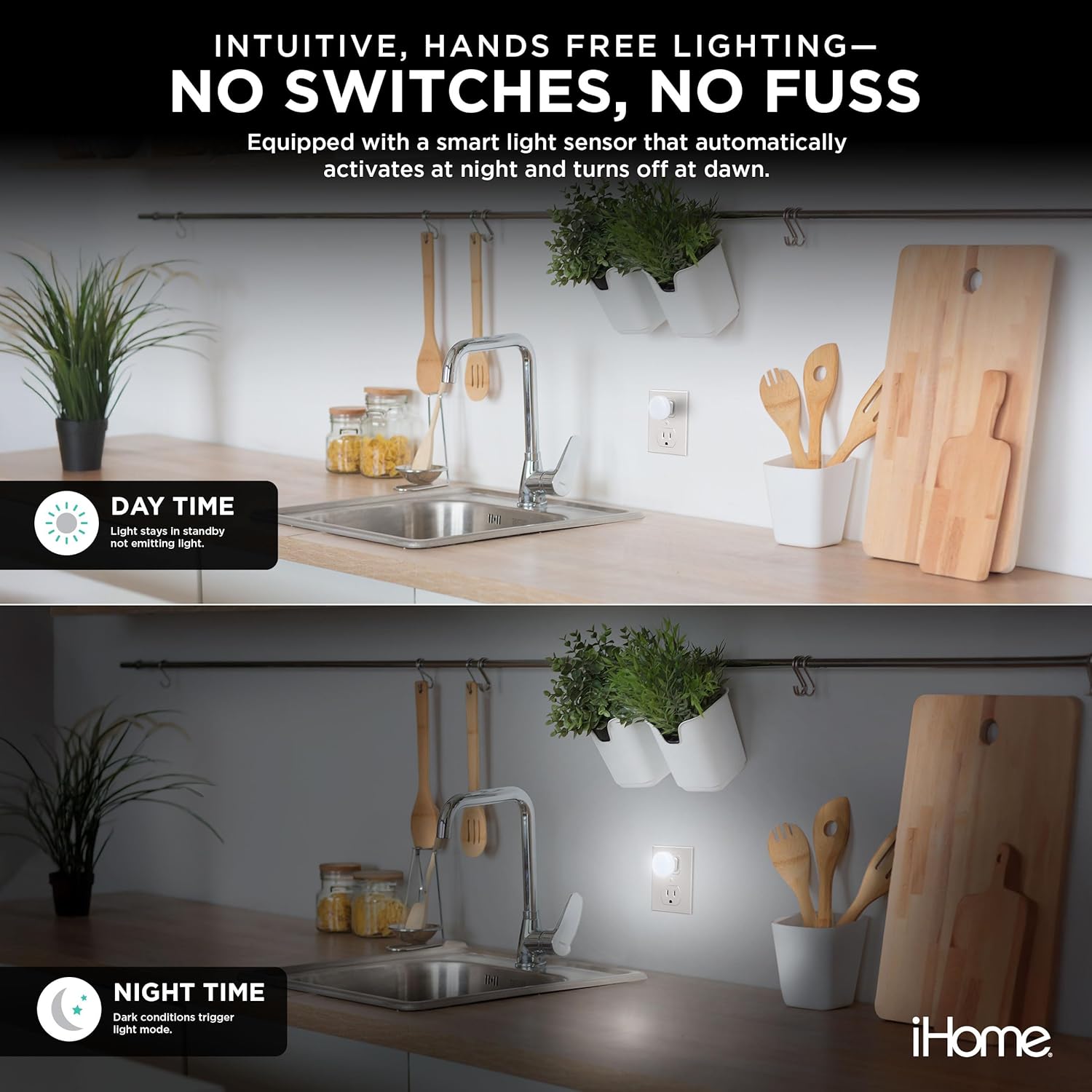
Image: A split image showing an iHome LED Night Light in a kitchen. The top half shows the light off during the day, and the bottom half shows it illuminated at night, demonstrating the dusk-to-dawn sensor functionality.

Image: A split image showing a nursery with a white iHome LED Night Light on the left and a red iHome LED Night Light on the right, illustrating the different light colors available in the 4-pack.

Image: A red iHome LED Night Light plugged into an outlet in a baby's room, casting a gentle red glow. This highlights the sleep-friendly nature of the red light.
4. Nlekọta
To ensure optimal performance and longevity of your iHome LED Night Lights, follow these simple maintenance guidelines:
- Nhicha: Disconnect the night light from the power outlet before cleaning. Use a soft, dry cloth to wipe the surface. Do not use liquid cleaners or abrasive materials, as these may damage the unit.
- Nlekọta ihe mmetụta: Keep the light sensor (located on the top of the unit) free from dust and obstructions to ensure accurate dusk-to-dawn operation.
- Nchekwa: If storing the night lights for an extended period, keep them in a cool, dry place away from direct sunlight.
5. Nchọpụta nsogbu
If you encounter any issues with your iHome LED Night Lights, please refer to the following common troubleshooting steps:
- Ìhè anaghị agbanwu n'ọchịchịrị:
- Ensure the night light is securely plugged into a working electrical outlet.
- Check that the light sensor on top of the unit is not covered or obstructed by furniture, curtains, or other objects.
- Verify that the ambient light level is sufficiently low for the sensor to activate. Test in a completely dark room if necessary.
- Light remains on during daylight:
- Ensure the light sensor is not in a perpetually dim area or covered by shadows.
- Confirm that there is adequate ambient light for the sensor to detect daylight.
- Flickering or inconsistent light:
- Try plugging the night light into a different outlet to rule out an issue with the electrical supply.
- Ensure the unit is clean and free from dust or debris.
6. Nkọwapụta
| Ụdị | iHome |
| Nọmba nlereanya | 2IHLT100 |
| Akụkụ ngwaahịa | 6"D x 5"W x 6"H |
| Lamp Ụdị | Ìhè abalị |
| Agba Ncha | White and Red (as per pack) |
| Ihe ndò | Plastic |
| Njirimara Pụrụ Iche | Plug In, Dusk-to-Dawn Sensor |
| Ihe onwunwe | Plastic |
| Ngwa gụnyere | LED Lights (4 units) |
| Ibu Ibu | 1 pound |
| Agụnyere batrị? | Mba |
| Achọrọ batrị? | Mba |
7. Akwụkwọ ikike na nkwado
For warranty information or technical support, please refer to the contact details provided on the product packaging or visit the official iHome websaịtị. Debe akwụkwọ nnata ịzụrụ maka akwụkwọ ikike.


