1. Okwu mmalite
This manual provides detailed instructions for the installation, operation, and maintenance of your GIGABYTE GA-B760M D3HP WIFI6 motherboard. Designed for optimal performance and reliability, this motherboard supports Intel Core 14th, 13th, and 12th generation CPUs and features DDR5 memory support, PCIe 4.0 M.2 connectors, and Wi-Fi 6 connectivity. Please read this manual thoroughly before beginning installation to ensure proper setup and to maximize the lifespan of your product.
2. Atụmatụ igodo
- Nkwado CPU: Compatible with Intel Core 14th, 13th, and 12th generation processors.
- Nhazi ike: Features a 4+1+1 phase hybrid digital VRM solution for stable power delivery.
- Ebe nchekwa: Supports Dual Channel DDR5 memory with 4 DIMM slots and XMP memory module support.
- Nchekwa: Equipped with 2 PCIe 4.0 x4 M.2 connectors for high-speed storage.
- Njikọta: Includes GbE LAN and Wi-Fi 6 802.11ax for fast and reliable network connectivity.
3. Ntọala na nwụnye
Before installing the motherboard, ensure your system is powered off and disconnected from the power source. Handle the motherboard by its edges to avoid static discharge.
3.1 Nhazi motherboard
Familiarize yourself with the layout of the motherboard components before proceeding with installation.

Foto 1: Si elu gbadata view of the GIGABYTE GA-B760M D3HP WIFI6 motherboard, showing the CPU socket, DIMM slots, PCIe slots, and various headers.
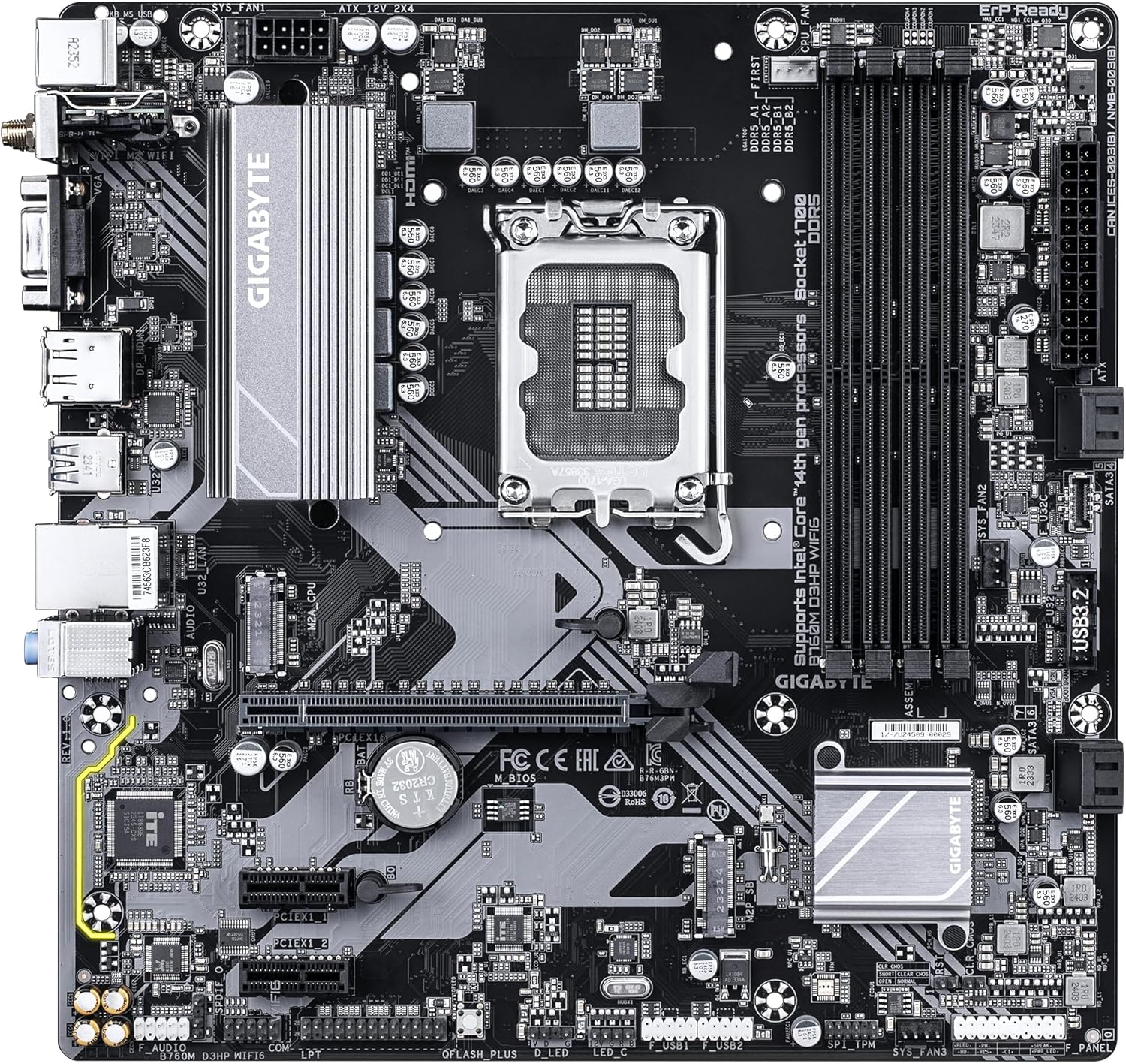
Foto 2: N'akuku view of the GIGABYTE GA-B760M D3HP WIFI6 motherboard, highlighting the heatsinks and overall component placement.
3.2 Nwụnye CPU
- Chọta oghere LGA 1700 CPU na motherboard.
- Mepee oghere oghere CPU wee bulie efere ibu ahụ.
- Carefully align the CPU with the socket, ensuring the triangular mark on the CPU matches the mark on the socket. Do not force the CPU into the socket.
- Lower the load plate and secure it with the lever.
- Tinye ihe mkpuchi okpomọkụ na CPU ahụ wee tinye ihe mkpuchi CPU dịka ntuziaka nke onye nrụpụta ya si dị.
3.3 Ebe nchekwa (RAM) nwụnye
- Locate the four DDR5 DIMM slots.
- Mepee obere vidiyo na nsọtụ abụọ nke oghere DIMM.
- Dozie notch na modul ebe nchekwa DDR5 na igodo dị na oghere DIMM.
- Tinye modulu ebe nchekwa ahụ nke ọma n'ime oghere ahụ ruo mgbe mkpachị ndị ahụ ga-adaba n'ọnọdụ ha. Hụ na emechiela mkpachị abụọ ahụ.
- For dual-channel configuration, refer to the motherboard's specific manual for recommended slot pairing.
3.4 Storage Device Installation (M.2 SSDs and SATA Drives)
- M.2 SSD: Locate the M.2 connectors. Remove the M.2 screw/standoff. Insert the M.2 SSD into the slot at a 30-degree angle. Push down the SSD and secure it with the screw/standoff.
- Ụgbọ ala SATA: Connect SATA data cables from your storage drives (HDDs/SSDs) to the SATA ports on the motherboard. Connect power cables from your power supply to the drives.
3.5 Njikọ ike
- Jikọọ njikọ ike isi ATX nke nwere pin 24 site na ọkọnọ ike gị gaa na ọdụ ụgbọ mmiri kwekọrọ na motherboard.
- Connect the 8-pin ATX 12V CPU power connector to the port near the CPU socket.
3.6 Ogwe ihu na njikọ dị n'akụkụ
Connect your case's front panel connectors (power button, reset button, USB ports, audio jacks, LED indicators) to the corresponding headers on the motherboard. Refer to the motherboard's detailed manual for exact pin layouts.

Foto 3: Rear I/O panel of the GIGABYTE GA-B760M D3HP WIFI6 motherboard, showing USB ports, display outputs, audio jacks, Ethernet, and Wi-Fi antenna connectors.
4. Ntuziaka ọrụ
4.1 Ntọala BIOS
Upon first boot, you may need to enter the BIOS (Basic Input/Output System) to configure settings such as boot order, date/time, and enable specific features. To enter BIOS, press the DEL key repeatedly during startup. The GIGABYTE UEFI BIOS provides an intuitive graphical interface for configuration.
4.2 Nwụnye ọkwọ ụgbọala
After installing your operating system, install the necessary drivers for the motherboard's components (chipset, audio, LAN, Wi-Fi, etc.). These drivers are typically provided on a support DVD or can be downloaded from the official GIGABYTE websaịtị maka ụdị motherboard gị akọwapụtara.
5. Nlekọta
- Nhicha: Jiri ikuku emechiri emechi hichaa uzuzu sitere na motherboard na case fans mgbe niile. Hụ na sistemụ ahụ agbanyụrụ ma gbanyụọ ya tupu ị sachaa ya.
- Mmelite BIOS: Lelee GIGABYTE kwa oge website for BIOS updates. BIOS updates can improve system stability, compatibility, and performance. Follow the instructions provided by GIGABYTE carefully when updating the BIOS.
- Mmelite ọkwọ ụgbọala: Debe ndị ọkwọ ụgbọ ala gị ka emelitere iji hụ na arụmọrụ kacha mma yana ndakọrịta na ngwanrọ na ngwaike ọhụrụ.
6. Nchọpụta nsogbu
- Enweghị ike:
- Lelee njikọ ike niile (ATX pin 24, CPU pin 8).
- Gbaa mbọ hụ na agbanyere ọkụ ọkụ.
- Nwalee ọkụ eletrik ahụ site na iji sistemụ ọzọ ma ọ bụ ihe nnwale ọkụ eletrik.
- Enweghị Ngosipụta:
- Ensure the monitor is connected to the graphics card (or integrated graphics port if no discrete GPU is used).
- Tinyegharịa kaadị eserese na modul ebe nchekwa.
- Gbalịa jiri naanị otu osisi RAM buut.
- Akwụsịghị / Mkpọka Sistemu:
- Lelee okpomọkụ CPU na GPU.
- Ensure all components are properly seated.
- Gbaa ngwaọrụ nyocha ebe nchekwa ka ịlele mperi RAM.
- Update BIOS and drivers.
- Okwu Njikọta netwọkụ:
- For wired LAN, check the Ethernet cable and router connection.
- For Wi-Fi, ensure antennas are securely attached and drivers are installed.
- Verify network settings in the operating system.
7. Nkọwapụta
| Njirimara | Nkọwa |
|---|---|
| Ụdị | GIGABYTE |
| Aha Nlereanya | B760M D3HP WIFI6 |
| Socket CPU | LGA 1700 |
| Ndị nhazi dakọtara | Intel Core 14th Gen, Intel Core 13th Gen, Intel Core 12th Gen |
| Ụdị Chipset | Intel B760 |
| Teknụzụ ebe nchekwa RAM | DDR5 |
| Ọsọ elekere ebe nchekwa | 5600 MHz |
| Ngwa dakọtara | Personal Computer, Desktop Computer |
| Platform | Windows 10, Windows 11 |
| Akụkụ ngwaahịa | 9.61 x 9.61 x 1.38 sentimita asatọ |
| Ibu Ibu | 2.2 pound |
8. Akwụkwọ ikike na nkwado
Maka ozi akwụkwọ ikike na nkwado teknụzụ, biko rụtụ aka na GIGABYTE gọọmentị website or contact GIGABYTE customer service. Keep your proof of purchase for warranty claims.
GIGABYTE Official Websaịtị: www.gigabyte.com


