1. Okwu mmalite
Thank you for choosing the Infiniity DM56 Sport Smartwatch. This device is designed to enhance your active lifestyle with advanced fitness tracking, health monitoring, and smart connectivity features. Equipped with a vibrant 1.43-inch AMOLED display, built-in GPS, and comprehensive health sensors, the DM56 is your reliable companion for both daily wear and intense workouts.
This manual provides detailed instructions on how to set up, operate, maintain, and troubleshoot your smartwatch to ensure optimal performance and longevity.

Foto 1.1: N'ihu view of the Infiniity DM56 Sport Smartwatch, showcasing its round AMOLED display and rugged design.
2. Kedu ihe dị na Igbe ahụ
Upon opening your Infiniity DM56 Sport Smartwatch package, please ensure all the following items are present:
- Infiniity DM56 Sport Smartwatch
- Ịchaji eriri
- Akwụkwọ ntuziaka (akwụkwọ a)
3. Nhazi
3.1 Ịchaji elekere smart
Before first use, fully charge your DM56 smartwatch. A full charge typically takes approximately 2 hours.
- Connect the magnetic charging cable to the charging contacts on the back of the smartwatch. Ensure the pins align correctly.
- Plug the USB end of the charging cable into a standard USB power adapter (5V/1A recommended) or a computer's USB port.
- The watch display will show a charging indicator. Once fully charged, the indicator will change or disappear.
3.2 Ijikọ na ama gị
To unlock the full potential of your DM56 smartwatch, you need to pair it with your smartphone via Bluetooth using the dedicated companion application. The DM56 is compatible with Android 5.0+ and iOS 11 and above.
- Budata ngwa: Chọọ maka the official Infiniity companion app (refer to the packaging or quick start guide for the exact app name) on the Google Play Store (for Android) or Apple App Store (for iOS) and install it.
- Kwado Bluetooth: Gbaa mbọ hụ na agbanyere Bluetooth na ekwentị gị.
- Mepee ngwa: Launch the companion app on your smartphone and follow the on-screen instructions to create an account or log in.
- Tinye ngwaọrụ: Within the app, navigate to the 'Add Device' or 'Pair Device' section. The app will search for available smartwatches.
- Select DM56: Select 'DM56' from the list of found devices. A pairing request may appear on both your phone and the watch. Confirm the pairing on both devices.
- Nhazi zuru oke: Once paired, the app will guide you through initial settings, such as profile information, notification permissions, and data synchronization.
4. Ịrụ ọrụ smartwatch
4.1 Nsoro ụzọ
The DM56 features a responsive touchscreen and physical buttons for intuitive control.
- Ihuenyo mmetụ aka: Mịgharịa elu, ala, aka ekpe, ma ọ bụ aka nri iji lelee menu na ọkwa. Pịa iji họrọ ihe.
- Bọtịnụ anụ ahụ: The watch has multiple buttons, typically labeled 'SPORT', 'SEL', 'BACK', and a dedicated 'GPS' button. Their functions may vary depending on the current screen or mode.
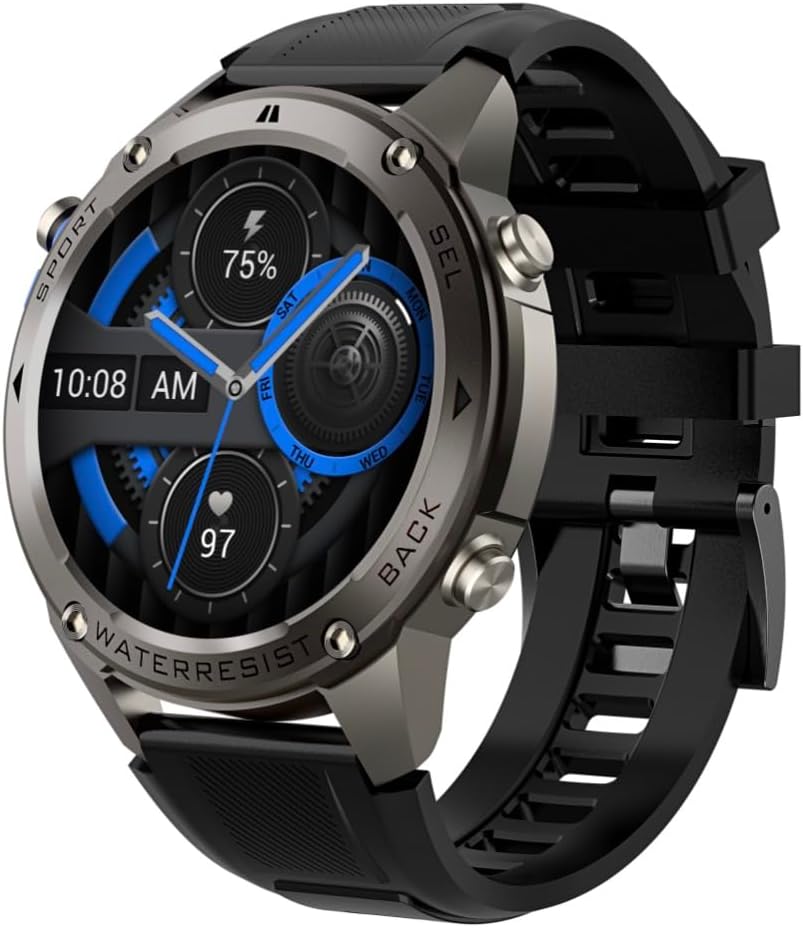
Foto 4.1: Akụkụ view of the Infiniity DM56 Sport Smartwatch, highlighting the physical control buttons.
4.2 Ngosipụta atụmatụ
The 1.43-inch AMOLED display offers vibrant colors and deep blacks with a resolution of 466x466 pixels.
- Ngosipụta mgbe niile: The DM56 supports Always-On Display functionality, allowing you to see the time and essential information at a glance without needing to raise your wrist or press a button. This feature can be configured in the watch settings.

Image 4.2: The Infiniity DM56 Sport Smartwatch display, showcasing a typical watch face with various data points.
4.3 Built-in GPS & Compass
The DM56 features dual-frequency GPS (L1+L5) and supports multiple satellite systems (GPS, GLONASS, BDS, Galileo, NAVIC, QZSS) for precise outdoor tracking. A built-in compass further aids navigation.
- GPS Ndepụta: When starting an outdoor activity (e.g., running, cycling), the watch will automatically attempt to acquire a GPS signal. Ensure you are in an open area for faster signal acquisition. Your route, distance, and pace will be recorded.
- Kompas: Access the compass feature from the watch's menu to get real-time directional information.

Image 4.3: The Infiniity DM56 Sport Smartwatch from an angle, highlighting the dedicated GPS button on the side.

Foto 4.4: nso nso view of the GPS button on the Infiniity DM56 Sport Smartwatch, indicating its function.
4.4 All-Day Health Monitoring
The DM56 is equipped with the VC30F sensor for continuous health monitoring.
- Nlekota obi obi: Track your heart rate in real-time throughout the day. View your current heart rate on the watch face or in the dedicated heart rate app.
- Nyocha ọbara oxygen (SpO2): Tụọ ọkwa oxygen saturation ọbara gị.
- Nchicha ụra: The watch automatically monitors your sleep patterns, including deep sleep, light sleep, and awake times. View detailed sleep analysis in the companion app.
- Ndepụta nrụgide: Na-enyocha oke nrụgide gị n'ụbọchị niile.
- Ntughari: Counts your daily steps, distance, and estimated calories burned.
Note: The Infiniity DM56 Smartwatch is NOT A MEDICAL DEVICE. All health monitoring data is for reference only and should not be used for medical diagnosis or treatment.
Ụdị egwuregwu 4.5
The DM56 offers over 170 customizable sports modes, with 14 built-in modes such as outdoor running, cycling, and swimming. You can add up to 10 additional modes manually via the companion app.
- Ịmalite mmemme: Navigate to the 'Workout' or 'Sports' menu on the watch, select your desired activity, and tap to start.
- N'oge mmemme: The watch will display real-time metrics such as duration, distance, heart rate, and calories burned.
- Ending Activity: Swipe or press the designated button to pause or end the activity. Your workout data will be saved and synchronized with the app.
4.6 Smart Notifications & Calls
Once paired with your smartphone, the DM56 can receive notifications and handle calls directly on your wrist.
- Amamọkwa: Receive alerts for incoming calls, SMS messages, and app notifications (e.g., social media, email). Configure which app notifications you want to receive in the companion app.
- Make/Answer Call: The DM56 allows you to make and answer calls directly from the watch, utilizing its built-in microphone and speaker. Ensure the watch is connected to your phone via Bluetooth.
5. Nlekọta
5.1 Ọkwa Mmiri Na-anaghị Adọba Mmiri
The DM56 has a 5ATM waterproof rating, meaning it can withstand water pressures equivalent to a depth of 50 meters. This makes it suitable for swimming, showering, and other water-based activities. However, it is not recommended for diving or high-pressure water activities.
- Avoid exposing the watch to hot water, steam, or strong detergents.
- Mgbe i jiri mmiri nnu sachaa elekere ahụ, jiri mmiri dị ọcha sachaa ya nke ọma.
5.2 Nhicha na Nlekọta
To maintain the appearance and functionality of your smartwatch:
- Na-ehicha ahụ elekere mgbe niile ma jiri eriri dị nro, d hichaa ya.amp akwa .
- Ensure the charging contacts on the back of the watch are clean and dry before charging.
- Zere iji ihe nhicha ma ọ bụ ihe mgbaze.
5.3 Nhazi Ndụ Batrị
The DM56 is powered by a 500mAh high-voltage battery, offering extended usage. To maximize battery life:
- Adjust screen brightness to a lower level.
- Limit the use of Always-On Display if not essential.
- Gbanyụọ ọkwa na-enweghị isi.
- Disable continuous heart rate monitoring if not needed 24/7.
6. Nchọpụta nsogbu
If you encounter issues with your Infiniity DM56 smartwatch, try the following common solutions:
- Lelee anaghị agbanye: Hụ na elekere ahụ chajịchara nke ọma. Jikọọ ya na chaja ma chere nkeji ole na ole tupu ị nwaa ịgbanye ya ọzọ.
- Enweghị ike ijikọ na ekwentị:
- Gbaa mbọ hụ na agbanyere Bluetooth na ekwentị gị na elekere.
- Hụ na elekere ahụ dị n'ime oke Bluetooth nke ekwentị gị.
- Malitegharịa ma elekere ahụ ma ekwentị gị.
- Clear Bluetooth cache on your phone (Android) or forget the device and re-pair.
- Ensure the companion app is updated to the latest version.
- Data ahụike ezighi ezi:
- Gbaa mbọ hụ na etinyere elekere nke ọma na nkwojiaka gị, ọ bụghị nke siri ike ma ọ bụ nke tọgbọrọ chakoo.
- Hichaa ihe mmetụta dị n'azụ elekere.
- Note that environmental factors and individual physiology can affect readings. Remember, it is not a medical device.
- Anataghị ọkwa:
- Lelee ntọala ngosi na ngwa enyi.
- Ensure the app has necessary permissions on your phone (e.g., notification access).
- Verify that the watch is connected to your phone.
- Ndụ batrị dị mkpụmkpụ: Refer to Section 5.3 for battery optimization tips.
Ọ bụrụ na okwu ahụ na-aga n'ihu mgbe ịnwale usoro ndị a, biko kpọtụrụ nkwado ndị ahịa maka enyemaka ọzọ.
7. Nkọwapụta
| Njirimara | Nkọwapụta |
|---|---|
| Nọmba nlereanya | DM 56 |
| Ngosipụta | 1.43-inch AMOLED, 466x466 pixels |
| Ihe mmetụta | Heart Rate (VC30F), Accelerometer (STK8321), Magnetometer (Compass), Barometer+Altitude (SPL07-03) |
| Njikọta | Bluetooth 5.3 |
| Ike batrị | 500mAh |
| Ọkwa mgbochi mmiri | 5ATM |
| Ndakọrịta | Android 5.0+ and iOS 11 and above |
| Ibu Ibu | 3 ounces |
| Akụkụ ngwugwu | 4.25 x 4.25 x 2.8 sentimita asatọ |
| Sistemụ nrụọrụ | Android Wear 2.7 (Note: This refers to the underlying OS, not necessarily full Android Wear functionality) |
| GPS | Built-in GPS (L1+L5 dual-frequency) |
| Ụdị | Gburugburu |
| Ụdị batrị | Nonstandard Battery, Lithium Ion |
8. Akwụkwọ ikike na nkwado
The Infiniity DM56 Sport Smartwatch comes with a standard manufacturer's warranty. Please refer to the warranty card included in your product packaging for specific terms and conditions, including warranty duration and coverage details.
For technical support, troubleshooting assistance beyond what is covered in this manual, or warranty claims, please contact Infiniity customer service through the contact information provided on the product packaging or the official Infiniity websaịtị.
Biko dowe ihe akaebe nke ịzụrụ ihe maka ebumnuche ikike.


