Okwu mmalite
This user manual provides detailed instructions for the FREEWOLF T96 Smart Display Wireless Gaming Keyboard and Mouse Combo. This combo is designed for a seamless and responsive experience across various devices and applications, from gaming to office work.
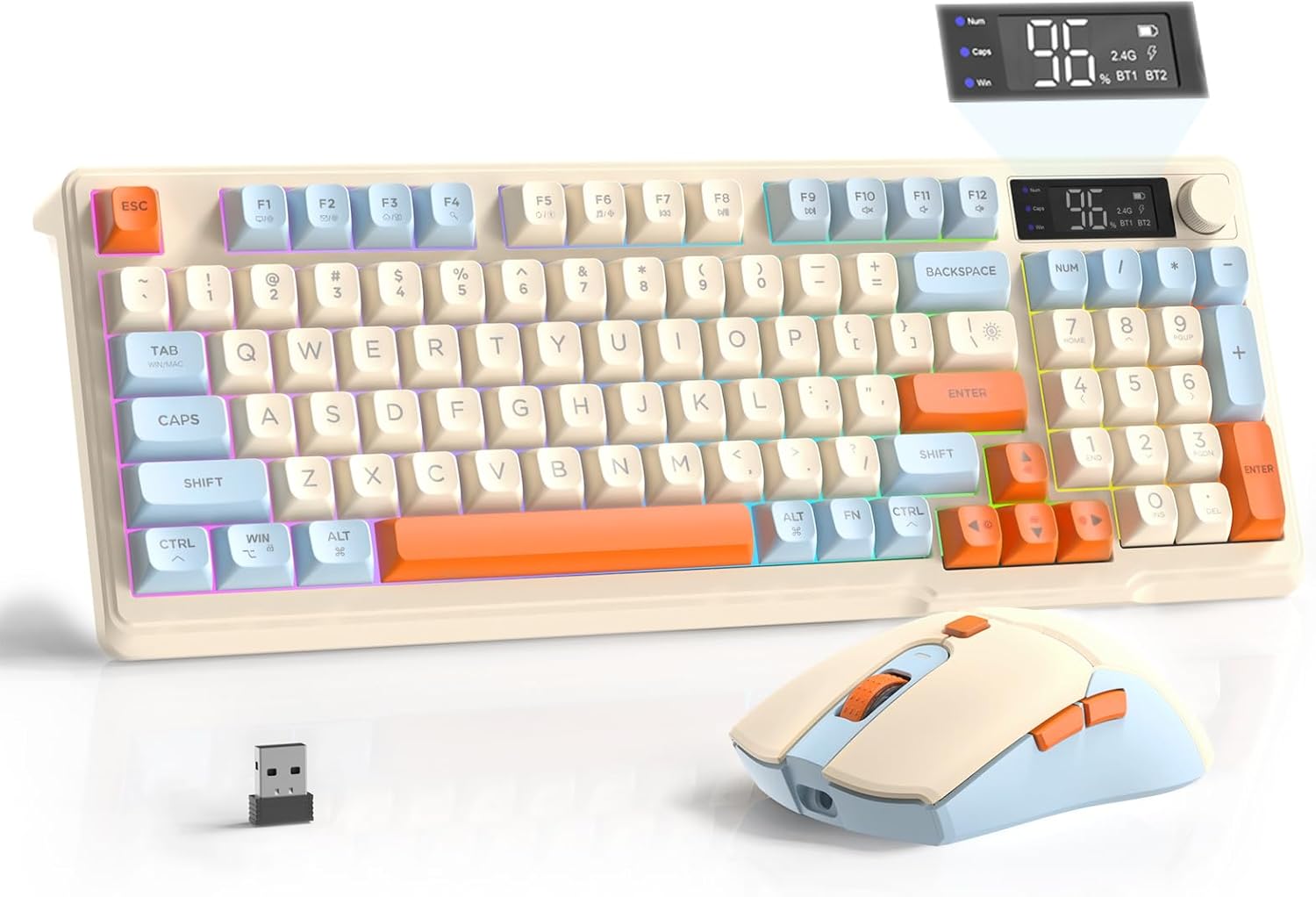
Image: The FREEWOLF T96 Wireless Gaming Keyboard and Mouse Combo, featuring the keyboard, mouse, and USB receiver.
Ihe ngwugwu
Gbaa mbọ hụ na ihe niile dị na ngwugwu:
- 1 x T96 Membrane Keyboard
- 1 x T96 Wireless Mouse
- 1 x eriri USB-C
- 1 x USB Receiver (stored in mouse bottom slot)
- 1 x Akwụkwọ ntuziaka onye ọrụ
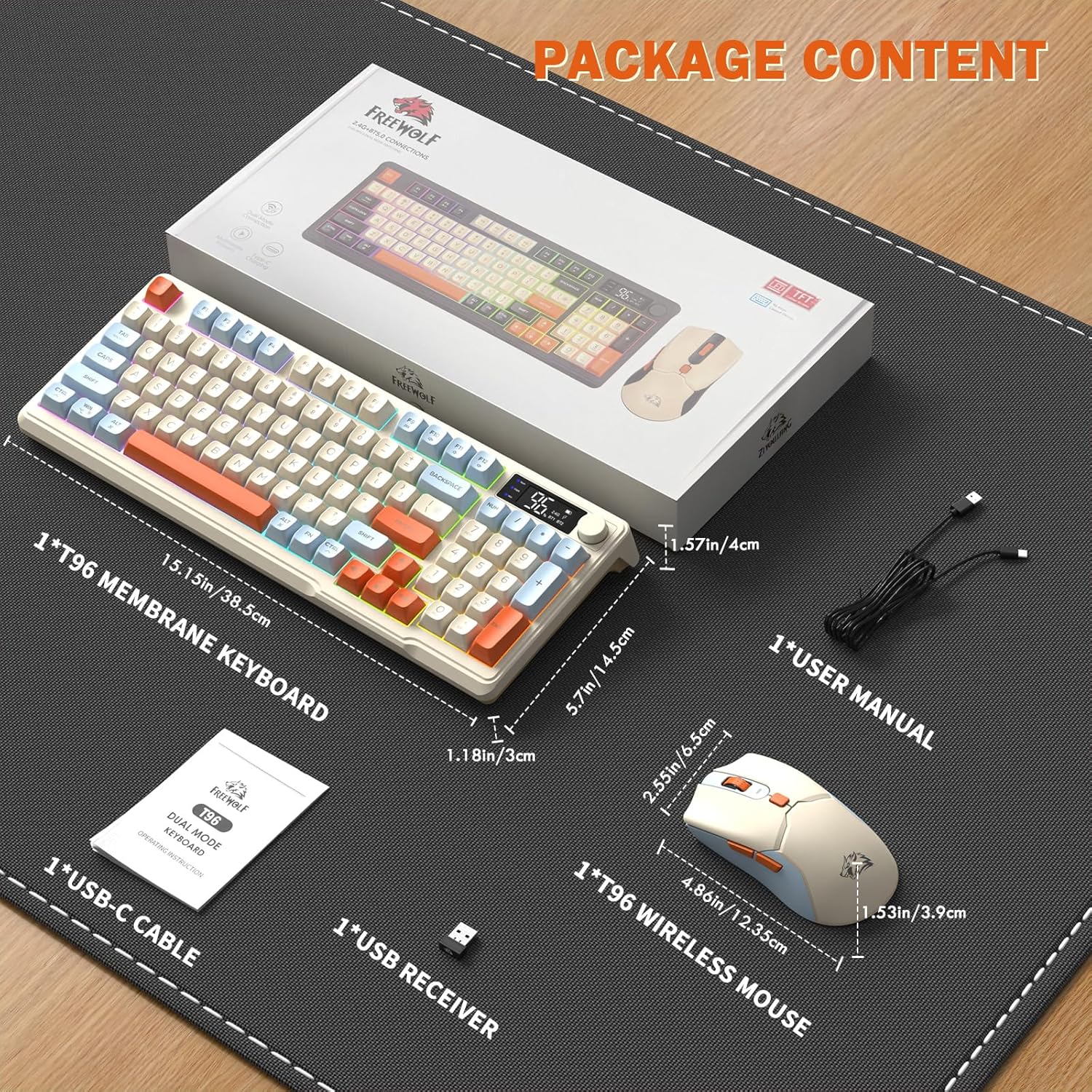
Image: A visual representation of the package contents, including the keyboard, mouse, USB-C cable, USB receiver, and user manual.
Melite
Nhọrọ njikọta
The T96 combo supports dual-mode wireless connectivity:
- Njikọ ikuku 2.4G: Utilizes the included USB receiver for a stable, plug-and-play connection.
- Bluetooth Connections (BT1/BT2): Allows pairing with up to two Bluetooth-enabled devices, enabling seamless switching.
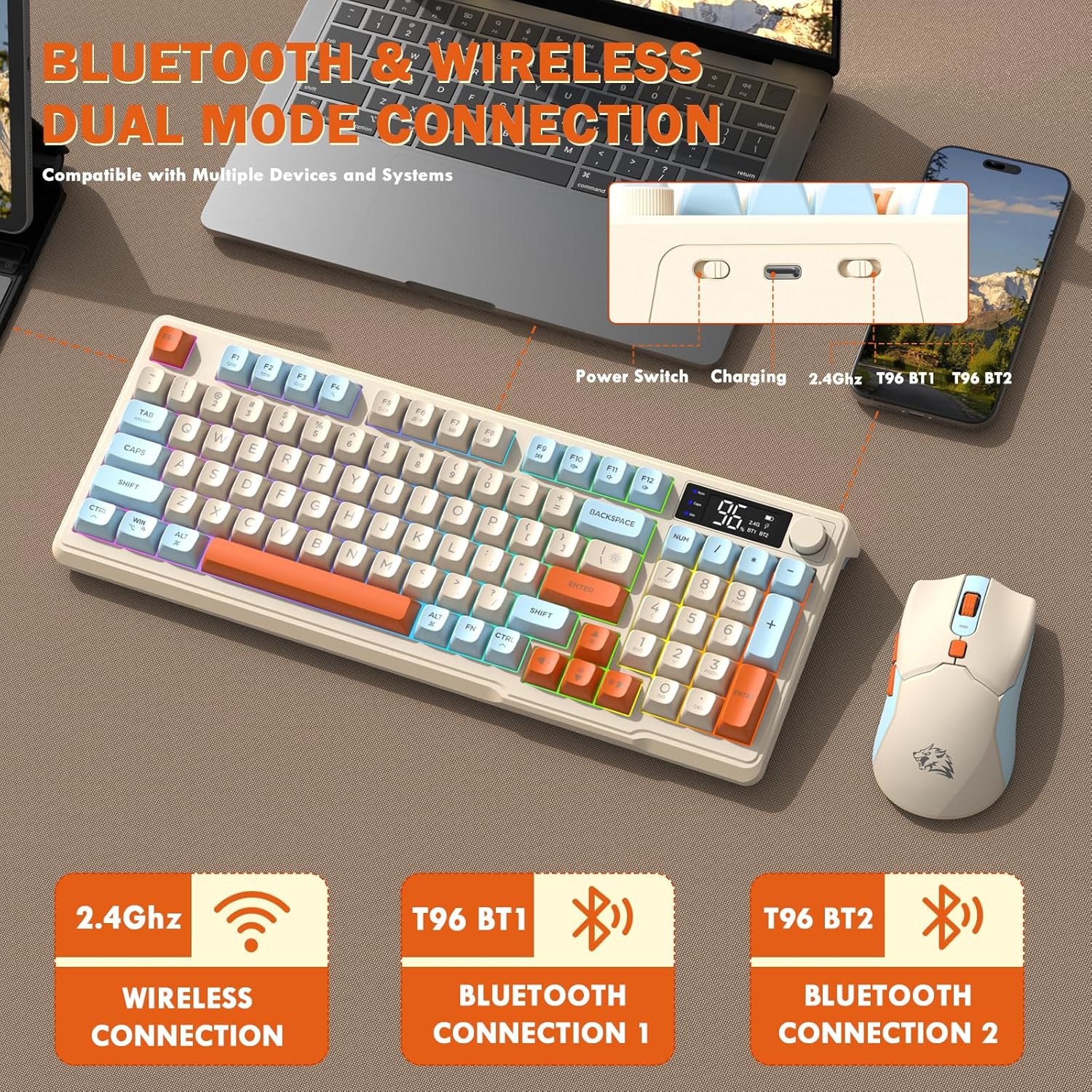
Image: Diagram illustrating the dual-mode connection options (2.4GHz, Bluetooth 1, Bluetooth 2) and the location of the power switch, charging port, and connection indicators on the keyboard.
Nzọụkwụ mbido mbụ
- Ngwa chaja: Before first use, fully charge both the keyboard and mouse using the provided USB-C cable. The keyboard has a 2000mAh battery, and the mouse has a 500mAh battery. The smart display on the keyboard will show charging progress.
- Chọta onye nnata USB: The USB receiver for 2.4G wireless connection is stored in a slot on the bottom of the mouse. Remove it for use.
- Ike Na: Gbanwuo ahụigodo na òké site na iji mgba ọkụ nke otu ha.
- Connect via 2.4G Wireless:
- Fanye eriri USB n'ọdụ ụgbọ mmiri dị na kọmputa gị.
- Ensure the keyboard and mouse are set to 2.4G mode (indicated on the keyboard's smart display). They should connect automatically.
- Jikọọ site na Bluetooth:
- Switch the keyboard and mouse to BT1 or BT2 mode.
- On your device (PC, laptop, tablet, smartphone), open Bluetooth settings.
- Chọọ maka "T96 Keyboard" and "T96 Mouse" in the list of available devices and pair them.
- The smart display will indicate the active Bluetooth connection (BT1 or BT2).
Ntuziaka ọrụ
Ọrụ ahụigodo
The T96 keyboard features a 94-key compact layout with various functions to enhance your experience.
Smart Display Functions
The intelligent LED display provides real-time information:
- Ọnọdụ batrị: Na-egosi pasentị batrị fọdụrụnụtage.
- Ụdị njikọ: Indicates active connection (2.4G, BT1, BT2).
- Ọganihu Nchaji: Displays charging status when connected to power.
- Caps Lock/Num Lock/Win Lock Indicators: Shows status of these keys.
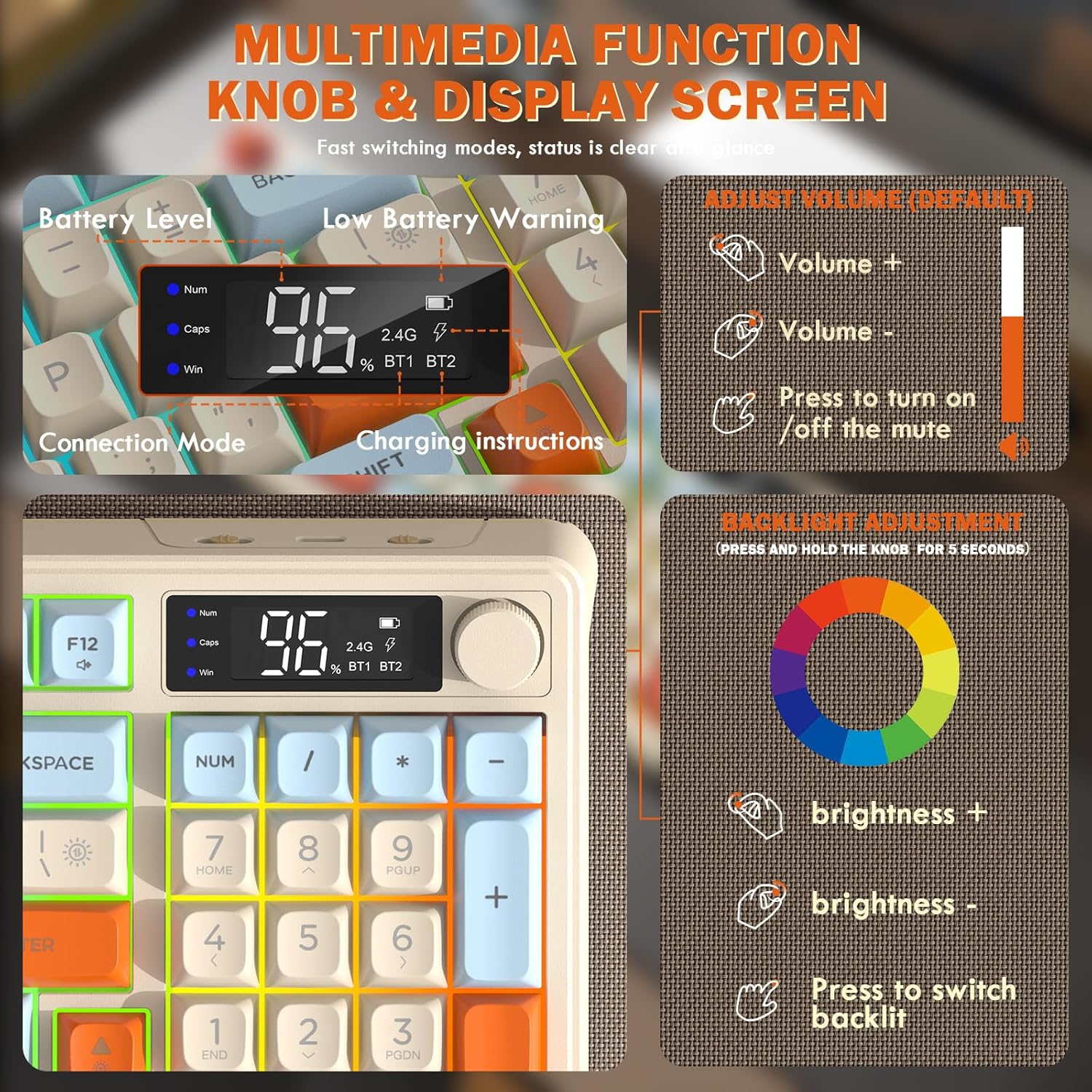
Image: Close-up of the keyboard's smart display showing battery level, connection mode, and charging instructions. Also details the multimedia knob's functions for volume and backlight control.
Multimedia Control Knob
Located on the top right of the keyboard, this knob offers quick control:
- Tụgharịa: Adjusts system volume (clockwise for volume up, counter-clockwise for volume down).
- Pịa: Toggles mute on/off.
- Pịa ma jide (sekọnd 5): Activates backlight adjustment mode. Rotate to change brightness, press to switch light effects.
Multimedia Hotkeys (FN Combinations)
The keyboard includes 12 dedicated multimedia hotkeys accessible via the FN igodo:
- FN + F1-F12: Access various multimedia and system functions (e.g., media playback, volume, browser, email). Refer to keycap legends for specific functions.
Njikwa ọkụ azụ
The keyboard features vibrant rainbow LED backlighting. Control it using the following combinations:
- FN + akụ elu: Mụbaa nchapụta azụ azụ.
- FN + akụ ala: Belata nchapụta azụ.
- FN + Ụka aka nri: Mee ka ọsọ ọkụ azụ dịkwuo elu.
- FN + Ụka aka ekpe: Belata ọsọ ọkụ azụ.
- FN + \|: Switch between different lighting modes (e.g., always on, breathing, off).
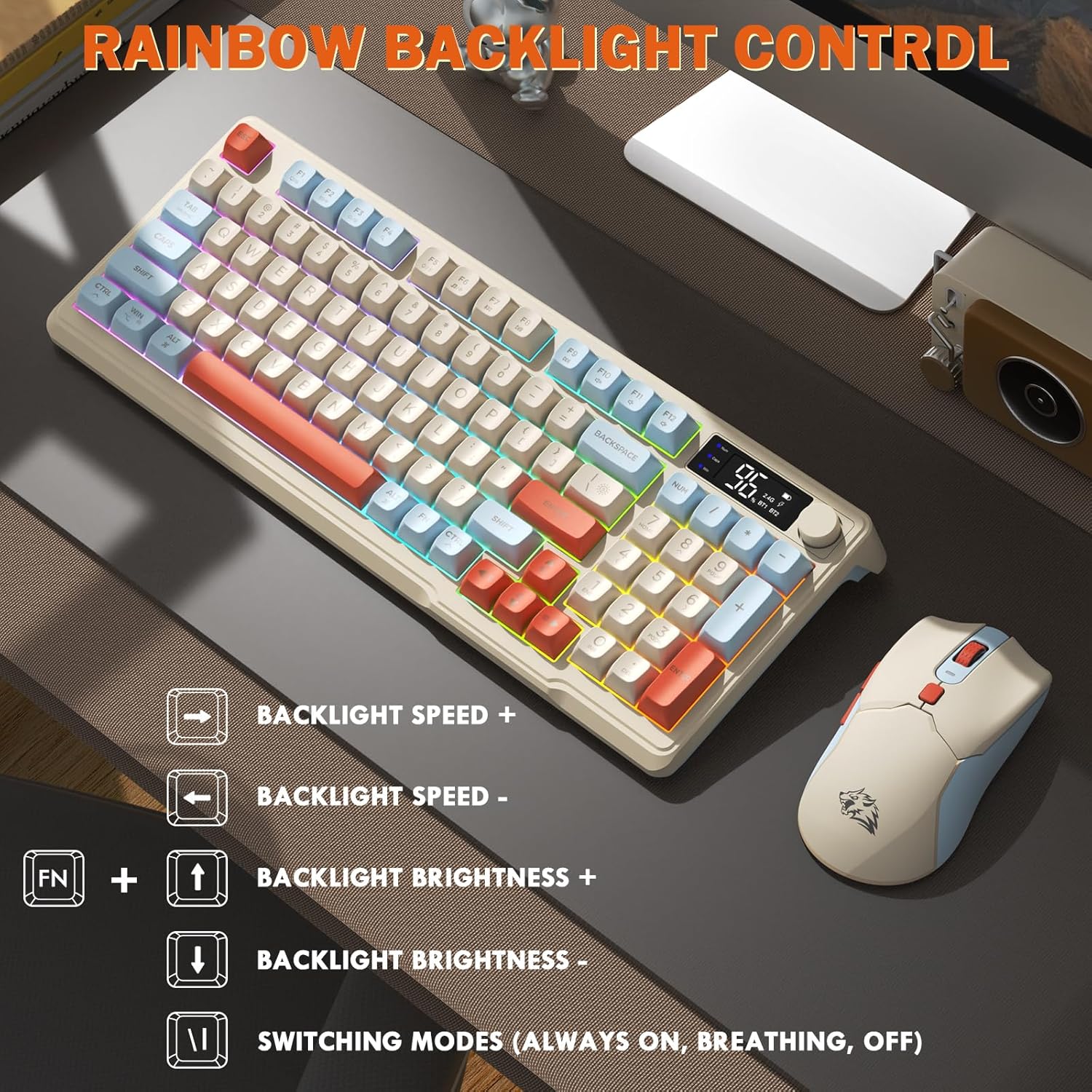
Image: Visual guide for controlling the rainbow LED backlight, showing key combinations for brightness, speed, and mode switching.
Mgbochi mmụọ
The keyboard supports 26-key rollover anti-ghosting technology, ensuring accurate registration of multiple simultaneous key presses, crucial for gaming.
Ọrụ òké
The T96 gaming mouse is designed for precision and comfort.
Mmezi DPI
Adjust the mouse sensitivity (DPI) to suit your preference:
- Pịa Bọtịnụ DPI (located behind the scroll wheel) to cycle through available DPI settings: 800 / 1600 / 2400 / 4000 DPI.
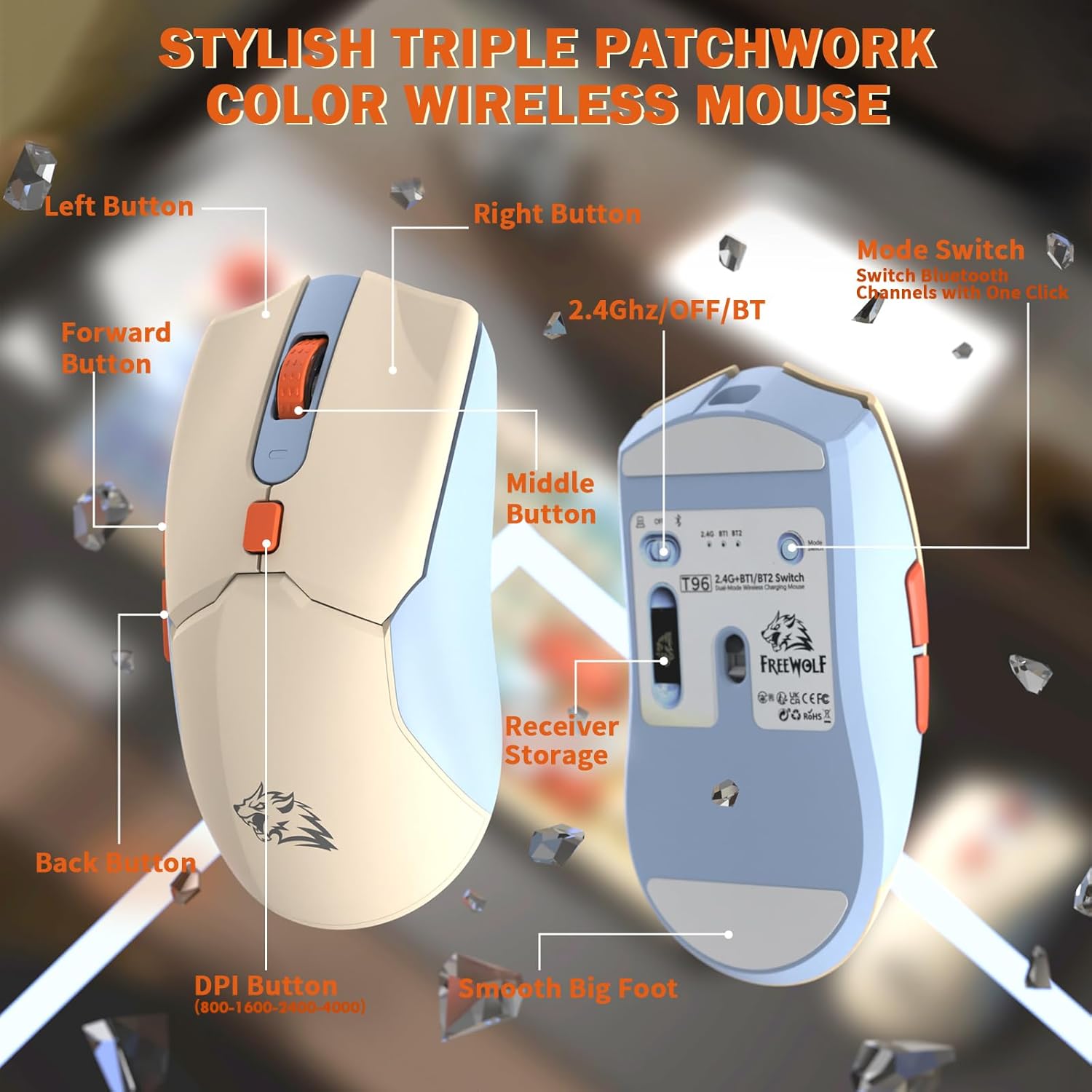
Foto: Zuru ezu view of the T96 wireless mouse, highlighting its buttons (Left, Right, Middle, Forward, Back, DPI) and the receiver storage compartment on the bottom.
Bọtịnụ enwere ike ime
The mouse features six programmable buttons. Refer to specific software (if applicable, not mentioned in data) or operating system settings for customization options.
Ọnụego ntuli aka
The mouse operates at different polling rates depending on the connection mode:
- Bluetooth (BT): 115Hz
- Ikuku 2.4G: 125Hz
Nlekọta
Nhicha
- Use a soft, dry cloth to clean the surfaces of the keyboard and mouse.
- Maka unyi isi ike, ntakịrị dampen akwa na mmiri ma ọ bụ dị nwayọọ, na-adịghị abrasive Cleaner.
- Zere iji kemịkalụ siri ike, ihe mgbaze, ma ọ bụ ihe ndị na-emebi emebi, n'ihi na ihe ndị a nwere ike imebi njedebe.
- Do not immerse the devices in water or any liquid.
Nlekọta batrị
Iji bulie ndụ batrị yana ịrụ ọrụ:
- Recharge the devices when the low battery indicator appears on the keyboard's smart display.
- Zere igbapu batrị kpamkpam ugboro ugboro.
- Debe ngwaọrụ ndị a n'ebe dị jụụ ma kpọọ nkụ mgbe a naghị eji ha ruo ogologo oge.
- The devices feature smart power-saving modes: the keyboard enters sleep mode after 3 minutes of inactivity, and the mouse after 2 minutes. They wake instantly upon touch.

Image: Illustration showing the 2000mAh battery capacity of the keyboard and 500mAh battery capacity of the mouse, emphasizing long-lasting power.
Nchọpụta nsogbu
If you encounter issues with your T96 combo, refer to the following common solutions:
| Nsogbu | Ihe nwere ike ime | Ngwọta |
|---|---|---|
| Ahụigodo/Òké anaghị aza | Low battery; Incorrect connection mode; USB receiver not connected (2.4G); Bluetooth not paired. |
|
| Njikọ ma ọ bụ ogologo oge | Interference; Distance from receiver/device; Low battery. |
|
| Ìhè azụ anaghị arụ ọrụ ma ọ bụ na-ebelata | Backlight turned off; Brightness set too low; Low battery. |
|
| DPI òké anaghị agbanwe agbanwe | Apịghị bọtịnụ DPI nke ọma. |
|
Nkọwapụta
| Njirimara | Nkọwa |
|---|---|
| Ụdị | FREEWOLF |
| Nlereanya | T96 |
| Teknụzụ Njikọta | 2.4Ghz Wireless, Bluetooth (BT1, BT2) |
| Ụdị ahụigodo | Membrane, 94-Key Compact Layout |
| Isi okwu | PBT Triple-Tone Spherical Keycaps |
| Ìhè azụ | Rainbow LED Backlight |
| Mgbochi mmụọ | 26-Igodo Rollover |
| Ike Batrị ahụigodo | 2000mAh |
| Igwe DPI | 800 / 1600 / 2400 / 4000 DPI (Enwere ike ịgbanwe) |
| Mouse Polling Rate (BT) | 115Hz |
| Mouse Polling Rate (2.4G) | 125Hz |
| Ike batrị òké | 500mAh |
| Ngwa dakọtara | Laptọọpụ, njikwa egwuregwu, PC, Mbadamba ụrọ, ama ama |
| Sistemu eji arụ ọrụ | Windows, macOS, Linux, iOS, gam akporo |
| Ibu Ibu | 2.12 pound (ihe dị ka 0.96 n'arọ) |
| Akụkụ ngwugwu | 16.26 x 8.78 x 1.85 sentimita (ihe dịka 41.3 x 22.3 x 4.7 cm) |
Akwụkwọ ikike na nkwado
Information regarding product warranty and customer support was not provided in the available data. Please refer to the product packaging or the manufacturer's official website for details on warranty coverage and how to contact customer support for assistance.


