Okwu mmalite
Thank you for choosing the URBAN UR476Y Double Security Bike Lock. This high-security folding lock is designed to provide maximum protection for your bicycle or electric scooter with its robust construction and integrated 120dB smart alarm system. This manual provides essential information for the proper setup, operation, and maintenance of your lock to ensure its optimal performance and longevity.
Ihe ngwugwu
Before proceeding with installation, please verify that all components are present:
- URBAN UR476Y Folding Bike Lock with Alarm
- CR2 Battery (pre-installed or separate)
- Carrying Holder
- 3 igodo
- 2 kposara
- 2 Adjustable Cable Ties
- 2 Non-Slip Straps
- Allen Igodo
Ntọala na nwụnye
1. Ntinye batrị
The URBAN UR476Y lock requires one CR2 battery for the alarm function. The battery may be pre-installed. If not, or if replacement is needed:
- Locate the battery compartment on the alarm module.
- Jiri obere screwdriver mepee oghere.
- Fanye batrị CR2, na-ahụ na polarity ziri ezi.
- Mechie ọnụ ụlọ ahụ nke ọma.

2. Mounting the Carrying Holder
The included carrying holder allows for convenient transport of the lock on your bicycle or electric scooter frame. The holder features a side-opening design for easier access and to prevent frame damage.
- Họrọ ebe: Select a suitable location on your bike or scooter frame. Ensure it does not interfere with pedaling or other components.
- Nhọrọ Mgbakwunye:
- Iji skru: If your frame has mounting points (e.g., water bottle cage mounts), use the provided screws to attach the holder.
- Using Straps/Cable Ties: For frames without mounting points, use the adjustable cable ties or non-slip straps to secure the holder firmly. Ensure a tight fit to prevent movement during travel.
- Insert Lock: Once the holder is securely mounted, insert the folded lock into the holder from the side. The side-opening design facilitates easy insertion and removal.


Ntuziaka ọrụ
1. Ịkpọchi ngwaọrụ
The URBAN UR476Y features a "Sek Click Locking" mechanism, allowing you to lock it without needing the key immediately.
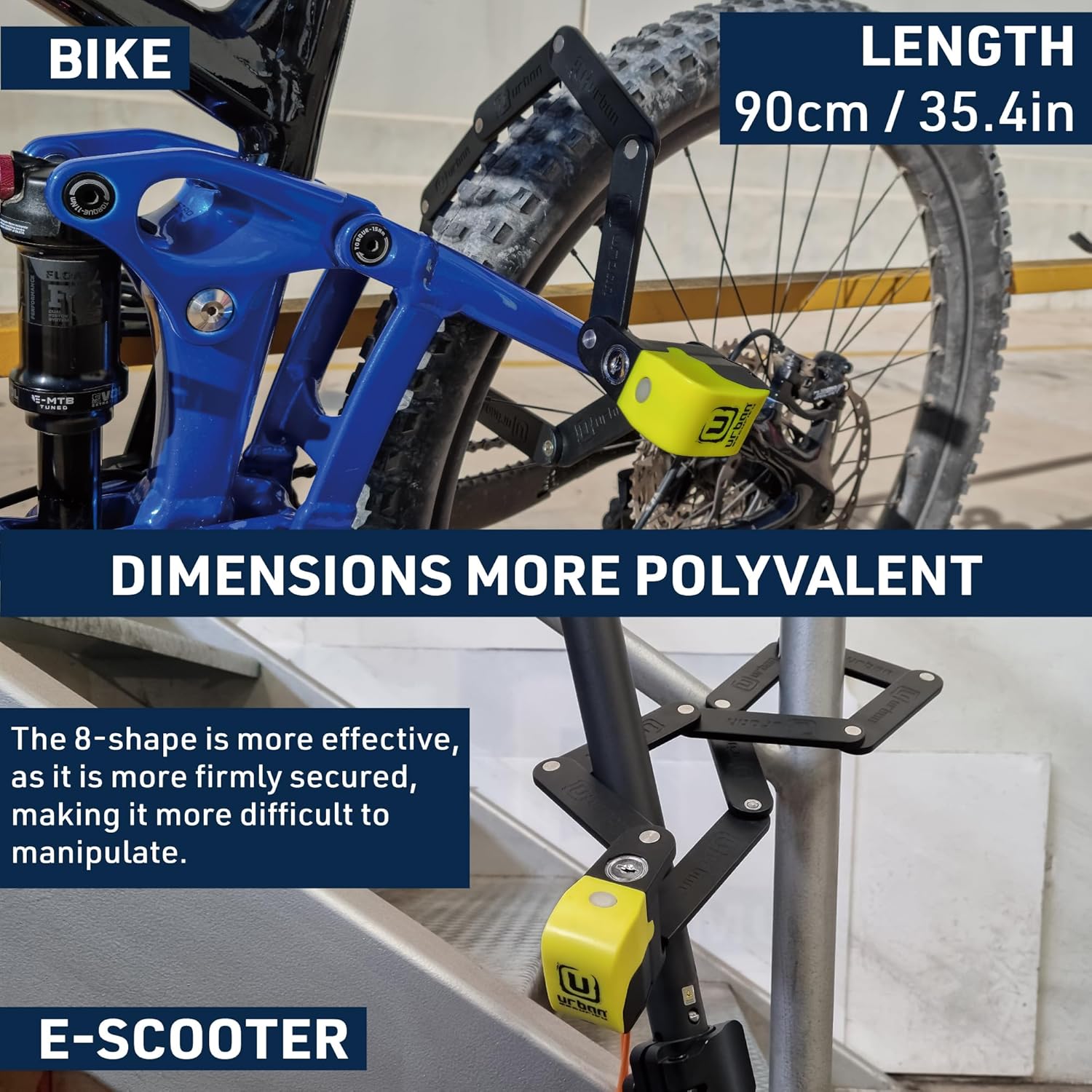
- Unfold the lock to its full length (90cm / 35.4in).
- Wrap the lock around your bicycle or scooter frame and a fixed object (e.g., a bike rack, pole).
- Align the locking mechanism and push the folding bars together until you hear a "click." The lock is now secured.


2. Activating the Smart Alarm
The integrated smart alarm provides an additional layer of security with a 120dB siren and LED alerts.
- After locking the device, press the alarm activation button located on the lock body.
- A short beep and an LED flash will confirm that the alarm is armed.
- The alarm system is sensitive and designed for early detection. It will first emit a warning sound upon minor disturbance.
- If the disturbance continues, the full 120dB alarm will activate, accompanied by LED alerts.

3. Ịkpọghee ngwaọrụ
To unlock the URBAN UR476Y:
- Insert one of the provided keys into the keyhole.
- Turn the key to disengage the locking mechanism.
- The alarm will automatically disarm when the lock is opened with the key.
- Remove the lock from your vehicle and fold it for storage.

Nlekọta
1. Nlekọta n'ozuzu
- Keep the lock clean from dirt and debris. Wipe it with a damp akwa dị ka mkpa.
- Avoid using harsh chemicals or abrasive cleaners, which can damage the plastic coating and internal mechanisms.
- The lock features a silent 360° rotation mechanism and a soft protector to prevent noise and paint damage. Ensure these components remain free of obstructions.

2. Ngbanwe batrị
If the alarm's sound weakens or fails to activate, it may be time to replace the CR2 battery. Follow the steps outlined in the "Battery Installation" section under Setup.
3. Key Care
- Keep your keys safe and consider storing a spare in a secure location.
- Avoid forcing the key if it feels stiff; apply a small amount of graphite lubricant to the keyhole if necessary.
Nchọpụta nsogbu
- Alarm Not Activating:
- Check if the CR2 battery is correctly installed and has sufficient charge. Replace if necessary.
- Ensure the alarm activation button is pressed firmly after locking.
- Alarm Too Sensitive/False Alarms:
- Ensure the lock is securely attached to your vehicle and a stable object to minimize accidental movement.
- Avoid placing the lock in areas prone to strong vibrations or wind.
- Usoro Mkpọchi Siri Ike:
- Apply a small amount of graphite lubricant to the keyhole and moving parts of the folding mechanism.
- Ensure no dirt or debris is obstructing the mechanism.
Nkọwapụta
| Njirimara | Nkọwa |
|---|---|
| Aha Nlereanya | UR476Y |
| Ụdị mkpọchi | Folding Lock, Pin Tumbler |
| Ihe onwunwe | Alloy Steel (8 pieces of 6mm thick steel) |
| Ogologo | 90 cm (35.4 sentimita) |
| Decibel mkpu | 120 dB |
| Ụdị batrị | 1 x CR2 (gụnyere) |
| Ibu Ibu | 1.16 n'arọ (2.55 pound) |
| Akụkụ ngwaahịa | 8.27 x 2.36 x 2.6 sentimita (apịaji) |
| Atụmatụ pụrụ iche | Smart Alarm, LED Alert, Warning Function, Silent Movement Mechanism, Soft Protector, Waterproof |
Akwụkwọ ikike na nkwado
URBAN is a recognized European manufacturer of high-security vehicle locks. While specific warranty details are not provided in this manual, URBAN is committed to assisting its customers. For any questions, support, or warranty inquiries, please refer to the contact information provided with your purchase or visit the official URBAN Security websaịtị.
URBAN SECURITY: "Enjoy Moving. Feel Safe."


