1. Okwu mmalite
The Bose SoundLink Flex (2nd Gen) is a portable Bluetooth speaker designed to deliver high-fidelity audio with deep bass. Its rugged, waterproof, and dustproof construction makes it suitable for various environments, including outdoor use. This manual provides essential information for setting up, operating, maintaining, and troubleshooting your speaker.
2. Ozi nchekwa
Please read and retain all safety and use instructions. This product contains small parts that may be a choking hazard. Keep out of reach of children. Do not expose the speaker to extreme temperatures. Use only the charging cable provided or a certified USB-C cable. Avoid dropping or subjecting the speaker to strong impacts.
3. Kedu ihe dị na Igbe ahụ
- SoundLink Flex Speaker (2nd Gen)
- USB-C® (C to A) cable
- Mpempe akwụkwọ nchekwa
4. Ngwaahịa gafereview
4.1. Akụkụ Igwe Okwu
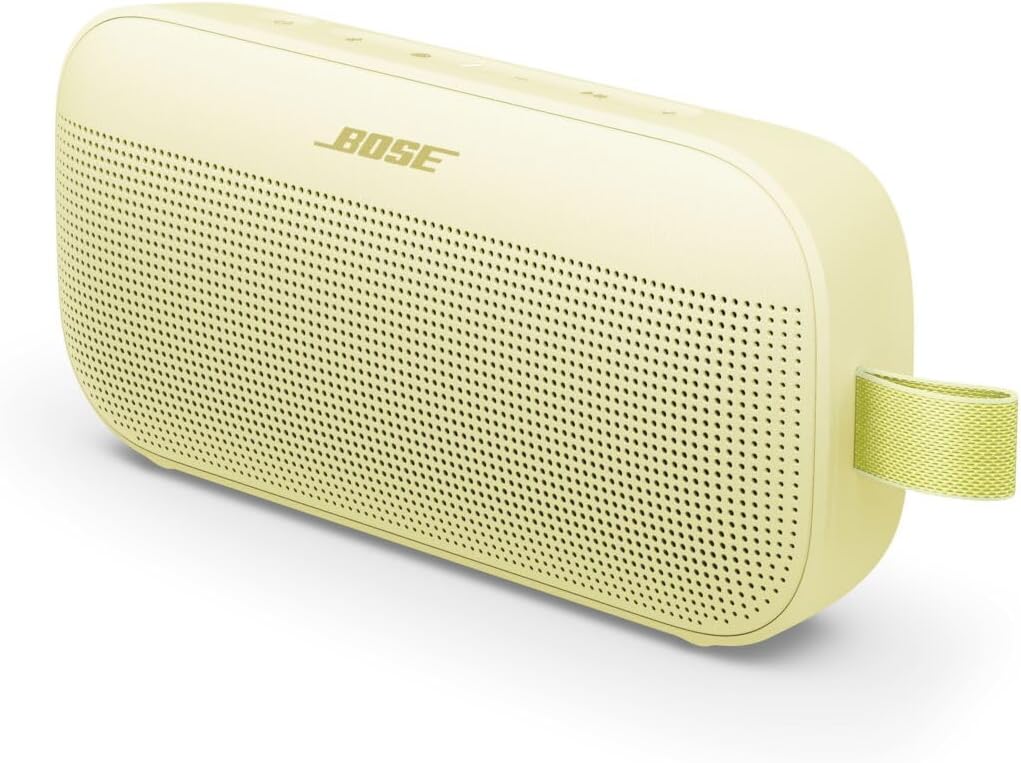
The image above displays the Bose SoundLink Flex (2nd Gen) portable Bluetooth speaker in Citrus Yellow, showcasing its compact, rectangular design with a perforated speaker grille and a durable utility loop on the side.
4.2. Njikwa na egosi
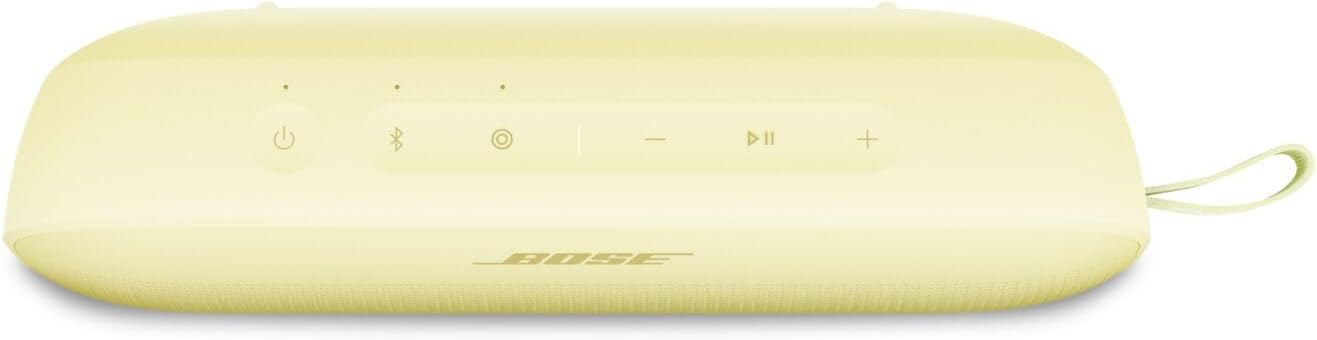
This image shows the top panel of the Bose SoundLink Flex (2nd Gen) speaker, highlighting the control buttons for power, Bluetooth pairing, volume adjustment, and a multi-function button.
- bọtịnụ ike (⏻): Pịa ka ịgbanwuo ma ọ bụ gbanyụọ.
- Bọtịnụ Bluetooth (🖧): Pịa ka ịbanye mode mmakọ Bluetooth.
- Mpịakọta ọnụ (-): Na-ebelata olu ọdịyo.
- Multi-function Button (●): Controls playback (play/pause), track skipping, and voice assistant access.
- Elu elu (+): Na-abawanye olu ọdịyo.
- Ihe ngosi batrị: Na-egosi ọkwa batrị ugbu a.
- Ihe ngosi Bluetooth: Na-egosi ọkwa njikọ Bluetooth.
4.3. ọdụ ụgbọ mmiri

The image displays the side of the Bose SoundLink Flex (2nd Gen) speaker, clearly showing the USB-C charging port, which is protected by a cover to maintain its waterproof rating.
- Ọdụ USB-C: Eji ya maka chajịa ọkà okwu.
5. Nhazi
5.1. gingchaji Okwu Okwu
Before initial use, fully charge the speaker. Connect the USB-C (C to A) cable to the speaker's USB-C port and the other end to a USB wall charger (not included) or a computer's USB port. The battery indicator will show charging status.
5.2. Ịgbanye / gbanyụọ
Pịa bọtịnụ Ike (⏻) to turn the speaker on or off. A tone will indicate the power status.
5.3. Njikọ Bluetooth
- Turn on the speaker. The Bluetooth indicator will slowly pulse blue.
- On your device (smartphone, tablet, laptop), enable Bluetooth and select "Bose SoundLink Flex" from the list of available devices.
- Once connected, the Bluetooth indicator will glow solid white, and you will hear an audible confirmation.
- To pair another device, press and hold the Bluetooth button (🖧) until the indicator pulses blue again, then repeat step 2.
5.4. Using the Bose Connect App
Download the Bose Connect app for additional features, including EQ adjustment, battery life monitoring, Bluetooth connection management, and shortcut customization. The app also facilitates Party Mode and Stereo Mode setup.
6. .rụ ọrụ
6.1. Audiokpọ Audio
Once connected via Bluetooth, play audio from your device. Use the speaker's Multi-function button (●) for playback control:
- Pịa otu ugboro ka ịkpọọ ma ọ bụ kwụsịtụ.
- Pịa ugboro abụọ ka ịga n'ihu.
- Pịa ugboro atọ iji gbapụ azụ.
6.2. Na-agbanwe olu
Use the Volume Up (+) and Volume Down (-) buttons on the speaker or your connected device to adjust the audio volume.
6.3. PositionIQ Technology
The SoundLink Flex features PositionIQ technology, which automatically detects the speaker's orientation (standing up, lying flat, or hanging) and optimizes the sound output for the best listening experience.
6.4. Party Mode and Stereo Mode
You can link two compatible Bose speakers for a more expansive audio experience:
- Ụdị nnọkọ Play the same audio on both speakers for a larger sound field.
- Ọnọdụ stereo: Designate one speaker as the left channel and the other as the right channel for true stereo separation.
These modes are typically configured through the Bose Connect app.
6.5. Ịkpọ oku
The speaker includes a built-in microphone. When a call comes in, the music will pause. Press the Multi-function button (●) once to answer or end a call.
7. Nlekọta
7.1. Nhicha
Jiri nwayọ hichaa ọkà okwu, damp cloth. Do not use any solvents, chemicals, or abrasive cleaning agents. Ensure the USB-C port cover is securely closed before cleaning with water.
7.2. Mgbochi mmiri na uzuzu
The SoundLink Flex is IP67-rated, meaning it is waterproof and dustproof. It can withstand immersion in water up to 1 meter (3.3 feet) for up to 30 minutes. Always ensure the USB-C port cover is fully sealed to maintain its water resistance.
7.3. Nlekọta batrị
For optimal battery life, avoid fully discharging the speaker frequently. Store the speaker in a cool, dry place when not in use for extended periods. Recharge the battery periodically if stored for long durations.
8. Nchọpụta nsogbu
| Okwu | Ngwọta enwere ike |
|---|---|
| Ọkà okwu anaghị agba ọkụ | Gbaa mbọ hụ na agbagoro batrị. Jikọọ na isi iyi ike site na iji eriri USB-C. |
| Enweghị ike ijikọ site na Bluetooth | Ensure the speaker is in pairing mode (pulsing blue light). Check your device's Bluetooth settings. Move the speaker closer to your device. |
| Enweghị ụda ma ọ bụ olu dị ala | Increase volume on both the speaker and your connected device. Ensure the speaker is not muted. |
| Ogo ọdịyo adịghị mma | Move the speaker closer to your device. Avoid obstructions between the speaker and device. Check for interference from other wireless devices. |
| Speaker not responding | Perform a soft reset by pressing and holding the Power button for 10 seconds until the speaker turns off. Then power it back on. |
9. Nkọwapụta
| Njirimara | Nkọwa |
|---|---|
| Aha Nlereanya | Bose SoundLink Flex Speaker (2nd Gen) |
| Ụdị Ọkà Okwu | Ọkà Okwu Nwere Ike |
| Teknụzụ Njikọta | Bluetooth 5.3 |
| Ikuku iche | Ruo 30 ụkwụ (mita 9) |
| Ọkwa Nguzogide mmiri | IP67 (ihe na-egbochi mmiri na uzuzu uzuzu) |
| Ndụ batrị | Up to 12 hours (at typical listening levels) |
| Nchaji ọdụ ụgbọ mmiri | USB-C |
| Ọnọdụ mmepụta ọdịyo | Stereo (when paired with another compatible Bose speaker) |
| Ibu Ibu | 0.59 Kilogram (1.3 pound) |
| Akụkụ ngwaahịa | 3.56"D x 7.93"W x 2.06"H |
| Usoro njikwa | Ngwa, pịa bọtịnụ |
10. Akwụkwọ ikike na nkwado
The Bose SoundLink Flex (2nd Gen) is covered by a manufacturer's warranty. For specific warranty details, registration, and technical support, please visit the official Bose website or contact Bose customer service. Keep your proof of purchase for warranty claims.
For additional support and product information, visit: www.bose.com


