1. Okwu mmalite
Thank you for choosing the GOBOULT Flex On-Ear Bluetooth Headphones. This manual provides essential information for setting up, operating, and maintaining your headphones. Please read it carefully before use to ensure optimal performance and longevity of your device.

Image: GOBOULT Flex On-Ear Bluetooth Headphones in Jet Black, showcasing imewe mara mma.
2. Kedu ihe dị na Igbe ahụ
Chọpụta na ihe niile dị na ngwugwu gị:
- GOBOULT Flex On-Ear Bluetooth Headphones
- Type-C Fast Charging Cable
- AUX Cable (for wired connection)
- Akwụkwọ ntuziaka (akwụkwọ a)
- Akwụkwọ ikike kaadị
3. Ngwaahịa gafereview
The GOBOULT Flex headphones feature an adjustable headband and soft earcups designed for comfort during extended use. Key components include:
- Ihe mkpuchi isi nwere ike idozi: For a customized fit.
- Earcups: Padded for comfort, housing the 40mm audio drivers.
- bọtịnụ njikwa: Power, Volume Up/Down, Multi-function Button.
- Ụdị-C ọdụ ụgbọ mmiri: Maka ịchaji batrị dị n'ime.
- Ọdụ ụgbọ mmiri AUX: Maka njikọ ọdịyo wired.
- Igwe okwu: Integrated Zen™ ENC mic for clear calls.

Image: Close-up of the GOBOULT Flex headphones highlighting the adjustable headband and earcups for comfortable wear.
4. Nhazi
4.1 Ịchaji ekweisi
Before first use, fully charge your headphones. Connect the provided Type-C charging cable to the headphone's charging port and the other end to a USB power source (e.g., wall adapter, computer USB port).
- Nchaji zuru ezu na-ewe ihe dịka nkeji iri isii.
- Chajị nkeji ise na-enye ruo awa abụọ nke oge egwuregwu.
- Ihe ngosi LED ga-egosi ọkwa nchaji (dịka ọmụmaatụ, ọbara ọbara maka ịchaji, acha anụnụ anụnụ maka chaja zuru oke).
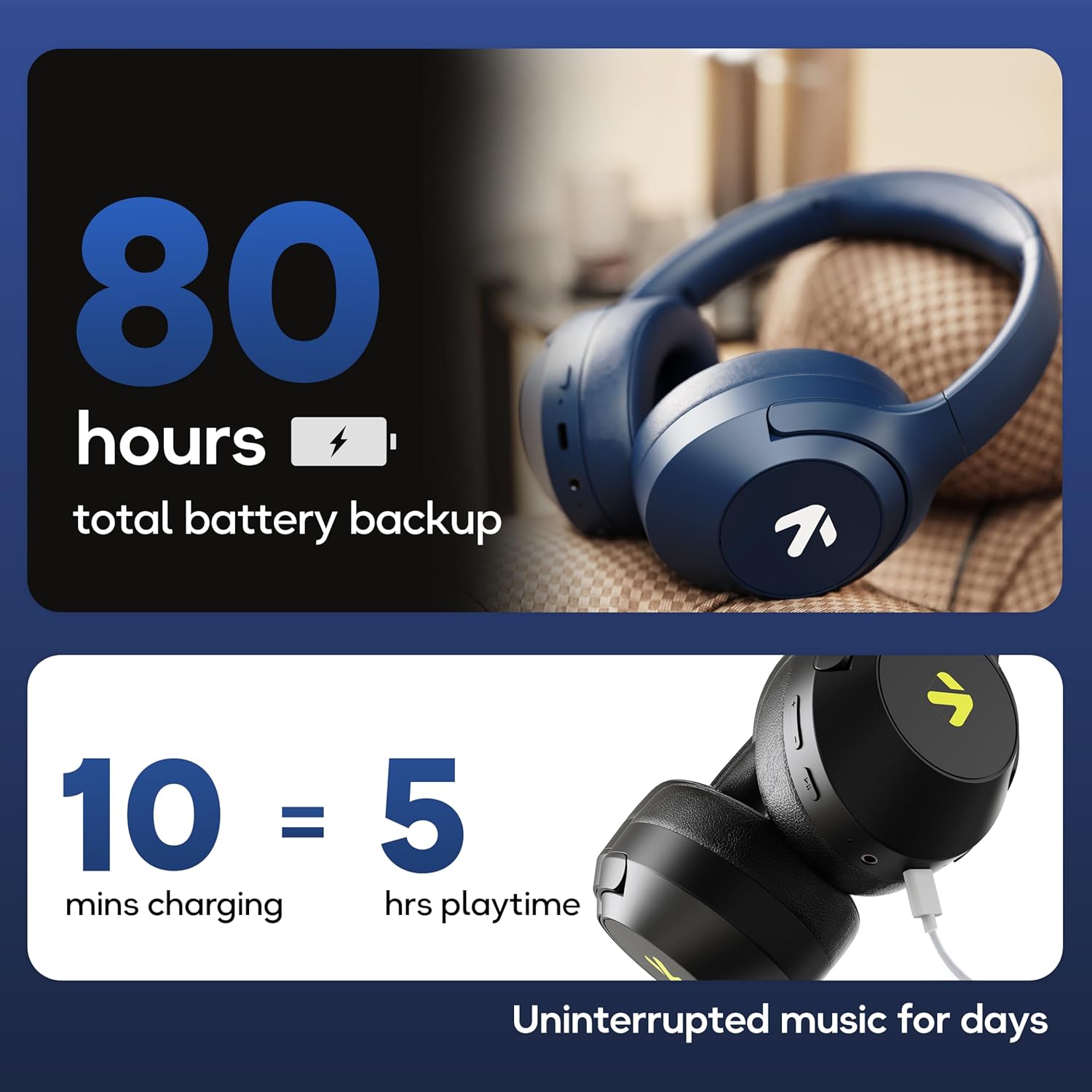
Image: Visual representation of the GOBOULT Flex headphones' battery life and fast charging capability.
4.2 Gbanyụọ/ gbanyụọ
- Iji gbanye: Press and hold the Power button for 3 seconds. The LED indicator will flash.
- Iji gbanyụọ: Press and hold the Power button for 5 seconds. The LED indicator will turn off.
4.3 Njikọ Bluetooth
The GOBOULT Flex headphones utilize Bluetooth 5.4 for stable and fast connections.
- Gbaa mbọ hụ na agbanyụrụ ekweisi.
- Press and hold the Power button for approximately 5-7 seconds until the LED indicator flashes red and blue alternately, indicating pairing mode.
- Na ngwaọrụ gị (smartphone, tabletị, laptọọpụ), gbanye Bluetooth wee chọọ ngwaọrụ dị.
- Select "GOBOULT Flex" from the list of devices.
- Ozugbo ejikọrọ, ihe ngosi LED ga -eji nwayọ na -acha anụnụ anụnụ.

Image: Illustration of the GOBOULT Flex headphones connecting via Bluetooth 5.4, highlighting the fast pairing feature.
4.4 Njikọ AUX
You can use the headphones with a wired connection when the battery is low or for devices without Bluetooth. Connect one end of the 3.5mm AUX cable to the headphone's AUX port and the other end to your audio source's 3.5mm jack.
5. Ntuziaka ọrụ
5.1 Njikwa ntọala
| Ọrụ | Omume |
|---|---|
| Gwuo/kwụsịtụ | Pịa bọtịnụ Multi-function otu ugboro. |
| Elu elu | Pịa bọtịnụ olu elu (+). |
| Mpịakọta ọnụ | Pịa bọtịnụ ụda ala (-). |
| Track na-esote | Pịa ma jide bọtịnụ olu elu (+). |
| Egwu gara aga | Pịa ma jide bọtịnụ ụda ala (-). |
5.2 Njikwa oku
The integrated Zen™ ENC (Environmental Noise Cancellation) microphone ensures clear communication during calls.

Foto: Zuru ezu view of the GOBOULT Flex headphones highlighting the Zen™ ENC mic for noise-reduced calls.
| Ọrụ | Omume |
|---|---|
| Zaa/Kwụsị Oku | Pịa bọtịnụ Multi-function otu ugboro. |
| Jụ oku | Pịa ma jide bọtịnụ Multi-function maka sekọnd abụọ. |
5.3 Onye enyemaka olu
Activate your device's voice assistant (e.g., Google Assistant, Siri) directly from your headphones.
- Mee ka onye enyemaka olu rụọ ọrụ: Pịa bọtịnụ Multi-function ugboro abụọ.

Image: GOBOULT Flex headphones showing compatibility with voice assistants and IPX5 water resistance.
5.4 Ụdị Egwuregwu (Ọnọdụ Dị Ala)
For an optimized gaming experience, activate the 60ms ultra-low latency Combat™ Gaming Mode.
- Activate Gaming Mode: Refer to your device's specific instructions or the product's quick start guide for the button combination to toggle gaming mode.

Image: GOBOULT Flex headphones illustrating the Combat™ Gaming Mode with 60ms ultra-low latency for mobile gaming.
Ụdị EQ 5.5
The headphones feature 4 EQ modes to customize your audio experience:
- Bass
- Nkume
- Pop
- Olu olu
To switch between EQ modes, refer to the specific button press sequence in your quick start guide or product packaging. This functionality allows you to tailor the sound profile ka mmasị gị.

Foto: Ofeview of GOBOULT Flex features, including the 4 EQ modes for sound customization.
6. Nlekọta
6.1 Nhicha
Wipe the headphones with a soft, dry cloth. Do not use abrasive cleaners or solvents. For earcups, gently wipe with a damp akwa ma kwe ka ikuku kpoo kpamkpam tupu ejiri ya.
6.2 Nchekwa
Debe ekweisi n'ebe dị jụụ ma kpọọ nkụ, ebe anwụ na-anaghị anwụ kpọmkwem na oke okpomọkụ dị elu. Nhazi a na-apịachi apịachi na-enye ohere maka nchekwa dị obere.
6.3 Mgbochi mmiri (IPX5)
The GOBOULT Flex headphones are rated IPX5, meaning they are resistant to sweat and light splashes of water. They are not designed for submersion in water. Avoid exposing them to heavy rain or showering.
7. Nchọpụta nsogbu
| Nsogbu | Ngwọta enwere ike |
|---|---|
| Igwe ekweisi anaghị agba ọkụ. | Ensure the headphones are charged. Connect to a power source using the Type-C cable. |
| Enweghị ike ijikọ site na Bluetooth. | Ensure headphones are in pairing mode (flashing red/blue). Turn off and on your device's Bluetooth. Move closer to the device. |
| Enweghị ụda. | Check volume levels on both headphones and connected device. Ensure headphones are properly paired or AUX cable is fully inserted. |
| Ogo oku na-adịghị mma. | Ensure the microphone is not obstructed. Move to a quieter environment. |
8. Nkọwapụta
| Njirimara | Nkọwa |
|---|---|
| Aha Nlereanya | Flex (ProBass) |
| Njikọta | Bluetooth 5.4, AUX |
| Nha ọkwọ ụgbọ ala ọdịyo | 40mm |
| Oge egwuregwu | Ruo awa iri abụọ |
| Nchaji ọdụ ụgbọ mmiri | Ụdị-C |
| Oge Nchaji | Ihe ruru. Nkeji 60 |
| Igwe okwu | Zen™ ENC Mic |
| Ọnọdụ Latency dị ala | 60ms (Combat™ Gaming Mode) |
| Mmiri Nguzogide | IPX5 |
| Nzaghachi ugboro ugboro | 20 Hz |
| Mmetụta | 118 dB |
| Mgbochi | 32 Ohm |
| Ibu Ibu | 214 grams |
9. Akwụkwọ ikike na nkwado
The GOBOULT Flex headphones come with a 1-year warranty. To avail of the extended warranty and for any support inquiries, please register your product on the official GOBOULT website. For technical assistance or customer service, refer to the contact information provided on your warranty card or the GOBOULT official websaịtị.
Manufacturer: Exotic Mile Private Limited
Obodo amụrụ: China


