1. Ngwaahịa gafereview
The LDARC R02 is a 1:64th scale mini RC car designed for high-tech remote control fun. This compact vehicle, weighing only 28 grams, is equipped with advanced features including lighting, brake lights, turn signals, and reverse functions. It offers full proportional control for precise maneuvering.
The R02 comes as an RTR (Ready-To-Run) kit, meaning it includes all necessary components for immediate use. It is suitable for various indoor environments, allowing for thrilling racing experiences even on a desk.

Image: The LDARC R02 Mini RC Car, its CT03 remote controller, and the portable carrying case.

Image: Icons illustrating key features such as 60 minutes working time, beginner mode, voltage alarm, full proportional control, USB charging, shock absorbers, simulation vehicle paint, lamp system, built-in battery, rubber tires, metal gears, and 4-piece bearings.
2. Ozi nchekwa
This product is recommended for individuals aged 14 years and up. It is not intended for use by young children without adult supervision due to small parts and the nature of its operation.
- Always operate the RC car in a safe environment, away from obstacles, people, and pets.
- Avoid operating near water or in wet conditions to prevent damage to electronic components.
- Do not modify the product in any way, as this may void the warranty and pose safety risks.
- Ensure the battery is charged in a safe area, away from flammable materials.
- Debe obere akụkụ ebe ụmụaka na-agaghị erute ka ihe egwu kpagbuo.
3. Nhazi
3.1 Unboxing na nlele mbụ
Upon receiving your LDARC R02 kit, carefully remove all components from the packaging. Verify that all items listed in the "What's in the Box" section are present and undamaged. The RTR kit includes the RC car and the CT03 remote controller.
3.2 Ịchaji batrị
The R02 RC car has a built-in lithium battery with a capacity of 95mAh. Before first use, or when the battery is low, connect the car to a suitable USB power source using the provided Type-C charging cable. The charging time is approximately 90 minutes. The CT03 controller also features USB charging.
- Connect the Type-C end of the charging cable to the car's charging port.
- Connect the USB-A end to a 5V USB power adapter (not included, typically a phone charger).
- The charging indicator light on the car will show charging status (refer to car's specific LED behavior for full/charging indication).
- For the CT03 controller, use its dedicated USB charging port.
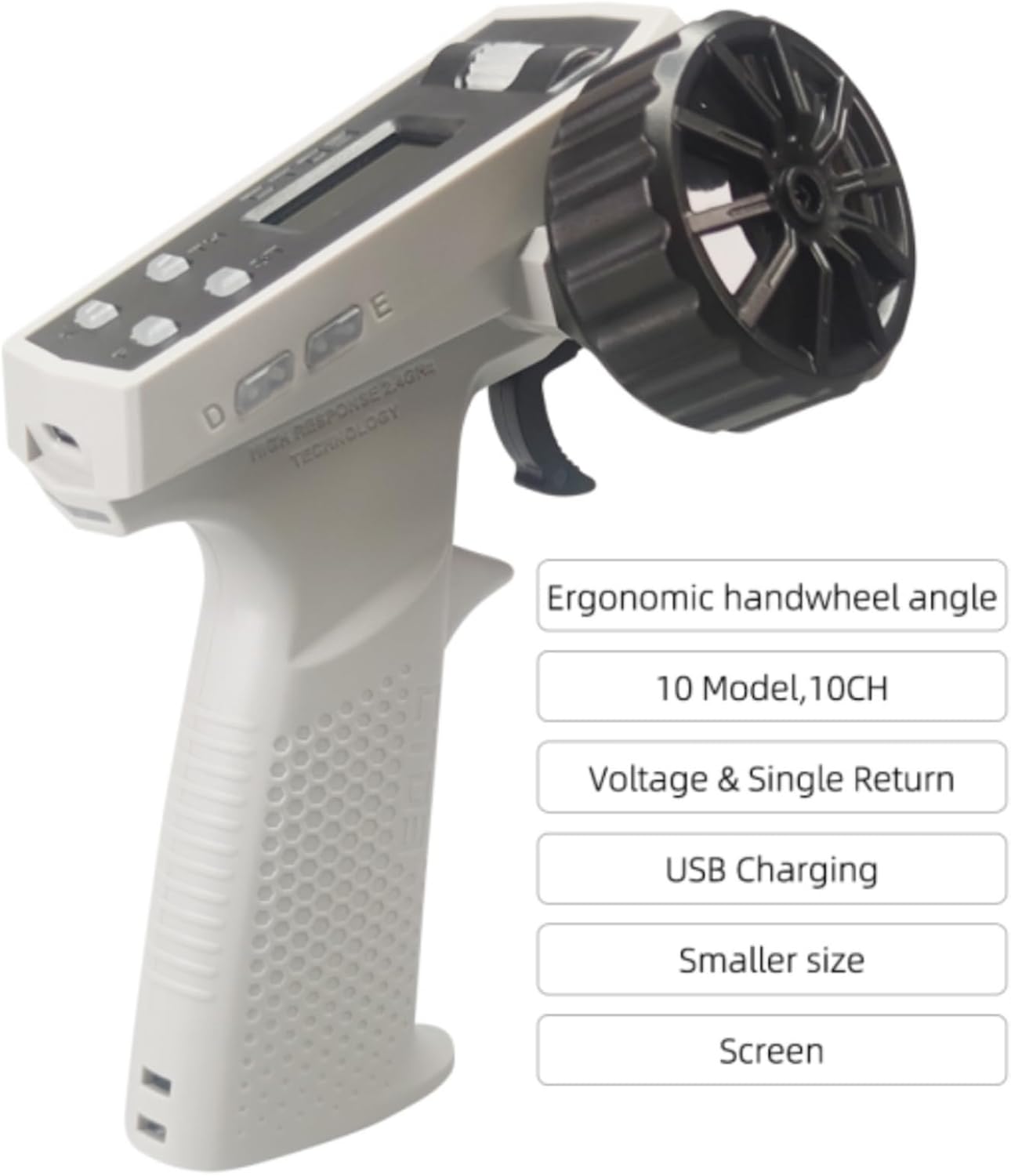
Image: The CT03 remote controller, highlighting its ergonomic handwheel angle, 10 model memory, 10 channels, voltage and single return display, USB charging capability, smaller size, and LCD screen.
3.3 Controller Pairing
The CT03 controller operates on a 2.4GHz frequency, offering a remote control distance of approximately 30 meters. The car and controller are typically pre-paired from the factory. If re-pairing is necessary, follow these steps:
- Ensure both the RC car and the CT03 controller are powered off.
- Turn on the RC car.
- Turn on the CT03 controller.
- Observe the indicator lights on both devices. They should connect automatically. If not, refer to the detailed pairing instructions in the included quick start guide.
4. Ntuziaka ọrụ
The LDARC R02 offers full proportional control, allowing for precise steering and throttle input, similar to a real car.
4.1 Njikwa ntọala
- Mkpalite trotul: Pull the trigger to move forward, push it away from you to reverse. The amount you pull or push determines the speed.
- Ụgbọ ala: Turn the wheel left or right to steer the car. The degree of turn corresponds to the steering angle.
4.2 Advanced Functions (CT03 Controller)
The CT03 controller provides various settings and functions accessible via its LCD screen and buttons:
- Ndozi ọsọ ọsọ: Adjust the maximum speed (TH) using the controller settings (Low/Middle/High modes).
- Ndozi ntuziaka: Fine-tune the steering sensitivity (ST) for precise control (Small/Middle/Big modes).
- Sistemụ ọkụ: Control the car's LED lights, brake lights, turn signals, and reverse lights. These can be turned on or off via the controller.
- Emergency Flashers: Activate emergency flashers/turn signal lights using the designated button.
- High and Low Beam: Switch between high and low beam headlights.

Image: The silver LDARC R02 RC car with its bright LED headlights illuminated, positioned on a surface with orange traffic cones, demonstrating its lighting capabilities.

Image: The silver LDARC R02 RC car positioned on a miniature race track, featuring red and white track barriers, illustrating its intended use for racing and maneuvering.
The R02 has a working time of up to 60 minutes on a full charge, depending on usage.
5. Nlekọta
Proper maintenance will extend the lifespan and performance of your LDARC R02 RC car.
5.1 Nhicha
It is crucial to operate and store the RC car on clean surfaces. Avoid dirt, gravel, animal hair, human hair, and other debris, as these can interfere with the car's moving parts and electronics. Use a soft, dry cloth to wipe down the car after each use. For hard-to-reach areas, a soft brush or compressed air can be used.
5.2 Nlekọta batrị
- Do not overcharge or over-discharge the built-in lithium battery.
- Store the car with a partially charged battery (around 50%) if it will not be used for an extended period.
- Zere ikpughe batrị na oke okpomọkụ.
5.3 Nlekọta n'ozuzu
- Inspect the car regularly for any loose screws or damaged parts.
- While durable, the car's small size means its components are delicate. Avoid hard impacts or drops from significant heights.
- If any parts, such as axles, become dislodged, carefully reassemble them. Note that these are very small components.
6. Nchọpụta nsogbu
This section addresses common issues you might encounter with your LDARC R02 RC car.
| Nsogbu | Ihe nwere ike ime | Ngwọta |
|---|---|---|
| Car does not respond to controller. | Low battery in car or controller; Not paired; Out of range. | Charge car and controller batteries; Re-pair car and controller; Operate within 30m range. |
| Car moves erratically or not smoothly. | Debris in moving parts; Damaged components (e.g., axle, servo). | Clean car thoroughly; Inspect axles and gears for damage. If a servo issue is suspected, contact support. |
| Lights are not functioning. | Lights turned off via controller; Wiring issue. | Check controller settings to ensure lights are enabled; Inspect wiring for visible damage. |
| Axle or wheel hub detaches. | Impact or stress on the wheel assembly. | Carefully reinsert the axle into the wheel hub. Due to small part size, this may require precision. |
If you encounter issues not listed here or require further assistance, please refer to the support section.
7. Nkọwapụta
| Njirimara | Nkọwa |
|---|---|
| Nọmba nlereanya | R02 |
| Ọnụ ọgụgụ | 1:64 |
| Akụkụ ngwaahịa | 1.97 x 1.18 x 1.18 sentimita asatọ |
| Ibu Ibu | 1.1 pound |
| Ike batrị | 95mAh (batrị lithium arụnyere n'ime ya) |
| Oge ọrụ | Ruo nkeji iri abụọ |
| Oge Nchaji | Approximately 90 minutes (Type-C interface) |
| Onye njikwa | CT03, 2.4GHz, 10 Channel, LCD screen |
| Anya njikwa anya | Ihe dị ka mita 30 |
| Afọ akwadoro | Afọ 14 na karịa |
| Ngwa gụnyere | RC Car RTR (Ready-To-Run) |
8. Akwụkwọ ikike na nkwado
8.1 Atụmatụ Nchedo
Optional protection plans may be available for this product, offering extended coverage beyond the standard manufacturer's warranty. These plans typically cover accidental damage and malfunctions. Please refer to your purchase documentation or retailer for details on available protection plans.
- 2-Year Protection Plan (e.g., $8.99)
- 3-Year Protection Plan (e.g., $11.99)
- Complete Protect (monthly plan, e.g., $16.99/month)
Ndị na-enye ọrụ ndị ọzọ na-enye atụmatụ ndị a, ha dị iche na akwụkwọ ikike nke onye nrụpụta.
8.2 Nkwado ndị ahịa
For technical support, warranty claims, or inquiries regarding your LDARC R02 Mini RC Car, please contact the manufacturer, captainrc, or your point of purchase. Retain your proof of purchase for warranty purposes.
Ị nwere ike ịchọta ozi kọntaktị na ngwugwu ngwaahịa ahụ, onye ọrụ nke onye nrụpụta ahụ websaịtị, ma ọ bụ site na ụlọ ahịa ebe azụrụ ngwaahịa ahụ.


