Okwu mmalite
The ATTACK SHARK X1 Superlight Wireless Gaming Mouse is engineered for high-performance gaming and versatile daily use. Featuring a PAW3395PRO gaming sensor, tri-mode connectivity (2.4G wireless, Bluetooth, and wired USB-C), and an innovative magnetic charging dock with RGB lighting, the X1 mouse provides precision, speed, and convenience. Its ultra-lightweight design and durable switches ensure comfort and longevity for extended use.
Ihe ngwugwu
- ATTACK SHARK X1 Superlight Wireless Gaming Mouse
- Magnetic RGB Charging Dock
- USB-C na eriri USB-A
- 2.4GHz Wireless Receiver (Nano Dongle)
- Akwụkwọ ntuziaka (akwụkwọ a)

Image: The ATTACK SHARK X1 mouse shown alongside its magnetic charging dock.
Ngwaahịa gafereview
The X1 mouse features a lightweight ergonomic design with programmable buttons and a high-precision optical sensor. The accompanying magnetic charging dock provides convenient charging and also houses the 2.4GHz wireless receiver.
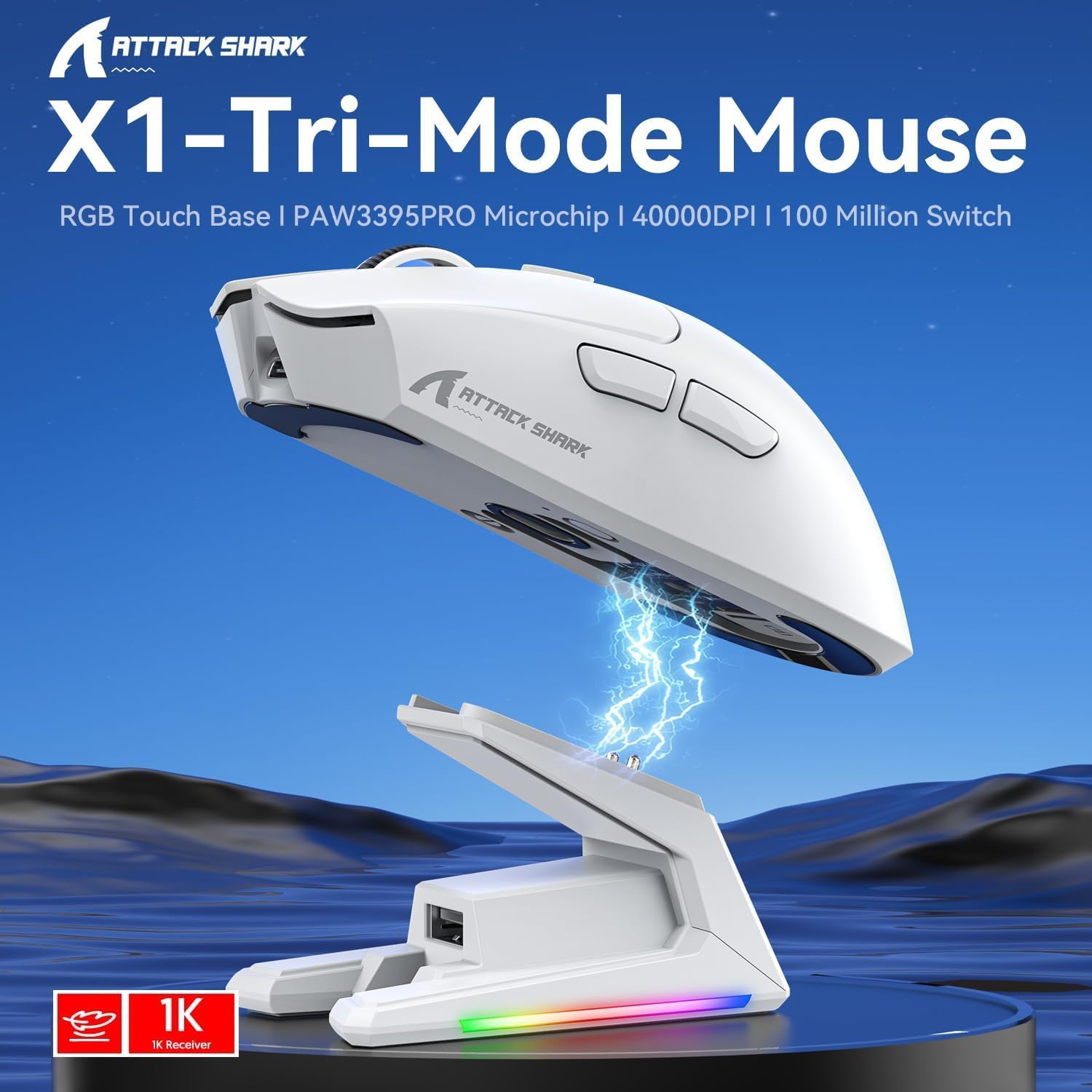
Foto: Ofeview of the X1 Tri-Mode Mouse highlighting its key features.
Ihe ndị mejupụtara òké:
- Pịa bọtịnụ aka ekpe/aka nri: Standard mouse buttons with durable OMRON switches.
- Mpempe akwụkwọ mpịakọta: For vertical scrolling and middle-click functionality.
- Bọtịnụ DPI: Located on top for quick sensitivity adjustments.
- Bọtịnụ akụkụ: Two programmable buttons on the left side for forward/backward navigation or custom macros.
- Ọdụ USB-C: Maka njikọ wired na ịchaji.
- Mgbanwe ike/Ụdị: Located on the bottom, allows switching between OFF, 2.4G, and Bluetooth modes.
- PAW3395PRO Sensor: High-performance optical sensor for precise tracking.
Charging Dock Components:
- Magnetic Charging Pins: Align with the mouse for effortless charging.
- RGB Lighting Strip: Customizable lighting effects.
- Touch-Sensitive Panel: For controlling RGB lighting on the dock.
- Ọdụ ụgbọ mmiri USB-A: For connecting the 2.4GHz wireless receiver.
- Ọdụ ụgbọ mmiri USB-C: For powering the dock.

Foto: nso nso view of the charging dock's USB data interface for the 2.4G receiver and the Type-C charging interface.
Melite
1. Njikọ waya:
- Connect the USB-C end of the provided cable to the mouse's USB-C port.
- Jikọọ njedebe USB-A na ọdụ USB dị na kọmputa gị.
- Ensure the power/mode switch on the bottom of the mouse is set to the 'OFF' position. The mouse will function in wired mode and charge simultaneously.

Image: The X1 mouse connected to a laptop via its USB-C cable, demonstrating wired mode and charging capability.
Njikọ ikuku 2.4GHz:
- Plug the 2.4GHz wireless receiver into an available USB-A port on your computer or into the USB-A port on the charging dock.
- Set the power/mode switch on the bottom of the mouse to the '2.4G' position.
- Òké kwesịrị jikọọ na akpaghị aka na nnata.
3. Njikọ Bluetooth:
- Set the power/mode switch on the bottom of the mouse to the 'BT' position.
- The mouse will enter pairing mode (indicator light may flash).
- Na kọmputa ma ọ bụ ngwaọrụ gị, gaa na ntọala Bluetooth wee chọọ ngwaọrụ ọhụrụ.
- Select 'ATTACK SHARK X1' (or similar name) from the list of available devices to pair. The mouse supports memory for up to 3 Bluetooth devices.
Ntuziaka ọrụ
Ndozi DPI:
The X1 mouse features a dedicated DPI button on its top surface. Press this button to cycle through the preset DPI levels. The mouse supports up to 40,000 DPI with 6 programmable sensitivity presets. The current DPI level may be indicated by an LED color change (refer to the Web Cloud Driver for specific indications).

Foto: Zuru ezu view of the PAW3395PRO gaming sensor, emphasizing its high precision.
Web Cloud Driver Software:
The ATTACK SHARK X1 utilizes an innovative web-based cloud driver for customization, eliminating the need for software installation. Access the driver through your web browser to configure advanced functions such as:
- DPI adjustment and custom profiles
- Ntọala ọnụego ntuli aka
- Competitive mode activation
- Custom button assignments
- Macro recording and personalized key mapping
The open-source driver automatically identifies your computer system. Refer to the product packaging or official websaịtị maka kpọmkwem URL iji nweta Web Cloud Driver.

Image: Screenshot of the X1 Web Cloud Driver interface, showing options for key settings, macros, and other functions.
RGB Lighting Customization (Dock):
The magnetic charging dock features an integrated touch-sensitive panel that allows you to customize its RGB lighting effects. Tap the panel to cycle through different lighting modes. Press and hold the panel to turn the RGB lighting on or off.
Nchaji na ndụ batrị
The X1 mouse can be charged via the included USB-C cable or by placing it on the magnetic charging dock. The dock provides effortless charging; simply align the mouse with the charging pins for instant power-up. A full charge typically takes approximately 2 hours and provides up to 65 hours of continuous working time.

Image: The X1 mouse magnetically docked for charging, showcasing the RGB lighting of the dock.

Image: An illustration depicting the optimized battery life of the X1 mouse, indicating efficient power usage.
Nlekọta
To ensure the longevity and optimal performance of your ATTACK SHARK X1 mouse and charging dock, follow these maintenance guidelines:
- Nhicha: Use a soft, dry cloth to wipe down the mouse and dock. For stubborn dirt, a slightly damp cloth can be used, but ensure no moisture enters the internal components or charging pins. Avoid harsh chemicals or abrasive materials.
- Nlekọta ihe mmetụta: Keep the optical sensor on the bottom of the mouse clean and free of dust or debris to maintain accurate tracking.
- Nchekwa: When not in use for extended periods, store the mouse and dock in a cool, dry place away from direct sunlight and extreme temperatures.
- Ịchaji ntụtụ: Periodically inspect the charging pins on the dock and the corresponding contacts on the mouse for any residue or corrosion. Clean gently with a cotton swab if necessary.
Nchọpụta nsogbu
If you encounter issues with your ATTACK SHARK X1 mouse, refer to the following common troubleshooting steps:
- Òké anaghị aza:
- Gbaa mbọ hụ na ebubo òké ahụ.
- Check the power/mode switch on the bottom of the mouse is set to the correct connection mode (2.4G, BT, or OFF for wired).
- For 2.4G wireless, ensure the receiver is properly plugged into a USB port. Try a different USB port.
- For Bluetooth, ensure Bluetooth is enabled on your device and the mouse is paired. Try re-pairing the mouse.
- Try connecting the mouse via the USB-C cable to see if it functions in wired mode.
- Inconsistent Tracking or Cursor Lag:
- Hichaa ihe mmetụta anya na ala nke òké ahụ.
- Hụ na ị na-eji òké ahụ n'elu ebe kwesịrị ekwesị (dịka ọmụmaatụ, òké pad).
- Check for interference in 2.4G wireless mode (e.g., other wireless devices).
- Adjust DPI settings using the DPI button or Web Cloud Driver.
- Okwu ịchaji:
- Ensure the USB-C cable is securely connected to the charging dock and a power source.
- Verify the mouse is correctly seated on the magnetic charging dock, ensuring the pins make proper contact.
- Try charging directly via the USB-C cable connected to the mouse.
- Web Cloud Driver Not Accessible:
- Ensure your computer has an active internet connection.
- Nyochaa nke ahụ URL maka Web Cloud Driver is entered correctly.
- Gbalịa ọzọ web ihe nchọgharị.
Nkọwapụta
| Njirimara | Nkọwa |
|---|---|
| Nlereanya | X1 |
| Njikọta | Tri-Mode: 2.4G Wireless, Bluetooth 5.2, Wired USB-C |
| Sensọ | PixArt PAW3395PRO Optical Gaming Sensor |
| Ọnụ ego DPI | Up to 40,000 DPI (6 programmable presets) |
| IPS | 650 IPS |
| Osooso | 50G |
| Mgbanwe | OMRON Mechanical Switches (100 Million Clicks lifespan) |
| Ibu | Approx. 53g (Ultra-light) |
| Ndụ batrị | Ruo awa 65 (iji na-aga n'ihu) |
| Ịchaji | Magnetic Charging Dock / USB-C Wired |
| Ọnụego ntuli aka | 1000Hz (1ms response) |
| Akụkụ (Ngwugwu) | 7.09 x 4.53 x 2.17 sentimita asatọ |
| Item Weight (Packaged) | 7.7 ounces |
Akwụkwọ ikike na nkwado
For warranty information and technical support, please refer to the official ATTACK SHARK websaịtị ma ọ bụ kpọtụrụ ndị ahịa ha ozugbo. Debe nnata nzụta gị dị ka ihe akaebe nke ịzụrụ ihe maka akwụkwọ ikike ọ bụla.
Maka enyemaka ọzọ, gaa na ATTACK SHARK Store on Amazon.


