Okwu mmalite
Welcome and thank you for choosing the HTC Wireless Earbuds TWS6 5.3. This manual provides detailed instructions to help you set up, operate, and maintain your earbuds for optimal performance. Please read this manual thoroughly before using your device.
Ihe ngwugwu
Biko chọpụta na ihe niile dị na ngwugwu gị:
- 2 x HTC Earbuds
- 1 x USB-C Nchaji USB
- 1 x Akpa nchaji
- Abụọ abụọ x Eartip rọba (S/L)
- 1 x Quick Start Guide (physical document)

Ngwaahịa gafereview
Familiarize yourself with the components of your HTC TWS6 earbuds.
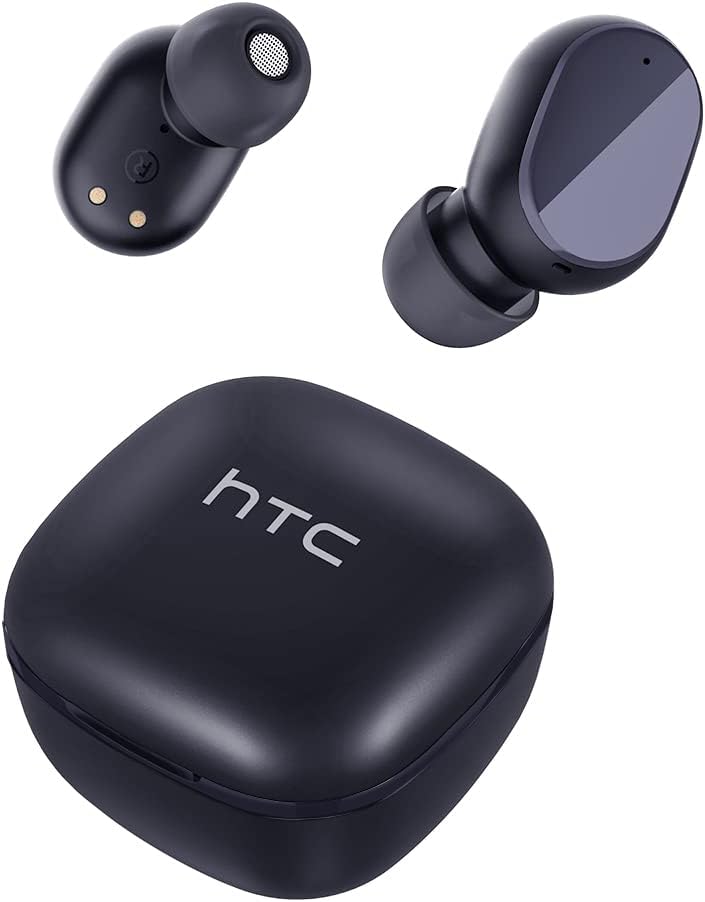

Melite
Ịchaji ihe ntị na akpa
Tupu ojiji nke mbụ, chajie nke ọma ntị na akpa nchaji.
- Tinye ntị ntị n'ime akpa nchaji.
- Jikọọ eriri USB-C na ọdụ chaja dị na akpa ahụ na isi iyi ike.
- Ọkụ egosi na ikpe ahụ ga-egosi ọkwa nchaji.
- A full charge provides approximately 5 hours of playback for earbuds and up to 22 hours with the charging case.

Njikọ Bluetooth
Follow these steps to pair your earbuds with your device:
- Mepee igbe nchaji. Igwe ntị ga-abanye na ọnọdụ njikọta na-akpaghị aka.
- Na ngwaọrụ gị (smartphone, mbadamba, wdg), gbanye Bluetooth.
- Chọọ maka "HTC TWS6" na ndepụta ngwaọrụ Bluetooth dị.
- Select "HTC TWS6" to connect. A voice prompt will confirm successful pairing.

Yi akwa ntị
For optimal sound quality and comfort, choose the correct eartip size and wear the earbuds properly.
- Select the eartips (S, M, L) that best fit your ears.
- Jiri nwayọọ tinye ihe ntị ntị ọ bụla n'ime ọwa ntị gị.
- Rotate slightly to ensure a secure and comfortable fit.
Ntuziaka ọrụ
Njikwa Smart Touch
The HTC TWS6 earbuds feature intuitive touch controls:
- Kpọọ/Kwụsị Egwu: Otu mgbata na ntị ntị.
- Track na-esote: Pịa bọtịnụ ntị aka nri ugboro abụọ.
- Gara aga Track: Kpatụ ntị ugboro abụọ n'akụkụ aka ekpe.
- Olu elu: Pịa ugboro atọ na ntị ntị aka nri.
- Olu ala: Pịa ugboro atọ na ekwe ntị aka ekpe.
- Azịza/Kwụsị Oku: Otu mgbata na ntị ntị.
- Jụ oku: Pịa ma jide otu ntị ntị maka sekọnd 2.
- Mee ka onye enyemaka olu rụọ ọrụ: Pịa ma jide otu ntị ntị maka sekọnd 3.

Gbanyụọ/ Gbanyụọ
The earbuds automatically power on when removed from the charging case and power off when placed back into the case and the lid is closed.
To manually power on, press and hold the touch area for 3 seconds. To manually power off, press and hold the touch area for 5 seconds.
Nlekọta na nlekọta
Nhicha
Regularly clean your earbuds and charging case to ensure optimal performance and hygiene.
- Jiri akwa dị nro, kpọrọ nkụ, akwa na-enweghị lint ka ihichapụ ntị ntị na akpa nchaji.
- Wepụ isi ntị ma jiri ncha na mmiri dị nro hichaa ha, wee kpọọ nkụ nke ọma tupu ị tinyeghachi ya.
- Ejila ihe nchacha abrasive ma ọ bụ ihe mgbaze.
Nguzogide mmiri (IPX5)
The HTC TWS6 earbuds are IPX5 sweatproof, meaning they are resistant to splashes and sweat.
Mara: They are not designed for submersion in water. Avoid exposing them to heavy rain, showering, or swimming. Ensure the charging port is dry before charging.

Nchekwa
Mgbe ejighị ya, chekwaa earbuds n'ime akpa nchaji ha iji chebe ha ma debe ha ebubo.
Chekwaa n'ebe dị jụụ, ebe kpọrọ nkụ na-adịghị na oke okpomọkụ.
Nchọpụta nsogbu
| Nsogbu | Ngwọta |
|---|---|
| Igwe ntị anaghị ejikọta ọnụ | Ensure earbuds are charged. Turn off and on Bluetooth on your device. Forget "HTC TWS6" from your device's Bluetooth list and re-pair. |
| Naanị otu earbud na-arụ ọrụ | Place both earbuds back into the charging case, close the lid, then open it again. Ensure both earbuds are charged. |
| Obere olu ma ọ bụ ogo ụda adịghị mma | Adjust volume on your device. Clean eartips and earbud mesh. Try different eartip sizes for a better seal. |
| Okwu nchaji | Check USB-C cable and power adapter. Ensure charging contacts on earbuds and case are clean and dry. |
| Igwe ntị na-akwụsị ugboro ugboro | Ensure your device is within the Bluetooth range (approx. 10 meters/33 feet) and there are no significant obstructions. |
Ọ bụrụ na nsogbu anọgide, biko kpọtụrụ ndị ọrụ nkwado ndị ahịa.
Nkọwapụta
| Njirimara | Nkọwa |
|---|---|
| Aha Nlereanya | NKWO 6 |
| Ụdị Bluetooth | 5.3 |
| Teknụzụ Njikọta | Ikuku |
| Teknụzụ nzikọrịta ozi ikuku | Bluetooth |
| Ndụ batrị (Earbuds) | Awa 5 |
| ngụkọta oge egwuregwu (ya na ikpe) | Awa 22 |
| Oge Njikere (Ikpe) | Ihe dị ka awa 5 |
| Ọkwa Nguzogide mmiri | IPX5 (nke na-adịghị ekpuchi mmiri) |
| Usoro njikwa | Metụ aka |
| Igwe okwu | Yes (with ENC) |
| Ngwa dakọtara | Android and iOS Smartphones, Gaming Devices |
| Ihe onwunwe | Plastic |
| Ibu Ibu | 3.17 ounces |
| UPC | 734257974554 |
| Njikwa mkpọtụ | Nkagbu mkpọtụ na-eme mgbanwe |
| Ụdị ọkwọ ụgbọ ala ọdịyo | Ọkwọ ụgbọala dị ike |
| Mgbochi | 199.99 Ohm |
Akwụkwọ ikike na nkwado
HTC provides a 360-day warranty extension for this product, as detailed in the product information.
For technical assistance, warranty claims, or any inquiries, please contact HTC customer support.
Nkwado ndị ahịa: Refer to the contact information provided in your product packaging or visit the official HTC websaịtị maka nhọrọ nkwado kachasị ọhụrụ.


