1. Okwu mmalite
This manual provides essential information for the safe and effective operation of your ION Audio Retro Glow Boombox. This device combines classic audio playback with modern connectivity, featuring an AM/FM radio, cassette player/recorder, Bluetooth 5.3, USB, and SD card playback capabilities. Please read this manual thoroughly before use and retain it for future reference.
2. Ozi nchekwa
- Ewepụla akụkụ ahụ na mmiri ma ọ bụ mmiri.
- Zere idobe nkeji n'akụkụ ebe okpomọkụ ma ọ bụ na ìhè anyanwụ.
- Gbaa mbọ hụ na ikuku ikuku kwesịrị ekwesị; egbochila oghere ventilashị ọ bụla.
- Jiri naanị mgbakwunye / ngwa ndị nrụpụta akọwapụtara.
- Kwupụ ngwaọrụ ahụ n'oge oke mmiri ozuzo ma ọ bụ mgbe ejighi ya ogologo oge.
- Tụtụ aka n'aka ndị ọrụ ruru eru.
3. Gịnị gụnyere
Upon unpacking, ensure all items listed below are present and in good condition:
- ION Audio Retro Glow Boombox
- Igwe ọkụ ọkụ
- Ntuziaka Ngwa ngwa ngwa
4. Ngwaahịa gafereview
The Retro Glow Boombox features a translucent housing with multi-colored LED lights that synchronize with music. It includes dual full-range speakers for robust audio output.
Ogwe ihu

Foto 1: N'ihu view of the Retro Glow Boombox, showcasing the cassette deck, radio tuner, and illuminated dual speakers.
Njikwa kacha elu

Ọgụgụ 2: Zuru ezu view of the top panel, including volume, bass, treble controls, cassette function buttons (Pause, Stop/Eject, F.FWD, REW, Play, REC), and mode selectors (Tape, Aux, Radio, Bluetooth/USB/SD).
Side Panel and Rear
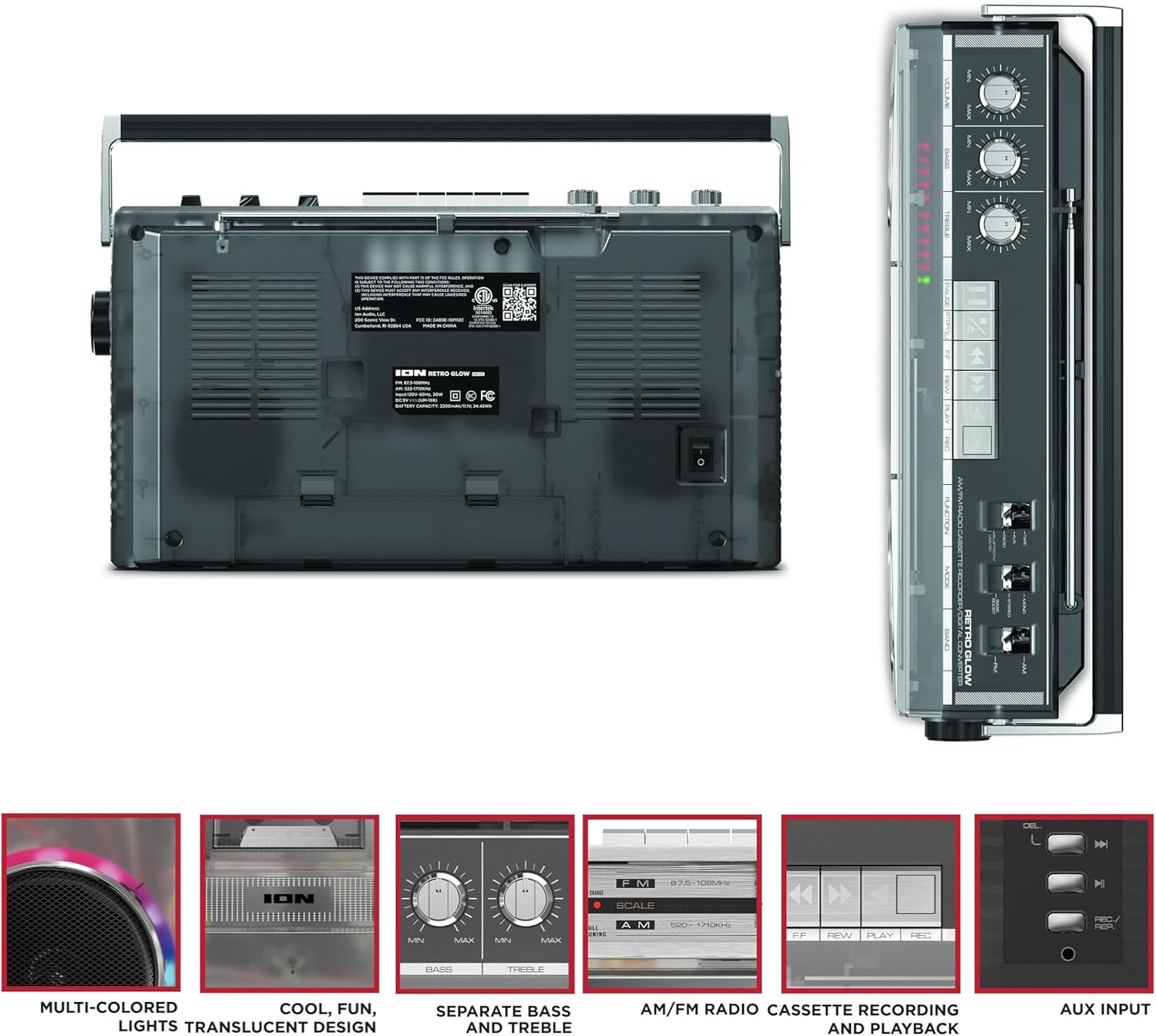
Figure 3: Side panel illustrating the USB port, SD card slot, and playback control buttons. The rear panel includes the power input and battery compartment.
5. Nhazi
Ịkwalite Boombox
The Retro Glow Boombox can be powered via the included AC power cable or by batteries for portable use.
- Ike AC: Connect the power cable to the AC input on the rear of the unit and then to a wall outlet.
- Ike batrị: Open the battery compartment on the rear and insert the required batteries (type and quantity specified in specifications).

Ọgụgụ 4: N'azụ view of the boombox, highlighting the power input and the battery compartment for portable operation.
6. Ntuziaka ọrụ
Ọrụ izugbe
- Gbanyụọ/ Gbanyụọ: Use the power switch to turn the unit on or off.
- Njikwa olu: Adjust the 'VOLUME' knob on the top panel to increase or decrease the sound level.
- Njikwa ụda: Use the 'BASS' and 'TREBLE' knobs to customize the audio output to your preference.
- Ọkụ LED: The multi-colored LED lights around the speakers dance in sync with the music. Refer to the Quickstart Guide for specific controls to change light modes or turn them off.
Ọrụ redio
- Switch the 'FUNCTION' selector to 'RADIO'.
- Select 'AM' or 'FM' using the 'BAND' switch.
- Extend the telescopic antenna for optimal FM reception. For AM, rotate the unit for best reception.
- Use the 'TUNING' knob to scan for stations.
Cassette Player/Recorder
- Nkpọghachi: Press the 'STOP/EJ' button to open the cassette door. Insert a cassette tape and close the door. Press 'PLAY' to begin playback.
- Edekọ: To record from the radio, built-in microphone, or an external source (via Aux input), ensure a blank cassette is inserted. Select the desired source using the 'FUNCTION' switch. Press the 'REC' button (often simultaneously with 'PLAY') to start recording.
- Ọsọ n'iru/Nweghachi: Use the 'F.FWD' and 'REW' buttons for tape navigation.
Njikọ Bluetooth
- Switch the 'FUNCTION' selector to 'BLUETOOTH/USB/SD'. The unit will enter pairing mode.
- On your Bluetooth-enabled device, search for 'Retro Glow Boombox' and select it to pair.
- Once paired, you can stream audio wirelessly to the boombox.
USB and SD Card Playback
- Insert a USB drive or SD card into the respective slot on the side panel.
- Switch the 'FUNCTION' selector to 'BLUETOOTH/USB/SD'. The unit should automatically detect and begin playing audio files sitere na mgbasa ozi etinyere.
- Use the playback control buttons (play/pause, skip forward/backward) on the side panel to manage your audio.
Ntinye inyeaka
- Connect an external audio device (e.g., smartphone, MP3 player) to the 'AUX' input using a 3.5mm audio cable (not included).
- Switch the 'FUNCTION' selector to 'AUX'. Audio from your external device will play through the boombox speakers.
7. Nlekọta
- Nhicha: Jiri akwa dị nro dị nro hichaa mpụta nke unit ahụ. Ejila ihe nchacha abrasive ma ọ bụ ihe mgbaze.
- Cassette Deck Care: Regularly clean the tape heads and pinch rollers with a cotton swab lightly dampA na-eji isopropyl alcohol eme ihe iji hụ na ụda ya dị mma ma gbochie mmebi teepu ahụ.
- Nchekwa: When not in use, store the boombox in a cool, dry place away from direct sunlight and extreme temperatures.
8. Nchọpụta nsogbu
Enweghị ike
- Ensure the power cable is securely connected to both the unit and a working power outlet.
- If using batteries, check if they are inserted correctly and are not depleted.
Enweghị ụda
- Check the volume level on the boombox and the connected audio source (if applicable).
- Ensure the correct function mode (Radio, Tape, Bluetooth, USB/SD, Aux) is selected.
- For cassette playback, verify the tape is inserted correctly and the heads are clean.
Okwu njikọta Bluetooth
- Make sure the boombox is in Bluetooth pairing mode.
- Ensure your Bluetooth device is within range (typically 30 feet or 10 meters).
- Gbalịa iwepụ ma megharịa ngwaọrụ ahụ ọzọ.
9. Nkọwapụta
| Akụkụ ngwaahịa | 9.25 x 16.25 x 5.25 sentimita asatọ |
| Ibu Ibu | 8.93 pound |
| Teknụzụ Njikọta | Bluetooth 5.3, USB, SD Card, Aux Input |
| Ụdị Ọkà Okwu | Stereo, Full-Range |
| Isi Iyi Ike | AC Power Cable, Rechargeable Battery (approx. 10-hour life) |
| Atụmatụ pụrụ iche | AM/FM Radio, Cassette Player/Recorder, Multi-colored LED Lights, Retro VU Meters, Separate Bass and Treble Controls |
10. Akwụkwọ ikike na nkwado
For warranty information or technical support, please refer to the Quickstart Guide included with your product or visit the official ION Audio website. Keep your purchase receipt as proof of purchase may be required for warranty claims.


