1. Okwu mmalite
This manual provides detailed instructions for the Taiahiro BK820 Typewriter Mechanical Gaming Keyboard and Mouse Combo. Designed for both gaming and daily computing, this combo offers a unique retro aesthetic combined with modern mechanical performance and customizable RGB lighting. Please read this manual thoroughly to ensure proper setup, operation, and maintenance of your new device.
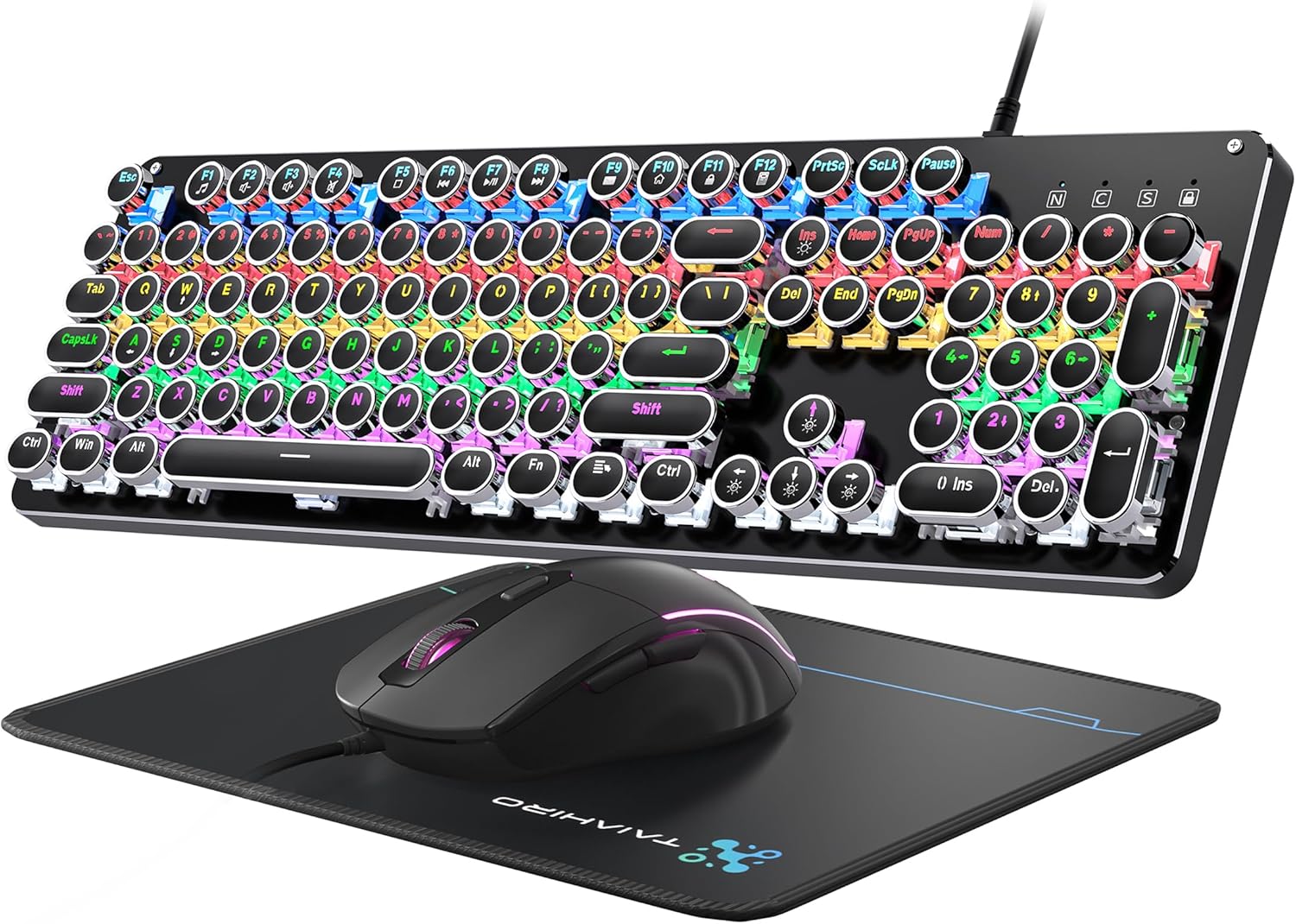
Figure 1: Taiahiro BK820 Typewriter Mechanical Gaming Keyboard and Mouse Combo.
2. Ihe ngwugwu
The Taiahiro BK820 combo includes the following items:
- Ahụigodo Mechanical typewriter
- Igwe egwu egwuregwu wired
- Mpempe òké
3. Akụrụngwa Ngwaahịa
The Taiahiro BK820 combo is equipped with several features to enhance your user experience:
- Typewriter Mechanical Keyboard and Mouse Set: Features mechanical blue switches, durable round keycaps, and an adjustable DPI optical mouse. Offers speed, accuracy, and comfort with a crisp click sound and precise tactile feedback.
- Metal Panel & Top Quality: The mechanical gaming keyboard is constructed from top-grade aluminum alloy with a matte finish. Double-shot-molded ABS keycaps are wear-resistant, non-fading, and removable for easy cleaning.
- 7 Colors Breathing RGB Gaming Mouse: Wired gaming mouse with a high-precision optical sensor and super-fast game engine. Features 4 Adjustable DPI Levels (800/1600/2400/3200), RGB backlighting, an anti-skid scroll wheel, and 7-color lighting with breathing and cycling effects.
- 104-Key Anti-Ghost Ergonomic Keyboard: 104 anti-ghosting keys for fast response. Full-size keyboard includes 12 multimedia keys and a number pad. Ergonomically designed with a high-low key layout, suspended round keys, and adjustable double kickstand feet to reduce hand fatigue.
- 11 Modes RGB Backlighting: Keyboard features 4-color RGB backlighting with 11 different lighting modes. Double-shot injection molded keycaps ensure clear backlight and extreme durability. Brightness and breathing speed are adjustable.
- Wide Compatible: USB 2.0 plug-and-play connection. Compatible with PC, laptop, Mac, and other devices, supporting Windows, Linux, and Mac OS systems.
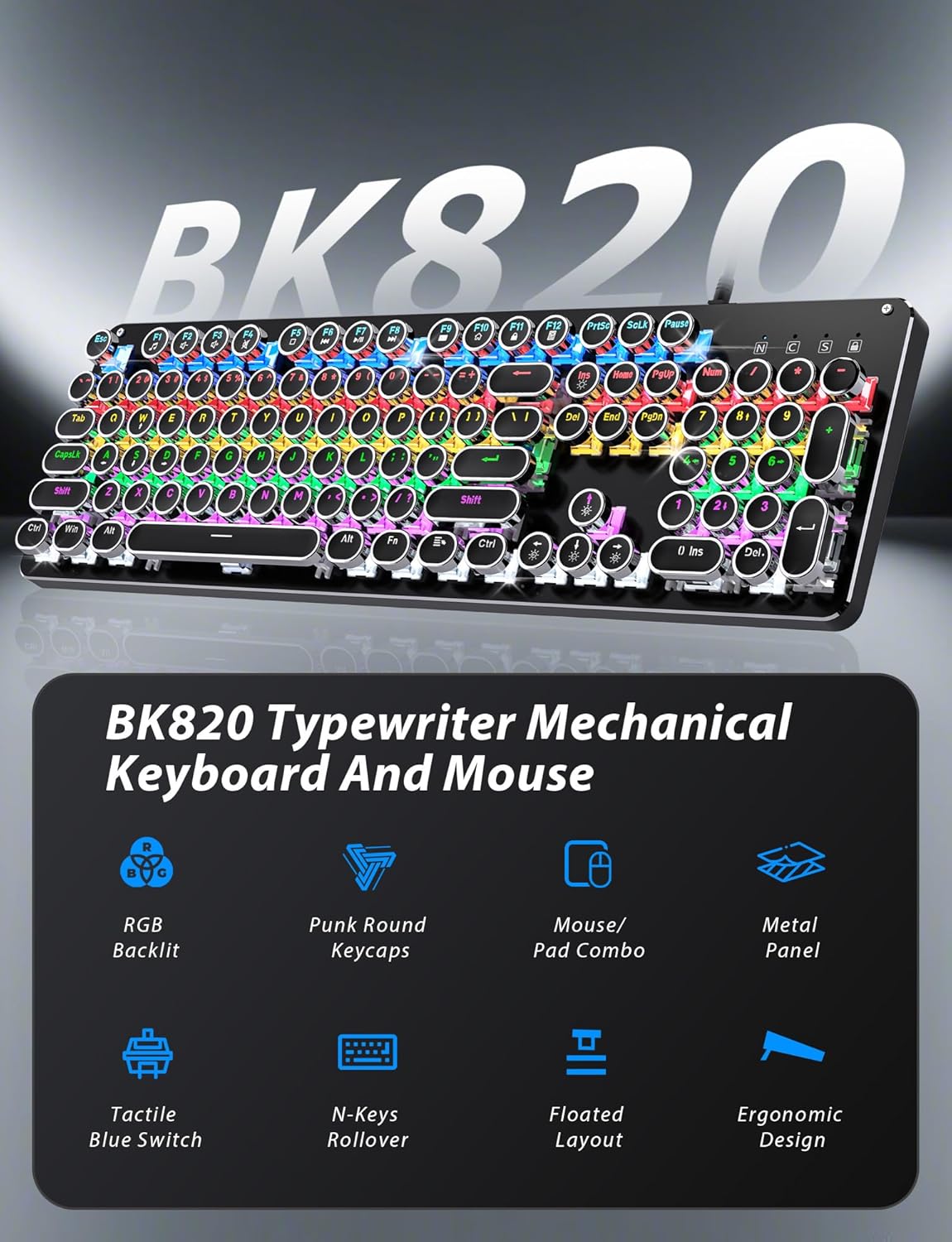
Figure 2: Key features of the Taiahiro BK820 combo.
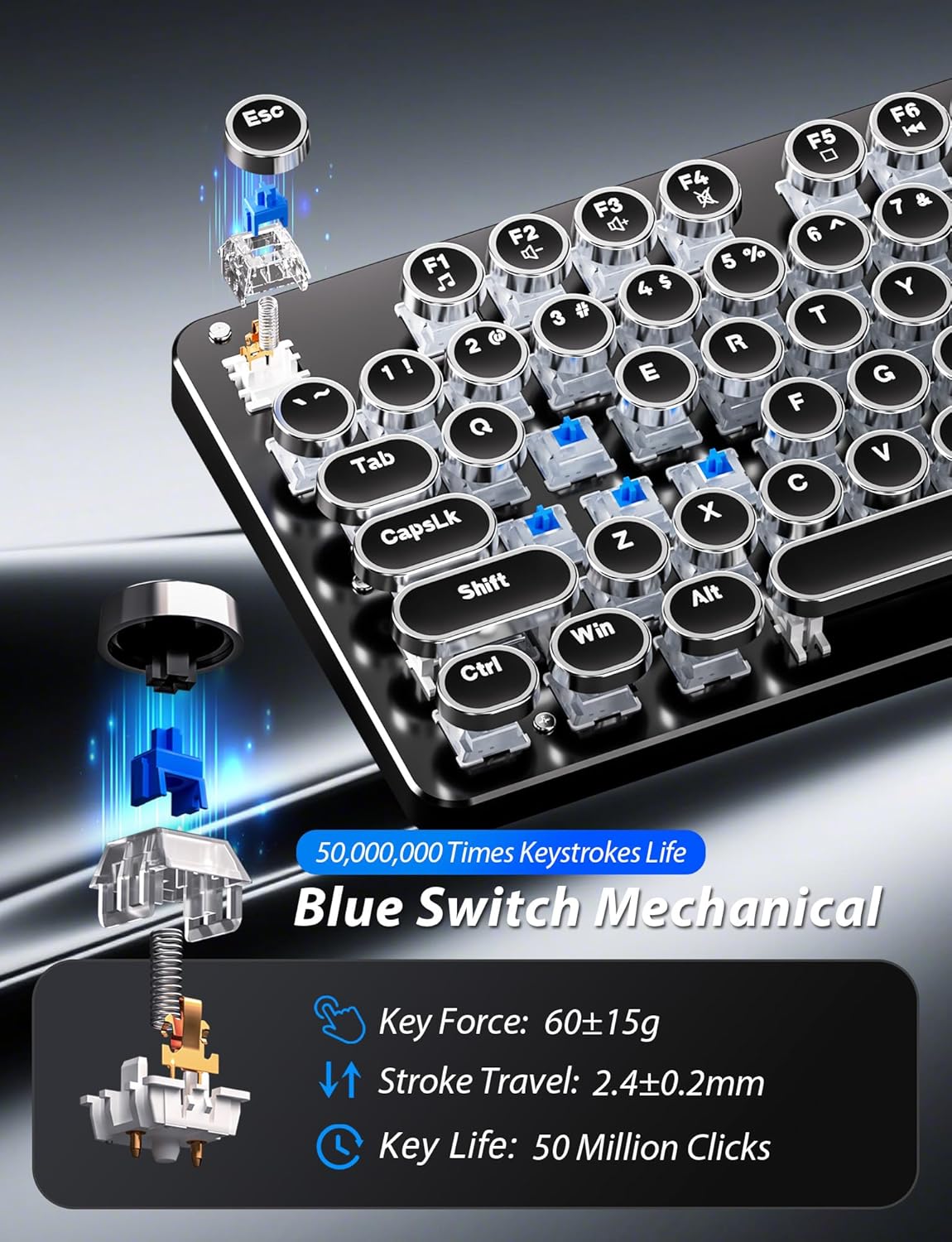
Ọgụgụ 3: Zuru ezu view of the mechanical blue switches.
4. Nhazi ntuziaka
- Jikọọ ahụigodo: Plug the keyboard's USB cable into an available USB 2.0 port on your computer. The keyboard is plug-and-play and should be recognized automatically by your operating system.
- Jikọọ òké: Plug the mouse's USB cable into another available USB 2.0 port on your computer. The mouse is also plug-and-play.
- Dezie akụkụ ahụigodo: Flip the keyboard over. Extend the adjustable double kickstand feet located on the underside of the keyboard to achieve your preferred typing angle.
- Gbakwụnye ezumike nkwojiaka (Nhọrọ): The keyboard features a magnetic wrist rest. Align the wrist rest with the front edge of the keyboard until it snaps into place.
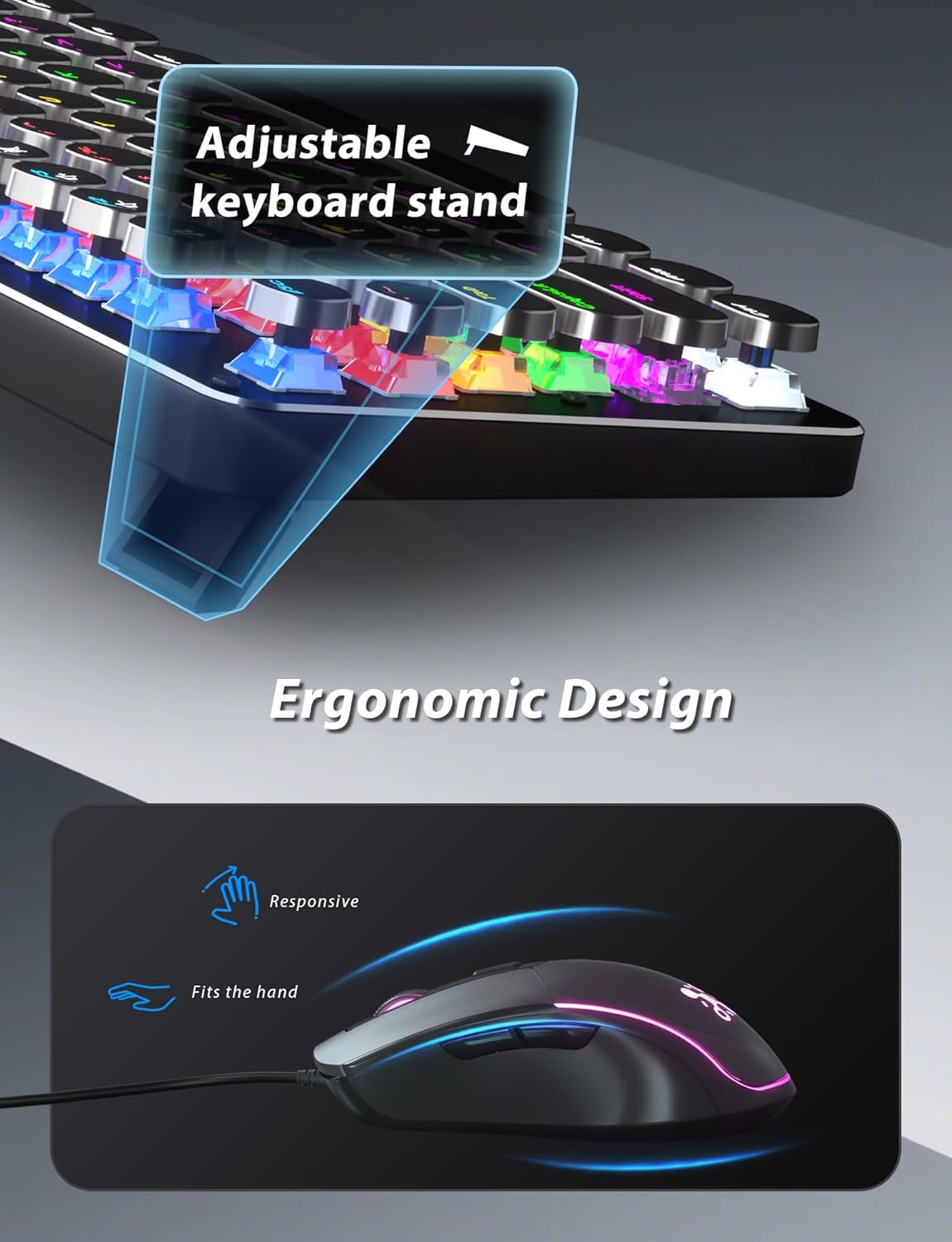
Figure 4: Adjustable keyboard stand for ergonomic comfort.
5. Ntuziaka ọrụ
5.1 Ọrụ ahụigodo
- RGB Backlight Modes: Pịa Fn + INS iji gbaa okirikiri site na ụdị ọkụ azụ RGB 11 dị iche iche.
- Gbanwee ọkụ azụ: Pịa Fn + ↑ (akụ elu) to increase brightness or Fn + ↓ (akụ ala) ibelata nchapụta.
- Gbanwee ọsọ ọkụ azụ: Pịa Fn + ← (Ụka aka ekpe) to decrease animation speed or Fn + → (Ụka akanri) to increase animation speed for dynamic lighting modes.
- Ụdị egwuregwu: The keyboard offers 6 preset gaming modes. Press Fn + F1 site na Fn + F6 to activate specific key lighting for different game types.
- Igodo mgbasa ozi: Jiri ihe Fn igodo jikọtara ya na nke F1-F12 keys for various multimedia controls (e.g., volume, play/pause, calculator).
- Mkpọchi igodo Windows: Pịa Fn + Mmeri to lock or unlock the Windows key, preventing accidental presses during gaming.

Figure 5: Keyboard RGB backlight controls.
5.2 Ọrụ òké
- Ndozi DPI: Press the DPI button located on the top of the mouse to cycle through 4 adjustable DPI levels (800/1600/2400/3200).
- RGB ọkụ: The mouse features 7-color breathing and cycling RGB lighting that changes automatically.
- Bọtịnụ n'ihu/Azu: Jiri bọtịnụ ndị dị n'akụkụ maka ịnyagharịa ngwa ngwa na web ihe nchọgharị ma ọ bụ ngwa ndị ọzọ.

Figure 6: Taiahiro BK820 Gaming Mouse with RGB lighting and DPI button.
5.3 Vidiyo ngwaahịa ngwaahịa
Vidiyo nke 1: Vidiyo a na-egosi etu esi ewepụ ihe egwuview of the 104-Key Retro Typewriter Mechanical Gaming Keyboard and Mouse combo, showcasing nhazi na atụmatụ ya.
Video 2: This video demonstrates the unboxing experience of the BK820 Typewriter Mechanical Keyboard and Mouse, showing the contents as they are removed from the packaging.
Video 3: This video introduces the Typewriter Mechanical Keyboard and Mouse Combo, highlighting its design and functionality.
6. Nlekọta
To ensure the longevity and optimal performance of your keyboard and mouse:
- Isi igodo nhicha: The double-shot-molded ABS keycaps are removable. Gently pull them off to clean any dust or debris underneath. Use a soft, damp cloth to wipe the keycaps and the keyboard surface. Ensure all parts are dry before reattaching keycaps.
- Mouse Cleaning: Use a soft, dry cloth to clean the mouse surface. Avoid using harsh chemicals or abrasive materials.
7. Nchọpụta nsogbu
- Ahụigodo ma ọ bụ òké anaghị aza: Ensure both the keyboard and mouse USB cables are securely plugged into your computer's USB ports. Try plugging them into different USB ports.
- Ìhè azụ anaghị arụ ọrụ / na-edozi: Verify that the keyboard is powered on. Use Fn + INS to cycle through modes. Adjust brightness with Fn + ↑/↓ and speed with Fn + ←/→.
- Windows Key Disabled: If the Windows key is not functioning, it might be locked. Press Fn + Mmeri to toggle its lock status.
- DPI òké anaghị agbanwe: Press the dedicated DPI button on the mouse to cycle through the available sensitivity settings.
8. Nkọwapụta
| Ụdị | Taiahiro |
| Nọmba nlereanya | BK820 |
| Agba | Nwa |
| Teknụzụ Njikọta | USB |
| Njirimara Pụrụ Iche | Azụ azụ |
| Ngwa dakọtara | PC, Laptop, Mac |
| Ibu Ibu | 2.51 pound |
| Akụkụ ngwugwu | 17.8 x 6.42 x 3.03 sentimita asatọ |
9. Akwụkwọ ikike na nkwado
For warranty information, technical support, or any inquiries regarding your Taiahiro BK820 Typewriter Mechanical Gaming Keyboard and Mouse Combo, please refer to the manufacturer's official websaịtị ma ọ bụ kpọtụrụ ndị ahịa ha ozugbo. Debe akwụkwọ nnata ịzụrụ maka akwụkwọ ikike.


