Okwu mmalite
The Motorola DLR1060 is a 6-channel digital business radio designed for reliable and private communication in various professional environments. Operating in the digital 900 MHz ISM license-free band, this radio offers enhanced clarity and security compared to analog systems. Its compact and lightweight design, combined with robust features, makes it an essential tool for efficient team coordination.
Kedu ihe gụnyere
The Motorola DLR1060 package typically includes the following items:
- Motorola DLR1060 2-Way Digital Business Radio (quantity as per pack size)
- Batrị Lithium-ion enwere ike ịgbanye
- Tray chaja na ihe nkwụnye ike
- Ihe mkpuchi eriri swivel
- User Guide and Safety Leaflet

Image: A typical 6-pack of Motorola DLR1060 digital business radios, showcasing the compact design of each unit.
Atụmatụ igodo
- Digital 900 MHz ISM License-Free Band: Ensures private and reliable communication.
- Ogologo ogologo: Covers up to 300,000 square feet or 20 floors.
- Ọwa 6: Provides multiple communication lines for different teams or purposes.
- Nkwanye olu: User-friendly voice prompts for channel navigation, battery status, and feature customization.
- Radio Profile ID: Unique 4-digit ID for enhanced privacy and direct communication.
- Computer Programming Software (CPS): Allows for personalized setups, including Private Groups, custom channel names, and radio settings.
- Ihe owuwu na-adịgide adịgide: Complies with Military Standards 810 C, D, E, F, and G for resistance against shock, vibration, extreme temperatures, and dust.
- Ogologo ndụ batrị: Internal rechargeable battery provides up to 14 hours of continuous operation.
- Instant Mute: Quickly silence the radio when needed.
- Bọtịnụ Elu A Na-ahazi: Assign frequently used functions for quick access.
Melite
1. Ịchaji batrị
- Insert the rechargeable Lithium-Ion battery into the radio, ensuring it clicks securely into place.
- Place the radio into the charging tray.
- Connect the power adapter to the charging tray and plug it into a standard electrical outlet.
- The charging indicator light on the tray will illuminate to show charging status. A full charge typically takes several hours.

Image: The Motorola DLR1060 radio securely seated in its charging cradle, ready for power connection.
2. Attaching the Belt Holster
- Align the radio with the swivel belt holster.
- Slide the radio into the holster until it locks into position.
- Attach the holster to your belt or clothing for convenient carrying.
Ntuziaka ọrụ
1. Gbanyụọ / gbanyụọ
- Iji gbanye, pịa ma jide Ike/NchNhr button (usually located on the top or side) until you hear a tone or voice prompt.
- Iji gbanyụọ, pịa ma jide Ike/NchNhr button again until the radio shuts down.

Foto: Akụkụ view of the DLR1060 radio, highlighting the power button and volume controls for easy access.
2. Na-agbanwe olu
- Jiri ihe Elu elu (+) na Olu ala (-) buttons on the side of the radio to adjust the listening volume.
3. Ịhọrọ ọwa
- Tugharia ihe Knob Nhọrọ Ọwa (typically on the top) to choose one of the 6 available channels.
- The radio will provide a voice prompt announcing the selected channel number.
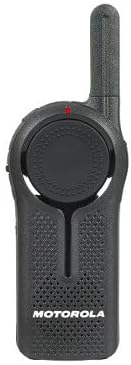
Foto: N'ihu view of the DLR1060 radio, featuring the prominent channel selector knob and integrated speaker.
4. Na-ebufe na ịnata
- Ka ịnyefe, pịa ma jide Push-To-Talk (PTT) bọtịnụ n'akụkụ redio. Kwuo nke ọma n'ime igwe okwu.
- Hapụ bọtịnụ PTT ka gee ntị maka nzaghachi.
- Ensure you are on the same channel as the person you wish to communicate with.
5. Private Communication (Radio Profile ID)
- The DLR1060 uses a unique 4-digit Radio Profile ID for private communication. This ID must be programmed into all radios intended for a private group.
- Refer to the Computer Programming Software (CPS) manual for detailed instructions on setting up and managing Radio Profile IDs and Private Groups.
Nlekọta
Cleaning the Radio
- Jiri nwayọ hichaa mpụta redio, damp akwa .
- Do not use harsh chemicals, cleaning solvents, or strong detergents, as these can damage the radio's casing and internal components.
- Ensure the radio is powered off and disconnected from any charging accessories before cleaning.
Nlekọta batrị
- Always use genuine Motorola batteries and charging accessories.
- Zere ikpughe batrị na oke okpomọkụ.
- If the radio will not be used for an extended period, store the battery separately in a cool, dry place.
Nchọpụta nsogbu
| Nsogbu | Ngwọta enwere ike |
|---|---|
| Redio anaghị agbanye ọkụ. | Gbaa mbọ hụ na chajịrị batrị zuru oke yana itinye ya nke ọma. |
| Enweghị ike ịnyefe ma ọ bụ nata. | Verify that all radios are on the same channel and have the correct Radio Profile ID. Check if the battery is low. |
| Ogo ọdịyo adịghị mma ma ọ bụ kwụ ọtọ. | Move closer to the other radio or to an open area. Check for obstructions. Ensure the antenna is clear. |
| Ndụ batrị dị mkpụmkpụ karịa ka a tụrụ anya ya. | Ensure the battery is fully charged before use. Battery performance can degrade over time; consider replacing older batteries. |
Nkọwapụta
| Njirimara | Nkọwa |
|---|---|
| Ugboro ugboro | 900 MHz ISM (License-Free) |
| Ọwa | 6 |
| Oke | Up to 300,000 sq ft / 20 Floors |
| Ndụ batrị | Ruo awa iri na abụọ (ojiji nkịtị) |
| Durability Standards | Military Standards 810 C, D, E, F, G |
| Ihe eji eme ụlọ | Polycarbonate |
| FCC ID | AZ489FT5870 |
| Ngwa dakọtara | Speaker, Headphone, Laptop (for CPS) |
| Agba | Nwa |
Akwụkwọ ikike na nkwado
For detailed warranty information and technical support, please refer to the documentation provided with your product or visit the official Motorola Solutions websaịtị. Debe nnata nzụta gị dị ka ihe akaebe nke ịzụrụ maka nkwupụta ikike.


