Masajoy Wireless Headset User Manual
Ụdị: Spark 06
Okwu mmalite
The Masajoy Wireless Headset with Mic for Work (Model: Spark 06) is designed to provide clear and reliable audio communication for various professional and personal uses. Featuring multiple connection modes, AI noise cancellation, and a comfortable design, this headset is ideal for business video conferencing, online courses, and call center environments.

Figure 1: Masajoy Wireless Headset and included accessories.
Kedu ihe dị na Igbe ahụ
Biko chọpụta na akụrụngwa niile dị na ngwugwu:
- Wireless Headset with Mic for Work
- USB A / C Dongle
- USB C to 3.5MM Cable
- Pịnye C Nchaji USB
- Akwụkwọ ntuziaka onye ọrụ
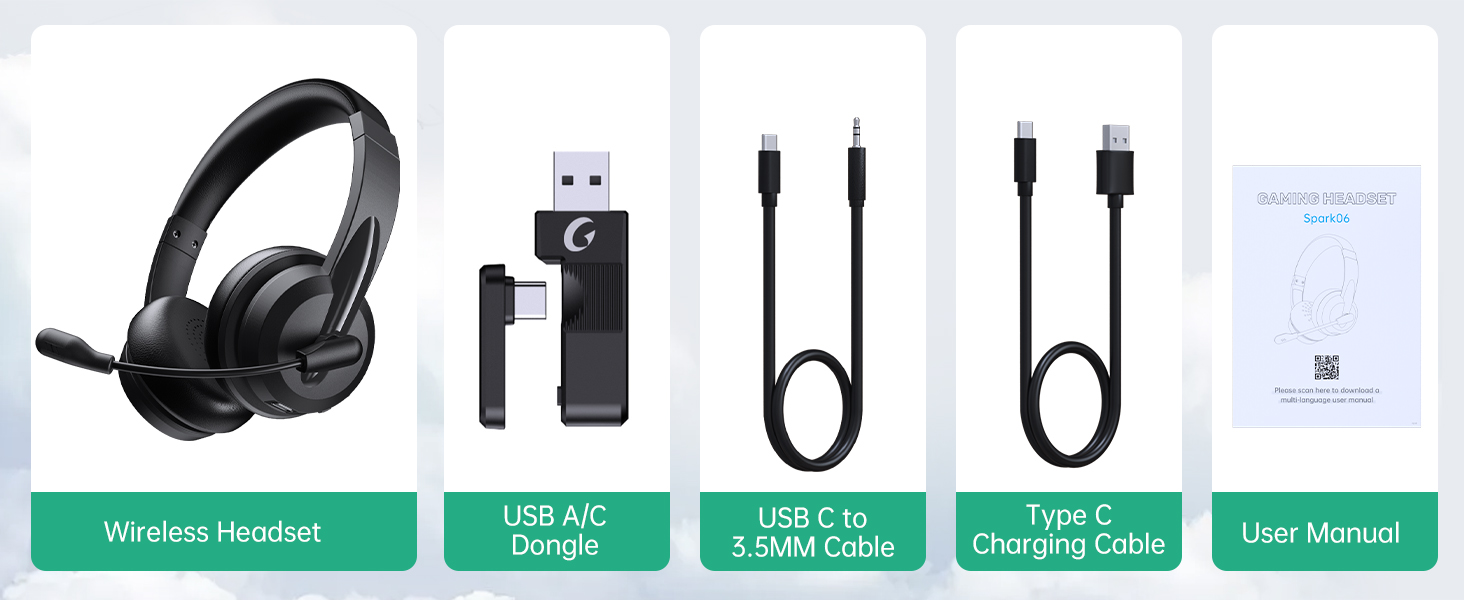
Foto 2: Ihe dị n'ime ngwugwu.
Melite
Ịchaji ekweisi
Before first use, fully charge the headset. Connect the Type C Charging Cable to the headset's charging port and the other end to a USB power source (e.g., computer USB port, wall adapter). The charging indicator light will show the charging status.
- Oge Nchaji zuru ezu: Ihe dịka awa 2.5
- Oge Okwu: Ruo awa iri atọ na ise
- Oge ịkpọghachi egwu: Ruo awa iri na abụọ

Figure 3: Long Battery Life for Extended Use.
Ụdị njikọ
The Masajoy headset supports three connection modes:
-
Bluetooth V5.3 Connection:
For wireless connection to Bluetooth-enabled devices (e.g., smartphones, laptops). Ensure the headset is in pairing mode (refer to operating instructions for details). Chọọ maka "Spark 06" in your device's Bluetooth settings and connect.
-
2.4G Wireless (USB A/C Dongle):
For wireless connection to computers without Bluetooth or for a dedicated connection. Plug the USB A or USB C dongle into an available USB port on your computer. The headset will automatically connect to the dongle.
-
Wired 3.5mm Audio Cable:
For a wired connection to devices with a 3.5mm audio jack. Connect one end of the USB C to 3.5MM Cable to the headset's USB-C port and the other end to your device's 3.5mm audio jack. This mode is useful when battery is low or for devices that do not support wireless connections.

Figure 4: Dual Connection Options (Bluetooth & 2.4G Wireless).
NOTE: This headset does not support dual device connection simultaneously.
Ntuziaka ọrụ
Gbanyụọ/ Gbanyụọ
- To Power On: Press and hold the Power button until you hear a voice prompt.
- To Power Off: Press and hold the Power button until you hear a voice prompt.
Njikwa olu
Use the volume control buttons located on the headset to adjust the listening volume.
AI Noise Cancelling Microphone
The headset features advanced AI noise cancellation to reduce background noise during calls. This feature enhances clarity for the listener.
NOTE: This AI Noise Cancelling feature is only available when connected via Bluetooth.

Figure 5: AI Noise Cancelling in action.
Ọrụ Ogbi Igwe Okwu
To mute the microphone, simply rotate the microphone boom to the upright position. A voice prompt will confirm "MIC mute". To unmute, rotate the microphone boom back down.

Figure 6: Microphone Mute Control by Rotation.
Nkasi obi na Nhazi
The headset is designed for all-day wear with protein memory foam ear cups that are soft and breathable, preventing overheating. The adjustable and expandable headband ensures a comfortable fit for most head shapes.

Figure 7: Comfortable and Breathable Design.
Nkọwapụta
| Njirimara | Nkọwa |
|---|---|
| Aha Nlereanya | Spark 06 |
| Teknụzụ Njikọta | Wireless (Bluetooth V5.3, 2.4G), Wired (3.5mm) |
| Njikwa mkpọtụ | AI Noise Cancellation (Bluetooth mode only), Passive Noise Cancellation |
| Ndụ Batrị (Oge Okwu) | Ruo awa iri abụọ |
| Battery Life (Music Playback) | Ruo awa iri abụọ |
| Oge Nchaji | Ihe ruru. awa 2.5 |
| Ikuku iche | Up to 36 feet (11 meters) for Bluetooth |
| Nha ọkwọ ụgbọ ala ọdịyo | 40 millimeters |
| Mmetụta igwe okwu | 43 dB |
| Jack ekweisi | USB-C (for charging/wired audio) |
| Ngwa dakọtara | PC, Mac, Laptop, Chromebook, tablet, smartphones, MP3 players, PS5, PS4, Xbox one, gaming systems with an aux port |
| Ihe onwunwe | Faux Leather, Polycarbonate (PC), Metal, Acrylonitrile Butadiene Styrene (ABS) |
| Ibu Ibu | 10.2 ounces |
| Agba | Nwa |
Nlekọta
- Nhicha: Jiri akwa dị nro dị nro hichaa ekweisi. Ejila ihe nchacha abrasive ma ọ bụ ihe mgbaze.
- Nchekwa: Chekwaa ekweisi n'ebe dị jụụ, kpọrọ nkụ na-adịghị na ìhè anyanwụ kpọmkwem na oke okpomọkụ.
- Nlekọta batrị: Ka ịgbatị ndụ batrị ogologo, zere ịchaji ekweisi ugboro ugboro. Na-ana ya ụgwọ oge niile, ọbụlagodi ma ọ bụrụ na ejighị ya ogologo oge.
- Ijikwa: Avoid dropping the headset or subjecting it to strong impacts. Do not twist or bend the microphone boom excessively beyond its intended rotation.
Nchọpụta nsogbu
| Nsogbu | Ihe nwere ike ime | Ngwọta |
|---|---|---|
| Igweisi anaghị agba ọkụ. | Batrị dị ala. | Charge the headset fully using the provided Type C charging cable. |
| Enweghị ike ijikọ site na Bluetooth. | Headset not in pairing mode; device Bluetooth off; out of range. | Ensure headset is in pairing mode. Turn Bluetooth on your device. Move headset closer to the device (within 36 feet). |
| Enweghị ụda sitere na ekweisi. | Volume too low; incorrect audio output selected on device; headset not connected. | Increase headset volume. Check device's audio output settings. Re-establish connection. |
| Igwe okwu anaghị arụ ọrụ. | Microphone muted; incorrect input device selected; AI Noise Cancellation issue. | Ensure microphone boom is not in the upright (muted) position. Check device's microphone input settings. Note that AI Noise Cancellation is only active in Bluetooth mode. |
| Poor sound quality / static. | Interference; out of range; low battery. | Move away from other wireless devices. Move closer to the connected device. Charge the headset. |
Akwụkwọ ikike na nkwado
Masajoy products are designed for reliability and performance. For warranty information and technical support, please refer to the official Masajoy website or contact customer service using the details provided in the original product packaging or purchase receipt.
Ị nwekwara ike ịga na Masajoy Store on Amazon maka ozi ngwaahịa na akụrụngwa nkwado.


