1. Okwu mmalite
The THOMSON RT350DAB is a portable radio designed for receiving both DAB/DAB+ digital radio and FM analog radio broadcasts. It features a compact and lightweight design, a clear dot matrix display, and a telescopic antenna for optimal reception. The radio can be powered via the included AC adapter or by 4 LR6 (AA) batteries for portable use.

Foto 1.1: N'ihu view of the THOMSON RT350DAB Portable DAB/FM Radio.
2. Ihe ngwugwu
Biko lelee na ihe niile dị:
- THOMSON RT350DAB Portable DAB/FM Radio
- Ada Ada AC
- Akwụkwọ ntuziaka (akwụkwọ a)

Image 2.1: The THOMSON RT350DAB radio in its retail packaging.
3. Nhazi
3.1 Ịkwanye redio
The RT350DAB radio can be powered in two ways:
- Ike AC: Connect the included AC power adapter to the DC IN socket on the back of the radio and then plug it into a standard wall outlet.
- Ike batrị: For portable use, insert 4 x LR6 (AA) batteries (not included) into the battery compartment located on the back of the radio. Ensure correct polarity (+/-) as indicated inside the compartment.

Foto 3.1: N'azụ view of the radio showing the battery compartment and AC adapter connection.
3.2 Antenna Positioning
Extend the telescopic antenna fully for optimal reception of both DAB and FM signals. Adjust its position for the best signal quality.
4. Ntuziaka ọrụ
4.1 Gbanyụọ ma ọ bụ gbanyụọ
Rotate the large knob on the front panel clockwise to turn the radio on. Rotate it counter-clockwise until it clicks to turn the radio off.
4.2 Nhọrọ Ụdị (DAB/FM)
Pịa Ụdị button (often labeled with 'M' or 'DAB/FM') to switch between DAB and FM radio modes.
4.3 Tuning DAB Stations
- Ensure the radio is in DAB mode.
- The radio will typically perform an automatic scan for available DAB stations upon first use or after a reset. The display will show "Scanning" or "Connexion...".
- Jiri ihe Dezie/Họrọ knob or arrow buttons (◀ / ►) to navigate through the list of found stations.
- Pịa OK or Họrọ button to confirm your choice and start listening.

Image 4.1: The radio display indicating a connection or scanning process.
4.4 Tuning FM Stations
- Switch the radio to FM mode.
- Nyocha akpaka: Pịa ma jide Nyochaa bọtịnụ (ọ bụrụ na ọ dị) ma ọ bụ Dezie/Họrọ knob to automatically search for the next available FM station.
- Akwụkwọ ntuziaka: Pịa nkenke Dezie/Họrọ knob or arrow buttons (◀ / ►) to fine-tune the frequency.
4.5 Atọrọ atọ
The radio allows you to save your favorite stations for quick access.
- Ịchekwa ihe atọrọ: Tune to the desired station. Press and hold one of the preset buttons (1, 2, 3, etc.) until the display confirms the station has been saved.
- Icheta Preset: Briefly press the corresponding preset button (1, 2, 3, etc.) to instantly tune to the saved station.
4.6 Njikwa olu
Rotate the large knob on the front panel to adjust the volume level.
5. Nlekọta
5.1 Nhicha
Wipe the radio with a soft, dry cloth. Do not use abrasive cleaners, waxes, or solvents as these may damage the finish. Ensure no liquids enter the device.
5.2 nnọchi batrị
When using battery power, replace all 4 LR6 (AA) batteries when the low battery indicator appears on the display or when the radio's performance diminishes. Always replace with new batteries of the same type and ensure correct polarity.
5.3 Nlekọta n'ozuzu
Avoid exposing the radio to extreme temperatures, direct sunlight, high humidity, or dusty environments. Do not drop the radio or subject it to strong impacts.
6. Nchọpụta nsogbu
| Nsogbu | Ihe nwere ike ime | Ngwọta |
|---|---|---|
| Enweghị ike | AC adapter not connected or faulty; batteries depleted or incorrectly inserted. | Check AC adapter connection and power outlet. Replace batteries, ensuring correct polarity. |
| Poor reception (DAB/FM) | Antenna anaghị agbatị maọbụ anaghị adị mma n'ọnọdụ ya; ebe mgbaàmà adịghị ike. | Fully extend and adjust the telescopic antenna. Try moving the radio to a different location. Perform a full scan for DAB stations. |
| Enweghị ụda | Volume too low; radio muted. | Increase the volume. Check if there is a mute function (refer to specific button labels if present). |
| DAB stations not found | Initial scan not performed; out of DAB coverage area. | Perform a full DAB scan. Check DAB coverage in your area. |
7. Nkọwapụta
| Njirimara | Nkọwa |
|---|---|
| Ụdị | THỌMSON |
| Nlereanya | RT350DAB |
| Nkà na ụzụ Tuner | DAB+, FM |
| Mmepụta Ọkà Okwu | 3 W RMS |
| Ụdị ngosi | Dot Matrix |
| Isi Iyi Ike | AC (via included adapter), 4 x LR6 (AA) batteries (not included) |
| Akụkụ (L x W x H) | 23 x 7 x 15 cm (approximate, based on product images) |
| Ibu | 312 g |
| Njirimara Pụrụ Iche | Enwere ike ibugharị |
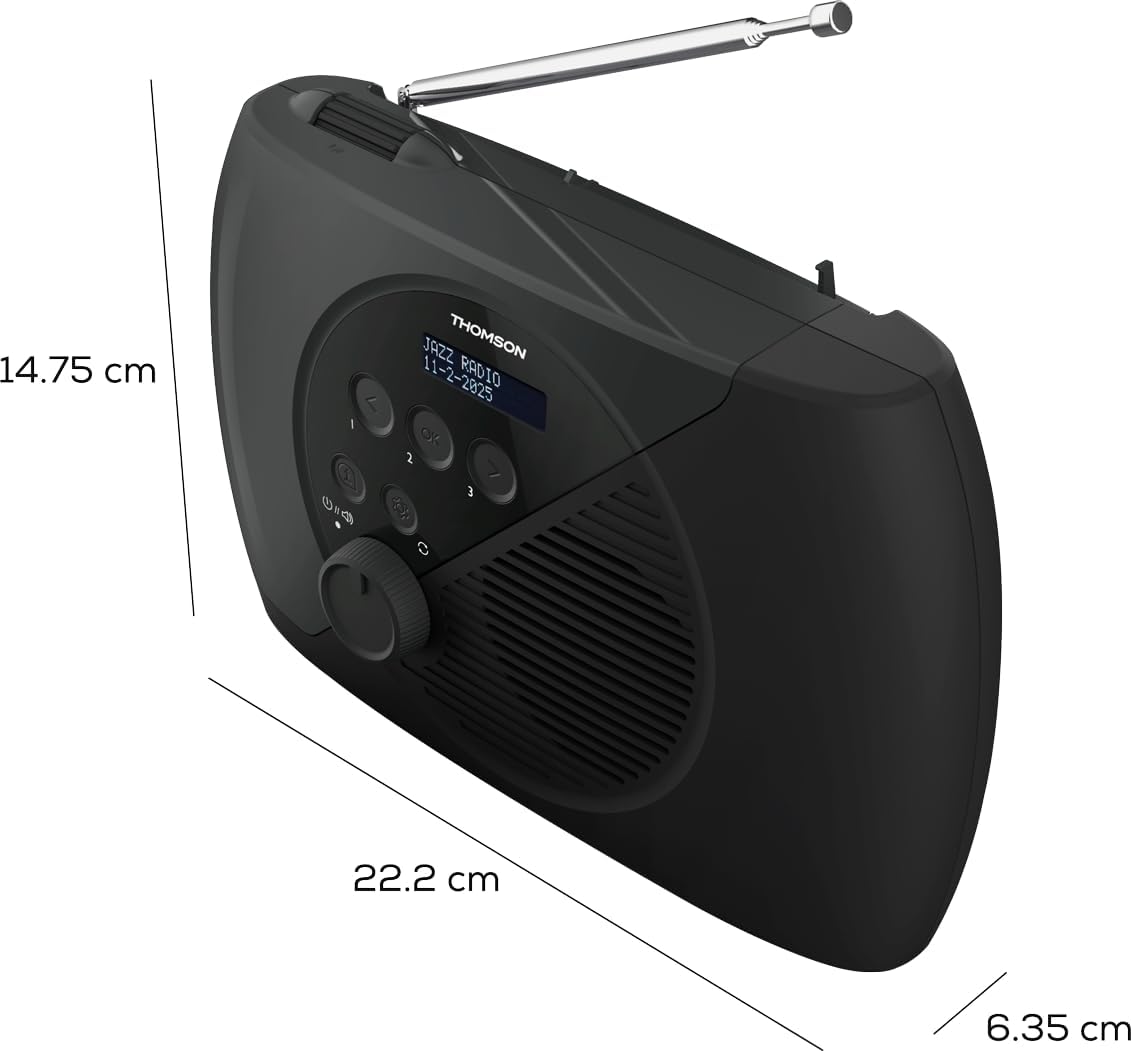
Image 7.1: Dimensions of the THOMSON RT350DAB radio.
8. Akwụkwọ ikike na nkwado
8.1 Ozi akwụkwọ ikike
This product is covered by a manufacturer's warranty. Please refer to the warranty card included with your purchase or contact your retailer for specific details regarding warranty duration and terms.
8.2 Nkwado ndị ahịa
For technical assistance, troubleshooting beyond this manual, or service inquiries, please contact THOMSON customer support or your local retailer. Contact information can typically be found on the THOMSON official websaịtị ma ọ bụ na nkwakọ ngwaahịa gị.


