1. Okwu mmalite
Thank you for choosing the AGPTEK Register Booster Fan. This device is designed to improve air circulation from your existing HVAC system by boosting airflow through 4x10 inch floor, wall, or ceiling vents. Featuring a smart thermostat, 10 adjustable speeds, a quiet brushless motor, and an innovative aroma diffuser, it helps maintain comfortable temperatures and enhance your living environment efficiently.
2. Ntuziaka nchekwa
- Gụọ ntuziaka niile tupu ojiji ma jide maka nrụtụ aka n'ọdịnihu.
- Gbaa mbọ hụ na ọkọnọ ọkụ voltage matches the fan's requirements (100-240V AC).
- Do not operate the fan with a damaged cord or plug. If damaged, contact customer support.
- Debe mkpịsị aka na ihe ndị mba ọzọ n'ebe a na-eji fan eme ihe mgbe ị na-arụ ọrụ.
- Do not immerse the fan unit in water or other liquids.
- Place the fan on a stable surface or securely install it in a vent opening.
- Avoid blocking the air intake or exhaust vents to ensure proper operation and prevent overheating.
- Ezubere ngwaahịa a maka naanị ime ụlọ.
3. Ihe ngwugwu
Biko lelee ngwungwu maka ihe ndị a:
- AGPTEK Register Booster Fan Unit
- Njikwa anya
- Wall Power Adapter (with 3.7m / 144-inch cable)
- Akwụkwọ ntuziaka (akwụkwọ a)
4. Akụrụngwa Ngwaahịa
- Innovative Aroma Diffuser Design: Features a dedicated spot for an aroma pad to infuse your space with essential oils.
- Ọrụ nchekwa ike: Optimizes HVAC efficiency by circulating residual warm or cool air, reducing energy waste.
- Smart and Manual Control: Equipped with a high-precision temperature sensor for automatic operation. Includes an on-board control panel and a remote control for manual adjustments.
- Quiet and Powerful Brushless Motor: Operates below 18 dB with a maximum speed of 3600 RPM and 10 adjustable fan speeds.
- Compact and Hassle-Free Setup: Designed to fit standard 4 x 10 inch vent openings. Plug-and-play installation.
- Ngosipụta smart: Automatically dims after one minute of inactivity to avoid disturbing your sleep.
5. Ntọala na nwụnye
The AGPTEK Register Booster Fan is designed for easy installation in standard 4 x 10 inch vent openings.
- Verify Vent Size: Ensure your existing duct opening measures 4 x 10 inches. Remove the old vent cover before measuring the duct opening itself, not the overall size of the old cover. The booster fan's face will extend past the duct opening.
- Nkwanye: Carefully place the booster fan into the 4 x 10 inch duct opening. It can be installed in floor, wall, or ceiling vents.
- Njikọ ike: Connect the power adapter to the fan unit, then plug the adapter into a standard 100-240V AC electrical outlet.


6. Ntuziaka ọrụ
The fan can be controlled via the on-board panel or the included remote control.
6.1. On-Board Control Panel
The control panel features a digital display and buttons for various functions:

- Bọtịnụ ike: Press to turn the fan On or Off.
- Mgbanwe Ọsọ (+/-): Use these buttons to increase or decrease the fan speed (1-10 levels).
- Bọtịnụ ụkpụrụ: Cycle through different operating modes (e.g., Smart Thermostat Mode, Manual Mode).
- Ngosipụta Digital: Shows current temperature, fan speed, and operating mode. The display will dim automatically after 1 minute of inactivity.
6.2. Remote Control
Njikwa dịpụrụ adịpụ na-enye ohere dị mfe ịnweta ọrụ fan niile site na anya.

- Bọtịnụ ike: Na-agbanyụ/gbanyụọ fan ahụ.
- Mgbanwe Ọsọ (+/-): Adjusts fan speed from 1 to 10.
- Bọtịnụ ụkpụrụ: Switches between Summer Mode (30-80°F) and Winter Mode (80-80°F) for smart temperature control.
- Bọtịnụ ngụ oge: Sets an operating timer (e.g., 1H, 2H, 4H).
6.3. Smart Thermostat Operation
The fan's intelligent sensor automatically activates or deactivates based on your desired temperature settings.
- Ụdị okpomọkụ: Set a desired temperature range (e.g., 30-80°F). The fan will turn on when the room temperature exceeds the upper limit of your set range, boosting cool air.
- Ụdị oyi: Set a desired temperature range (e.g., 80-80°F). The fan will turn on when the room temperature falls below the lower limit of your set range, boosting warm air.
- Adjust the temperature settings using the remote control or on-board buttons.
6.4. Aroma Diffuser Usage
Enhance your environment with your favorite essential oils.
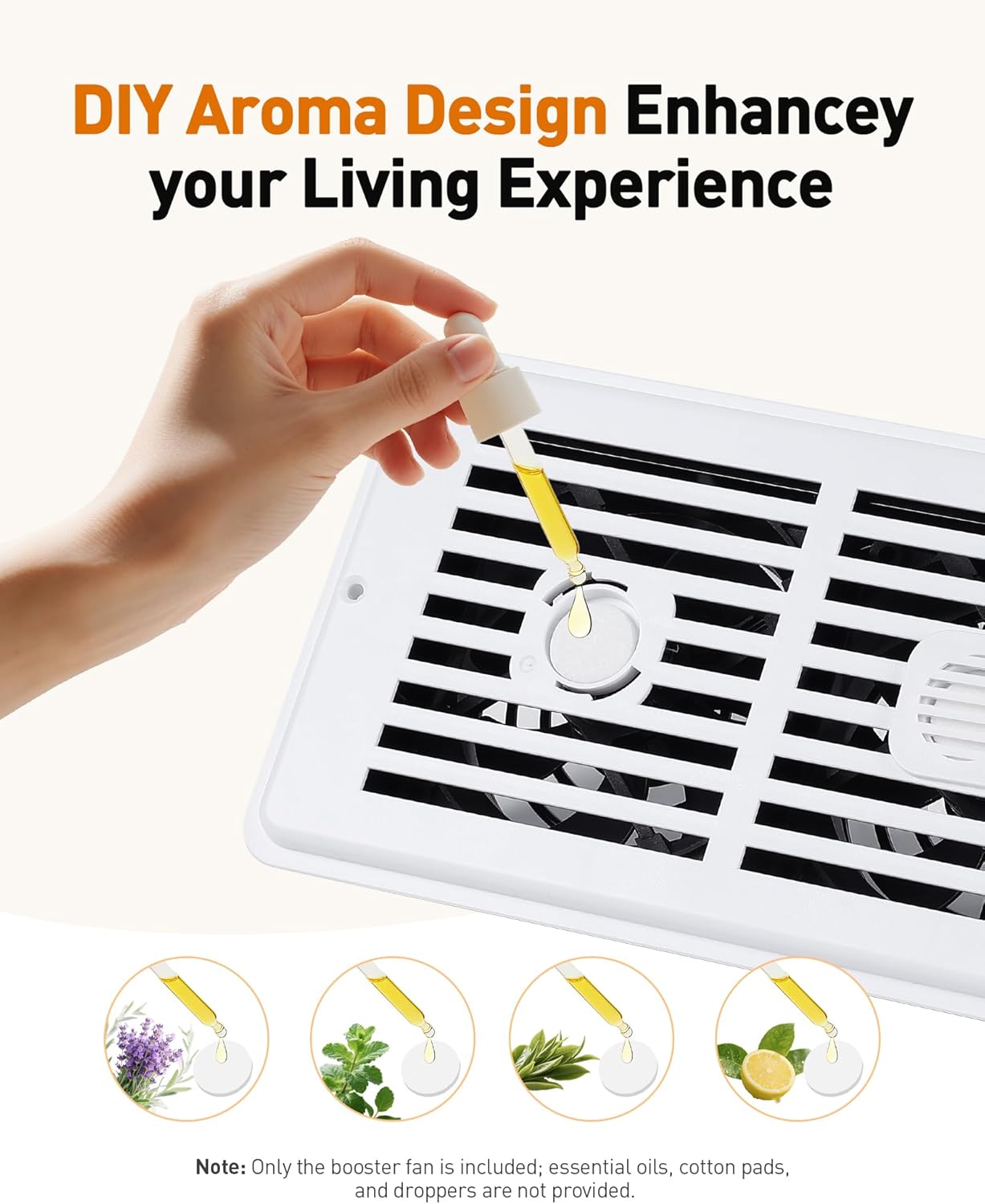
- Locate the aroma pad slot on the fan grille.
- Place a few drops of your preferred essential oil onto an aroma pad (not included).
- Insert the aroma pad into the designated slot.
- As the fan operates, the gentle breeze will diffuse the fragrance into the room.
7. Nlekọta
Ndozi mgbe niile na-eme ka arụmọrụ kachasị mma na ogologo oge nke onye na-akwado ihe nkwado gị.
- Na-ehicha onye ofufe: Disconnect the power adapter before cleaning. Use a soft, dry cloth to wipe the exterior of the fan. For the grilles, a soft brush or vacuum cleaner with a brush attachment can be used to remove dust. Do not use abrasive cleaners or immerse the unit in water.
- Aroma Pad Replacement: Replace aroma pads regularly to maintain fragrance effectiveness and hygiene.
8. Nchọpụta nsogbu
If you encounter issues with your AGPTEK Register Booster Fan, refer to the following common problems and solutions:
| Nsogbu | Ihe nwere ike ime | Ngwọta |
|---|---|---|
| Fan does not turn on, but display lights up. | Fan speed set to 0 or in an inactive smart mode. | Increase fan speed using the '+' button on the unit or remote. Check if the fan is in Smart Mode and if the current temperature is within the inactive range. |
| Enweghị ikuku ma ọ bụ ikuku na-adịghị ike. | Fan speed too low; vent obstructed; fan not properly seated. | Increase fan speed. Ensure the vent opening is clear of obstructions. Re-seat the fan firmly in the vent. |
| Njikwa anya anaghị arụ ọrụ. | Battery depleted; obstruction between remote and fan; remote out of range. | Replace the remote control battery. Ensure there are no objects blocking the signal. Operate the remote within a reasonable distance from the fan. |
| Onye ofufe na-eme mkpọtụ. | Fan speed too high; loose installation; foreign object in fan. | Reduce fan speed. Ensure the fan is securely installed in the vent. Disconnect power and carefully check for any foreign objects. |
9. Nkọwapụta
| Njirimara | Nkọwapụta |
|---|---|
| Ụdị | AGPtek |
| Nọmba nlereanya | APRGF1W1-US |
| Agba | Ọcha |
| Enyere ike | 8 Watt |
| Ntinye AC | AC AC 100-240V |
| Ọnụọgụ nke Ọsọ ọsọ | 10 |
| Ọkwa mkpọtụ | Below 18 Decibels |
| Ofufe ikuku | 120 CFM |
| Akụkụ ngwaahịa | 35.28 x 15.01 x 7.29 cm (13.89 x 5.91 x 2.87 inch) |
| Ibu ngwaahịa | 739g (1.63 lbs) |
| Ogologo eriri | 3.7m (144 sentimita asatọ) |
| Compatible Vent Size | 4 x10 inch |
| Ụdị njikwa | Push Button, Remote Control |
| Ụdị nkwụnye | Floor Mount, Wall Mount, Ceiling Mount |
| Atụmatụ pụrụ iche | Remote Control, Quiet Operation, Portable, Timer, Smart Thermostat, Aroma Diffuser |
10. Akwụkwọ ikike na nkwado
The AGPTEK Register Booster Fan comes with a manufacturer's warranty. For specific warranty details, please refer to the documentation included with your purchase or contact AGPTEK customer support.
If you have any questions, require technical assistance, or need to report an issue, please contact AGPTEK customer service through the retailer's platform or the official AGPTEK websaịtị.


