1. Ngwaahịa gafereview
Ihe Ourlife Sports Action Camera is designed to capture clear and detailed images with 1080P HD video recording and 5MP photography. It is suitable for various activities, from outdoor sports to everyday moments, delivering vibrant and dynamic visuals. Its robust design, including a waterproof casing and wide-angle lens, makes it an ideal companion for adventurers.
Akụkụ ndị bụ isi:
- HD 1080P Video & 5MP Photography: Capture high-resolution videos and crisp still images.
- Nhazi mgbochi mmiri: Designed for extreme sports, allowing use while surfing, swimming, or diving.
- 140° Ultra-Wide-Angle Lens: Na-ejide ubi sara mbara nke view maka foo imikputage.
- Batrị 400mAh na-adịte aka: Supports extended shooting time.
- 2-Inch HD LCD Screen: Na-enye ihe doro anya view for framing shots and playback.
- Ngwa ngwa-Enyi na Enyi: Easy to operate for all users.

Figure 1.1: The Ourlife Sports Action Camera enclosed in its waterproof housing, ready for underwater use. The camera features an HD 1080P display and is designed for capturing dynamic visuals in various environments.
2. Kedu ihe dị na Igbe ahụ
Biko lelee ọdịnaya nke ngwugwu gị ka ị hụ na ihe niile dị:
- Ourlife Sports Action Camera
- Ụlọ enweghị mmiri
- Jikwaa Bar/Pole Ugwu
- Mpempe akwụkwọ 1
- Ugwu 1
- Ugwu 2
- Ugwu 3
- Ugwu 4
- Bandeeji
- Batrị enwere ike ịgbanye (400mAh)
- Chaja batrị
- Akwụkwọ ntuziaka (akwụkwọ a)
- Ogwe Pry

Figure 2.1: All included accessories and components for the Ourlife Sports Action Camera. This includes various mounts, the waterproof housing, battery, charger, and other essential items.
3. Ntuziaka Nhazi
3.1 Ịchaji batrị
- Insert the provided 400mAh rechargeable battery into the battery charger.
- Connect the battery charger to a power source using a compatible USB cable (not included) and adapter.
- The indicator light on the charger will show the charging status. Once fully charged, disconnect the charger.
3.2 Itinye Batrị na Kaadị Ebe Nchekwa
- Open the battery compartment cover on the camera.
- Insert the charged battery, ensuring the correct polarity.
- Locate the TF (microSD) card slot. Insert a compatible memory card (Class 10 or higher, up to 32GB recommended) until it clicks into place.
- Mechie mkpuchi nke batrị batrị nke ọma.
3.3 Attaching the Waterproof Housing and Mounts
- To use the camera underwater or in harsh environments, place it inside the waterproof housing. Ensure the housing is clean and free of debris, and the seal is properly seated.
- Close the housing latch firmly to create a watertight seal.
- Attach the desired mount (e.g., Handle Bar/Pole Mount, Clip, or other mounts) to the waterproof housing or directly to the camera if not using the housing, depending on your activity.
- Secure the mount using the provided screws or clips.

Figure 3.1: The camera in its waterproof housing, demonstrating its capability to be submerged up to 98 feet (approximately 30 meters). This housing protects the camera during water-based activities.
4. Ntuziaka ọrụ
4.1 Gbanyụọ/ gbanyụọ
- Iji gbanye: Press and hold the Power/Mode button (usually located on the front or top of the camera) for a few seconds until the screen lights up.
- Iji gbanyụọ: Press and hold the Power/Mode button again until the screen turns off.
4.2 Navigating the 2-Inch LCD Screen
The 2-inch HD LCD screen allows you to preview your shots, review footage, and navigate settings. Use the Power/Mode button to cycle through modes (Video, Photo, Playback, Settings) and the Up/Down buttons (if available) or Shutter button to select options within menus.
4.3 Recording Videos and Taking Photos
- Ụdị vidiyo: Once powered on, the camera typically defaults to video recording mode. Press the Shutter/OK button (usually on top) to start recording. Press it again to stop.
- Foto mode: Press the Power/Mode button repeatedly until the camera enters photo mode. Press the Shutter/OK button to take a picture.
- Ụdị ịkpọghachi: Switch to playback mode to review vidiyo na foto gị edere na ihuenyo LCD.
4.4 Using the 140° Wide-Angle Lens
The 140° wide-angle lens is automatically engaged, providing a broad field of view. This is ideal for capturing expansive landscapes, group shots, or immersive action footage where you want to include more of the surroundings.

Figure 4.1: Visual representation of the Ourlife Sports Action Camera highlighting its key features: 12MP image resolution, 140° wide-angle lens, waterproof capability, 2-inch LCD display, and 1080P Ultra HD video capture.
5. Nlekọta
5.1 Cleaning the Camera and Housing
- Use a soft, lint-free cloth to clean the camera body and LCD screen. For stubborn smudges, slightly dampen akwa na mmiri.
- Maka oghere, jiri akwa nhicha oghere pụrụ iche na ngwọta iji zere ncha.
- After using the waterproof housing in saltwater, rinse it thoroughly with fresh water and let it air dry. Ensure no salt residue remains on the seals.
5.2 Nlekọta batrị
- Gbanyụọ batrị zuru oke tupu ojiji mbụ.
- Avoid completely draining the battery regularly to prolong its lifespan.
- If storing the camera for an extended period, charge the battery to about 50% and remove it from the camera.
5.3 Nchekwa
Store the camera and its accessories in a cool, dry place, away from direct sunlight and extreme temperatures. Keep it in its original packaging or a protective case to prevent damage.
6. Nchọpụta nsogbu
| Nsogbu | Ihe nwere ike ime | Ngwọta |
|---|---|---|
| Igwefoto anaghị agba ọkụ. | Battery is dead or not inserted correctly. | Chajie batrị ahụ nke ọma. Hụ na etinyere batrị ahụ na polarity ziri ezi. |
| Cannot record video or take photos. | Memory card is full, corrupted, or not inserted. | Insert a compatible memory card. Format the memory card (this will erase all data). Delete unnecessary files. |
| Ọdịdị vidiyo/foto adịghị mma. | Lens is dirty. Insufficient lighting. Incorrect settings. | Clean the lens. Ensure adequate lighting. Check camera settings for resolution and exposure. |
| Water leakage into housing. | Housing not properly sealed. Debris on seal. Damaged seal. | Ensure housing latch is firmly closed. Check for and remove any debris on the rubber seal. Inspect the seal for cracks or damage; replace if necessary. |
7. Nkọwapụta
| Ụdị | Ourlife |
| Nọmba nlereanya | RXE123 |
| Mkpebi ịse vidiyo | 1080p HD |
| Mkpebi foto | 5 megapixel (MP) |
| Nha ihuenyo | 2-inch LCD |
| Wide-Angle Field of View | 140° |
| Ike batrị | 400mAh |
| Ụdị ebe nchekwa Flash | TF (microSD) |
| Usoro Nseta vidiyo | AVI |
| Teknụzụ ihe mmetụta foto | CCD |
| Ogologo Focal kacha | 30 |
| Ogologo Fokalụ kacha nta | 28 |
| Oghere kacha | 2.8 f |
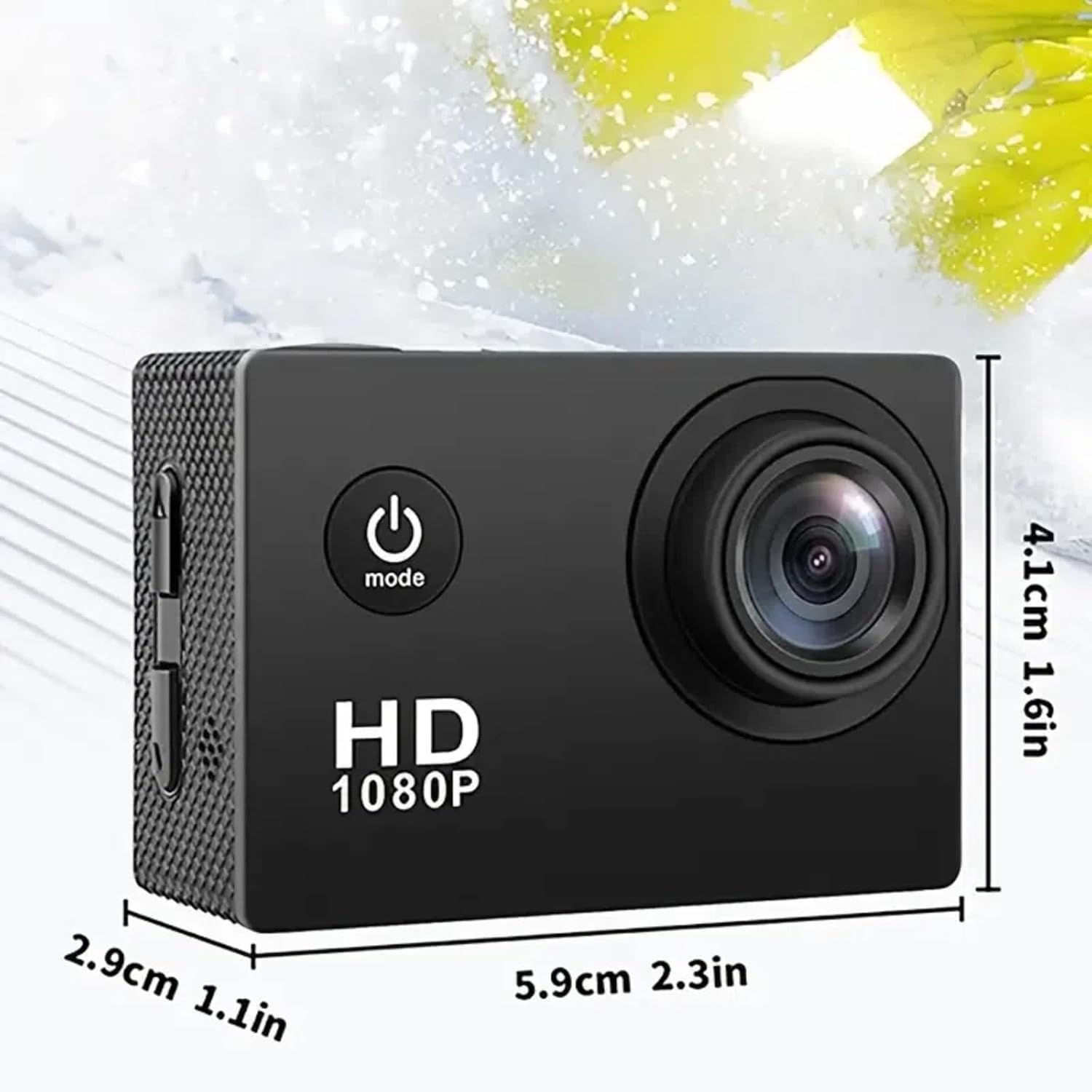
Figure 7.1: Physical dimensions of the Ourlife Sports Action Camera, showing its compact size for portability and ease of use.
8. Akwụkwọ ikike na nkwado
For warranty information, technical support, or service inquiries, please contact Ourlife customer support. Details can typically be found on the product packaging or the official Ourlife websaịtị.
Biko dowe akwụkwọ ikike ịzụrụ ihe ọ bụla.


