Okwu mmalite
This manual provides instructions for the setup, operation, maintenance, and troubleshooting of your XINFUTE WH-TA11PE replacement remote control for Toshiba Air Conditioners. This remote is designed to function as an original replacement for controlling both cooling and heating functions.
Melite
1. Ntinye batrị
The XINFUTE WH-TA11PE remote control requires two (2) AAA batteries for operation. Follow these steps to install the batteries:
- Chọta mkpuchi mkpuchi batrị n'azụ nke njikwa anya.
- Wetuo mkpuchi ahụ ala ma ọ bụ pịa eriri ma welie oghere ka imepe oghere ahụ.
- Fanye batrị AAA abụọ, na-ahụ na njedebe dị mma (+) na nke na-adịghị mma (-) dabara nke ọma na akara ndị dị n'ime ụlọ ahụ.
- Dochie mkpuchi nke batrị batrị site na mweghachi ya n'ime ebe ruo mgbe ọ pịrị na nchekwa.
Mara: No pairing or programming is required. The remote control is ready for use immediately after battery installation.
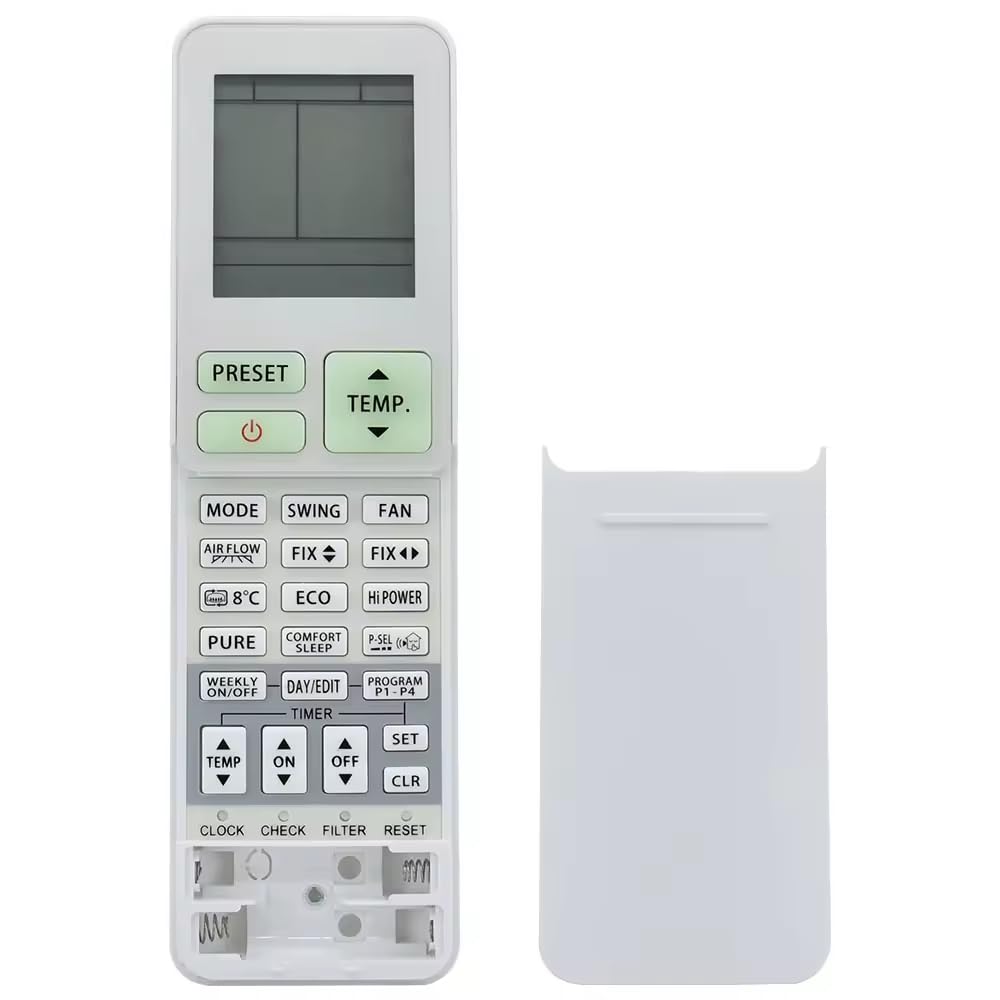
Foto: ihu na azụ view of the XINFUTE WH-TA11PE remote control. The back view highlights the battery compartment, indicating where two AAA batteries should be inserted.
Ntuziaka ọrụ
This replacement remote control is designed to function identically to the original Toshiba Air Conditioner remote, supporting both cooling and heating modes. Point the remote control directly at your Toshiba Air Conditioner unit when pressing buttons.
Ọrụ ndị bụ isi:
- Gbanyụọ/ Gbanyụọ: Pịa IKE button to turn the air conditioner on or off.
- Nhọrọ ụdị: Jiri ihe MODE button to cycle through available modes (e.g., Cool, Heat, Fan, Dry, Auto).
- Ndozi okpomọkụ: Jiri ihe KWESỊRỊ (v) na Kwụsị ala (▼) buttons to set your desired temperature.
- Ọsọ onye ofufe: Adjust the fan speed using the MMA bọtịnụ.
- Swing/Louvre: Control the air direction with the INGTỌ or AKW .KWỌ button (if applicable to your AC model).
Refer to your Toshiba Air Conditioner's original manual for specific functions and button layouts if you require advanced operation details.
Nlekọta
Nlekọta kwesịrị ekwesị ga-eme ka njikwa remote gị dị ogologo oge.
- Nhicha: Wipe the remote control with a soft, dry cloth. Do not use liquid cleaners, abrasive pads, or chemical solvents.
- Ngbanwe batrị: Replace batteries when the remote's range decreases or it stops responding. Always replace both batteries at the same time with new ones of the same type (AAA).
- Nchekwa: Ọ bụrụ na agaghị eji njikwa ime ihe ruo ogologo oge, wepụ batrị ndị ahụ ka ọ ghara ịwụfu na mmebi nwere ike ime.
- gburugburu: Keep the remote control away from direct sunlight, high temperatures, and high humidity. Avoid dropping the remote or exposing it to strong impacts.
Nchọpụta nsogbu
If you experience issues with your XINFUTE WH-TA11PE remote control, try the following solutions:
- Remote anaghị aza:
- Lelee ma etinyere batrị ndị ahụ nke ọma site na iji polarity ziri ezi (+/-).
- Jiri batrị AAA ọhụrụ dochie batrị ochie.
- Hụ na enweghị ihe mgbochi ọ bụla n'etiti njikwa remote na ngwaọrụ ikuku oyi.
- Jide n'aka na ị nọ n'ime oke ọrụ dị irè nke igwe oyi.
- Ọrụ ụfọdụ anaghị arụ ọrụ:
- Verify that your Toshiba Air Conditioner model supports the specific function you are trying to use. Some advanced features may vary between AC models.
Ọ bụrụ na nsogbu ahụ anọgide mgbe ị nwalechara usoro ndị a, biko gaa na ngalaba Akwụkwọ ikike na Nkwado maka enyemaka ndị ọzọ.
Nkọwapụta
| Nọmba nlereanya | WH-TA11PE |
| Ụdị | XINFUTE |
| Ngwa dakọtara | Toshiba Air Conditioners |
| Isi Iyi Ike | Batrị 2 x AAA (anaghị etinye ya) |
| Akụkụ ngwaahịa | 4 x 3 x 1 sentimita asatọ |
| Ibu Ibu | 2.82 ounces |
| Ihe onwunwe | ABS ihe |
| Njirimara Pụrụ Iche | Ergonomic |
Akwụkwọ ikike na nkwado
Ozi akwụkwọ ikike
Your XINFUTE WH-TA11PE remote control comes with a akwụkwọ ikike otu afọ site na ụbọchị azụrụ ya. Akwụkwọ ikike a na-ekpuchi ntụpọ nrụpụta ma na-eme ka ngwaahịa ahụ rụọ ọrụ dịka ebumnuche ya dị n'okpuru ojiji nkịtị.
Nkwado ndị ahịa
If you encounter any issues or are not satisfied with your purchase, please contact XINFUTE customer support. It is recommended to reach out within 24 hours of receiving your product for prompt assistance. Contact details can typically be found on the product packaging or the retailer's website where the purchase was made.


