Okwu mmalite
This manual provides essential information for the proper setup, operation, and maintenance of your My Arcade Sonic The Hedgehog Joystick Player. Please read this manual thoroughly before using the product to ensure a safe and enjoyable gaming experience.
Ngwaahịa gafereview
The My Arcade Sonic The Hedgehog Joystick Player is a portable retro gaming console featuring classic SEGA titles. It offers an authentic arcade experience with a joystick and dedicated buttons.
Akụkụ ndị bụ isi:
- Officially licensed SEGA game console.
- High-resolution 3.5-inch full-color display.
- Na-agụnye Sonic the Hedgehog na Sonic the Hedgehog 2.
- 3.5mm headphone jack for private audio.
- Ọkà okwu arụnyere na njikwa olu.
- Ncha ihuenyo nwere ike idozi.
- Powered by 4 AA batteries (not included) or USB-C cable (not included).
Ngwa:
- Gaming Console Unit
- Joystick
- Action Buttons (A, B, C)
- Bọtịnụ ụlọ
- Credit/Start Button
- Njikwa olu (+/-)
- Njikwa ihie
- Jack ekweisi 3.5mm
- USB-C Power Input (5V IN)
- Battery Compartment (requires 4 AA batteries)

The My Arcade Sonic The Hedgehog Joystick Player, a portable retro gaming console.
Melite
Powering the Console:
- Nwụnye batrị: Locate the battery compartment on the back of the console. Insert 4 AA batteries (not included), ensuring correct polarity.
- USB-C Power (Optional): Alternatively, connect a USB-C cable (not included) to the 5V IN port on the back of the console to power it.
Ojiji mbụ:
- Peel off the protective screen sticker before use.
- Turn on the console using the power switch located on the back.

N'azụ view of the console, highlighting the battery compartment, USB-C port, and headphone jack.
Ntuziaka ọrụ
Game Selection and Start:
- Once powered on, use the joystick to navigate and select your desired game (Sonic the Hedgehog or Sonic the Hedgehog 2) from the main menu.
- Pịa START/CREDIT button to add virtual coins and begin the game.
- To skip the Sonic demo mode, press the START/CREDIT bọtịnụ.
Njikwa:
- Joysticks: Controls character movement.
- Action Buttons (A, B, C): Perform in-game actions such as jumping or attacking.
- Njikwa Olu (+/-): Adjust the sound level of the built-in speaker using the buttons on the back of the console.
- Ihu ihuenyo: Adjust the screen brightness using the dedicated button on the back.
- Jack ekweisi: For private listening, connect 3.5mm headphones to the headphone jack on the back.
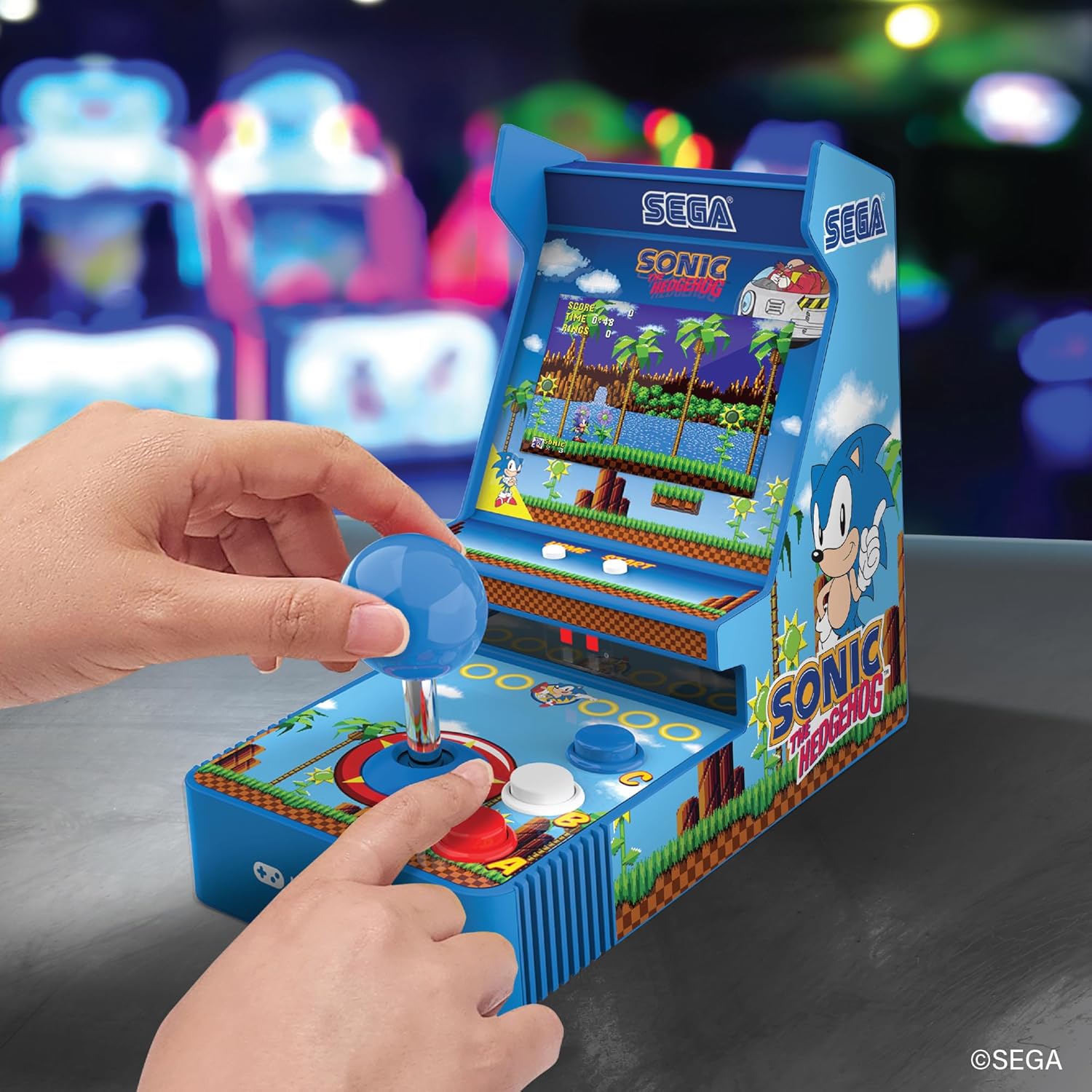
N'ihu view of the console, showing the joystick, action buttons, and screen during gameplay.
Official video demonstrating the My Arcade Sonic Arcade Game in action, showcasing gameplay and features.
Nlekọta
To ensure the longevity of your My Arcade Sonic The Hedgehog Joystick Player, follow these simple maintenance guidelines:
- Keep the console clean by wiping it with a soft, dry cloth. Avoid using abrasive cleaners or solvents.
- Store the console in a cool, dry place away from direct sunlight and extreme temperatures.
- If not in use for an extended period, remove the AA batteries to prevent leakage.
Nchọpụta nsogbu
If you encounter any issues with your My Arcade Sonic The Hedgehog Joystick Player, refer to the following common solutions:
- Console does not power on: Ensure that fresh AA batteries are correctly installed or that the USB-C cable is securely connected to a power source.
- Game does not start from demo mode: Pịa START/CREDIT button to exit demo mode and begin gameplay.
- Enweghị ụda: Check the volume control buttons on the back of the console. If headphones are connected, ensure they are fully plugged in and functioning correctly.
- Screen is dim: Adjust the screen brightness using the dedicated button on the back of the console.
If problems persist, please contact My Arcade customer support for further assistance.
Nkọwapụta
| Njirimara | Nkọwa |
|---|---|
| Akụkụ ngwaahịa | 4"L x 6.8"W x 7.6"H |
| Ụdị njikwa | Joystick |
| Ibu Ibu | 0.63 Kilogram (1.39 pound) |
| Nha ihuenyo | 3.5 sentimita asatọ |
| Isi Iyi Ike | 4 AA batteries (not included) or USB Type C (not included) |
| Ngwaọrụ Akụrụngwa | USB Ụdị C |
| Ụdị ngosi | LCD |
| Ihe onwunwe | Plastic |
| Ike Nchekwa ebe nchekwa | 4 MB |
| Nọmba nlereanya | DGUNL-7157 |
| UPC | 845620071579 |
Ozi nchekwa
- Ọ dịghị mma maka ụmụaka na-erubeghị afọ 3 n'ihi obere akụkụ.
- Na-elekọta ụmụaka mgbe niile n'oge eji.
- Do not expose the console to water or excessive moisture.
- Zere ịda ma ọ bụ itinye ihe njikwa ahụ n'ọnọdụ siri ike.
- Use only recommended battery types and ensure correct installation.
Akwụkwọ ikike na nkwado
For warranty information or technical support, please refer to the official My Arcade websaịtị ma ọ bụ kpọtụrụ ngalaba ọrụ ndị ahịa ha. Debe nnata nzụta gị ka ihe akaebe nke ịzụrụ.


