Okwu mmalite
Thank you for choosing the Micool BT-X Easy On-Ear Headphones. These headphones are designed to provide a comfortable listening experience with high-quality audio and extended battery life. Featuring Bluetooth 5.4 technology and a unique open-ear design, they are perfect for various activities, from sports to daily commutes.
Kedu ihe dị na Igbe ahụ
- Micool BT-X Easy On-Ear Headphones (Left & Right)
- Akpa nchaji ikuku
- USB-C eriri USB
- Akwụkwọ ntuziaka onye ọrụ
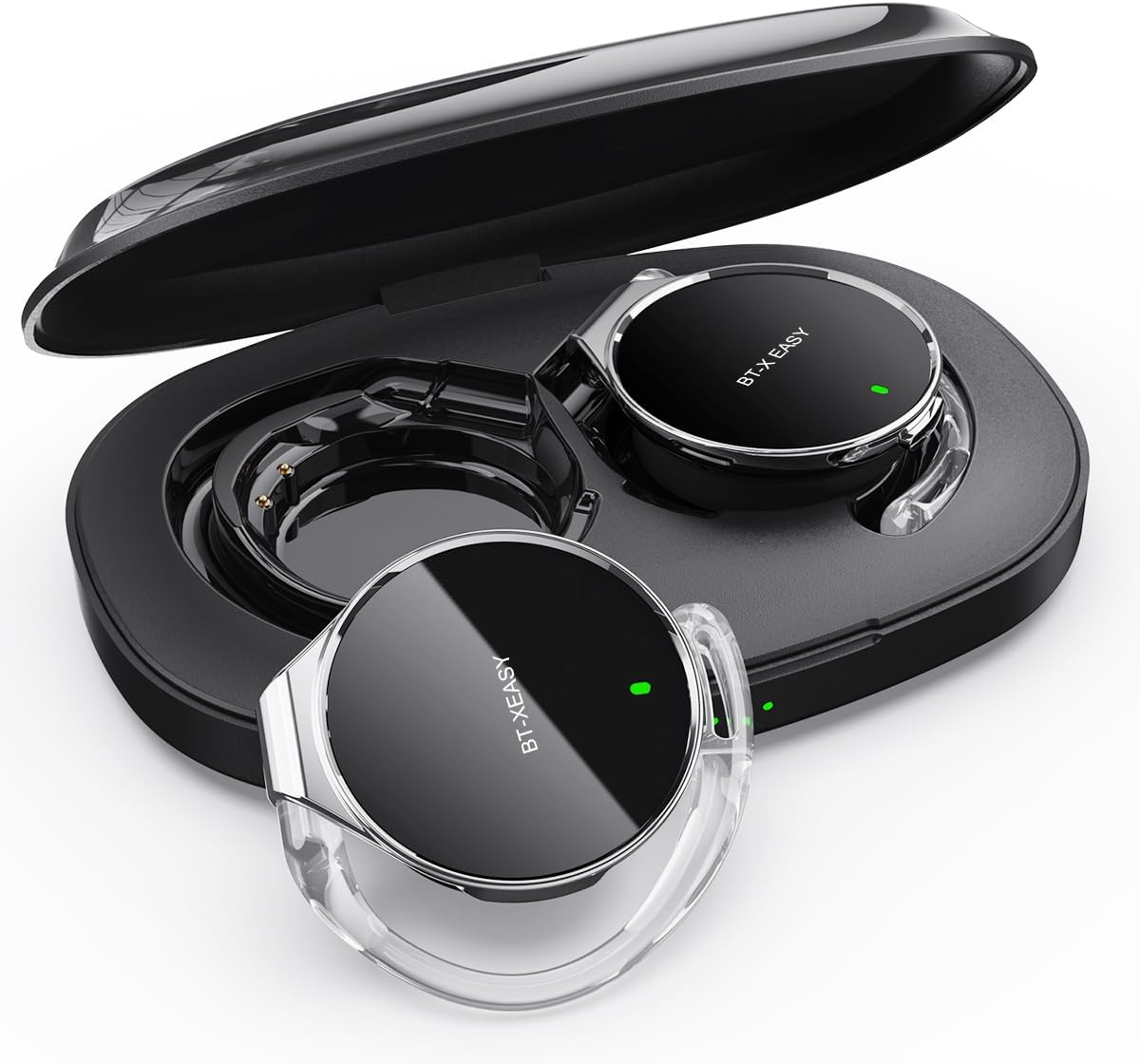
Image: Micool BT-X Easy On-Ear Headphones and their charging case, showing the headphones placed inside the open case.
Njirimara ngwaahịa
- HD Stereo Audio: 28mm speakers for rich bass and clear sound.
- Bluetooth Bluetooth: Fast pairing, stable connection, and reliable use.
- Mbelata mkpọtụ: ANC+ENC adaptive noise reduction for clearer calls with 4 microphones.
- Ogologo ndụ batrị: Up to 18 hours of music playback on a single charge, and up to 52 hours total with the charging case.
- Dị mma: Small, lightweight 36mm diameter with sponge earcup design for comfortable wear without ear compression.
- Njikọ ọtụtụ ebe: Connect to two devices simultaneously (e.g., phone, laptop, tablet).
- Njikwa kensinammuo: Easy control of music and calls via multifunction buttons.
- Mmiri na-eguzogide mmiri: E mere ya ka ọ ghara ịgbawa agbawa ma ọ bụ gbawaa agbawa.

Foto: nso nso view of the headphone highlighting its compact design and touch control area.
Melite
1. Nchaji mbụ
Before first use, fully charge the headphones and the charging case. Connect the provided USB-C cable to the charging case and a power source. The 4-stage power indicator lights on the case will show the charging progress (each light represents 25% battery capacity).

Image: The charging case displaying its 4-stage battery indicator lights.
2. Ijikọ na ngwaọrụ
- Mepee igbe nchaji. Igwe ekweisi ga-abanye na ọnọdụ njikọta na-akpaghị aka.
- Na ngwaọrụ gị (smartphone, mbadamba, laptọọpụ), gbanye Bluetooth.
- Chọọ maka "BT-XEASY" in the list of available Bluetooth devices and select it to connect.
- Ozugbo ejikọtara ya, ụda olu ga-akwado ijikọ na-aga nke ọma.
3. Multi-point Connection (Optional)
To connect to a second device, disconnect the headphones from the first device's Bluetooth settings. Then, pair with the second device following the steps above. Reconnect to the first device from its Bluetooth settings. The headphones will now be connected to both devices simultaneously.
Ntuziaka ọrụ
Yi ekweisi
- Nzọụkwụ 1: Open the ear-hook at a 30° angle.
- Nzọụkwụ 2: Rotate the headphone around your ear to the bottom of the ear-hook.
- Nzọụkwụ 3: Pịa ekweisi na clamp them tightly to your ear.
- Nzọụkwụ 4: Adjust the angle to make wearing more comfortable.

Image: Step-by-step visual guide on how to properly wear the on-ear headphones.
Njikwa mmetụ
The BT-X Easy headphones feature intuitive touch controls on each headset for easy management of audio and calls.
| Ọrụ | Omume |
|---|---|
| Kpọọ/kwụsịtụ egwu | Pịa x1 |
| Zaa/Kwụsị Oku | Pịa x1 |
| Jụ oku | Ogologo Pịa |
| Mute (in call) | Click x2 (prompt sound will confirm) |
| Track na-esote | Click x2 (Right Headphone) |
| Egwu gara aga | Click x2 (Left Headphone) |
| Elu elu | Hold (Right Headphone) |
| Mpịakọta ọnụ | Hold (Left Headphone) |

Image: Diagram illustrating the touch control functions on the headphone.
Vidiyo ngwaahịa ngwaahịa
Video: An official product video from Micool demonstrating the features and usage of the BT-X Easy On-Ear Headphones. This video provides a visual guide to the product's design, comfort, and functionality, including how to wear them and use the touch controls.
Nlekọta
- Nhicha: Use a soft, dry cloth to clean the headphones and charging case. Do not use abrasive cleaners or solvents.
- Nchekwa: When not in use, store the headphones in their charging case to protect them and ensure they are charged for next use.
- Nlekọta batrị: Iji mee ka batrị dị ogologo, zere iwepụ ekweisi gị kpamkpam mgbe niile. Chaji ha mgbe niile, ọbụlagodi na ejibeghị ha ruo ogologo oge.
- Nguzogide mmiri: The headphones are water-resistant, but not waterproof. Avoid submerging them in water or exposing them to heavy rain. Dry them thoroughly if they get wet.
Nchọpụta nsogbu
| Nsogbu | Ngwọta enwere ike |
|---|---|
| Ekweisi anaghị ejikọ | Ensure headphones are charged. Turn off and on Bluetooth on your device. Forget "BT-XEASY" from your device's Bluetooth list and re-pair. |
| Enweghị ụda ma ọ bụ olu dị ala | Check device volume and headphone volume. Ensure headphones are properly connected. Try playing different audio sources. |
| Otu earbud anaghị arụ ọrụ | Place both headphones back in the charging case, close the lid, wait a few seconds, then open and try again. Ensure both are charged. |
| Nchaji anaghị akwụ ụgwọ | Check USB-C cable and power adapter. Ensure proper connection. |
| Njikọ anaghị akwụsi ike | Move closer to your device. Avoid strong electromagnetic interference. Ensure no other devices are trying to connect simultaneously. |
Nkọwapụta
| Njirimara | Nkọwa |
|---|---|
| Aha Nlereanya | BT-X easy |
| Teknụzụ Njikọta | Ikuku (Bluetooth 5.4) |
| Ụdị ọkwọ ụgbọ ala ọdịyo | Dynamic Driver (28mm speakers) |
| Ndụ batrị (ekwe ntị) | Ruo awa iri abụọ |
| Mkpokọta ndụ batrị (ya na ikpe) | Ruo awa iri abụọ |
| Njikwa mkpọtụ | Active Noise Cancellation (ANC+ENC for calls) |
| Igwe okwu | 4 Igwe okwu |
| Ọkwa Nguzogide mmiri | Mmiri na-eguzogide |
| Ihe onwunwe | Acrylonitrile Butadiene Styrene (ABS) |
| Ibu Ibu | 5 ounces |
| UPC | 775494925862 |
Akwụkwọ ikike na nkwado
Micool provides 24-hour after-sales service for all purchased items. For any issues or inquiries, please contact Micool customer support through the official brand store or the platform where you purchased the product.
For detailed warranty information, please refer to the warranty card included in your product packaging or visit the official Micool websaịtị. Atụmatụ nchebe nwekwara ike ịdị maka mkpuchi ogologo.
Micool Brand Store: Visit Micool Store on Amazon


