1. Okwu mmalite
This manual provides comprehensive instructions for the Mycket portable DAB/DAB+/FM radio, Model D009. It covers setup, operation, maintenance, and troubleshooting to ensure optimal performance and longevity of your device. Please read this manual carefully before using the product.
The Mycket D009 radio features advanced signal reception technology for clear audio, Bluetooth 5.0 for wireless streaming, USB playback, AUX-in connectivity, a dual alarm clock, and a sleep timer. Its integrated rechargeable battery offers portability for use in various environments.
2. Ntuziaka nchekwa
- Ewepụla ngwaọrụ ahụ na mmiri ozuzo, mmiri mmiri ma ọ bụ oke okpomọkụ.
- Zere idobe ma ọ bụ idobe ngwaọrụ ahụ na mmetụta siri ike.
- Emela ka ngwaọrụ ahụ gbawaa ma ọ bụ gbalịa ịrụzi ya n'onwe gị. Nye ndị ọrụ ruru eru ọrụ niile.
- Debe ngwaọrụ ahụ n'ebe dị anya site na ebe okpomọkụ dị ka radiator, ihe ndekọ okpomọkụ, stovu, ma ọ bụ ngwaọrụ ndị ọzọ (gụnyere amplifiers) nke na-emepụta okpomọkụ.
- Use only the specified charging cable and power adapter (5V via USB) to charge the device.
- Ensure proper ventilation around the device during operation and charging.
- Tụfuo batrị na akụrụngwa eletrọnịkị nke ọma dịka iwu obodo siri dị.
3. Ngwaahịa gafereview
Ihe ngwugwu 3.1
- 1 x Mycket Portable DAB Radio (Model D009)
- 1 x eriri USB
- 1 x Akwụkwọ ntuziaka onye ọrụ
3.2 Nhazi na Njikwa Ngwaọrụ
Familiarize yourself with the main components and controls of your Mycket radio.

Foto nke 1: N'ihu view of the Mycket D009 portable DAB radio, showing the speaker grille, LCD display, control buttons (MODE, OK, O/M, FAV, 1-4), and the telescopic antenna extended. The right side shows the DC 5V USB-C port, reset button, and headphone jack.
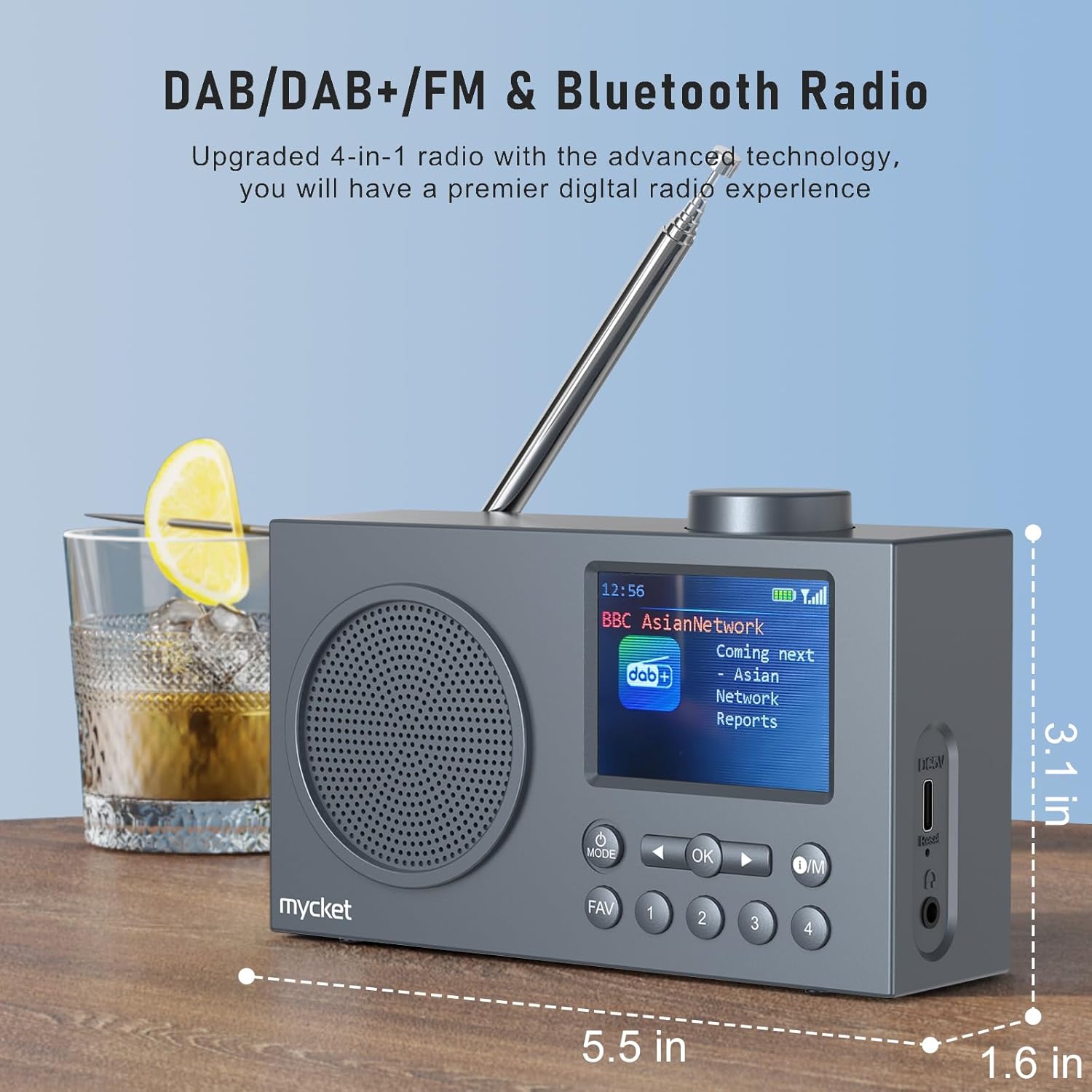
Foto nke 2: Akụkụ view of the Mycket D009 radio illustrating its compact dimensions: approximately 5.5 inches (length), 1.6 inches (width), and 3.1 inches (height). The image also highlights its DAB/DAB+/FM and Bluetooth capabilities.
- Ngosipụta: 2.4-inch TFT color display for station information, time, and settings.
- Ọkà okwu: Integrated Hi-Fi speaker for audio output.
- Antenna telescopic: For optimal radio signal reception.
- Bọtịnụ MODE: Switches between DAB, FM, Bluetooth, USB, and AUX modes.
- OK bọtịnụ: Na-akwado nhọrọ ma ọ bụ na-abanye na menu.
- Bọtịnụ O/M: Power On/Off and Menu access.
- Bọtịnụ FAV: Accesses favorite presets.
- Igodo ọnụọgụ (1-4): Direct access to stored presets.
- Navigation Buttons (Left/Right): Navigates menus or tunes stations.
- Mpịakọta Mpịakọta: Na-edozi olu ọdịyo.
- DC 5V USB-C Port: Maka ịchaji batrị dị n'ime.
- Tọgharịa bọtịnụ: Resets the device (use a thin object to press).
- Jack ekweisi 3.5mm: Maka ige ntị nkeonwe.
4. Nhazi
4.1 Ịchaji batrị
The radio is equipped with a built-in 2200mAh lithium battery. Before first use, fully charge the device.
- Connect the provided USB charging cable to the DC 5V USB-C port on the side of the radio.
- Jikọọ nsọtụ nke ọzọ nke eriri USB na ihe nkwụnye ọkụ USB dakọtara (anaghị etinye ya) ma ọ bụ ọdụ ụgbọ USB kọmputa.
- The charging indicator on the display will show the charging status. A full charge typically takes approximately 2.5 hours and provides up to 12 hours of playback time at 70% volume.

Foto nke 3: The Mycket D009 radio display showing a full battery indicator, emphasizing its long playback time on a single charge.
4.2 mmezi nke antenna
For optimal radio reception, fully extend the telescopic antenna. Adjust its position for the best signal quality.
4.3 Ike mbido
Pịa ma jide O/M button to power on the radio. The display will light up, and the device will typically start in the last used mode or initiate a DAB scan if it's the first use.
5. Ntuziaka ọrụ
5.1 Ụdị mgbanwe
Pịa MODE button repeatedly to cycle through available modes: DAB, FM, Bluetooth, USB, and AUX.
5.2 DAB/DAB+ Radio Operation
- Switch to DAB mode using the MODE bọtịnụ.
- The radio will automatically perform a full scan for available DAB/DAB+ stations upon first use or if no stations are found. To initiate a manual scan, press and hold the OK button, then select "Full Scan" from the menu.
- Once the scan is complete, use the navigation buttons (Left/Right) to browse through the list of available stations.
- Pịa OK to select and listen to a station.

Foto nke 4: The Mycket D009 radio display showing a DAB station and highlighting the auto-scan and 40 preset features (20 DAB & 20 FM).
5.2.1 Storing DAB Presets
The radio supports up to 20 DAB presets.
- Tune to the desired DAB station.
- Press and hold one of the number buttons (1-4) ma ọ bụ FAV button to save the current station to a preset slot. Follow the on-screen prompts to select a slot if using the FAV button.
- To recall a preset, briefly press the corresponding number button or the FAV button and select from the list.
5.3 FM Redio arụ ọrụ
- Jiri nke ahụ gbanwee gaa na ọnọdụ FM MODE bọtịnụ.
- To auto-scan for FM stations, press and hold the OK button. The radio will scan and store available stations.
- To manually tune, use the navigation buttons (Left/Right) to adjust the frequency.
- Pịa OK to confirm the station.
5.3.1 Storing FM Presets
The radio supports up to 20 FM presets, similar to DAB presets.
- Tinyegharịa na ọdụ FM achọrọ.
- Press and hold one of the number buttons (1-4) ma ọ bụ FAV button to save the current station.
- To recall a preset, briefly press the corresponding number button or the FAV button and select from the list.
5.4 Bluetooth 5.0 Pairing
Connect your smartphone or tablet to the radio via Bluetooth for wireless audio streaming.
- Jiri ya gbanwee gaa na ọnọdụ Bluetooth. MODE button. The radio display will show "Bluetooth Pairing" or similar.
- Na ekwentị mkpanaaka gị, gbanye Bluetooth wee chọọ ngwaọrụ dị.
- Select "Mycket D009" from the list of devices.
- Once paired, the radio will confirm the connection, and you can play audio from your device through the radio.

Foto nke 5: The Mycket D009 radio displaying "Playing" in Bluetooth mode, next to a smartphone showing "Mycket D009" as a connected Bluetooth device.
5.5 USB playback
Kpọọ ọdịyo MP3 files ozugbo site na draịvụ USB.
- Fanye draịva USB nwere MP3 files n'ọdụ ụgbọ mmiri USB.
- Gbanwee gaa na ọnọdụ USB site na iji MODE bọtịnụ.
- The radio will automatically detect and begin playing MP3 files. Use the navigation buttons to skip tracks.
Njikọ AUX 5.6
Connect external audio devices using a 3.5mm audio cable (not included).
- Connect one end of a 3.5mm audio cable to the AUX-in port on the radio.
- Jikọọ nsọtụ nke ọzọ na jakị ekweisi ma ọ bụ mmepụta ọdịyo nke ngwaọrụ mpụga gị.
- Jiri nke ahụ gbanwee gaa na ọnọdụ AUX MODE bọtịnụ.
- Jikwaa ọkpụkpọ dị na mpụga ngwaọrụ gị.
5.7 Ọrụ Elekere Mkpu
Set up to two independent alarms.
- Pịa ma jide O/M bọtịnụ ịbanye na menu.
- Navigate to "Alarm Settings" using the navigation buttons and press OK.
- Họrọ Mkpu 1 ma ọ bụ Mkpu 2.
- Set the alarm time, source (DAB, FM, or Buzzer), and volume.
- Kwenye ntọala site na ịpị OK.
Ọrụ Ngụ oge ụra 5.8
Set the radio to automatically turn off after a specified period.
- Pịa ma jide O/M bọtịnụ ịbanye na menu.
- Navigate to "Sleep Timer" and press OK.
- Select the desired duration (e.g., 15, 30, 60 minutes).
- The radio will automatically power off after the set time.
5.9 Ojiji Ekweisi
Connect 3.5mm headphones to the headphone jack for private listening. The internal speaker will be muted automatically.
6. Nlekọta
- Nhicha: Jiri ákwà dị nro ma kpọọ nkụ hichaa mpụta redio ahụ. Ejila ihe nhicha ma ọ bụ ihe mgbaze.
- Nlekọta batrị: Ka ịgbatị ndụ batrị ogologo, zere ịchaji batrị ugboro ugboro. Na-anya ngwaọrụ mgbe niile, ọbụlagodi na ọ naghị eji ya ogologo oge.
- Nchekwa: Chekwaa redio n'ebe dị jụụ, kpọrọ nkụ na-agaghị anwụ kpọmkwem na oke okpomọkụ.
7. Nchọpụta nsogbu
| Nsogbu | Ihe nwere ike ime | Ngwọta |
|---|---|---|
| Enweghị ike / Redio anaghị agbanye. | Batrị agwụla. | Jiri eriri USB enyere chajịa redio ahụ. |
| Nnweta redio na-adịghị mma (DAB/FM). | Antenna not fully extended or positioned correctly. Weak signal area. | Fully extend and adjust the telescopic antenna. Try moving the radio to a different location. Perform a full scan for stations. |
| Njikọ Bluetooth ada ada. | Radio not in Bluetooth mode. Device too far. Bluetooth not enabled on external device. | Ensure the radio is in Bluetooth mode. Keep devices within range (approx. 10 meters). Enable Bluetooth on your external device and search for "Mycket D009". |
| Enweghị ụda sitere na ọkà okwu. | Volume too low. Headphones connected. | Increase the volume. Disconnect headphones if not intended for private listening. |
| USB playback not working. | USB drive not inserted correctly. Incompatible file usoro. | Ensure USB drive is fully inserted. Check that files dị na usoro MP3. |
| Ngwaọrụ anaghị anabata. | Nsogbu ngwanrọ nwa oge. | Press the reset button on the side of the radio using a thin object (e.g., a paperclip). |
8. Nkọwapụta
| Ụdị | Mycket |
| Nlereanya | D009 |
| Ụdị redio | DAB, DAB+, FM |
| Ụdị Bluetooth | 5.0 |
| Nhọrọ ịkpọghachi | FM, DAB, DAB+, Bluetooth, USB MP3, AUX-in |
| Ike mmepụta okwu | 5 Watt |
| Ngalaba Ọkà Okwu | 4 Ω10 W 78 mm x 1 |
| Ngosipụta | 2.4-inch TFT Agba LCD |
| Ntọala | 40 (20 DAB, 20 FM) |
| Ụdị batrị | Built-in Lithium-ion (18650) |
| Ike batrị | 2200 mAh (3.7V - 2.2 Ah) |
| Oge nkwughachi | Approx. 8-9 hours at 70% volume (up to 12 hours) |
| Oge Nchaji | Ihe ruru. awa 2.5 |
| Ntinye ike | 5V site na USB |
| Akụkụ (Ngwaahịa) | Ihe ruru. 14 cm (L) x 4 cm (W) x 7.8 cm (H) |
| Njikọ mmepụta | Jack ekweisi 3.5mm |
9. Akwụkwọ ikike na nkwado
Mycket products are designed for reliability and performance. This product comes with:
- Akwụkwọ ikike nke ọnwa 12: Enjoy a hassle-free 12-month warranty from the date of purchase.
- Nkwado ndị ahịa: For any questions, issues, or support needs, please contact Mycket customer service.
Biko dowe ihe akaebe nke ịzụrụ ihe maka akwụkwọ ikike.


