1. Ngwaahịa gafereview
The FOXBOX DM4-B is a rugged GPS smart watch designed for active lifestyles. It features a 1.43-inch AMOLED display, built-in GPS with multi-satellite system support, a powerful 530mAh battery, and comprehensive health monitoring capabilities. It also includes a built-in LED flashlight and is designed to withstand various environmental conditions.

Figure 1: FOXBOX DM4-B Smart Watch with its key features displayed on the screen, including time, weather, and activity tracking. Two strap options, brown leather and black silicone, are shown.
2. Kedu ihe dị na Igbe ahụ
- 1 x FOXBOX DM4-B Smart Watch
- 2 x Watch Straps (one pre-installed, one additional)
- 1 x Regulator (tool for strap adjustment, if applicable)
- 1 x Charging Cable (magnetic)
- 1 x Akwụkwọ ntuziaka onye ọrụ
Video 1: An official product video demonstrating the FOXBOX DM4-B Smart Watch, highlighting its features and design. This video is provided by the seller.
Video 2: A 7-second preview ihe ngosi vidiyoasing the FOXBOX DM4-B Smart Watch's design and features. This video is provided by the seller.
3. Ntuziaka Nhazi
3.1 Ịchaji smart Watch
Before initial use, fully charge your smart watch. Connect the magnetic charging cable to the charging points on the back of the watch and plug the USB end into a compatible power source (e.g., USB wall adapter, computer USB port).
- The watch will not turn on with 0% battery. It needs to be charged for at least 15 minutes to start.
3.2 Ngwa nwụnye na ijikọ
To unlock the full functionality of your FOXBOX DM4-B, you need to install the companion app, "GloryFitPro", on your smartphone.
- Turn on your phone's Bluetooth.
- Scan the QR Code provided in the watch manual or search for "GloryFitPro" in your smartphone's app store (compatible with Android 5.0+ and iOS 11.0+). You can also download it from njikọ a.
- Open the "GloryFitPro" app.
- In the app, click "Please connect device", then find and add "DM4".
- Select "Pair" in the pairing pop-up window on your phone.
- After successful connection, you can use the watch to make/receive calls and access other features.

Figure 2: Step-by-step guide illustrating the connection process between the FOXBOX DM4-B Smart Watch and the GloryFitPro application on a smartphone.
3.3 Ntinye eriri
The watch comes with two straps: a silicone strap and a leather strap. To change or install a strap:
- Locate the quick-release pins on the back of the watch straps.
- Slide the pin to detach or attach the strap to the watch lugs.
- Ensure the strap is securely fastened before wearing.

Figure 3: The FOXBOX DM4-B Smart Watch presented with both its brown leather and black silicone strap options, highlighting the interchangeable design.
4. Ntuziaka ọrụ
4.1 Nsoro ụzọ
- Sịchaa elu/ala: Pịgharịa gaa na menu na ọkwa.
- Sụgharịa akaekpe/aka nri: Access quick functions or widgets.
- Kpatụ: Họrọ otu ihe ma ọ bụ kwado ihe omume.
- Bọtịnụ akụkụ: The watch features multiple side buttons for specific functions (e.g., Power, Back, Sport). Refer to the watch face for specific button labels.
4.2 Communication Features
With Bluetooth 5.3, the watch allows for convenient communication directly from your wrist.
- Zaa/Kpọọ oku: Use the built-in speaker and microphone to handle calls. Access contacts, call logs, or use the keypad to dial out.
- Ọkwa ozi: Nata na view messages from your smartphone.
- Enyemaka Olu: Interact with your phone's voice assistant directly from the watch.

Figure 4: The FOXBOX DM4-B Smart Watch demonstrating its Bluetooth calling capabilities, including contact lists, call logs, and a dial pad.
4.3 Nlekọta ahụike
The DM4-B smart watch continuously monitors various health metrics to help you maintain a healthy state.
- Ọnụọgụgụ obi: Nyochaa ọnụọgụ obi na-aga n'ihu.
- Oxygen ọbara (SpO2): Measures blood oxygen levels.
- Nyochaa ụra: Egwu ụra stages na oge.
- Nleba anya nrụgide: Measures stress levels.

Figure 5: The FOXBOX DM4-B Smart Watch's health monitoring features, including heart rate, blood oxygen, and detailed sleep tracking, are shown on the display.
4.4 Sports Modes & GPS
The watch supports over 100 sports modes and features a built-in GPS for accurate activity tracking.
- Ụdị egwuregwu 100+ Track detailed data such as heart rate, calories, and step count for various activities.
- GPS arụnyere: Utilizes 6 satellite positioning systems (GPS, GLONASS, BDS, Galileo, NAVIC, and QZSS) for fast and accurate outdoor tracking. Note: The built-in GPS can record and track activity paths but does not provide navigation or mapping capabilities.
- Ihe mmetụta nke ime: Includes a compass, altitude pressurization, and altimeter sensors to show current position, altitude, and air pressure.

Figure 6: The FOXBOX DM4-B Smart Watch tracking an outdoor route via its built-in GPS, with a corresponding map and activity statistics visible on a connected smartphone.

Figure 7: Visual representation of the FOXBOX DM4-B Smart Watch's advanced GPS capabilities, supporting six major satellite positioning systems for enhanced accuracy.
4.5 Ikanam ọkụ
The watch includes a powerful LED flashlight on its right side, providing illumination for various situations.
- Ogologo ihe ọkụ: 6-8 mita.
- Na-eji: Nighttime illumination, finding items in emergencies, temporary light source during outdoor activities.
- Ịkpachara anya: Do not direct the light towards eyes.

Figure 8: The integrated LED flashlight on the FOXBOX DM4-B Smart Watch, demonstrating its utility in low-light conditions for outdoor use, power outages, and general illumination.
4.6 Ọrụ ndị ọzọ
The DM4-B offers a range of additional features for daily convenience:
- Amụma Ihu Igwe: Nweta mmelite ihu igwe ozugbo.
- Mkpu na oge: Tọọ mkpu ma jiri ọrụ ngụ oge.
- Oge elekere: For timing activities.
- Mgbako: Ngụkọta ndị bụ isi na nkwojiaka gị.
- Njikwa egwu: Control music playback on your connected phone.
- Njikwa igwefoto: Remotely trigger your phone's camera shutter.
- Chọta ekwentị m: Locate your misplaced smartphone.
- Ihu elekere nwere ike ịhazi ya: Choose from over 200 watch faces or upload your own photos.

Figure 9: A collage of the FOXBOX DM4-B Smart Watch's diverse functionalities, such as voice assistant, calculator, world clock, phone finder, music and camera controls, and weather updates.

Figure 10: A variety of over 200 watch faces for the FOXBOX DM4-B Smart Watch, illustrating the extensive customization options available through the app, including uploading personal photos.
5. Nlekọta
5.1 Mmiri Nguzogide
The FOXBOX DM4-B has an IP68 waterproof rating and is 5ATM water-resistant, making it suitable for swimming and exposure to rain. However, it is not recommended for hot showers, saunas, or diving activities where water pressure is high or temperature changes are extreme.

Figure 11: The FOXBOX DM4-B Smart Watch demonstrating its 5ATM and IP68 water resistance while being worn during swimming, indicating its suitability for water-based activities.
5.2 Nhicha
Regularly clean your smart watch and straps to ensure optimal performance and hygiene. Use a soft, damp cloth to wipe the screen and body. For the straps, follow the cleaning instructions specific to the material (silicone or leather).
- A screen protector cleaning cloth (wet and dry) is included for screen maintenance.
5.3 Ndụ batrị
The watch is equipped with a 530mAh battery, offering extended usage times:
- Up to 40 days of standby time.
- 8-16 days of normal operation.
- Up to 7 days with heavy use.
To maximize battery life, manage screen brightness, disable unnecessary notifications, and limit continuous health monitoring when not required.
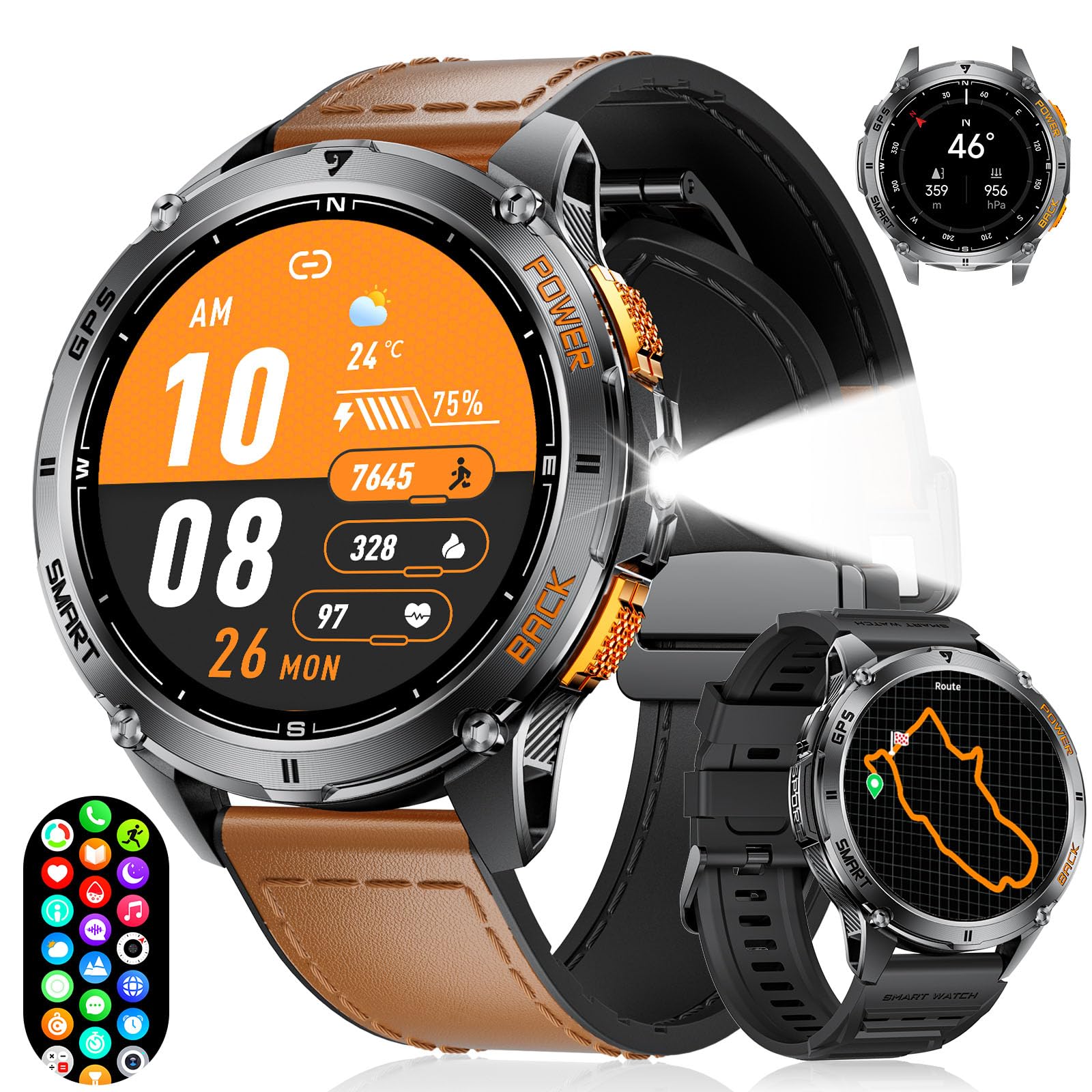
Figure 12: The FOXBOX DM4-B Smart Watch's impressive 530mAh battery capacity, detailing its endurance for heavy use (7 days), daily use (14+ days), and energy-saving mode (100+ days).
6. Nchọpụta nsogbu
6.1 Elekere anaghị agbanwu
If the watch does not turn on, ensure it has sufficient battery. Connect it to the charger for at least 15 minutes before attempting to power it on again.
6.2 Okwu njikọta
If you experience difficulty pairing the watch with your smartphone:
- Gbaa mbọ hụ na agbanyere Bluetooth na ekwentị gị.
- Gbaa mbọ hụ na elekere ahụ dị n'ime oke ekwentị gị.
- Restart both your phone and the smart watch.
- Clear the Bluetooth cache on your phone and try pairing again.
- Ensure the "GloryFitPro" app is updated to the latest version.
6.3 Inaccurate Health Readings
While the watch provides health monitoring features, these are for reference only and should not be used for medical diagnosis. For accurate medical measurements, consult a healthcare professional.
- Ensure the watch is worn snugly on your wrist, but not too tight, for optimal sensor contact.
- Zere oke mmegharị n'oge nha.
6.4 Notification Issues (e.g., RCS Texts)
Some advanced messaging features, such as RCS (Rich Communication Services) texts, may not be fully compatible with the watch's notification system. The watch primarily supports standard SMS notifications. If you are not receiving notifications:
- Check app permissions for "GloryFitPro" on your phone to ensure it has access to notifications.
- Verify that notifications are enabled within the "GloryFitPro" app settings for the desired applications.
- Ensure the watch is not in "Silent Mode" or "Do Not Disturb" mode.
7. Nkọwapụta
| Njirimara | Nkọwa |
|---|---|
| Nọmba nlereanya | DM4-B |
| Ngosipụta | 1.43-inch AMOLED (466x466 resolution) |
| Ike batrị | 530mAh Lithium Polymer |
| GPS | Built-in GPS (6 Satellite Positioning Systems) |
| Mmiri Nguzogide | IP68, 5ATM |
| Njikọta | Bluetooth 5.3 |
| Sistemụ nrụọrụ | GloryFitPro |
| Nchekwa ebe nchekwa | 256 MB |
| Atụmatụ pụrụ iche | LED Flashlight, Compass, Altimeter, Barometer, Heart Rate, SpO2, Sleep Monitor, Stress Monitor, 100+ Sport Modes, Voice Assistant, Music/Camera Control, Notifications, Alarms, Timer, Stopwatch, Calculator, World Clock, Find My Phone, Customizable Watch Faces. |
| Akụkụ ngwaahịa | 10.63 x 21.65 x 0.51 sentimita asatọ |
| Ibu Ibu | 8.8 ounces |
8. Akwụkwọ ikike na nkwado
For warranty information and customer support, please refer to the documentation included in your product packaging or visit the official FOXBOX website. You can also contact the seller directly through the platform where you purchased the product.
For additional support or inquiries, please visit the FOXBOX Store on Amazon.


