1. Ngwaahịa gafereview
The MOVE SPEED 145W Laptop Power Bank is a high-capacity portable charging solution designed for a wide range of electronic devices, including laptops, smartphones, and tablets. Featuring PD 3.1 fast charging technology and a 25,000mAh capacity, it ensures your devices remain powered during travel, work, or outdoor activities. The integrated digital display provides real-time charging insights, enhancing user convenience.
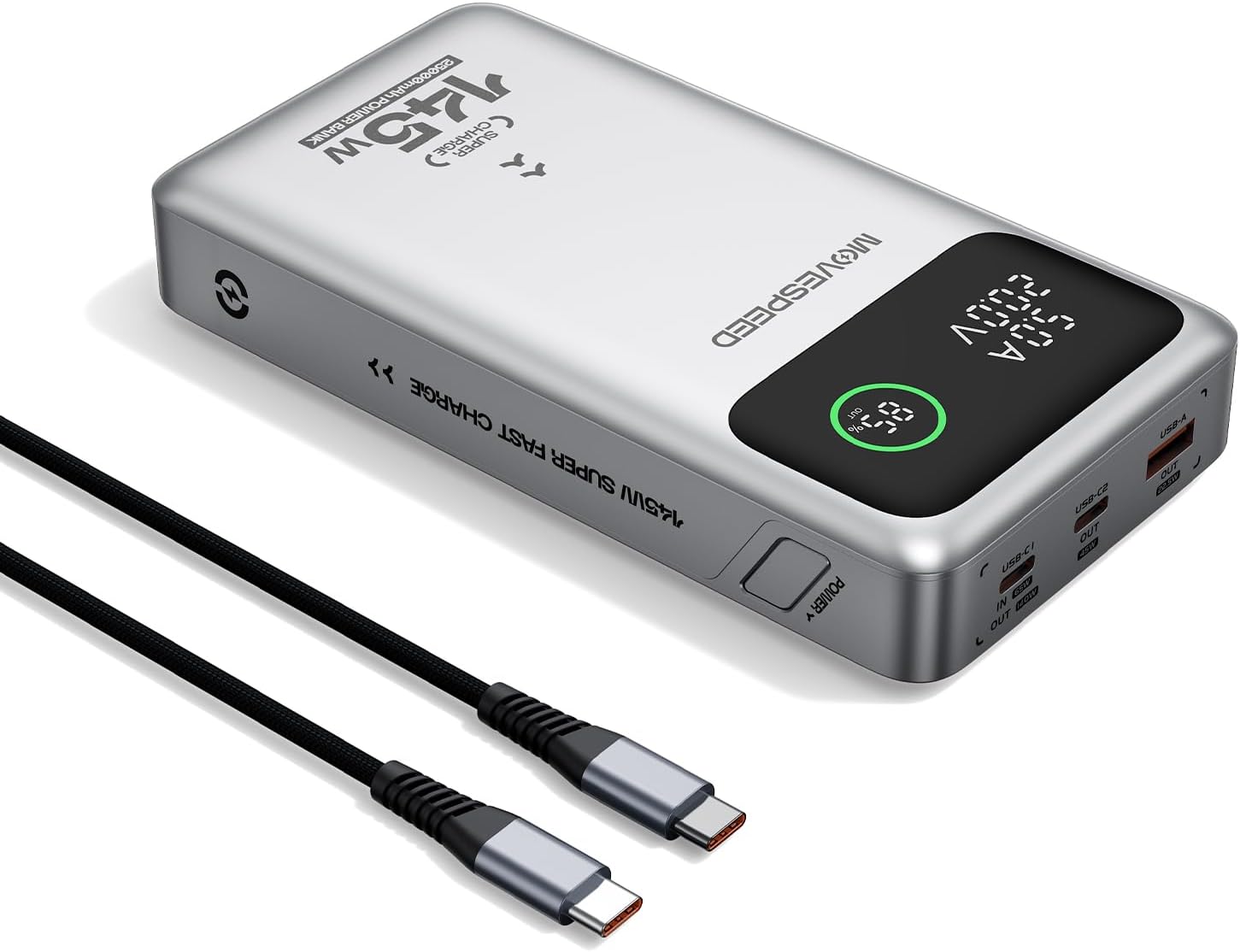
Figure 1.1: MOVE SPEED 145W Laptop Power Bank and 240W Type-C Cable.
2. Ozi nchekwa
Mkpachapụ anya nchekwa dị mkpa:
- Ewepụla ụlọ akụ ike ka ọ bụrụ oke okpomọkụ, ìhè anyanwụ kpọmkwem, ma ọ bụ ọkụ.
- Avoid dropping, disassembling, or attempting to repair the device yourself.
- Debe ya ka ọ ghara iru mmiri na oke mmiri.
- Gbaa mbọ hụ na ikuku ikuku dị mma n'oge eji na ịchaji.
- This power bank is flight-approved (25000mAh/92.5Wh) and meets FAA and TSA carry-on regulations.
- The device incorporates 9-layer protection against overcharging, overheating, and short circuits.

Figure 2.1: The power bank is designed to be air-travel friendly.

Figure 2.2: Built-in NTC Temperature Sensor and comprehensive protection features.
3. Ihe ngwugwu
Chọpụta na ihe niile dị na ngwugwu:
- MOVE SPEED 145W Laptop Power Bank x 1
- 240W 3.28Ft Type-C Cable x 1
- Akwụkwọ ntuziaka onye ọrụ x 1

Figure 3.1: Items included in the product package.
4. Akụrụngwa Ngwaahịa
- 140W Ultra-Fast Single-Port Charging: Supports PD 3.1, capable of charging a 16-inch MacBook Pro to 56% in approximately 30 minutes.
- 65W Ultra-Fast Recharging: Fully recharges the power bank in about 2 hours using a compatible high-wattage chaja.
- Nnukwu ike 25,000mAh: Provides multiple charges for various devices (e.g., 4 full charges for iPhone 16, 3 for Galaxy S24, 2 for iPad 11).
- Triple-Port Output:
- USB-C1 (IN/OUT): Up to 140W output, 65W input.
- USB-C2 (OUT): Up to 45W output.
- USB-A (OUT): Up to 22.5W output.

Figure 4.1: Single port output capabilities.

Figure 4.2: Two-port simultaneous output capabilities.

Figure 4.3: Three-port simultaneous output capabilities.
- Smart Dynamic Charging: Optimizes power distribution up to 145W combined output when multiple USB-C ports are active.
- Ngosipụta Smart LED: Na-egosi pasentị batrị ziri ezitage, charging status (INPUT/OUTPUT), and real-time voltage and current for each active port.
- Ngafe-Site na Nchaji: Allows simultaneous charging of devices while the power bank itself is being recharged.

Figure 4.4: Key features of the MOVE SPEED 145W Power Bank.

Figure 4.5: Fast charging capability for laptops.

Figure 4.6: Extended power supply for multiple devices.

Figure 4.7: Simultaneous charging of up to three devices.

Figure 4.8: Rapid recharging of the power bank.

Figure 4.9: The smart LED display provides comprehensive charging information.

Figure 4.10: Pass-through charging capability for convenience.
5. Nhazi
Before first use, it is recommended to fully charge the power bank.
- Connect the included 240W Type-C cable to the USB-C1 port (IN/OUT) on the power bank.
- Connect the other end of the cable to a compatible USB-C wall charger (65W or higher recommended for optimal charging speed).
- The digital display will show "IN" and the battery percentagmmụbaasing, indicating that the power bank is charging.
- Once the display shows 100%, the power bank is fully charged and ready for use.
6. Ntuziaka ọrụ
6.1 Ngwaọrụ Nchaji
To charge your electronic devices:
- Connect your device's charging cable to the appropriate output port on the power bank (USB-C1, USB-C2, or USB-A).
- Jikọọ nsọtụ nke ọzọ nke eriri na ngwaọrụ gị.
- The digital display will show "OUT" and the real-time voltage and current, indicating that your device is charging.
- The power bank will automatically detect the connected device and deliver the optimal charging speed.
Video 6.1: Demonstration of the MOVE SPEED power bank charging a laptop. This video highlights the product's ability to provide power to larger devices.
Vidiyo 6.2: Agafeeview of the MOVE SPEED laptop power bank's features and usage. This video provides a general demonstration of the product.
Video 6.3: Demonstration of the MOVESPEED portable laptop charger and its 145W power bank capabilities. This video showcases the power bank in action with various devices.
6.2 Ịchaji Power Bank
Iji fanye ụlọ akụ ọkụ:
- Connect the included 240W Type-C cable to the USB-C1 port (IN/OUT) on the power bank.
- Connect the other end of the cable to a power source, such as a wall adapter or a computer's USB-C port.
- The digital display will indicate "IN" and the charging progress.
Note: For optimal recharging speed, use a power adapter that supports 65W Power Delivery (PD) or higher.
7. Nkọwapụta
| Njirimara | Nkọwa |
|---|---|
| Nọmba nlereanya | YSPB-M25pro-US |
| Ike batrị | 25,000mAh / 92.5Wh |
| Ntinye USB-C1 | 65W Max |
| USB-C1 mmepụta | 140W Max (PD 3.1) |
| USB-C2 mmepụta | 45W Max |
| USB-A mmepụta | 22.5W Max |
| Mkpokọta mpụta | 145W Max (Dynamic Distribution) |
| Akụkụ | 8.19 x 4.49 x 1.56 sentimita asatọ |
| Ibu | 1.41 pound |
| USB gụnyere | 240W 3.28Ft Type-C Cable |
| Atụmatụ nchekwa | 9-layer protection (overcharging, overheating, short circuits, etc.), UN38.3 certified |
| Flight Approved | Yes (under 100Wh limit) |
8. Nlekọta
- Jiri akwa dị nro hichaa ụlọ akụ ike. Ejila kemịkalụ siri ike ma ọ bụ ihe abrasive.
- Chekwaa ụlọ akụ ọkụ ahụ n'ebe dị jụụ, kpọrọ nkụ na-adịghị na ìhè anyanwụ kpọmkwem na oke okpomọkụ.
- If storing for an extended period, recharge the power bank every 3-6 months to maintain battery health.
- Avoid exposing the ports to dust or debris.
9. Nchọpụta nsogbu
Okwu na azịza ndị nkịtị:
- Ụlọ akụ ọkụ anaghị akwụ ụgwọ:
- Ensure the charging cable is securely connected to both the power bank (USB-C1 port) and the power adapter.
- Verify that the wall adapter is functioning correctly and provides sufficient power (65W recommended).
- Gbalịa eriri chaja dị iche ma ọ bụ nkwụnye ọkụ.
- Ngwaọrụ anaghị akwụ ụgwọ site na ụlọ akụ ọkụ:
- Lelee ma ụlọ akụ ọkụ nwere ụgwọ zuru oke.
- Gbaa mbọ hụ na ejikọrọ eriri chaja na ma ụlọ akụ ọkụ yana ngwaọrụ gị.
- Gbalịa ọdụ ụgbọ mmiri mmepụta dị iche na ụlọ akụ ike.
- Verify that your device's charging cable is not damaged.
- Nchaji nwayọ:
- Ensure you are using the included 240W Type-C cable or another high-quality cable that supports fast charging.
- For recharging the power bank, use a 65W or higher PD-compatible wall adapter.
- When charging multiple devices, the total output power is dynamically distributed, which may result in slower charging for individual devices compared to single-port charging.
- Ngosipụta dijitalụ anaghị arụ ọrụ:
- Gbaa mbọ hụ na akwụgoro ụlọ akụ ọkụ nke ọma.
- Ọ bụrụ na nsogbu ahụ ka dị, kpọtụrụ nkwado ndị ahịa.
10. Akwụkwọ ikike na nkwado
MOVE SPEED offers a 36-month protection plan for this product. If you encounter any issues or have questions regarding your MOVE SPEED 145W Laptop Power Bank, please contact our customer support team for assistance.
For further support, visit the official MOVE SPEED store on Amazon: MOVE SPEED Store


