Okwu mmalite
This manual provides essential instructions for setting up, operating, and maintaining your AOLON Tetra R4 Smart Watch. Please read it carefully to ensure proper use and to maximize the device's features.
Na-amalite
1. Igbe mkpuchi
Your AOLON Tetra R4 Smart Watch package includes the following items:
- AOLON Tetra R4 Smart Watch
- Ịchaji eriri
- Akwụkwọ ntuziaka onye ọrụ
- Lelee Band

Image: Product Size And Packaging List
2. Ịchaji ngwaọrụ
Before first use, fully charge your smart watch. The device features a 350 mAh battery, providing up to 7 days of typical use and up to 30 days of standby time. A full charge takes approximately 2.5 hours.
- Jikọọ eriri chaja magnetik na ebe a na-achaji chaja dị n'azụ elekere ahụ.
- Tinye njedebe USB nke eriri ahụ n'ime ihe nkwụnye ike USB nkịtị (anaghị etinye ya) ma ọ bụ ọdụ USB nke kọmputa.
- The watch display will indicate charging status.
Video: This video demonstrates the unboxing and initial setup of the Tetra R4 Smart Watch, including charging and basic UI navigation.
3. Ngwa nwụnye na ijikọ
To unlock the full potential of your smart watch, download and install the GloryFitPro ngwa na smartphone gị.
- Scan the QR code in the included user manual or search for "GloryFitPro" in your smartphone's app store (App Store for iOS, Google Play for Android).
- Kwado Bluetooth na ekwentị gị.
- Open the GloryFitPro app and follow the on-screen instructions to add your device.
- Select "Aolon Tetra R4" from the list of available devices to connect.

Image: Connect the Smart Watch Via APP GloryFitPro "Aolon Tetra R4"
Na-arụ ọrụ elekere smart gị
1. Nsoro ụzọ
The AOLON Tetra R4 features a 1.43-inch AMOLED full touch screen, a rotating crown, and two physical buttons for intuitive control.
- Ihuenyo mmetụ aka: Mịgharịa aka ekpe, aka nri, elu, ma ọ bụ ala iji lelee menu na ọrụ. Pịa iji họrọ.
- Okpueze Na-agbagharị: Rotate to scroll through lists or adjust settings. Press to confirm or return to the watch face.
- Bọtịnụ anụ ahụ: Use for quick access to specific functions or to power on/off the device.
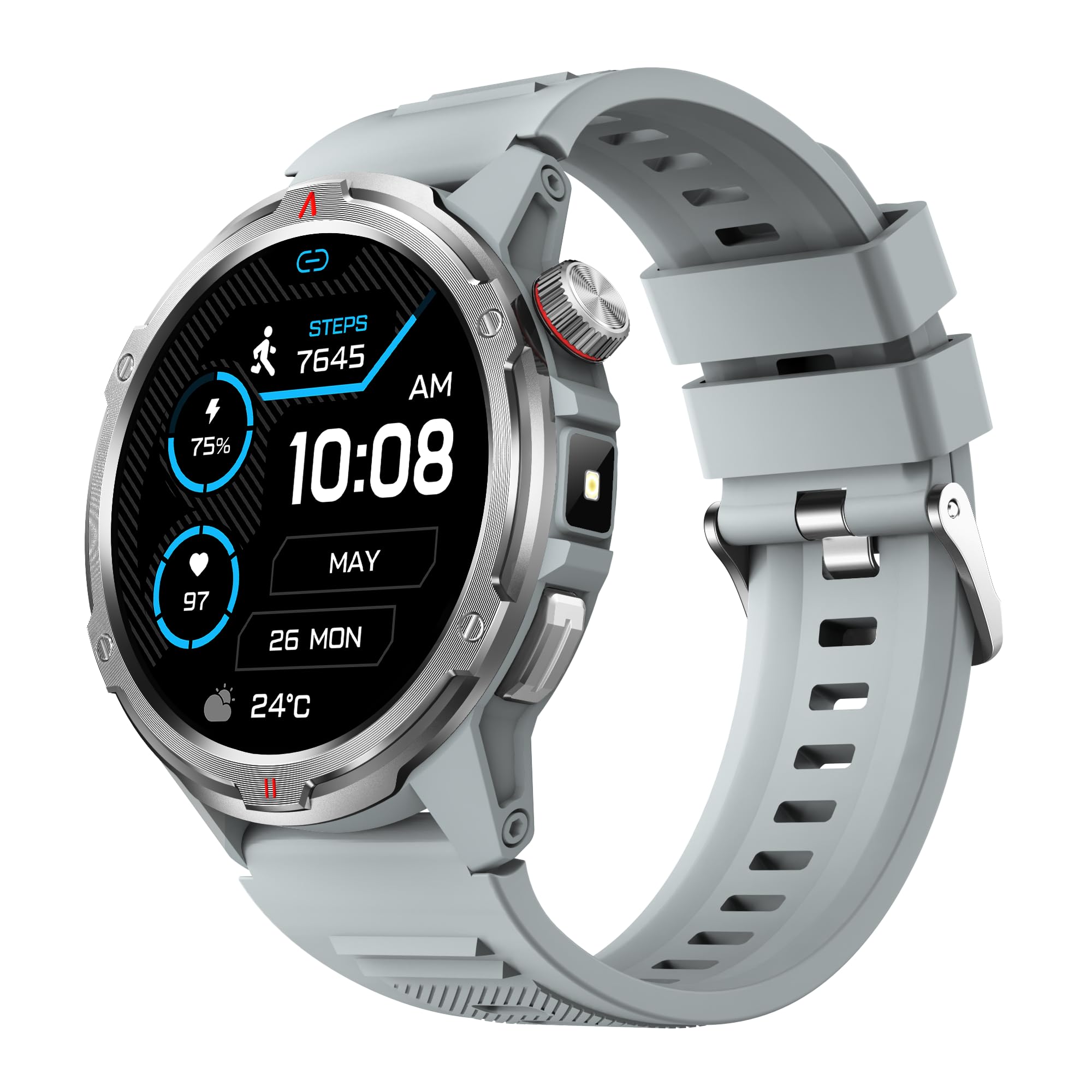
Foto: Isi ngwaahịa view showing the 1.43" AMOLED HD Full Touch Screen and physical buttons.
2. Nkwukọrịta atụmatụ
Stay connected directly from your wrist with Bluetooth calling and smart notifications.
- Oku Bluetooth: With the latest Bluetooth 5.2 chip, a high-quality speaker, and microphone, you can make and receive calls directly from your watch. You can also add up to 100 contacts and view kpọọ ndekọ.
- Amamọkwa Smart: Receive message alerts, alarms, and other daily essentials from your paired smartphone. (Note: Message reply is not supported).

Image: BT Call & Message Sync Watch
Video: This video highlights the stylish design and various features of the smartwatch, including communication capabilities.
3. Nlekọta ahụike
The AOLON Tetra R4 utilizes Cywee Professional Algorithms for accurate health tracking, providing insights into your well-being.
- Nlekota obi obi: Real-time heart rate monitoring throughout the day, whether at rest or during high-intensity exercise.
- Nyochaa Ọbara Oxygen (SpO2): Measure your blood oxygen level anytime to regulate your body.
- Nlekota Ọkwa Nrụgide: Built-in PPG, SAR, AFE sensors and advanced algorithms monitor stress levels and provide alerts.
- Nyochaa ụra: Combined with advanced algorithm analysis, it tracks deep sleep, light sleep, awake time, and REM sleep to help you understand and improve your sleep quality.
- Nyocha okirikiri nsọ nsọ: Provides intelligent management and thoughtful reminders for women's health.
- Nha otu-Mpịakọta: Check your heart rate, blood oxygen, and stress level simultaneously with a single tap.

Image: Heart Rate Monitoring
Video: This video demonstrates the heart rate and SpO2 monitoring features of the smartwatch.
4. Ụdị Egwuregwu na Nlele Ọrụ
Track your fitness journey with over 100 sports modes and comprehensive activity tracking.
- Ụdị egwuregwu 100+ Supports a wide range of activities, from running and cycling to swimming and mountaineering.
- Ihe nleba anya ihe omume: Records steps, calories burned, and distance covered.
- AGPS Function: Built-in AGPS provides accurate positioning and trajectory tracking for outdoor activities.

Image: 100+ More Sport Modes
Video: This video showcases the smart health features and the variety of over 100 sports modes available on the watch.
5. Outdoor Tools
Designed for outdoor enthusiasts, the Tetra R4 includes practical tools for navigation and convenience.
- Kompas: Kompas arụnyere n'ime ya maka ịnyagharịa.
- Igwe ọkụ: A convenient flashlight function for low-light situations.
- AGPS, Altimeter, Barometer: Auxiliary functions to assist with outdoor exploration.

Image: Built-in AGPS Movement
Video: This video demonstrates the IP68 waterproof rating and suitability for daily activities, including outdoor use.
6. Nhazi
Personalize your watch to match your style and preferences.
- Lelee ihu: Choose from over 150 pre-designed dials in the app, or customize your watch face with your own photos.

Image: Choose from a variety of watch faces
7. Other Practical Functions
The Tetra R4 offers a range of additional features to enhance your daily life.
- Mmelite ihu igwe
- Elekere mkpu
- Oge elekere na ngụ oge
- Njikwa egwu
- Remote Shutter for camera control
- Find Mobile Phone function
- Ihe mgbako
- Elekere ụwa
- Oku mberede
- Onye enyemaka olu

Image: Multiple Practical Functions
Video: This video demonstrates various multi-functional aspects of the Aolon Tetra R4 Smart Watch.
Nlekọta
1. Igwe anaghị agba nchara
The AOLON Tetra R4 Smart Watch has an IP68 waterproof rating. This means it is resistant to dust and can withstand immersion in water up to 1.5 meters for up to 30 minutes. It is suitable for daily use, including hand washing, rain, and shallow swimming. However, it is not recommended for hot showers, saunas, or diving, as steam and high water pressure can compromise the seals.

Image: IP68 Level Waterproof
2. Nhicha na Nlekọta
To maintain your watch's performance and appearance:
- Jiri nwayọ hichaa elekere na eriri mgbe niile, damp akwa .
- Zere iji kemịkalụ siri ike ma ọ bụ ihe nchacha.
- Gbaa mbọ hụ na kọntaktsị chajị dị ọcha na akpọnwụwo tupu chajịa.
3. Battery Life Optimization
Ka ịgbatị ndụ batrị:
- Adjust screen brightness to a lower level.
- Disable the Always-On Display (AOD) feature if not needed.
- Limit background app refresh and notifications.
- Turn off continuous heart rate monitoring if not required for extended periods.
Nchọpụta nsogbu
If you encounter issues with your AOLON Tetra R4 Smart Watch, try the following solutions:
- Watch not turning on/charging: Ensure the charging cable is securely connected to both the watch and a power source. Try a different USB port or power adapter.
- Connectivity issues (Bluetooth): Make sure Bluetooth is enabled on your smartphone and the watch is within range. Restart both the watch and your phone, then attempt to re-pair via the GloryFitPro app.
- Time synchronization incorrect: Ensure the watch is properly connected to the GloryFitPro app, as time is usually synced automatically from your phone. Reinstalling the app might resolve persistent issues.
- Inaccurate step count or health data: Ensure the watch is worn snugly on your wrist. Calibrate the device through the app if available.
- Ihuenyo anaghị anabata: Restart the watch by pressing and holding the power button. If unresponsive, allow the battery to fully drain and then recharge.
Nkọwapụta
| Njirimara | Nkọwapụta |
|---|---|
| Nọmba nlereanya | Tetra R4 |
| Ngosipụta | 1.43-inch AMOLED, 466x466 resolution |
| Ike batrị | 350 mAh |
| Ndụ Batrị Ojiji A Na-ejikarị | Ruo ụbọchị 7 |
| Oge Njikere | Ruo ụbọchị 30 |
| Oge Nchaji | Ihe ruru. awa 2.5 |
| Ngosi nke enweghị mmiri | IP68 |
| Njikọta | Bluetooth 5.2 |
| Ndakọrịta sistemụ arụmọrụ | Android 4.4+, iOS 9.0+ |
| Nlekọta ahụike | Heart Rate, SpO2, Stress, Sleep, Menstrual Cycle |
| Ụdị egwuregwu | 100+ |
| Atụmatụ Mpụga | Compass, Flashlight, AGPS, Altimeter, Barometer |
| Ibu | 52 grams |
Akwụkwọ ikike na nkwado
AOLON provides a Akwụkwọ ikike nke ọnwa 12 for the Tetra R4 Smart Watch. For any questions or issues, please contact AOLON Customer Support through Amazon. Our support team aims to provide a responsive resolution within 24 hours.


