Okwu mmalite
Thank you for choosing the AOLON Curve Smart Watch. This device is designed to enhance your daily life with advanced health monitoring, fitness tracking, and smart communication features. This manual provides essential information for setting up, operating, and maintaining your new smart watch.

Image: The AOLON Curve Smart Watch in Rose Gold, showcasing ya sleek imewe na mara mma ngosi.
Kedu ihe dị na Igbe ahụ
Upon opening your AOLON Curve Smart Watch package, you should find the following items:
- AOLON Curve Smart Watch (with Watch Band attached)
- Ịchaji eriri
- Akwụkwọ ntuziaka (akwụkwọ a)

Image: A visual representation of the product packaging contents, showing the watch, charging cable, and user manual.
Melite
1. Nchaji mbụ
Before first use, fully charge your smart watch. A full charge typically takes approximately 2.5 hours. The watch offers up to 7 days of normal use and over 20 days in power-saving mode on a single charge.
- Jikọọ eriri chaja magnetik na ebe a na-achaji chaja dị n'azụ elekere ahụ.
- Tinye njedebe USB nke eriri ahụ n'ime ihe nkwụnye ike USB nkịtị (anaghị etinye ya) ma ọ bụ ọdụ USB nke kọmputa.
- The watch display will indicate charging status.

Image: The smart watch connected to its magnetic charging cable, illustrating the charging process and battery icon.
2. Nbudata ngwa na ijikọ
To unlock the full potential of your AOLON Curve Smart Watch, download the companion app and pair it with your smartphone.
- Scan the QR code in your physical manual or search for "GloryFit" in the Apple App Store (for iOS) or Google Play Store (for Android).
- Wụnye ya Ebube ngwa na smartphone gị.
- Gbaa mbọ hụ na agbanyere Bluetooth na ekwentị gị.
- Open the GloryFit app, navigate to the "Device" section, and tap "Add Device".
- Select "Aolon Curve2" from the list of available devices to pair.
- Soro mkpali na ihuenyo ọ bụla iji mezue usoro njikọta.

Image: A step-by-step guide illustrating how to download the GloryFit app and connect the AOLON Curve Smart Watch to a smartphone.
Na-arụ ọrụ elekere smart gị
1. Nsoro ụzọ
The AOLON Curve Smart Watch features a 1.83-inch HD full-view curved display with a responsive touchscreen and an optical rotary button for intuitive navigation.
- Sịchaa elu/ala: Pịgharịa gaa na menu na ọkwa.
- Sụgharịa akaekpe/aka nri: Access quick functions or different watch faces.
- Kpatụ: Họrọ otu ihe ma ọ bụ kwado ihe omume.
- Pịa bọtịnụ akụkụ: Laghachi na ihuenyo mbụ ma ọ bụ gbanye/gbanyụọ.
- Rotate Side Button: Scroll through menus or adjust settings.

Foto: nkọwa zuru ezu view of the smart watch's 1.83-inch HD display with 3D curved glass, highlighting its visual clarity.
2. Ịhazi Ihu Elekere
Personalize your watch with over 120 customizable watch faces available through the GloryFit app. You can also set your own photos as watch faces.
- From the watch home screen, long-press the display to quickly change watch faces.
- For more options, open the GloryFit app and navigate to the watch face selection menu.

Image: Various digital and analog watch faces shown on the smart watch, demonstrating customization options.
3. Oku Bluetooth
With its built-in microphone and speaker, the smart watch allows you to make and receive calls directly from your wrist when connected to your phone via Bluetooth.
- To make a call, access the dial pad or contact list on your watch.
- To answer an incoming call, tap the green phone icon on the watch screen.
- To reject a call, tap the red phone icon.

Image: A user interacting with the smart watch to manage calls while driving, highlighting the Bluetooth calling feature.
4. Ọkwa Amamihe
Receive real-time notifications for messages, alarms, and other app alerts directly on your watch. Note that message reply is not supported directly from the watch.
- Ensure notification permissions are granted to the GloryFit app on your smartphone.
- Sụgharịa ala na ihu nche ka view ọkwa ndị na-adịbeghị anya.

Image: The smart watch displaying various app notifications, indicating its intelligent notification reminder feature.
5. Nlekọta ahụike
The AOLON Curve Smart Watch provides continuous monitoring of key health metrics.
- Ọnụọgụgụ obi: Continuous heart rate tracking with alerts for abnormal rates.
- Oxygen ọbara (SpO2): Monitor your blood oxygen levels.
- Nleba anya ụra: Tracks sleep duration, quality, and stages (deep, light, REM, awake).
- Nleba anya nrụgide: Na-enye nghọta na ọkwa nrụgide gị.
- Women's Cycle Tracking: Na-akwado ịchọpụta usoro nsọ nwanyị.
- Ncheta ịnọdụ ala: Alerts you to move after prolonged periods of inactivity.
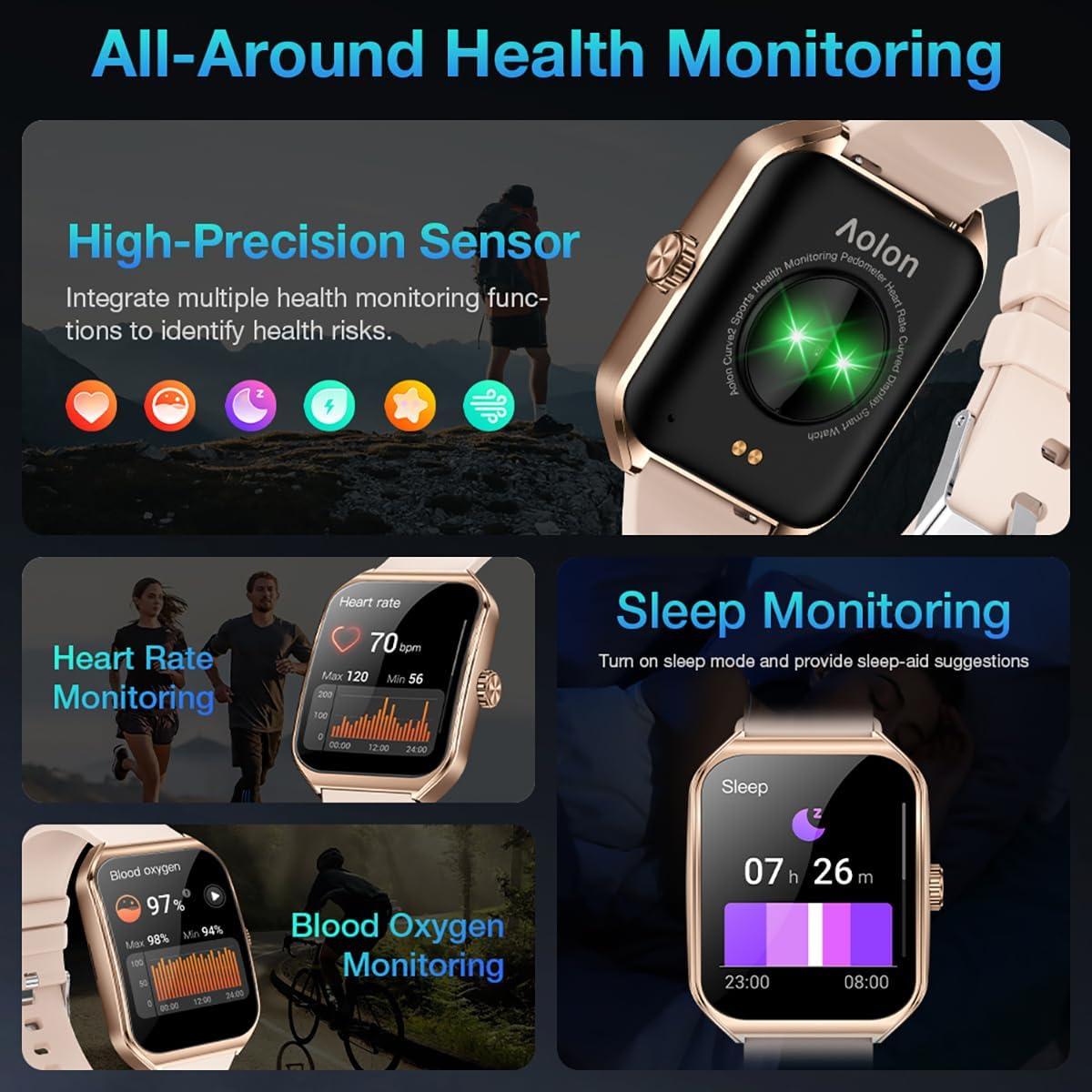
Image: A collage showing the smart watch monitoring heart rate, blood oxygen, and sleep, emphasizing its comprehensive health tracking capabilities.
Video: Demonstrates the 24/7 health monitoring features of the AOLON Smart Watch, including heart rate and SpO2 tracking.
6. Ụdị Egwuregwu na Nlele Ọrụ
The watch supports over 60 sports modes, allowing you to accurately monitor heart rate, calorie consumption, and exercise duration.
- Select your desired sports mode from the watch menu (e.g., outdoor run, indoor run, outdoor walk, ball games, dance, gymnastics).
- When connected to your phone, the watch can record and track your exercise routes using your phone's GPS.
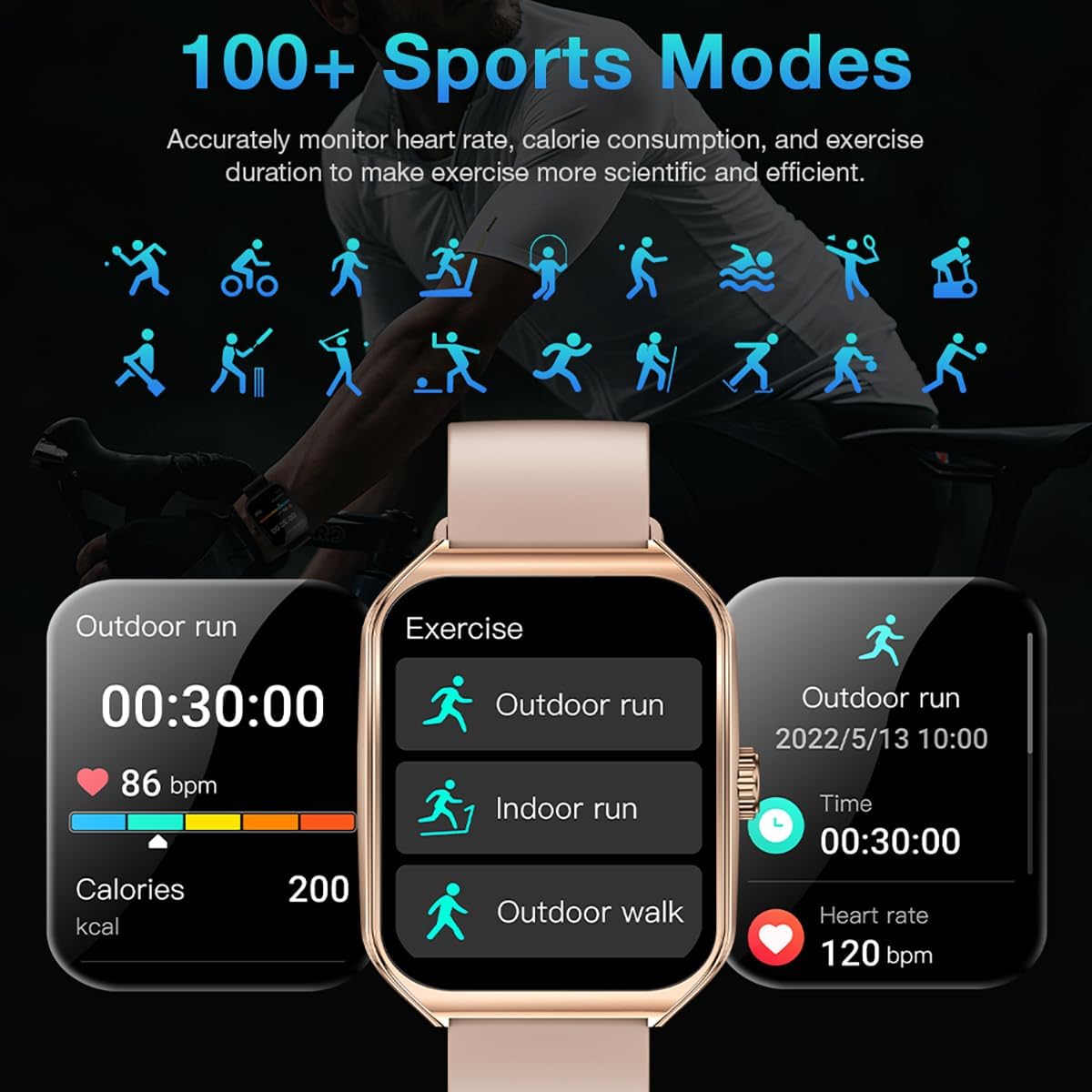
Image: The smart watch interface showing different sports modes and real-time exercise data like heart rate, calories, and distance.
7. Atụmatụ Amamihe Ndị Ọzọ
The AOLON Curve Smart Watch integrates several convenient features for daily use:
- Onye enyemaka olu AI: Quickly activate your voice assistant for tasks like making calls, checking weather, or setting alarms.
- Amụma ihu igwe: Nweta mmelite ihu igwe ozugbo.
- Njikwa egwu: Jikwaa ịkpọghachi egwu na ama gị.
- Elekere mkpu: Tọọ ma jikwaa mkpu.
- Elekere nkwụsị na ihe ngụ oge: Essential timing functions.
- Chọta ekwentị gị: Locate your paired smartphone.
- Igwe ọkụ: A simple flashlight function.
- Mgbako: Ngụkọta ndị bụ isi na nkwojiaka gị.
- Ọrụ SOS: For emergency situations.
Vidiyo: Efereview of the Curve2 Smart Watch features, including fitness tracking, notifications, and various smart functions.
Nlekọta
1. Ịsacha Elekere Gị
Regular cleaning helps maintain the appearance and functionality of your smart watch.
- Wipe the screen and body with a soft, damp akwa .
- The silicone strap is washable. You can gently clean it with mild soap and water.
- Zere iji kemịkalụ siri ike ma ọ bụ ihe na-emebi emebi.
2. Mmiri Na-eguzogide Mmiri (IP67)
The AOLON Curve Smart Watch is IP67 waterproof, meaning it is resistant to dust and can withstand immersion in water up to 1 meter for 30 minutes. It is suitable for daily use and light water activities like hand washing or rain exposure.
- Do not use the watch for diving, hot showers, or prolonged submersion in water.
- Zere ikpughe elekere ahụ na mmiri ma ọ bụ uzuoku dị elu.

Image: The smart watch partially submerged in water, illustrating its IP67 water resistance feature.
Nchọpụta nsogbu
If you encounter issues with your AOLON Curve Smart Watch, please refer to the following common solutions:
- Lelee anaghị agbanye: Hụ na elekere ahụ chajịchara nke ọma. Jikọọ ya na eriri chajị ma hapụ ya ka ọ chajị ruo opekata mpe nkeji iri atọ tupu ị nwaa ịgbanwuo ya.
- Enweghị ike ijikọ na ekwentị:
- Gbaa mbọ hụ na agbanyere Bluetooth na ekwentị gị yana elekere nọ n'ime oke.
- Malitegharịa ekwentị gị ma elekere.
- Check if the GloryFit app has necessary permissions (location, Bluetooth, notifications).
- If previously paired, try unpairing and re-pairing the device through the GloryFit app.
- Data ahụike ezighi ezi:
- Gbaa mbọ hụ na etinyere elekere nke ọma na nkwojiaka gị, ọ bụghị nke siri ike ma ọ bụ nke tọgbọrọ chakoo.
- Hichaa ihe mmetụta dị n'azụ elekere.
- Environmental factors or skin conditions can sometimes affect sensor accuracy.
- Amamọkwa anaghị apụta:
- Verify that notification permissions are enabled for the GloryFit app in your phone's settings.
- Ensure the watch is connected to your phone via Bluetooth.
- Check the notification settings within the GloryFit app to ensure specific app notifications are enabled.
Nkọwapụta
| Ngosipụta nha | 1.83 sentimita asatọ |
| Ụdị ngosi | HD Curved Display with 3D Curved Glass |
| Njikọta | Bluetooth 5.0 |
| Ike batrị | 245 ndeamp Oge awa |
| Battery Life (Normal Use) | Ruo ụbọchị 7 |
| Battery Life (Power-Saving Mode) | N'ime ụbọchị 20 |
| Oge Nchaji | Ihe ruru. awa 2.5 |
| Mmiri Nguzogide | IP67 |
| Nlekọta ahụike | Heart Rate, SpO2, Sleep, Stress, Women's Cycle |
| Ụdị egwuregwu | Ụdị 60+ |
| Ndakọrịta | Android & iOS |
| Ibu | 40g (watch body only) |
| Nọmba nlereanya | 5d738664-f1e0-4256-942f-d938b44e5e53 |
Akwụkwọ ikike na nkwado
AOLON provides a Akwụkwọ ikike nke ọnwa 12 for your smart watch. If you encounter any issues or require assistance, please contact our customer service team.
- Ndị ọrụ nlekọta ndị ahịa: Available 24 hours a day. Please contact us through Amazon Customer Service for prompt assistance.