Okwu mmalite
Thank you for choosing the Porodo Lifestyle 4K Digital Camera. This camera is designed to capture your world in stunning detail, offering 4K video recording and high-resolution 50MP images. With features like 16x digital zoom, a flip flash, and a 180° rotating screen, it is ideal for vlogging, photography, and various content creation needs. This manual provides essential information on setting up, operating, and maintaining your camera to ensure optimal performance and longevity.
Ozi nchekwa
- Do not expose the camera to extreme temperatures, direct sunlight, or high humidity.
- Zere ịda ma ọ bụ itinye igwefoto ahụ n'ọnọdụ siri ike.
- Keep the camera away from water and liquids unless specifically designed for underwater use (this model is not).
- Do not attempt to disassemble or modify the camera. This will void the warranty.
- Use only the specified battery type and charging method.
- Debe ebe ụmụaka na-apụghị iru.
Ihe ngwugwu
Biko lelee igbe maka ihe ndị a:
- Porodo Lifestyle 4K Digital Camera
- Batrị enwere ike ịgbanye (650mAh)
- -Dị-C Nchaji USB
- Akwụkwọ ntuziaka (akwụkwọ a)
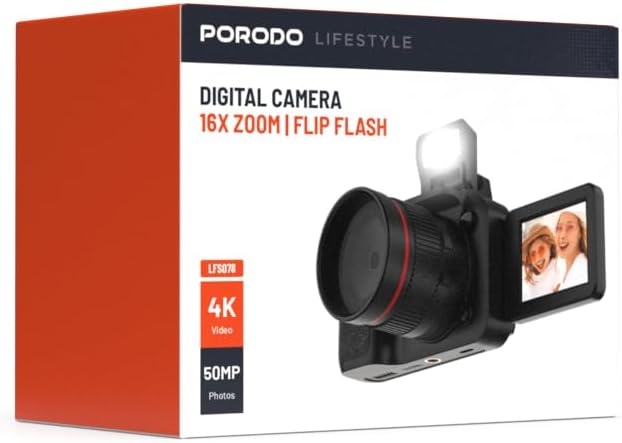
Foto: N'ihu view of the Porodo Lifestyle 4K Digital Camera retail box, showing the camera and key features.

Foto: Azụ view of the Porodo Lifestyle 4K Digital Camera retail box, displaying product specifications and features.
Ngwaahịa gafereview
Familiarize yourself with the various parts of your Porodo Lifestyle 4K Digital Camera.

Image: The Porodo Lifestyle 4K Digital Camera shown with its 180° rotating screen flipped open and the integrated flash extended upwards.
- oghere: Main optical component for capturing images and videos.
- Flip Flash: Na-enye ìhè ọzọ n'ọnọdụ obere ìhè.
- 180° Rotating Screen (2.2'' Display): Na-enye ohere maka mgbanwe viewing angles, ideal for vlogging and selfies.
- Bọtịnụ ike: Gbanyụọ/ gbanyụọ igwefoto.
- Bọtịnụ mkpuchi: Na-ese foto ma ọ bụ malite/kwụsị ndekọ vidiyo.
- Njikwa mbugharị: Adjusts the 16x digital zoom.
- Bọtịnụ igodo nsoroụzọ: For menu navigation and settings adjustment.
- Ụdị-C Port: Maka ịchaji na ịnyefe data.
- Oghere kaadị ebe nchekwa: For inserting an SD card (not included).
Melite
1. Ntinye batrị na Nchaji
- Chọta mkpuchi nke ebe batrị dị n'okpuru igwefoto ahụ.
- Mikpuo ihe mkpuchi ahụ iji mepee mkpuchi ahụ.
- Insert the provided 650mAh battery, ensuring the contacts align correctly.
- Close the battery compartment cover until it clicks securely.
- Connect the camera to a power source using the Type-C charging cable. The charging indicator will illuminate.
- A full charge takes approximately 2.5 hours. The indicator will change or turn off when charging is complete.
2. Ntinye Kaadị Ebe Nchekwa
A memory card (SD card, not included) is required to store photos and videos.
- Locate the memory card slot, usually on the side or bottom of the camera.
- Insert the SD card with the metal contacts facing the correct direction (refer to the diagram near the slot if available) until it clicks into place.
- Iji wepụ ya, jiri nwayọ pịa kaadị ahụ ruo mgbe ọ ga-apụta.
3. Ike izizi
- Press and hold the Power button for a few seconds until the screen illuminates.
- Upon first use, you may be prompted to set the date and time. Use the navigation buttons to adjust and confirm.
Ntuziaka ọrụ
Basic Photo Mode (50MP)
- Turn on the camera. It will typically default to photo mode.
- Frame your shot using the 2.2'' display.
- Press the Shutter button halfway down to focus (if applicable).
- Press the Shutter button fully to capture a 50MP image.

Image: A person holding the Porodo Lifestyle 4K Digital Camera, demonstrating a typical usage scenario for capturing photos.

Foto: Ọzọ view of a person holding the Porodo Lifestyle 4K Digital Camera, illustrating the camera's ergonomic design during use.
Basic Video Mode (4K)
- Switch the camera to video mode (usually via a dedicated button or menu option).
- Press the Shutter button once to start 4K video recording. A recording indicator (e.g., red dot, timer) will appear on the screen.
- Pịa bọtịnụ Shutter ọzọ ka ịkwụsị ndekọ.

Image: The Porodo Lifestyle 4K Digital Camera highlighting its 4K video resolution capability.
Using the 16X Digital Zoom
- While in photo or video mode, use the zoom controls (often marked with 'W' for Wide and 'T' for Telephoto) to adjust the 16x digital zoom.
- Press 'T' to zoom in and 'W' to zoom out.
Using the Flip Flash
- To activate the flash, manually flip it up from its resting position.
- The camera will automatically use the flash when needed in low-light conditions, depending on your flash settings (e.g., Auto, Fill-in, Red-eye reduction).
- To turn off the flash, gently push it back down until it locks into place.
Using the 180° Rotating Screen
- The 2.2'' display can be rotated 180 degrees.
- Flip the screen out from the side of the camera and rotate it to face forward for selfies or vlogging, or to various angles for creative shots.
- Ensure the screen is securely positioned before shooting.

Image: The Porodo Lifestyle 4K Digital Camera illustrating its 2.2-inch display and 180-degree flip screen functionality.
Nkpọghachi na ihichapụ Files
- Enter Playback mode (usually via a dedicated button or menu option).
- Use the navigation buttons to scroll through your photos and videos.
- Ka ihichapụ a file, select it and press the Delete button (often marked with a trash can icon). Confirm deletion when prompted.
Jikọọ na Kọmputa
- Gbanyụọ igwefoto.
- Connect the camera to your computer using the provided Type-C cable.
- Turn on the camera. It should appear as a removable disk drive on your computer.
- You can now transfer photos and videos to your computer.
Nlekọta
Na-ehicha igwefoto
- Jiri ákwà dị nro, nke na-enweghị ihe e ji ehicha ahụ, hichaa ahụ igwefoto ahụ.
- For the lens and screen, use a specialized lens cleaning cloth and solution. Do not use abrasive materials.
- Avoid spraying cleaning solutions directly onto the camera. Apply to the cloth first.
Nlekọta batrị
- Recharge the battery fully before first use.
- Zere ka batrị ahụ wụpụ kpamkpam mgbe niile iji mee ka ọ dịruo ogologo ndụ.
- If storing the camera for an extended period, charge the battery to about 50% and remove it from the camera.
Nchekwa
- Debe igwefoto ahụ n'ebe dị jụụ ma kpọọ nkụ, ebe anwụ na-anaghị anwụ kpọmkwem na oke okpomọkụ dị oke njọ.
- Jiri akpa igwefoto ma ọ bụ akpa iji chebe ya pụọ na uzuzu na ọkọ.
Nchọpụta nsogbu
| Nsogbu | Ihe nwere ike ime | Ngwọta |
|---|---|---|
| Igwefoto anaghị agbanwu. | Battery is dead or not installed correctly. | Charge the battery. Ensure the battery is inserted with correct polarity. |
| Enweghị ike ise foto/vidiyo. | Kaadị ebe nchekwa ejula, etinyeghị ya, maọbụ mebie ya. | Fanye kaadị ebe nchekwa. Hichapụ adịghị mkpa files. Hazie kaadị ahụ (nke a ga-ehichapụ data niile). |
| Images/Videos are blurry. | Lens is dirty. Insufficient light. Camera shake. | Clean the lens. Use the flash or shoot in brighter conditions. Hold the camera steady. |
| Flash not working. | Flash is not flipped up. Flash setting is off. | Ensure the flash is manually flipped up. Check flash settings in the menu. |
| Igwefoto na-ajụ oyi. | Nsogbu ngwanrọ. | Wepụ ma tinyeghachi batrị ahụ iji tọgharịa igwefoto ahụ. |
Nkọwapụta
Detailed technical specifications for the Porodo Lifestyle 4K Digital Camera:

Image: Visual representation of the camera's core capabilities: 4K video, 50MP photos, and 16x digital zoom.

Image: A detailed table outlining the technical specifications of the Porodo Lifestyle 4K Digital Camera.
- Aha nlereanya: Porodo Lifestyle 4K Digital Camera – 50MP, 16x Zoom, Flip Flash, 180° Rotating Screen
- Nọmba Nlereanya ihe: 6849108448116
- Akara: Porodo
- Kachasị WebMkpebi foto cam: 50 MP
- Mkpebi vidiyo: 4K (3840x2160)
- Mbugharị dijitalụ: 16X
- Mbugharị anya: 1.0
- Ngosipụta: 2.2'' (180° Rotating Screen)
- Ike batrị: 650mAh (1 P76 battery included)
- Oge ọrụ: Ruo awa iri abụọ
- Oge nchaji: Ihe dị ka awa 2.5
- Nchaji ọdụ ụgbọ mmiri: Ụdị-C
- Teknụzụ ihe mmetụta foto: CMOS
- Akwadoro File Ụdị: JPG (images), AVI (videos)
- Ndozi onyonyo: Dijitalụ
- Akụkụ akụkụ: 16:9, 4:3
- Nkọwa mita: ntụpọ
- Akụkụ ngwaahịa: 6 x 13 x 9 cm; 310 g
- Mba onye si: China
Akwụkwọ ikike na nkwado
Porodo products are designed with quality and reliability in mind. For warranty information and technical support, please refer to the official Porodo websaịtị ma ọ bụ kpọtụrụ onye nkesa mpaghara gị.
Nkwado n'ịntanetị: Gaa leta Porodo Store on Amazon maka ozi ngwaahịa na mmelite.
Nhọrọ Akwụkwọ ikike agbakwunyere: Additional warranty plans may be available through authorized retailers. Please check with your point of purchase for details.


