1. Okwu mmalite
Daalụ maka ịzụrụasing the XO F41 Mirror Bluetooth Speaker. This device combines a digital clock display with a portable Bluetooth speaker, offering multiple playback options including Bluetooth, TF card, and FM radio. Please read this manual carefully before use to ensure proper operation and to maximize your experience with the product.

Image 1.1: The XO F41 Mirror Bluetooth Speaker in use, showing its digital clock display.
2. Akụrụngwa Ngwaahịa
- Njikọ Bluetooth 5.3: For stable and efficient wireless audio streaming.
- Mirror Display: Clear digital time display with adjustable brightness.
- Ụdị ịkpọghachi ọtụtụ: Supports Bluetooth, TF card, and FM radio.
- Igwe okwu agbakwunyere: Maka oku na-enweghị aka.
- Ogologo oge ịkpọghachi: Up to 8 hours at 50% volume, 5 hours at 100% volume.
- Nhazi kọmpat na nke enwere ike ibugharị: Easy to carry and place anywhere.
- Nchaji USB-C: Modern and convenient charging port.
3. Ihe ngwugwu
Biko lelee ngwungwu maka ihe ndị a:
- XO F41 Mirror Bluetooth Speaker
- USB-C eriri USB
- Akwụkwọ ntuziaka onye ọrụ

Image 3.1: The XO F41 Mirror Bluetooth Speaker packaging.
4. Nhazi na Njikwa Ngwaọrụ
Mara onwe gị nke ọma na bọtịnụ na ọdụ ụgbọ mmiri nke ọkà okwu ahụ:
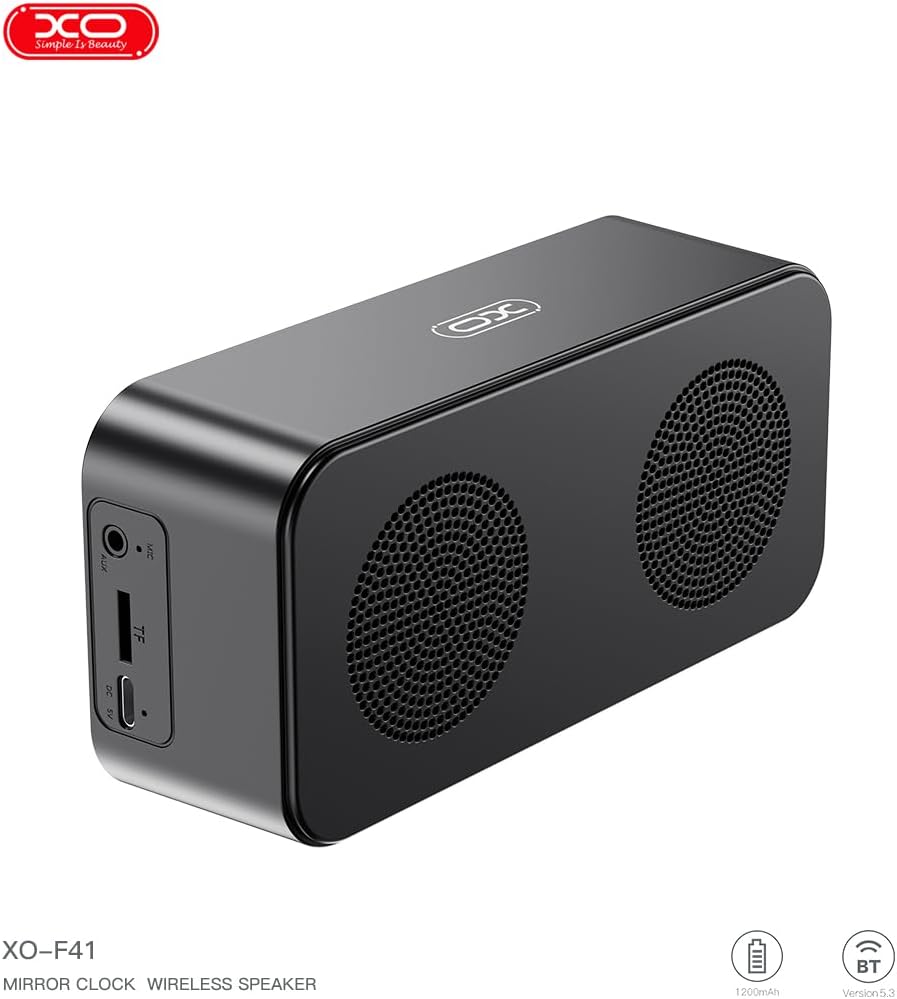
Foto 4.1: Akụkụ view of the XO F41 with ports labeled.
- Bọtịnụ ike: Press and hold to power on/off. Short press to switch modes.
- Bọtịnụ Kwụsị/Kwụsị: Kpọọ ma ọ bụ kwụsịtụ ọdịyo. Zaa/kwụsị oku.
- Elu elu/Egwu na-esote: Pịa mkpirisi maka ibuli olu, ogologo pịa maka egwu ọzọ.
- Egwu ala/Oge gara aga: Pịa obere oge maka mbelata olu, pịa ogologo oge maka egwu gara aga.
- Ọdụ USB-C: Maka ịchaji ngwaọrụ.
- Oghere TF Kaadị: Insert a TF (MicroSD) card for local music playback.
- Ọdụ ụgbọ mmiri AUX: Maka ntinye ọdịyo ejiri waya mee.
5. Nhazi
5.1 Ịchaji ọkà okwu
- Jikọọ eriri USB-C enyere na ọdụ chaja dị na ọkà okwu.
- Jikọọ nsọtụ nke ọzọ nke eriri na ihe nkwụnye ọkụ USB (anaghị etinye ya) ma ọ bụ ọdụ ụgbọ USB nke kọmputa.
- The charging indicator will illuminate. It takes approximately 3 hours for a full charge.
- The indicator will turn off or change color once fully charged.
5.2 Gbanyụọ ma ọ bụ gbanyụọ
- Iji gbanye: Press and hold the Power button for approximately 3 seconds. You will hear an audible prompt.
- Iji gbanyụọ: Press and hold the Power button for approximately 3 seconds. You will hear an audible prompt.
6. Ntuziaka ọrụ
6.1 Njikọ Bluetooth
- Ensure the speaker is powered on and in Bluetooth mode. If not, short press the Power button to cycle through modes until "BT" or a Bluetooth icon appears on the display.
- Na ekwentị mkpanaaka gị, gbanye Bluetooth wee chọọ ngwaọrụ dị.
- Select "XO-F41" from the list of devices.
- Once paired, the speaker will indicate a successful connection, and you can begin playing audio from your device.
6.2 TF Card Mode
- Insert a TF (MicroSD) card with MP3 audio files n'ime oghere kaadị TF.
- The speaker will automatically switch to TF card mode and begin playing music. If not, short press the Power button to cycle to TF card mode.
- Use the Volume Up/Down buttons for track navigation and the Play/Pause button for playback control.
Ọnọdụ redio FM 6.3
- Short press the Power button to switch to FM radio mode. The display will show the FM frequency.
- Long press the Play/Pause button to automatically scan and save available FM stations.
- Short press the Volume Up/Down buttons to switch between saved stations.
6.4 Clock and Alarm Settings
The XO F41 features a digital clock display. Specific instructions for setting the time and alarm are typically found in the detailed manual included with the product. Generally, a dedicated 'M' (Mode) or 'Set' button is used to enter time/alarm setting mode, and volume buttons are used to adjust values.

Image 6.1: The XO F41 speaker functioning as a bedside clock.
6.5 Ịgbanwe Ọcha Ngosipụta
The display brightness is adjustable. Look for a dedicated button (often labeled with a sun icon or similar) or a combination of button presses (e.g., double-pressing the Power button) to cycle through brightness levels. Refer to the included quick start guide for exact steps.
7. Nlekọta
- Nhicha: Jiri ákwà dị nro ma kpọọ nkụ hichaa elu okwu ahụ. Ejila ihe nhicha ma ọ bụ ihe mgbaze.
- Nchekwa: Chekwaa ọkà okwu n'ebe dị jụụ, kpọrọ nkụ pụọ na ìhè anyanwụ kpọmkwem na oke okpomọkụ mgbe ọ naghị eji ya ogologo oge.
- Nguzogide mmiri: This device is not waterproof. Avoid exposure to water or excessive moisture.
- Nlekọta batrị: Iji mee ka batrị dị ogologo, zere iwepụ batrị ahụ mgbe niile. Chaji ngwaọrụ ahụ mgbe niile, ọbụlagodi na ọ naghị arụ ọrụ mgbe niile.
8. Nchọpụta nsogbu
| Nsogbu | Ihe nwere ike ime | Ngwọta |
|---|---|---|
| Ọkà okwu anaghị agba ọkụ. | Batrị dị ala. | Chajie ọkà okwu ahụ ruo opekata mpe nkeji iri atọ. |
| Enweghị ike ijikọ site na Bluetooth. | Speaker not in pairing mode; Bluetooth disabled on device; too far from device. | Ensure speaker is in Bluetooth mode. Enable Bluetooth on your device. Move speaker closer to your device (within 10 meters). |
| No sound from TF card. | TF card not inserted correctly; unsupported file format; no audio files on card. | Tinyeghachi kaadị TF. Hụ na ị nwere ike itinye ya ọzọ. files are in MP3 format. Verify audio files are present on the card. |
| Nnabata redio FM na-adịghị mma. | Mgbaàmà na-adịghị ike; nnyonye anya gburugburu ebe obibi. | Move the speaker to a different location. Re-scan for stations. |
9. Nkọwapụta
| Njirimara | Nkọwa |
|---|---|
| Nọmba nlereanya | XO-F41 |
| Ụdị Bluetooth | Bluetooth V5.3 |
| Ugboro Bluetooth | 2.402GHz-2.480GHz |
| Ike batrị | 1200mAh |
| Nchaji ntinye | USB-C, DC5V/0.5A |
| Oge Nchaji | Ihe dị ka awa 3 |
| Oge egwuregwu | 8H (50% volume); 5H (100% volume) |
| Ogologo Irè | Ihe na-erughị mita 10 |
| Ike kacha | 5W |
| Ngalaba na-ekwu okwu | 52mm |
| Signgbaàmà-na-Noise ruru | > 80dB |
| Akụkụ ngwaahịa | 15 x 3.81 x 11 cm (approx. 150 x 45 x 72 mm) |
| Ibu ngwaahịa | 320 g (approx. 0.28 kg) |
| Ihe onwunwe | Plastic |
| Njirimara Pụrụ Iche | Icha ọkụ nwere ike ịgbanwe |

Image 9.1: Detailed product parameters.
10. Akwụkwọ ikike Ozi
The XO F41 Mirror Bluetooth Speaker comes with a standard manufacturer's warranty. Please refer to the warranty card included in your package for specific terms, conditions, and duration. Keep your purchase receipt as proof of purchase for any warranty claims.
11. Nkwado ndị ahịa
For further assistance, technical support, or inquiries regarding your XO F41 Mirror Bluetooth Speaker, please contact the retailer or manufacturer's customer service department. Contact details are typically provided on the product packaging or the official brand websaịtị.