1. Okwu mmalite
Thank you for choosing the MESWAO 15.6 inch Android 14 Tablet Pro. This tablet is designed to provide a superior visual and performance experience with its large Full HD display, powerful octa-core processor, and extended battery life. This manual will guide you through the setup, operation, maintenance, and troubleshooting of your new device, ensuring you get the most out of its advanced features.
2. Kedu ihe dị na Igbe ahụ
Biko lelee ihe dị n'ime ngwugwu gị. Ọ bụrụ na ihe ọ bụla efuo ma ọ bụ mebie, kpọtụrụ ndị ọrụ nkwado ndị ahịa.
- 1 x MESWAO 15.6 inch Android Tablet
- 1 x nkwụnye ọkụ
- 1 x Ụdị-C USB
- 1 x Akwụkwọ ntuziaka onye ọrụ
- 1 x Ụdị-C na eriri USB
- 1 x Stuck pin (SIM ejector tool)

Image: Visual representation of the MESWAO tablet and its included accessories.
3. Ngwaahịa gafereview
3.1 Atụmatụ
- 15.6-inch 1080P FHD IPS Display: Large screen with 1920x1080p resolution, 16:9 aspect ratio, 85% screen-to-body ratio, and 350 nits adjustable brightness for clear visuals.
- Android 14 OS: Latest Android version for faster app launches, intuitive user interface, split-screen multitasking, and GMS certification for Google Play access.
- MediaTek Helio G99 CPU: Octa-core processor (6nm, up to 2.2GHz) and ARM Mali-G57 GPU for smooth performance in multitasking, streaming, and gaming.
- 12,000mAh Mega Battery & 30W Fast Charging: Provides up to 15 hours of video playback and 12+ hours of daily use, with 90% charge in 3 hours.
- 6GB RAM + 128GB ROM (Expandable to 1TB): Ample storage for apps, photos, and videos, with expandable memory via microSD card (FAT32 format).
- Dual-band Wi-Fi & Bluetooth 5.0: High-speed 2.4G/5G Wi-Fi and efficient Bluetooth connectivity for peripherals.
- 5MP Front + 32MP Rear Cameras: Capture moments and conduct clear video calls.
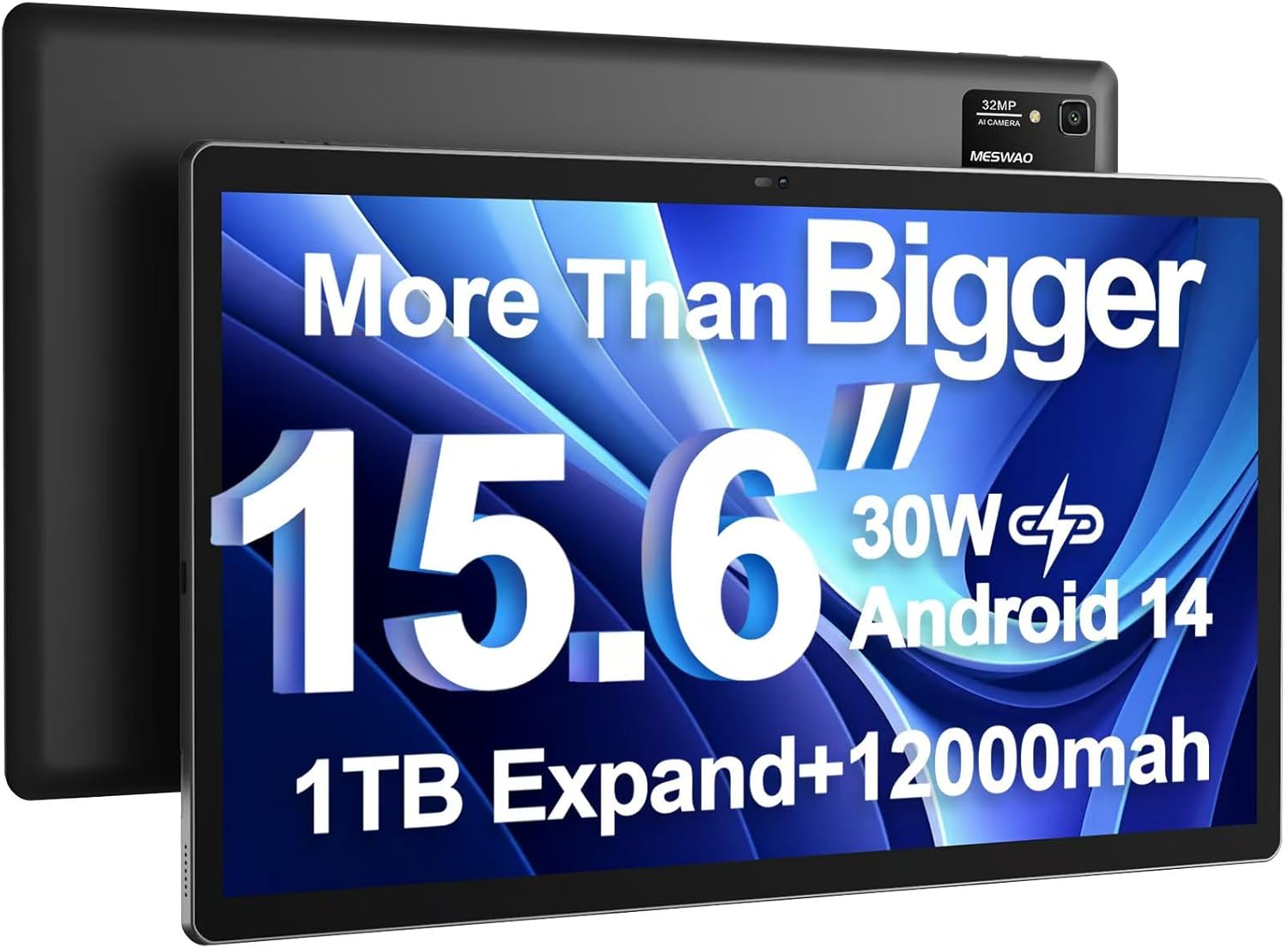
Image: The MESWAO 15.6 inch Android 14 Tablet Pro, showcasing its large display and rear camera module.

Image: Visual comparison highlighting the significantly larger screen area of the 15.6-inch tablet compared to a standard 10-inch tablet.

Image: Illustration of the tablet's 12,000mAh ultra-large capacity battery and 30W fast charging, indicating quick charge times and extended usage.
3.2 Tablet Components
Familiarize yourself with the physical components of your MESWAO tablet:
- Bọtịnụ ike: Dị n'akụkụ, a na-eji ya agbanyụ/gbanyụọ mbadamba ma ọ bụ teta/hie ụra na ihuenyo ahụ.
- Bọtịnụ olu: Adjust audio output levels.
- Igwefoto ihu: 5MP camera for video calls and selfies.
- Igwefoto azụ: 32MP camera with flash for high-resolution photos and videos.
- Ụdị-C Port: Maka ịchaji na ịnyefe data.
- Oghere TF Kaadị: Maka ịgbasa ebe nchekwa site na iji kaadị microSD.
- Ndị na-ekwu okwu stereo: Quad speakers for enhanced audio experience.
- Jack ekweisi 3.5mm: For wired audio connection (requires included Type-C to 3.5mm adapter).
4. Nhazi
4.1 Ike mbido
- Pịa ma jide bọtịnụ ike until the MESWAO logo appears on the screen.
- Soro mkpali na ihuenyo ka ịhọrọ asụsụ gị, mpaghara, wee jikọọ na netwọk Wi-Fi.
- Sign in with your Google account or create a new one to access Google Play Store and other services.
4.2 Ịchaji mbadamba nkume
Before first use, fully charge the tablet. Use the provided power adapter and Type-C cable.
- Connect the Type-C cable to the tablet's Type-C port.
- Tinye nkwụnye ọkụ n'ime oghere mgbidi.
- The charging indicator will appear on the screen. A full charge takes approximately 3 hours with the 30W fast charger.
4.3 Ịtinye kaadị MicroSD
To expand storage, insert a microSD card (FAT32 format, up to 1TB, sold separately).
- Locate the TF card slot on the side of the tablet.
- Use the provided stuck pin to gently press into the small hole next to the slot to eject the tray.
- Place the microSD card into the tray with the gold contacts facing down.
- Jiri nlezianya tinyeghachi tray ahụ n'ime oghere ahụ ruo mgbe ọ pịnyere n'ọnọdụ ya.
5. Ntuziaka ọrụ
5.1 Nsoro ụzọ
- Ihuenyo ụlọ: Pịa aka ekpe ma ọ bụ aka nri ka ịnyagharịa n'etiti ihuenyo ụlọ.
- Drawer ngwa: Access all installed applications (if using a launcher with an app drawer, otherwise apps are on home screens).
- Amamọkwa & Ntọala ngwa ngwa: Swipe down from the top of the screen to access notifications and quick settings toggles (Wi-Fi, Bluetooth, Brightness, etc.).
- Ngwa ọhụrụ: Tap the square icon (or swipe up and hold from the bottom if using gesture navigation) to view ma gbanwee n'etiti ngwa ejiri mee ihe ọhụrụ.
5.2 Multitasking with Split Screen
The Android 14 OS supports split-screen functionality for enhanced productivity.
- Open the first app you want to use.
- Go to the Recent Apps view.
- Tap the app icon at the top of the first app's card and select 'Split screen'.
- Choose the second app from your recent apps or app drawer to open it in the other half of the screen.
- Adjust the size of each app by dragging the divider in the middle.

Foto: Ofeview of key features of the Android 14 operating system on the tablet, including multitasking capabilities.
5.3 Njikọta
- Wi-Fi: Gaa na Ntọala> Netwọk & ịntanetị> Wi-Fi to connect to available networks. Supports 2.4Ghz and 5Ghz bands.
- Bluetooth: Gaa na Ntọala > Ngwaọrụ ejikọrọ > Mmasị njikọ > Bluetooth to pair with Bluetooth headphones, keyboards, or other devices.
- Screen Casting: The tablet supports wireless screen casting to compatible displays. Access this feature from Quick Settings or Settings > Connected devices > Connection preferences > Cast.

Image: Depiction of the tablet's stable dual-band Wi-Fi and Bluetooth 5.0 capabilities, enabling seamless wireless connections.
6. Nlekọta
6.1 Nlekọta batrị
- Zere oke okpomọkụ (ọkụ ma ọ bụ oyi) n'ihi na ha nwere ike imebi ndụ batrị.
- Do not let the battery completely drain frequently. Charge it before it reaches 0%.
- Use only the provided charger or a certified 30W PD fast charger.
6.2 Nhicha
- Jiri akwa dị nro na-enweghị lint hichaa ihuenyo na ahụ.
- Maka isi ike smudges, ntakịrị dampen akwa na mmiri ma ọ bụ ihe nchacha ihuenyo. Zere kemịkalụ siri ike.
- Efesala mmiri mmiri ozugbo na mbadamba ahụ.
6.3 Mmelite ngwanrọ
Lelee ma wụnye mmelite sistemu oge niile iji hụ na arụmọrụ na nchekwa kacha mma.
- Connect your tablet to a stable Wi-Fi network.
- Gaa na Ntọala> Sistemu> Mmelite sistemụ.
- Soro ntuziaka ihuenyo ka ibudata ma wụnye mmelite ọ bụla dị.
7. Nchọpụta nsogbu
Ọ bụrụ na ị hụ nsogbu na mbadamba gị, lee ihe ngwọta ndị a na-enye:
| Nsogbu | Ihe nwere ike ime | Ngwọta |
|---|---|---|
| Mbadamba agaghị agbanwu | Batrị dị ala; Sistemụ dara | Chajịa mbadamba ihe maka opekata mpe nkeji iri atọ. Pịa ma jide bọtịnụ ike maka sekọnd 10-15 ka ịmanye malitegharịa. |
| Arụmọrụ nwayọ/nkwụsị | Ngwa dị oke ọnụ ahịa na-agba; Ebe nchekwa dị ala; ngwanrọ ochie | Mechie ngwa ndabere. Kpochapụ cache. Hapụ ebe nchekwa. Lelee maka mmelite sistemụ. |
| Nsogbu njikọ Wi-Fi | Paswọọdụ na-ezighi ezi; Nsogbu rawụta; Agbanyụrụ Wi-Fi Mbadamba | Ensure Wi-Fi is on. Re-enter password. Restart router. Forget and reconnect to network. |
| Batrị na-agbapụ ngwa ngwa | High screen brightness; Background apps; Heavy usage | Reduce screen brightness. Close unused apps. Limit background data. Check battery usage in settings. |
| Touchscreen unresponsive/Phantom touches | Temporary software glitch; Defective unit | Restart the tablet. If the issue persists, contact MESWAO customer support for assistance. |
If the problem persists after trying these solutions, please contact MESWAO customer support for further assistance.
8. Nkọwapụta
| Njirimara | Nkọwa |
|---|---|
| Aha Nlereanya | MES-B3 Pro |
| Sistemụ nrụọrụ | Android 14 |
| Nha ihuenyo | 15.6 sentimita asatọ |
| Mkpebi ihuenyo | 1920 x 1080 pixels (Full HD IPS) |
| Nhazi | MediaTek Helio G99 Octa-core (up to 2.2GHz) |
| Ihe eserese eserese | Ogwe aka Mali-G57 |
| RAM | 6 GB |
| Nchekwa ime (ROM) | 128 GB |
| Nchekwa enwere ike ịgbasa | Up to 1TB via MicroSD card (FAT32 format) |
| Ike batrị | 12,000mAh |
| Ndụ batrị (Ọkara) | 13 Hours (up to 15 hours video playback) |
| Ịchaji | Nchaji ngwa ngwa 30W PD |
| Njikọ ikuku | 802.11a/b/ac/ax (2.4G/5G Dual-band Wi-Fi), Bluetooth 5.0 |
| Igwefoto ihu | 5MP |
| Igwefoto azụ | 32MP |
| Ibu Ibu | 4.42 pound (ihe dị ka 2 n'arọ) |
| Akụkụ ngwaahịa | 14.49 x 8.66 x 0.39 sentimita (36.8 x 22 x 1 cm) |
9. Akwụkwọ ikike na nkwado
MESWAO products come with a standard manufacturer's warranty. Please refer to the warranty card included in your package for specific terms and conditions. For technical support, troubleshooting assistance, or warranty claims, please contact MESWAO customer service through the contact information provided on the official MESWAO websaịtị ma ọ bụ ikpo okwu ịzụrụ ihe.
Ozi mkpọtụrụ: Please visit the official MESWAO website or refer to the support card included in your product packaging for the most up-to-date contact details.


