Okwu mmalite
The sofirn H35R LED Headlamp is a versatile and powerful lighting solution designed for various outdoor and indoor activities. Featuring both a super bright white light (1500 Lumens) and a specialized 660nm deep red light, it offers reliable illumination and preserves night vision. Its lightweight, comfortable, and IPX6 waterproof design ensures durability in diverse environments, making it perfect for camping, hiking, night running, or household repairs.
Ndepụta Ngwa
- 1 x sofirn H35R Headlamp
- 1 x Battery (included)
- 1 x USB-C Nchaji USB
- 1 x Isi
- 1 x Akwụkwọ ntuziaka onye ọrụ
Melite
Ntinye batrị & Nchaji
Tupu ojiji nke mbụ, hụ na chajịla batrị nke ọma.
- Unscrew the cap on one end of the headlamp to reveal the hidden USB-C charging port.
- Insert the included USB-C cable into the port. Connect the other end of the cable to a compatible USB power source.
- The charging indicator light will be red while charging and turn green when fully charged.
- To remove the battery for external charging or replacement, unscrew the cap on the opposite end of the headlamp.

Figure 1: Hidden USB-C Charging Port and Indicator
Na-agbakwunye headband
Isi okwuamp unit can be easily clipped into the headband mount. Adjust the elastic strap for a comfortable and secure fit on your head.

Figure 2: Adjustable Headband for Comfortable Fit
Video 1: Sofirn H35R Operation Guide
Ntuziaka ọrụ
Isi ọrụ
- Turn On White Light: From OFF, click the button once. The light will turn on to the last used white light mode.
- Turn On Red Light: From OFF, long press the button. The light will turn on to the last used red light mode.
- Adjust Brightness (White/Red Light): When the light is ON, long press the button to cycle through the modes: Moonlight/Low/Medium/High/Turbo. Release the button to select the desired brightness.
- Gbanyụọ: Click the button once from any mode to turn off the light.

Figure 3: Light Mode Operation Diagram
Atụmatụ
- 1500 Lumens White Light: Provides powerful illumination for various tasks and activities, with an impressive beam distance of 112 meters.
- 660nm Deep Red Light: Ideal for preserving night vision, stargazing, wildlife observation, or emergency signaling.
- Dị fechaa ma dị mma: Weighing just 80g, the H35R is designed for extended wear without discomfort.
- IPX6 Nkwanye mgbochi mmiri: Ensures reliable performance in rain, snow, and other challenging outdoor conditions.
- USB-C enwere ike ịchaji: Features a hidden USB-C port for convenient and sustainable charging.
- Smart Charging Indicators: Ọkụ na-acha uhie uhie na-egosi ịchaji, ọkụ ndụ ndụ na-egosi chaja zuru oke.
- Mwube Aluminom na-adịgide adịgide: Built to withstand tough environments.
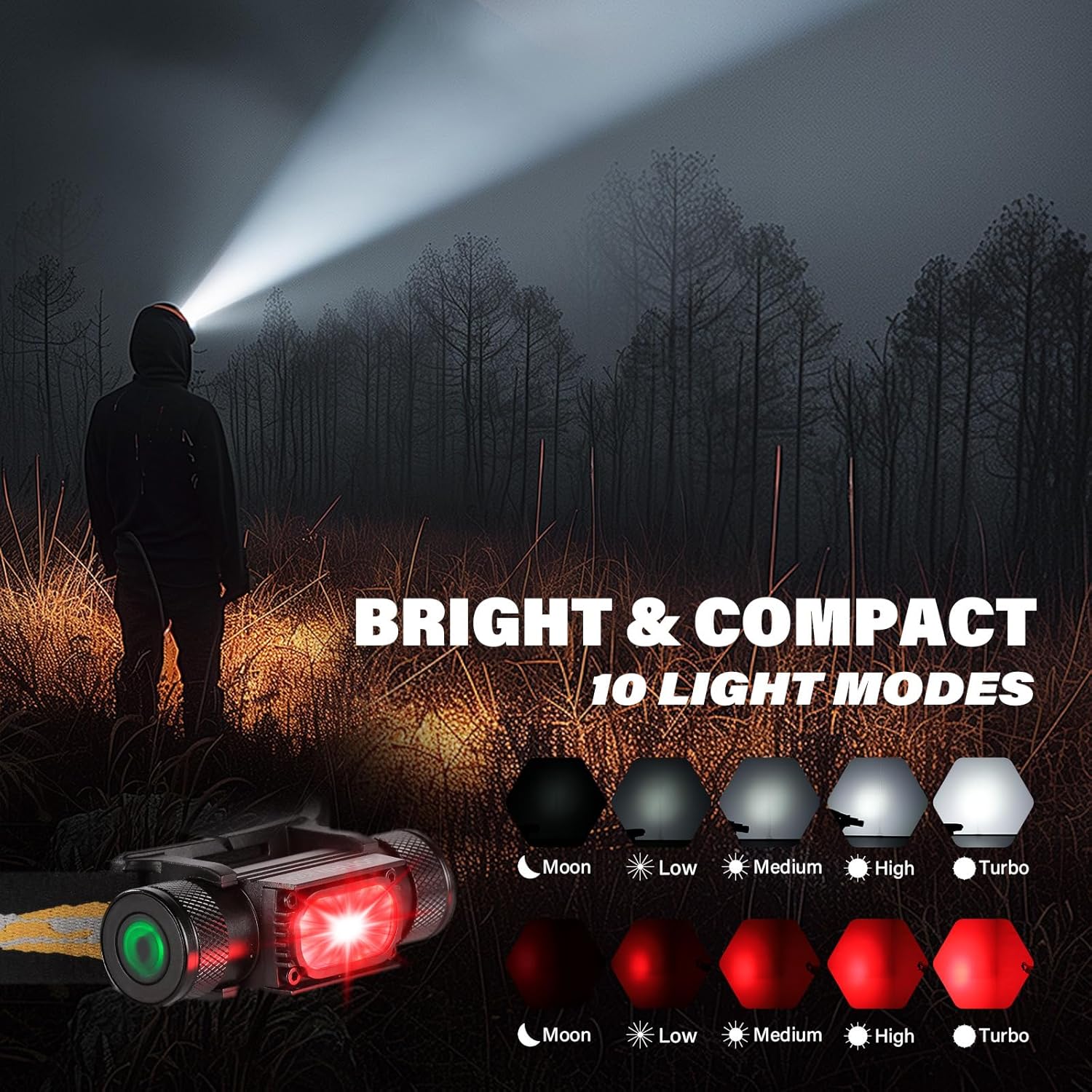
Figure 4: 660nm Deep Red Light in Use

Foto nke 5: Njirimara IPX6 nke na-anaghị echebe mmiri
Video 2: Sofirn H35R Headlamp gafereview
Nkọwapụta
| Njirimara | Uru |
|---|---|
| Njirimara Pụrụ Iche | Enwere ike ibugharị |
| Agba | Nwa |
| Isi Iyi Ike | Akwanyere batrị |
| Ụdị isi iyi ọkụ | Ikanam |
| Ihe onwunwe | Aluminom |
| Ọcha Ọcha | 1500 Lumen |
| Ogologo Ụzọ Ìhè | 112 mita |
| Ibu Ibu | 80 grams (2.82 ounces) |
| Ọkwa Nguzogide mmiri | Ihe mgbochi mmiri (IPX6) |
| Akụkụ ngwaahịa | 1.42"D x 3.31"W x 0.91"H |
| Eji akwadoro | Camping, Hiking, Running, Stargazing, Household Tasks, Outdoor Work |
Nlekọta
Nhicha
Hichapụ isi isiamp body with a soft, damp akwa . Ejila ihe nhicha abrasive.
Nlekọta batrị
Store the battery in a cool, dry place when not in use for extended periods. Recharge regularly to maintain battery health.
Mmiri Nguzogide
Ensure the end caps are securely tightened before exposing the headlamp to water to maintain its IPX6 rating.
Nchọpụta nsogbu
Ìhè anaghị agbanwu:
- Check if the battery is properly inserted and fully charged.
- Ensure the insulating paper (if present from new) has been removed from the battery terminals.
Light flickering or dimming unexpectedly:
- The battery might be low. Recharge the headlamp.
- Ensure the end caps are tightly screwed on.
Akwụkwọ ikike na nkwado
Akwụkwọ ikike
The sofirn H35R headlamp comes with a limited warranty. Please refer to the included user manual for specific warranty terms and conditions.
Nkwado ndị ahịa
For any questions, technical assistance, or warranty claims, please contact sofirn customer support through their official websaịtị ma ọ bụ onye na-ere ahịa ebe a zụrụ ngwaahịa ahụ.


