Okwu mmalite
Thank you for choosing the Vandlion 64GB Digital Voice Recorder. This device is designed for high-fidelity audio recording with advanced noise reduction, making it ideal for lectures, meetings, interviews, and personal notes. Its compact and portable design ensures convenience for on-the-go use. Please read this manual carefully to understand the features and operation of your new device.

Foto: The Vandlion 64GB Digital Voice Recorder, a sleek black device with a carabiner clip and a keyring, designed for portability.
Ihe ngwugwu
Mgbe ị na-emepe igbe ahụ, biko hụ na ihe niile dị:
- 1 x Vandlion Digital Voice Recorder
- 1 x eriri USB-C
- 1 x Comprehensive User Manual (this document)
- Ntuziaka Nnabata 1 x
Ngwaọrụ agwụlaview
Familiarize yourself with the physical components of your voice recorder.
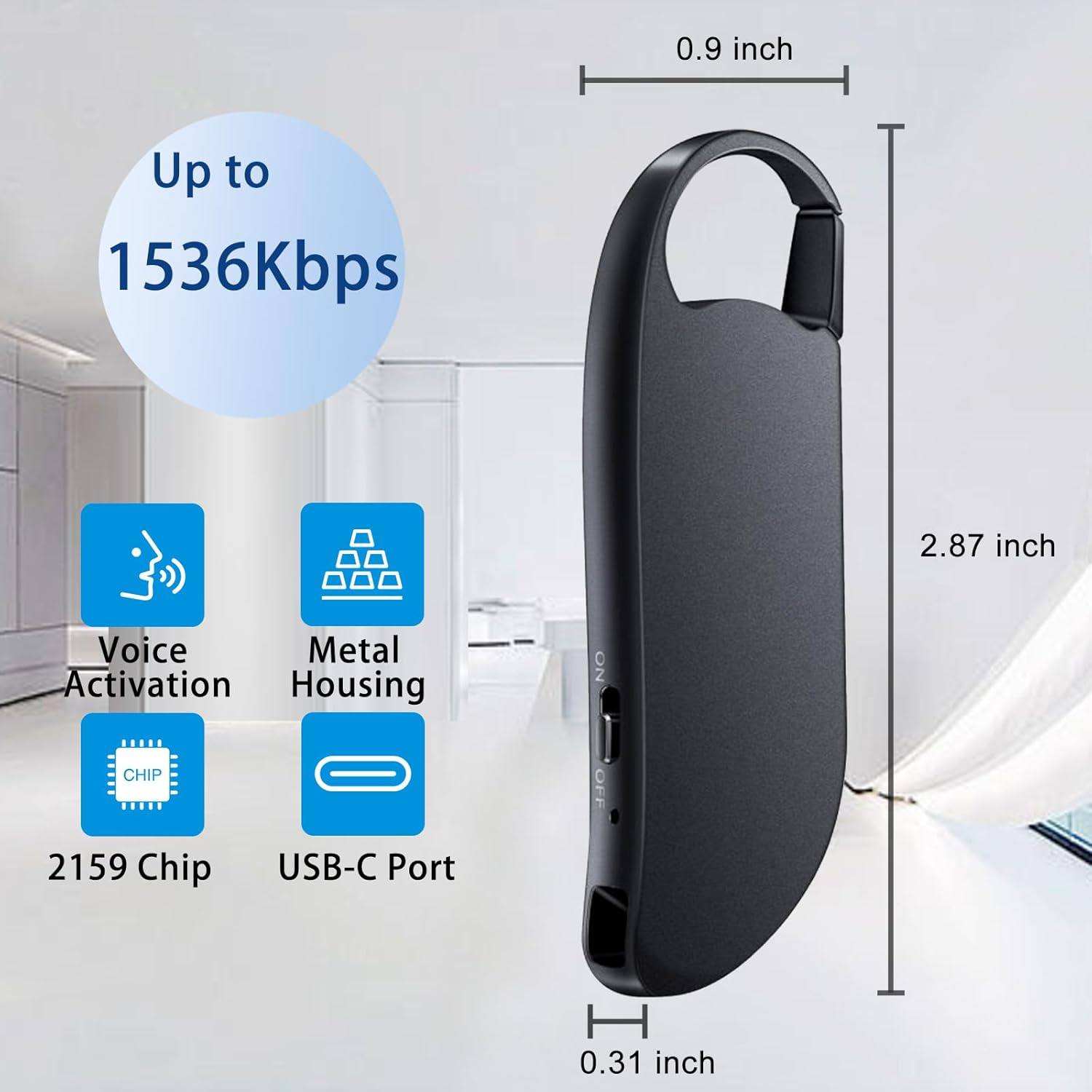
Foto: An illustration of the Vandlion Digital Voice Recorder highlighting its dimensions (0.31 inch thickness, 0.9 inch width, 2.87 inch length) and key features: Voice Activation, Metal Housing, 2159 Chip, and USB-C Port. It also indicates recording quality up to 1536Kbps.
- Gbanyụọ/gbanyụọ Located on the side, used to initiate and save recordings.
- Ọdụ USB-C: Maka ịchaji na ịnyefe data.
- Igwe okwu: Built-in for audio capture.
- Jack ekweisi (3.5mm): For audio playback (requires included adapter/headphones).
- Carabiner Clip/Keyring: Maka mfe ibugharị na itinye aka.
Melite
Ebo mbụ
Before first use, fully charge the device. Connect the supplied USB-C cable to the recorder's USB-C port and the other end to a computer's USB port or a compatible USB wall adapter. The charging indicator will provide feedback (refer to device's LED behavior for specifics, usually solid light during charge, off when full).
Ike ebe nchekwa
The device comes with 64GB of internal memory, capable of storing approximately 900 hours of recordings at 160kbps. No external memory cards are supported.
Ntuziaka ọrụ
Ndekọ Otu-emetụ
The Vandlion recorder features a simple one-touch operation for recording and saving.
- To start recording, slide the ON/OFF switch to the ON position. The device will automatically begin recording.
- To save the current recording and stop, slide the ON/OFF switch to the Gbanyụọ position. The recording will be saved to the internal memory.

Foto: Diagram illustrating the one-touch recording function with the ON/OFF switch. It also shows the included headphone adapter for playback.
Recording Quality and Noise Reduction
The recorder utilizes Vandlion's advanced 2159 chip and sophisticated DSP noise reduction technology to deliver high-fidelity sound. Recordings can be captured at bitrates up to 1536kbps, ensuring clear audio quality.

Foto: An illustration highlighting the "Triple Noise Reduction" feature, indicating HD recording, Noise reduction AI chip, and PCM noise reduction software, claiming 97% reduction in noise.
Voice Activated Recording (VOR)
Voice Activated Recording (VOR) mode allows the recorder to automatically pause recording when no sound is detected and resume when sound is present. This feature helps conserve storage space and reduces silent segments in your recordings. Note: Voice activation is disabled by default. Please refer to the detailed instructions below for activation.

Foto: A diagram illustrating the Voice Activation Function, showing how the device starts recording upon detecting sound and automatically stops when silent, thereby reducing silent gaps and saving space. It also shows how this feature can cut silent parts during playback.
To activate Voice Activated Recording: (Specific steps for VOR activation are not provided in the input data. Users should consult the included physical manual for precise button sequences or software settings.)
Ndekọ ịkpọghachi
Recordings can be played back using several methods:
- Headphone Playback: Connect the included headphone adapter and headphones to the device's USB-C port for direct audio playback.
- Ngwugharị Kọmputa: Connect the recorder to a Windows or Mac computer using the USB-C cable. The device will appear as a removable drive. Navigate to the recording folder (usually named "REC" or similar) and play the WAV audio files using your computer's media player.
- Android Phone Playback: (Not compatible with iPhone.) Connect the recorder to a compatible Android phone using an OTG adapter (not included). The phone should recognize the device as external storage, allowing you to access and play the recordings.

Foto: A visual guide demonstrating three methods for playing back recordings: connecting to a computer via USB-C, using the included headphones, and connecting to an Android phone via an OTG adapter.
Nlekọta
- Nhicha: Jiri akwa dị nro dị nro hichaa ngwaọrụ ahụ. Zere iji ihe nhicha mmiri ma ọ bụ ihe mgbaze.
- Nchekwa: Debe ihe ndekọ ahụ n'ebe dị jụụ ma kpọọ nkụ, ebe anwụ na-anaghị anwụ kpọmkwem na oke okpomọkụ dị oke njọ.
- Nlekọta batrị: Ka ịgbatị ndụ batrị ogologo, zere ịchaji batrị ugboro ugboro. Na-anya ngwaọrụ mgbe niile, ọbụlagodi na ọ naghị eji ya ogologo oge.
- Njikwa data: Regularly transfer important recordings to a computer or other storage device to prevent data loss and free up internal memory.
Nchọpụta nsogbu
| Nsogbu | Ihe kpatara/ Ngwọta nwere ike ime |
|---|---|
| Ngwaọrụ anaghị agbanwu. | Battery may be depleted. Connect to a power source using the USB-C cable and charge for at least 30 minutes. |
| Enweghị ike ịdekọ. |
|
| Poor recording quality / Excessive noise. |
|
| Kọmputa amataghị ngwaọrụ. |
|
| Voice Activation (VOR) not working. | VOR is disabled by default. Refer to the physical manual for specific instructions on how to enable this feature. |
Nkọwapụta
| Njirimara | Nkọwa |
|---|---|
| Nọmba nlereanya | Vandlion11 |
| Ebe nchekwa | 64 GB |
| Ike ịdekọ | Up to 900 hours (at 160kbps) |
| Bitrate ndekọ | 1536kbps (max) to 32kbps |
| Usoro ọdịyo | WAV |
| Mbelata mkpọtụ | DSP Noise Reduction, 2159 Chip |
| Interface | USB Ụdị-C |
| Ngwa dakọtara | Personal Computer (Windows/Mac), Smartphone (Android via OTG) |
| Igwe okwu | Wuru n'ime |
| Jack ekweisi | 3.5 mm (via adapter) |
| Ụdị batrị | Lithium ion (nwere ike ibugharị) |
| Ndụ batrị (Ọkara) | Awa 17 |
| Akụkụ ngwaahịa | 7.3 x 0.31 x 2.3 cm (2.87 x 0.9 x 0.31 inch) |
| Ibu | 34g (1.2 oz) |
Akwụkwọ ikike na nkwado
Vandlion products are designed for reliability and performance. For warranty information and customer support, please refer to the welcome guide included in your package or contact Vandlion customer service directly. Details for customer service are typically provided on the product packaging or the official Vandlion websaịtị.
Ndị ọrụ nlekọta ndị ahịa: Access to friendly customer service is provided with your purchase.
Iwu nloghachi: The standard return policy allows for refund/replacement within 30 days of purchase.


