1. Okwu mmalite
This manual provides detailed instructions for the proper use, setup, and maintenance of your Pard NV009-850nm Digital Night Vision Monocular. Please read this manual thoroughly before operating the device to ensure optimal performance and longevity. This device is designed for wildlife observation, hunting, and general outdoor viewing in various light conditions.

Image 1.1: The Pard NV009-850nm Digital Night Vision Monocular. This image displays the compact and ergonomic design of the monocular, highlighting its main body, objective lens, and eyepiece.
2. Ngwaahịa gafereview
Ihe ngwugwu 2.1
Mgbe ị na-emepe igbe ahụ, hụ na ihe niile edepụtara n'okpuru dị:
- Pard NV009-850nm Digital Night Vision Monocular
- Akpa na-ebu nchekwa
- Igwe nchaji USB
- Wrist Strap / Neck Strap
- Akwụkwọ ntuziaka (akwụkwọ a)

Image 2.1: Contents of the Pard NV009-850nm package. This image shows the monocular, its carrying case, charging cable, straps, and the user manual, all neatly arranged.
2.2 Atụmatụ
- Daytime and Nighttime Operation: Seamless transition between full-color daytime viewing and monochrome night vision mode.
- Onyonyo dị elu: Features a 1920x1080 FHD CMOS image sensor and a 1024x768 OLED display for clear, detailed visuals.
- Adjustable IR Illuminator: Integrated 850nm IR illuminator with three intensity levels, providing effective illumination up to 200 meters.
- Photo and Video Recording: Capture 2608x1944 resolution photos and 1920x1080 Full HD videos directly to a Micro SD card.
- Mbugharị anya na dijitalụ: Offers 4.7x optical magnification and 1.5x-3.0x digital zoom for precise target observation.
- Njikọ Wi-Fi: Connects to smart mobile devices via the "PardVision" app for remote viewing and data transfer.
- Picture-in-Picture (PIP) Mode: Provides a magnified inset view of the central area for enhanced detail without losing the wider field of view.
- Nhazi na-adịgide adịgide: IP67 waterproof rating ensures reliability in various outdoor conditions.

Image 2.2: Comparison of day and night vision modes. This image illustrates the monocular's capability to provide full-color images during the day and clear monochrome images at night, featuring a fox in both scenarios.

Image 2.3: Nighttime viewing range illustration. This graphic demonstrates the monocular's effective viewing distance of up to 200 meters (656 feet) in low-light conditions, showing a wild boar as an example target.

Image 2.4: Enhanced image quality demonstration. This image compares a blurred, lower-quality image with a sharp, enhanced image, illustrating the effectiveness of the PARD Visual Light Enhancement Algorithm (VLEA) and OLED display.
3. Nhazi
3.1 Ntinye batrị
- Locate the battery compartment cover, typically on the underside or side of the monocular.
- Open the cover by twisting or sliding it according to the indicator.
- Insert a fully charged 18650 type battery (not included) with the correct polarity (+/-) as indicated inside the compartment.
- Mechie mkpuchi batrị nke ọma.
Ntinye Kaadị SD Micro 3.2
The device supports Micro SD cards for storing photos and videos.
- Chọta oghere kaadị Micro SD, nke mkpuchi roba na-echebekarị.
- Gently insert the Micro SD card into the slot until it clicks into place. Ensure the card is oriented correctly.
- Close the rubber cover to protect the slot from dust and moisture.
3.3 Mgbanwe Ike Mmalite na Ndozi Lekwasị Anya
- Pịa ma jide bọtịnụ ike ka ịgbanwuo ngwaọrụ ahụ.
- Adjust the diopter ring on the eyepiece until the on-screen display (OSD) text appears sharp and clear to your eye.
- Rotate the objective lens focus ring to bring the observed image into sharp focus.
4. Ntuziaka ọrụ
4.1 Gbanyụọ ma ọ bụ gbanyụọ
- Ike Na: Pịa ma jide bọtịnụ Ike maka ihe dị ka sekọnd abụọ.
- Gbanyụọ: Press and hold the Power button for approximately 3 seconds until the device shuts down.
4.2 Mode Selection (Day/Night)
The NV009-850nm automatically adjusts to ambient light, but you can manually switch modes:
- Na isi viewing interface, short press the Mode button to toggle between Day (color) and Night (monochrome) vision modes.
4.3 IR Illuminator Adjustment
The integrated IR illuminator enhances visibility in complete darkness.
- Activate the IR illuminator by pressing its dedicated button (if available) or through the menu.
- Short press the IR button to cycle through the three intensity levels (Low, Medium, High) or to turn it off.

Image 4.1: IR Illuminator functionality. This graphic illustrates the 200m adjustable beam IR illuminator with its three intensity levels, showing how it illuminates a target in darkness.
4.4 Ọrụ Mbugharị
- Use the designated zoom buttons (often '+' and '-') to adjust the digital magnification. The optical magnification is fixed at 4.7x.
4.5 Foto na vidiyo
- Foto: In viewing mode, short press the Photo button to capture an image.
- Vidiyo: Short press the Video button to start recording. Press again to stop recording.

Image 4.2: Video recording and playback function. This image shows the monocular's ability to capture and play back high-definition video, with a simulated screen displaying a recorded scene of a fox.
4.6 Nghaghachi
- Enter the Playback menu via the main menu.
- Navigate through your recorded photos and videos using the directional buttons.
- Họrọ ihe iji view it on the OLED display.
4.7 Wi-Fi Connectivity (PardVision App)
- Download the "PardVision" app from your device's app store (Apple App Store or Google Play Store).
- On the monocular, enable Wi-Fi through the system settings. The device will broadcast a Wi-Fi network.
- Connect your smartphone or tablet to the monocular's Wi-Fi network.
- Open the PardVision app to view a live feed, control settings, and transfer files.
4.8 Picture-in-Picture (PIP) Mode
- Activate PIP mode through the quick menu or system settings.
- A magnified window will appear on the main display, showing a zoomed-in view of the central area.
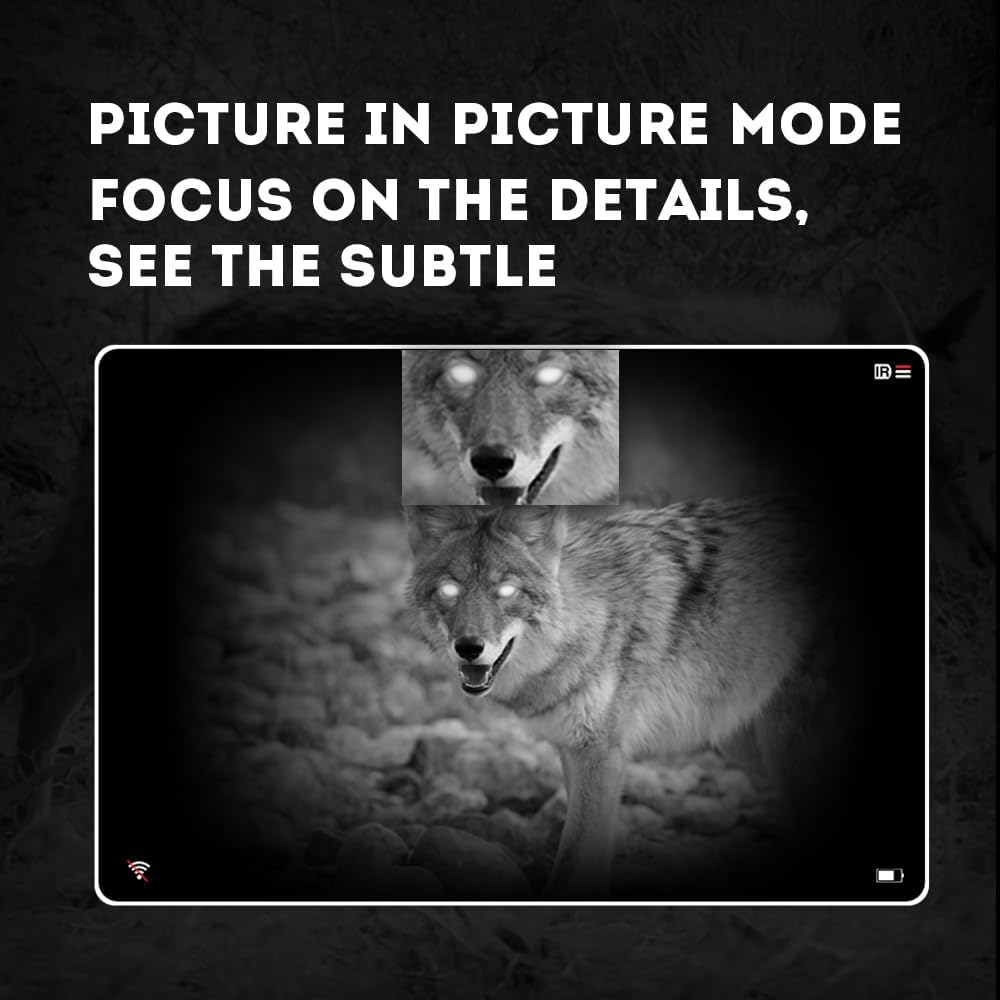
Image 4.3: Picture-in-Picture (PIP) mode. This image demonstrates how PIP mode allows users to focus on specific details within the main view, showing a magnified inset of a coyote's face.
5. Nlekọta
5.1 Na-ehicha ngwaọrụ
- lenses: Use a soft, lint-free cloth specifically designed for optical lenses. For stubborn smudges, use a small amount of lens cleaning solution. Avoid abrasive materials.
- Ahụ: Wipe the monocular's body with a soft, damp akwa . Ejila kemịkalụ siri ike ma ọ bụ ihe mgbaze.
5.2 Nlekọta batrị
- Always use high-quality, rechargeable 18650 batteries.
- Wepu batrị ma ọ bụrụ na agaghị eji ngwaọrụ ahụ ogologo oge.
- Chekwaa batrị n'ebe dị jụụ, kpọrọ nkụ.
5.3 Nchekwa
- Store the monocular in its protective carrying case when not in use.
- Keep the device in a dry environment, away from direct sunlight and extreme temperatures.
6. Nchọpụta nsogbu
If you encounter issues with your Pard NV009-850nm, refer to the following common problems and solutions:
| Nsogbu | Ihe nwere ike ime | Ngwọta |
|---|---|---|
| Ngwaọrụ anaghị agbanwu ọkụ | Low or depleted battery; Incorrect battery installation | Charge or replace the battery; Reinstall battery with correct polarity. |
| Onyonyo na-agba agba | Improper focus adjustment; Dirty lens | Adjust the diopter and objective lens focus rings; Clean the lenses. |
| No image in night mode | IR illuminator is off or set too low | Turn on the IR illuminator and adjust its intensity. |
| Nsogbu njikọ Wi-Fi | Wi-Fi not enabled on device; Incorrect app settings | Ensure Wi-Fi is enabled on the monocular; Check app permissions and settings. |
| Cannot record photos/videos | No Micro SD card; SD card full or corrupted | Insert a Micro SD card; Delete old files or format the card (backup important data first). |
If the problem persists after attempting these solutions, please contact Pard customer support.
7. Nkọwapụta
| Njirimara | Nkọwa |
|---|---|
| Ụdị | Pard |
| Aha Nlereanya | PARD Night Vision Monocular |
| Nọmba nlereanya | NV009-850nm |
| Agba | Nwa |
| Akụkụ ngwaahịa (LxWxH) | 7.16" x 2.24" x 2.79" (18.19 cm x 5.69 cm x 7.09 cm) |
| Ibu Ibu | 340 grams |
| Ihe onwunwe | Aluminom |
| Dayameta oghere ebumnuche | 25 millimeters |
| Enyemaka Anya | 25 millimeters |
| Ike ọhụụ abalị | Ee |
| IR Illuminator Wavelength | 850nm (with 940nm option available in other variants) |
| CMOS Sensor Resolution | 1920x1080 pikselụ |
| Ngosipụta ihuenyo | OLED 1024x768 |
| Ngosipụta anya | 4.7x |
| Dijitalụ mbugharị | 1.5x-3.0x |
| Mkpebi foto | 2608x1944 pikselụ |
| Mkpebi vidiyo | 1920x1080 pikselụ |
| Ngosi nke enweghị mmiri | IP67 |
| Ngwa dakọtara | Camera (for recording) |
| Ụdị nkwụnye | Rail Mount (if applicable for accessories) |
8. Akwụkwọ ikike na nkwado
8.1 Ozi akwụkwọ ikike
The Pard NV009-850nm Digital Night Vision Monocular comes with a 1-afọ akwụkwọ ikike site na ụbọchị azụrụ ya. Akwụkwọ ikike a na-ekpuchi ntụpọ na mmebi nrụpụta n'oge ojiji nkịtị. Ọ naghị ekpuchi mmebi sitere na ojiji na-ezighị ezi, ihe mberede, mgbanwe na-akwadoghị, ma ọ bụ mmezi na-ezighi ezi.
Biko dowe ihe akaebe nke ịzụrụ ihe maka akwụkwọ ikike.
8.2 Nkwado ndị ahịa
For technical assistance, warranty claims, or any questions regarding your device, please contact Pard customer support through the official Pard website or your retailer. When contacting support, please have your model number (NV009-850nm) and purchase date available.