1. Okwu mmalite
This manual provides detailed instructions for the assembly, operation, and maintenance of your Tribesigns 85.8" L-Shaped Executive Desk. Please read all instructions carefully before beginning assembly and retain this manual for future reference. This desk is designed to provide a spacious and organized workspace for home or business office environments.
2. Ozi nchekwa
ỊDỌ AKA NA NTỊ: Ọdịda iso ntuziaka nchekwa ndị a nwere ike bute mmerụ ahụ ma ọ bụ mebie ngwaahịa a.
- Always assemble the desk with the recommended number of people (2) to prevent injury and ensure proper alignment.
- Ensure the desk is properly anchored to the wall or floor to prevent tipping, especially if heavy items are placed on shelves or in drawers.
- Do not overload the desk with items heavier than it can safely support. Refer to the 'Specifications' section for weight limits.
- Debe obere akụkụ niile na ihe nkwakọba ihe n'ebe ụmụaka nọ na anụ ụlọ ka ị ghara ịkpagbu ihe egwu.
- Use only the provided hardware and tools, or equivalent, as specified in the assembly steps.
- Avoid using power tools with excessive torque, as this may strip screws or damage components.
- Place the desk on a level surface to ensure stability and prevent wobbling.
3. Ihe ngwugwu
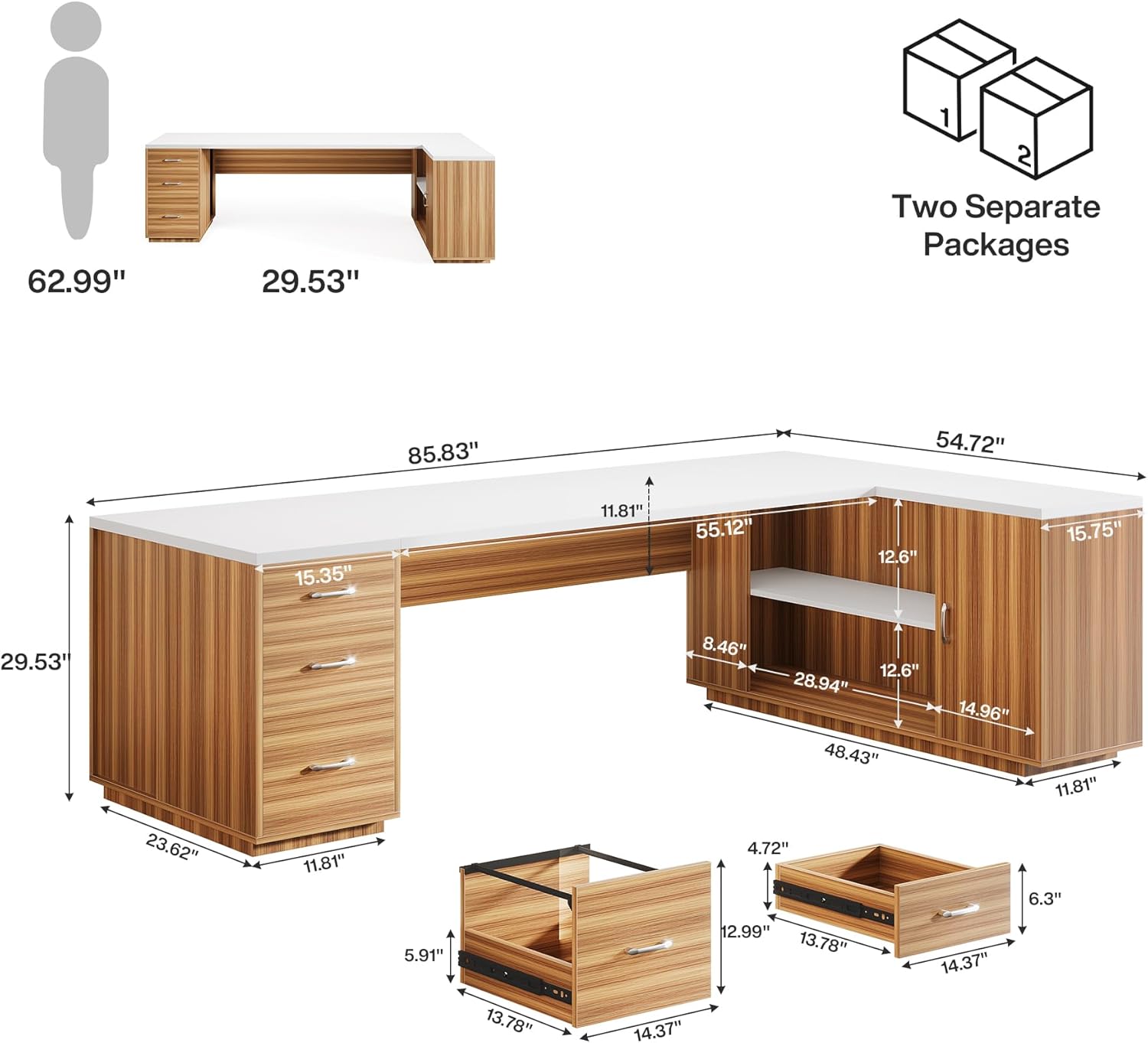
Your Tribesigns L-Shaped Executive Desk is shipped in two separate packages. Please verify that all components and hardware are present before beginning assembly. Refer to the parts list provided in your physical manual for exact quantities.
The following video demonstrates the unboxing process for the desk components:
4. Ntuziaka Mgbakọ
Assembly requires two people. Follow the steps below in sequence. A power drill with appropriate bits is recommended to expedite the process, but avoid overtightening screws.
For a visual guide, please refer to the comprehensive installation video:
Mgbakọ nzọụkwụ-site-nzọụkwụ gafereview:
- Kwadebe akụrụngwa: Lay out all wooden panels and hardware on a clean, soft surface to prevent scratches. Identify each part using the labels (e.g., 1, 2, 3, A, B).
- Assemble Drawer Frames: Attach the side panels of the drawers to the front and back panels using the specified screws and dowels. Ensure all connections are secure.
- Wụnye ihe ngosi Drawer: Secure the drawer slides to the inner sides of the desk's drawer compartments and to the outer sides of the assembled drawer frames using the provided screws. Ensure smooth operation.
- Construct Desk Base Units: Assemble the base units for both the main desk and the L-extension, following the numerical sequence in the diagram. Use cam locks and dowels for strong connections.
- Attach Desk Tops: Carefully place the main desk top and the L-extension top onto their respective base units. Secure them using the designated hardware.
- Wụnye ọnụ ụzọ kabinet: Attach hinges to the cabinet doors and then mount the doors to the cabinet section of the L-extension. Adjust hinges for proper alignment and smooth closing.
- Tinye shelf: Place the adjustable shelves into the cabinet and open storage sections. Use shelf pins to secure them at the desired height.
- Nyocha ikpeazụ: Verify that all screws are tightened, and the desk is stable. Adjust any leveling feet if necessary.
5. Ntuziaka ọrụ
Drawers:
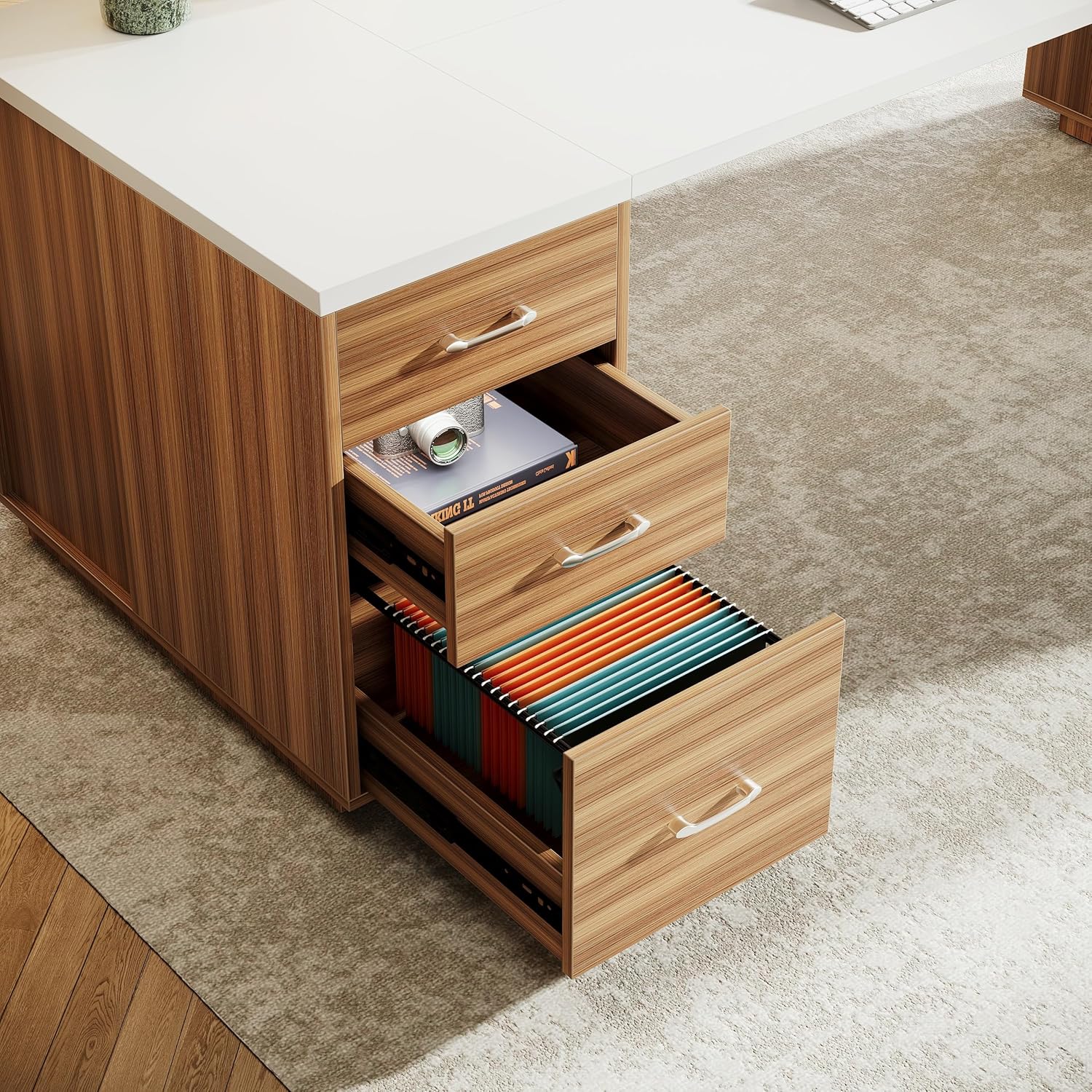
Desktọpụ ahụ nwere otu file drawer and two storage drawers. To open, gently pull the handle. To close, push firmly until the drawer is fully seated. The file drawer is designed to accommodate A4/Letter size files.
Kabinet na shelves:
The desk includes a cabinet with a door and an open storage shelf. The cabinet features an adjustable shelf to accommodate items of various sizes. To adjust the shelf, remove the shelf pins, reposition the shelf to the desired height, and reinsert the pins.

6. Nlekọta
- Nhicha: Jiri nwayọ hichaa elu ala, damp akwa . Zere kemịkalụ siri ike ma ọ bụ ihe nhicha nke nwere ike imebi njedebe.
- Mwụfu: Hichaa ihe ndị na-awụfusị ozugbo iji gbochie ntụpọ ma ọ bụ mebie osisi arụpụtara.
- Akụrụngwa: Na-elele skru na njikọ niile mgbe niile iji hụ na ha siri ike. Mee ka ọ sie ike dịka ọ dị mkpa.
- Ìhè anyanwụ: Avoid prolonged exposure to direct sunlight to prevent fading or discoloration of the wood grain finish.
- Okpomọkụ na mmiri: Protect the desk from excessive heat and moisture. Use coasters for drinks and heat pads for hot items.
7. Nchọpụta nsogbu
- Desktọpụ dị egwu: Ensure the desk is on a level surface. Check and tighten all assembly screws. Adjust the leveling feet if present.
- Draws anaghị agba nke ọma: Verify that the drawer slides are correctly installed and aligned. Ensure no debris is obstructing the tracks. Lubricate slides with a silicone-based spray if needed.
- Cabinet Door Misalignment: Adjust the hinges on the cabinet door. Most hinges allow for minor adjustments to align the door properly.
- Akụkụ na-efu: If any parts are missing or damaged upon arrival, please contact Tribesigns customer service immediately for assistance.
8. Nkọwapụta
| Njirimara | Nkọwa |
|---|---|
| Ụdị | Agbụrụ |
| Nọmba nlereanya | QQY12NP7PV |
| Ụdị | L-ọdịdị |
| Nhazi oche | Ụlọ ọrụ Executive |
| Akụkụ ngwaahịa (D x W x H) | 54.72"D x 85.83"W x 29.53"H |
| Agba | Agba aja aja |
| Ụdị | Oge a |
| Isi ihe | Osisi injinia |
| Ụdị ihe kacha elu | Osisi injinia |
| Ụdị mmecha | Wood Grain (Walnut) |
| Onu ogugu | 3 (1 file drawer, 2 storage drawers) |
| Ọnụọgụ nke shelf | 2 (1 open, 1 in-cabinet) |
| Mgbakọ achọrọ | Ee |
| Ọnụọgụ ndị mmadụ akwadoro maka Mgbakọ | 2 |
9. Akwụkwọ ikike & Nkwado
Tribesigns provides a limited warranty for this product. For specific warranty details, please refer to the documentation included with your purchase or contact Tribesigns customer service. If you encounter any issues or require assistance, please reach out to our support team via the contact information provided on our official websaịtị ma ọ bụ site na onye na-ere ahịa gị.


