1. Ngwaahịa gafereview
The Berrcom Wrist Blood Pressure Monitor is an automatic digital device designed for convenient and accurate blood pressure measurement at home. It features a large LCD display, voice broadcast function, and memory storage for two users, making it suitable for family use.

Image: The Berrcom Wrist Blood Pressure Monitor, showcasing its large digital display and compact design.
2. Gịnị gụnyere
Your Berrcom Wrist Blood Pressure Monitor package includes the following items:
- 1 x Berrcom Wrist Blood Pressure Monitor
- 1 x Akwụkwọ ntuziaka onye ọrụ
- 2 x AA batrị
- 1 x Compact Storage Case

Image: A visual representation of the items included in the product package: the blood pressure monitor, user manual, batteries, and storage case.
3. Nhazi
3.1. Ntinye batrị
- Mepee mkpuchi mkpuchi batrị n'azụ ngwaọrụ.
- Tinye batrị AA abụọ ahụ, hụ na polarity ziri ezi (+/-).
- Mechie mkpuchi nke batrị batrị nke ọma.
3.2. Initial Settings (Time/Date)
Refer to the detailed instructions in the included User Manual for setting the time and date. This ensures accurate record-keeping of your measurements.
4. Ntuziaka ọrụ
4.1. Proper Cuff Placement
Accurate readings depend on correct cuff placement. Follow these steps:
- Adjust the cuff: Wear the wristband on your left wrist with your palm facing up.
- Position the monitor: Ensure the distance between the edge of the wristband and the bottom of your palm is approximately one finger's width (about 1-2 cm).
- Maintain proper posture: Sit up straight and relax. Keep your wrist at the same level as your heart during the measurement.

Image: Visual guide for wearing the wrist blood pressure monitor on the left wrist, with the device positioned at heart level for accurate readings.

Image: A four-step visual guide demonstrating the correct procedure for using the blood pressure monitor, from cuff adjustment to starting the measurement.
4.2. Iwere nha
- Once the cuff is correctly positioned and you are in a relaxed posture, press the Malite/Kwụsị bọtịnụ.
- The monitor will automatically inflate the cuff and begin the measurement.
- Remain still and do not talk during the measurement process.
- The results (Systolic, Diastolic, and Pulse) will be displayed on the large LCD screen and announced via voice broadcast.

Image: The blood pressure monitor displaying results, with an illustration indicating its voice broadcast capability for clear audio feedback.
4.3. Voice Broadcast and Mute Mode
The monitor features a clear voice broadcast function that guides you through the measurement process and announces the results. This is particularly helpful for users with visual impairments.
To enable or disable the voice broadcast (mute mode), refer to the specific instructions in your User Manual. This allows for discreet measurements when preferred.
4.4. Dual-User Memory Function
The Berrcom monitor supports two individual users, each with a memory capacity of 120 readings. This allows for tracking and comparing health trends over time for multiple family members.
To switch between User 1 and User 2, press the dedicated user selection button (often indicated by a person icon). The display will show which user's memory is currently active.
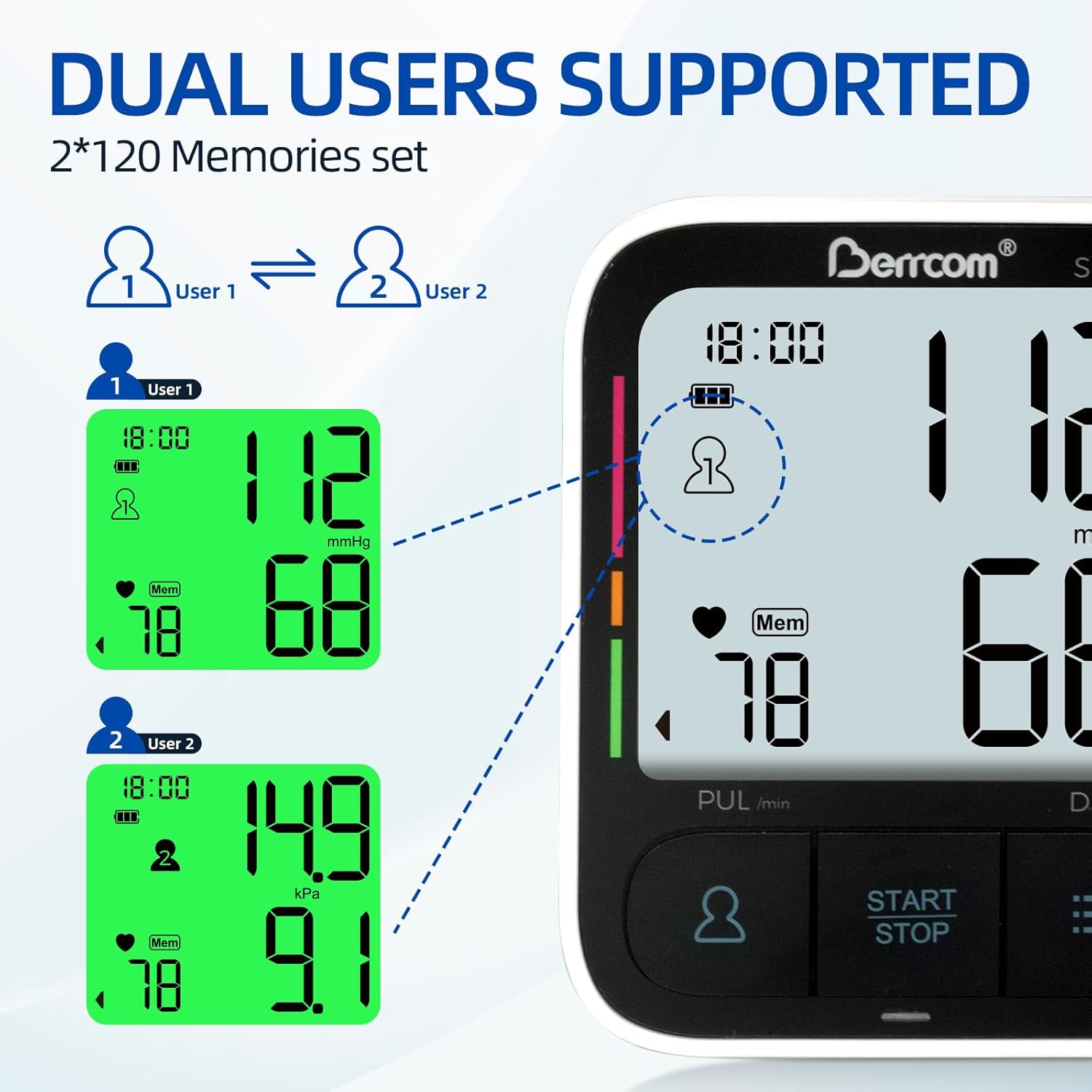
Image: The monitor's display illustrating the dual-user support, showing separate memory banks for User 1 and User 2, each capable of storing 120 readings.
4.5. Interpreting Results and Indicator Bar
The large backlit LCD display shows your Systolic (SYS), Diastolic (DIA) blood pressure, and Pulse (PUL) readings. An indicator bar on the side of the display provides a quick visual assessment of your blood pressure category:
- Uhie: Nnukwu nrụgide
- Orange/Yellow: Middle high pressure
- Akwụkwọ ndụ akwụkwọ ndụ: Nrụgide nkịtị

Image: The monitor's large LED screen clearly displaying blood pressure readings, alongside a color-coded indicator bar that visually represents the pressure level (high, middle high, normal).
5. Nlekọta
5.1. Na-ehicha ngwaọrụ
Jiri ákwà dị nro ma kpọọ nkụ hichaa ihe nlekota na cuff. Ọ bụrụ na ọ dị mkpa, jiri ákwà dị nro hichaa ya.ampejiri mmiri ma ọ bụ ihe nhicha dị nro mee ya. Ejila ihe nhicha abrasive ma ọ bụ mikpuo ngwaọrụ ahụ n'ime mmiri.
5.2. Ngbanwe batrị
When the low battery indicator appears on the display, replace both AA batteries with new ones. Dispose of used batteries according to local regulations.
5.3. Nchekwa
Store the blood pressure monitor in its compact storage case when not in use to protect it from dust and damage. Keep it in a cool, dry place away from direct sunlight and extreme temperatures.

Image: A person demonstrating the compact size of the blood pressure monitor by placing it into its included storage case, highlighting its portability.
6. Nchọpụta nsogbu
| Nsogbu | Ihe nwere ike ime | Ngwọta |
|---|---|---|
| Ọgụgụ na-ezighi ezi | Incorrect cuff placement, movement during measurement, improper posture, low batteries. | Ensure cuff is correctly positioned (1-2cm from palm, at heart level). Remain still and silent. Replace batteries if low. Take multiple readings for consistency. |
| Display Not Working / No Power | Batrị anwụọla ma ọ bụ tinye na ezighi ezi. | Lelee polarity nke batrị. Jiri batrị AA ọhụrụ dochie ya. |
| Cuff Does Not Inflate | Air leakage from cuff, tube disconnected, or pump malfunction. | Check for any visible damage to the cuff or tube. Ensure the tube is securely connected. If the issue persists, contact customer support. |
| Voice Broadcast Not Working | Mute mode is activated. | Refer to the User Manual to deactivate mute mode and enable voice broadcast. |
7. Nkọwapụta
| Njirimara | Nkọwa |
|---|---|
| Akụkụ ngwaahịa | 3.16"L x 2.57"W x 0.94"Th (8.03 x 6.53 x 2.39 cm) |
| Ibu | 8.78 ounces (ihe dị ka gram 249) |
| Nọmba Nlereanya ihe | Berrcom (ASIN: B0DMF8BLMP) |
| Onye nrụpụta | Berrcom |
| Isi Iyi Ike | Battery Powered (2 x AA Batteries) |
| Ụdị ngosi | Ngosipụta azụ azụ LED |
| Nha Cuff | Adjustable Wrist Cuff (5.3"-7.6" / 13.5-19.3 cm) |
| Ike ebe nchekwa | 2 users x 120 readings each |
| Atụmatụ | Voice Broadcast, Irregular Heartbeat Detection, One-button Operation |
8. Ozi nchekwa
Please read all instructions carefully before use. This device is intended for home use and should not replace professional medical advice or treatment. Statements regarding dietary supplements have not been evaluated by the FDA and are not intended to diagnose, treat, cure, or prevent any disease or health condition.
Consult your physician if you have any concerns about your blood pressure readings or health condition.
9. Akwụkwọ ikike na nkwado
For warranty information, technical support, or any product-related inquiries, please refer to the contact details provided in the included User Manual or visit the official Berrcom websaịtị. Debe akwụkwọ nnata ịzụrụ maka akwụkwọ ikike.


