Okwu mmalite
Thank you for choosing the ToughTested ROC 5 Solar Power Bank. This rugged and reliable power bank is designed for outdoor and demanding environments, offering multiple charging options including MagSafe compatible wireless charging, USB-C Power Delivery, Quick Charge 3.0, and an emergency solar panel. This manual provides essential information for the safe and efficient use of your device.

Image: The ToughTested ROC 5 Solar Power Bank, a compact black and orange device with a solar panel, is shown attached magnetically to the back of a smartphone, illustrating its wireless charging capability. A hand holds the phone and power bank.
Ngwaahịa gafereview
Atụmatụ igodo
- Ike batrị 5000mAh: Provides multiple charges for smartphones and other devices.
- MagSafe & Qi-Compatible Wireless Charging: Supports MagSafe for compatible iPhones and universal Qi for other wireless charging devices.
- USB-C PD 20W & Quick Charge 3.0: Offers fast wired charging for various devices.
- Ogwe Nchaji anyanwụ: Designed for emergency recharging in remote locations.
- Nhazi IP54 nke na-egbochi ihu igwe: Resistant to dust and splashing water.
- Igwe ọkụ ọkụ agbakọtara ọnụ: Multi-mode flashlight for illumination.
Ngwa
- Ogwe Nchaji Anyanwụ
- Wireless Charging Pad (Magnetic)
- USB-C Ntinye/Ọdụ mmepụta
- USB-A Ọpụpụ Port
- Ikanam Battery egosi ọkụ
- bọtịnụ ike
- Igwe ọkụ ọkụ LED

Image: A graphic showcasing the ToughTested ROC 5 Solar Power Bank with icons and text emphasizing its solar charging capability, IP54 waterproof design, and MagSafe compatibility. The power bank is depicted in an outdoor setting.
Melite
Nchaji Mbụ nke Ụlọ Nchekwa Ike
Before first use, fully charge your ROC 5 Power Bank using the USB-C port. Connect the included USB-A to USB-C cable to a compatible USB wall adapter (not included) and the USB-C port on the power bank. The LED indicator lights will illuminate to show charging progress and battery level. A full charge is indicated when all LED lights are solid.

Image: A visual representation of the ToughTested ROC 5 Power Bank simultaneously charging a smartwatch via USB-C, a smartphone via USB-A, and another smartphone wirelessly. This illustrates its multi-device charging capabilities.
Ntuziaka ọrụ
Nchaji
- Connect your device's charging cable to either the USB-C (input/output) or USB-A (output) port on the power bank.
- Jikọọ nsọtụ nke ọzọ nke eriri na ngwaọrụ gị.
- Press the power button on the power bank to initiate charging. The LED indicators will show the remaining battery level.
Wireless Charging (MagSafe & Qi Compatible)
- Ensure your device is wireless charging compatible (Qi-enabled or MagSafe compatible). For MagSafe, ensure your iPhone (17/16/15/14/13 series) has an official MagSafe case or no case for optimal magnetic alignment.
- Align your device with the wireless charging pad on the power bank. For MagSafe, the magnets will assist in proper alignment.
- Press the power button on the power bank to activate wireless charging. Your device should indicate that it is charging.
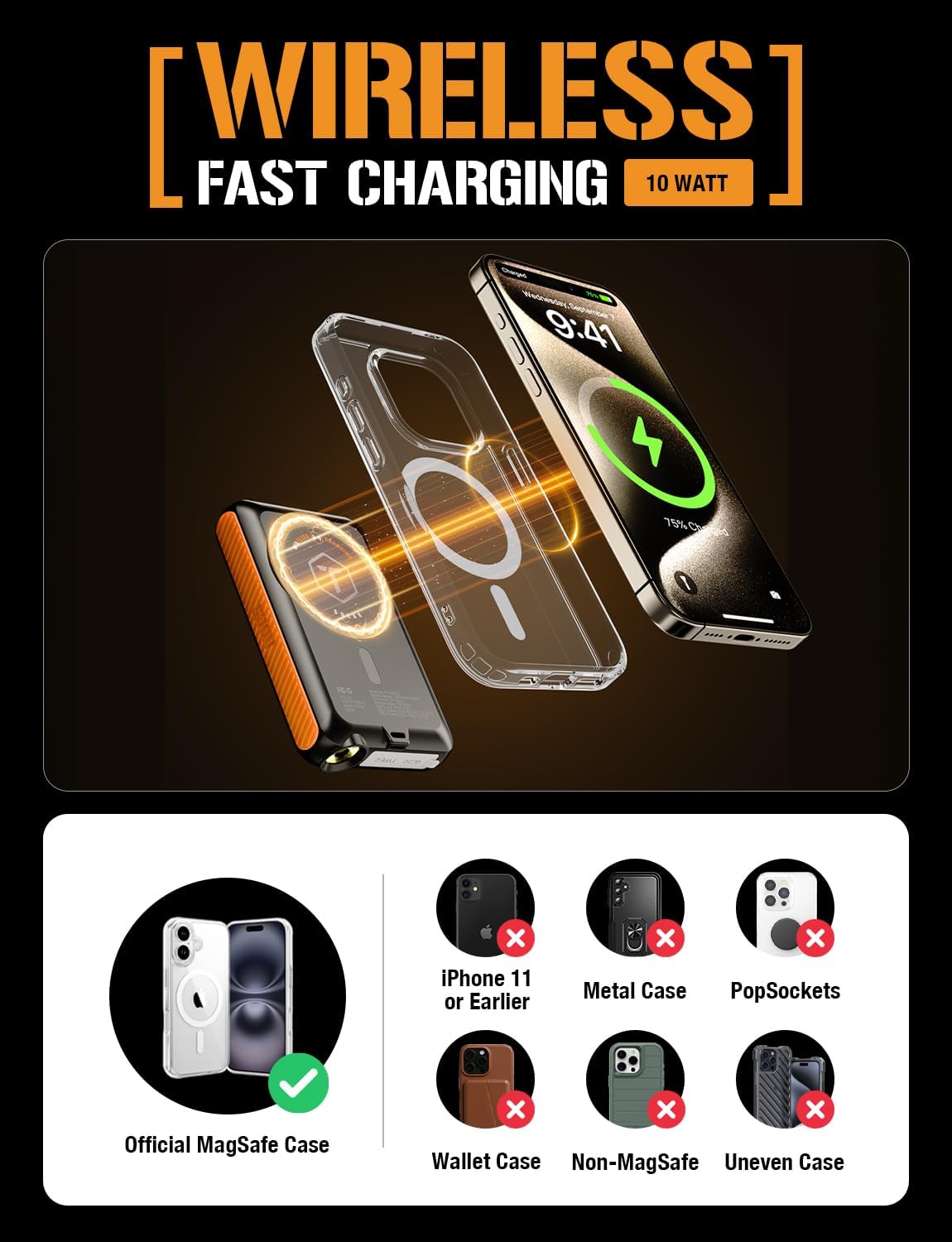
Image: A diagram showing the ToughTested ROC 5 Power Bank wirelessly charging an iPhone. It highlights the magnetic alignment for MagSafe compatibility and lists incompatible scenarios like metal cases or PopSockets.
Ịchaji anyanwụ
The integrated solar panel is designed for emergency power replenishment and trickle charging in direct sunlight. It is not intended as a primary charging method due to its limited output (up to 100mA per hour). For daily use, recharge the power bank via its USB-C port.
- Place the solar panel directly facing strong sunlight.
- The LED indicators may show a slow charge, or the charge rate may be too low to register on the indicators if sunlight is not optimal.

Image: The ToughTested ROC 5 Solar Power Bank is shown attached to the side of a camouflage backpack, positioned to receive direct sunlight in a desert landscape, illustrating its use as an emergency solar reserve.
Igwe ọkụ ọkụ LED
To activate the multi-mode LED flashlight:
- Gbanwuo/ Gbanyụọ: Double-press the power button.
- Ụdị okirikiri: Once the flashlight is on, single-press the power button to cycle through modes (e.g., constant light, strobe, SOS).
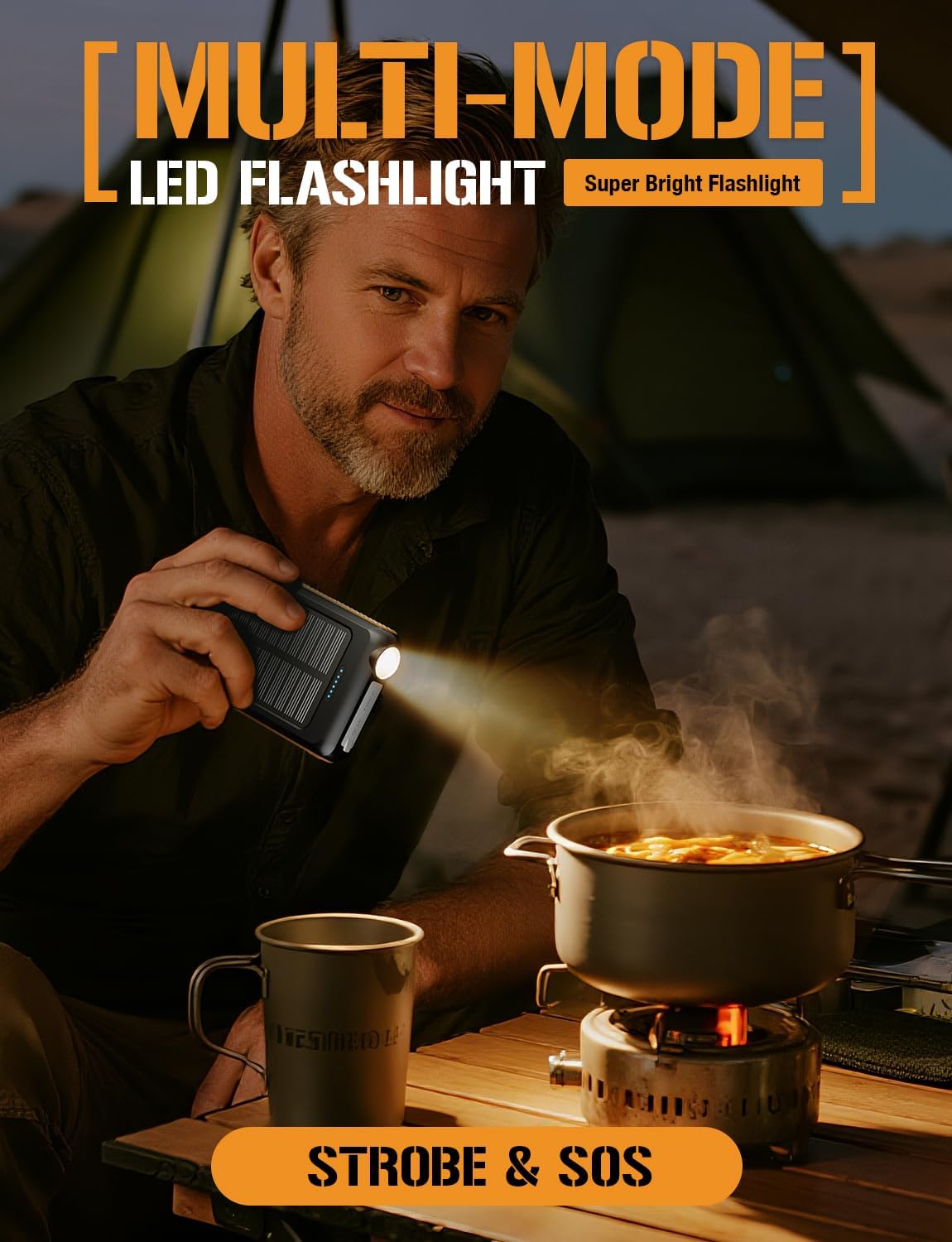
Image: A man is shown holding the ToughTested ROC 5 Power Bank, using its integrated LED flashlight to illuminate a cooking pot over a portable stove in a low-light outdoor setting, demonstrating its utility as a multi-mode flashlight.
Nlekọta
- Nhicha: Wipe the power bank with a dry, soft cloth. Avoid using harsh chemicals or abrasive materials.
- Nchekwa: Store the power bank in a cool, dry place away from direct sunlight and extreme temperatures. For long-term storage, ensure the battery is charged to approximately 50-75% to preserve battery health.
- Nlekọta batrị: To maximize battery lifespan, avoid fully discharging the power bank frequently. Recharge it regularly, even if not in active use.
Nchọpụta nsogbu
- Ụlọ akụ Power anaghị akwụ ụgwọ: Ensure the USB-C cable is securely connected to both the power bank and a working power source. Try a different cable or wall adapter.
- Device Not Charging (Wired): Verify the cable connection to both the power bank and your device. Ensure the power bank has sufficient charge and the power button has been pressed.
- Device Not Charging (Wireless): Check for proper alignment of your device on the wireless charging pad. Remove any thick cases or metallic objects that may interfere with wireless charging. Ensure the power bank has sufficient charge and the power button has been pressed.
- Nchaji anyanwụ nwayọ: Solar charging is supplementary. Ensure the panel is in direct, strong sunlight. Cloud cover or indirect light will significantly reduce charging efficiency.
- Igwe ọkụ anaghị arụ ọrụ: Double-press the power button to turn the flashlight on or off. Ensure the power bank has sufficient charge.
Nkọwapụta
| Nọmba nlereanya | TT-PBW-5C |
| Ike batrị | 5000 mAh |
| Akụkụ ngwaahịa | 5.6 x 2.8 x 0.6 sentimita asatọ |
| Ibu Ibu | 7.8 ounces |
| Ụdị njikọ | USB Ụdị A, USB Ụdị C |
| Mmepụta Nchaji Ikuku | MagSafe Compatible, Qi Compatible |
| USB-C mmepụta | PD 20W |
| USB-A mmepụta | QC 3.0 |
| Ntinye Nchaji anyanwụ | Up to 100mA (Emergency Reserve) |
| Nguzogide ihu igwe | IP54 (Uzuzu na-eguzogide) |
Ozi nchekwa
- Do not expose the power bank to fire, water, or extreme temperatures.
- Do not disassemble, puncture, or modify the device.
- Debe ebe ụmụaka na-apụghị iru.
- Avoid dropping or subjecting the power bank to severe impacts.
- If the power bank swells, overheats, or emits an unusual odor, discontinue use immediately.
- Tụfuo ngwaahịa ahụ nke ọma dịka iwu mpaghara siri dị.
Akwụkwọ ikike na nkwado
The ToughTested ROC 5 Solar Power Bank comes with a Akwụkwọ ikike nke afọ 5, reflecting our commitment to quality and durability. For warranty claims, technical support, or further assistance, please visit the official ToughTested website or contact customer service through your retailer.

Image: The ToughTested ROC 5 Power Bank, its user guide, a USB cable, and a prominent '5 Year ToughCare' warranty badge are displayed together in a rugged outdoor environment, emphasizing the product's durability and extended support.


