1. Ntuziaka nchekwa dị mkpa
Biko gụọ ntuziaka niile nke ọma tupu i jiri ngwa ahụ ma debe ha maka ntụaka n'ọdịnihu. Ọ bụrụ na i meghị iwu ndị a, ọ nwere ike ibute nkụchi ọkụ eletrik, ọkụ, ma ọ bụ mmerụ ahụ dị njọ.
- Nchekwa Eletriki: Gbaa mbọ hụ na voltage gosiri na ngwa ngwa kwekọrọ na mains mpaghara gị voltage before connecting. Do not immerse the cord, plug, or appliance in water or other liquids. Do not operate the appliance with a damaged cord or plug.
- Ebe na-ekpo ọkụ: Surfaces become hot during use. Always use oven mitts when handling hot components. Do not touch hot surfaces directly.
- Igwe ikuku: Do not block any ventilation openings. Allow at least 10 cm of free space on the back and sides, and 10 cm above the appliance.
- Nkwanye: Place the appliance on a stable, heat-resistant surface, away from walls and other heat-sensitive materials.
- Ụmụaka: This appliance is not intended for use by children. Close supervision is necessary when any appliance is used near children.
- Ojiji: Do not use the appliance for purposes other than those described in this manual. Do not leave the appliance unattended during operation.
- Nlekọta: Unplug the appliance from the outlet when not in use and before cleaning. Allow it to cool down completely before handling or cleaning.
2. Ngwaahịa gafereview
The LEHMANN 9L XXL Dual Basket Air Fryer is designed for efficient and healthy cooking. It features two independent cooking zones, a powerful 2400W heating system, 12 preset programs, and WiFi connectivity for smart control.

Foto 2.1: N'ihu view of the LEHMANN Dual Basket Air Fryer with included paper liners.
2.1 Atụmatụ
- Dual Independent Baskets: Esi nri abụọ dị iche iche na okpomọkụ dị iche iche na oge n'otu oge.
- 9L XXL Capacity: Large total capacity suitable for family-sized meals.
- Ike 2400W: Na-eme ka ikpo ọkụ ngwa ngwa na nri dị mma.
- 12 Mmemme atọrọ: One-touch cooking for popular dishes.
- Mgbanwe okpomọkụ: Range from 80°C to 200°C.
- Njikwa ihuenyo mmetụ: Intuitive digital display for easy operation.
- Njikọ WiFi: Control and monitor cooking via a smartphone app.
2.2 Ogwe njikwa gafereview

Ọgụgụ 2.2: Zuru ezu view of the control panel with key functions highlighted.
- Time/Temperature Adjustment: Use '+' and '-' buttons to set cooking time and temperature.
- Mmemme atọrọ: Icons representing various food types for quick selection.
- Bọtịnụ ike: Gbanyụọ/ gbanyụọ ngwa ahụ.
- Ihe ngosi WiFi: Na-egosi ọkwa njikọ.
- Bọtịnụ ọkụ: Activates the internal basket light.
- Ihe ncheta ịma jijiji: Icon indicates when to shake the basket for even cooking.
- SYNC Function: Synchronizes the finish time of both baskets.
- DUAL COOK Function: Applies the settings of one basket to the other.
- Bọtịnụ mmalite/Kwụsị: Na-amalite ma ọ bụ na-akwụsị usoro esi nri.
3. Tupu Mbụ Jiri
3.1 Mwepu na mkpochapụ mbụ
- Wepu ihe nkwakọ ngwaahịa niile, akwụkwọ mmado, na akara n'ime ngwa ahụ.
- Jiri mmiri ọkụ, ncha efere, na ogbo na-anaghị afụ ụfụ saa nkata na efere ndị ahụ nke ọma. Sachaa ma kpọọ nkụ kpamkpam.
- Jiri mgbasa ozi hichapụ ime na mpụga ngwa ahụamp akwa . Ejila akụkụ bụ isi n'ime mmiri.
- Ensure all parts are dry before plugging in the appliance.
3.2 Ntinye
- Debe fryer ikuku n'elu kwụsiri ike, larịị na elu na-eguzogide okpomọkụ.
- Ensure there is adequate air circulation around the appliance (at least 10 cm clearance on all sides).
- Edokwala ngwa ahụ n'akụkụ ihe ọkụ ọkụ ma ọ bụ ebe okpomọkụ.
4. Ntuziaka ọrụ
4.1 Basic Arụmọrụ
- Place the crisper plate into the basket and then insert the basket into the main unit.
- Add your ingredients to the basket. Do not overfill.
- Plug the power cord into a grounded wall outlet. The appliance will beep, and the display will illuminate.
- Pịa bọtịnụ Ike (3) ịgbanwuo ihe e ji esi nri ikuku.
- Select the desired basket (1 or 2) if not already selected.
- Adjust the temperature using the '+' and '-' buttons for temperature.
- Adjust the cooking time using the '+' and '-' buttons for time.
- Pịa bọtịnụ Malite/Kwụsị ka ịmalite isi nri.
4.2 Iji Mmemme atọrọ

Figure 4.1: The control panel showing various preset cooking program icons.
The air fryer comes with 12 preset programs for common foods. To use a preset program:
- After turning on the appliance, select the desired basket.
- Tap the icon corresponding to your desired food (e.g., fries, chicken, fish). The display will show the default time and temperature for that program.
- You can adjust the time and temperature manually if needed.
- Pịa bọtịnụ Malite/Kwụsị ka ịmalite isi nri.
4.3 Dual Zone Cooking
The dual basket design allows for versatile cooking. You can cook two different foods or larger quantities of one food.
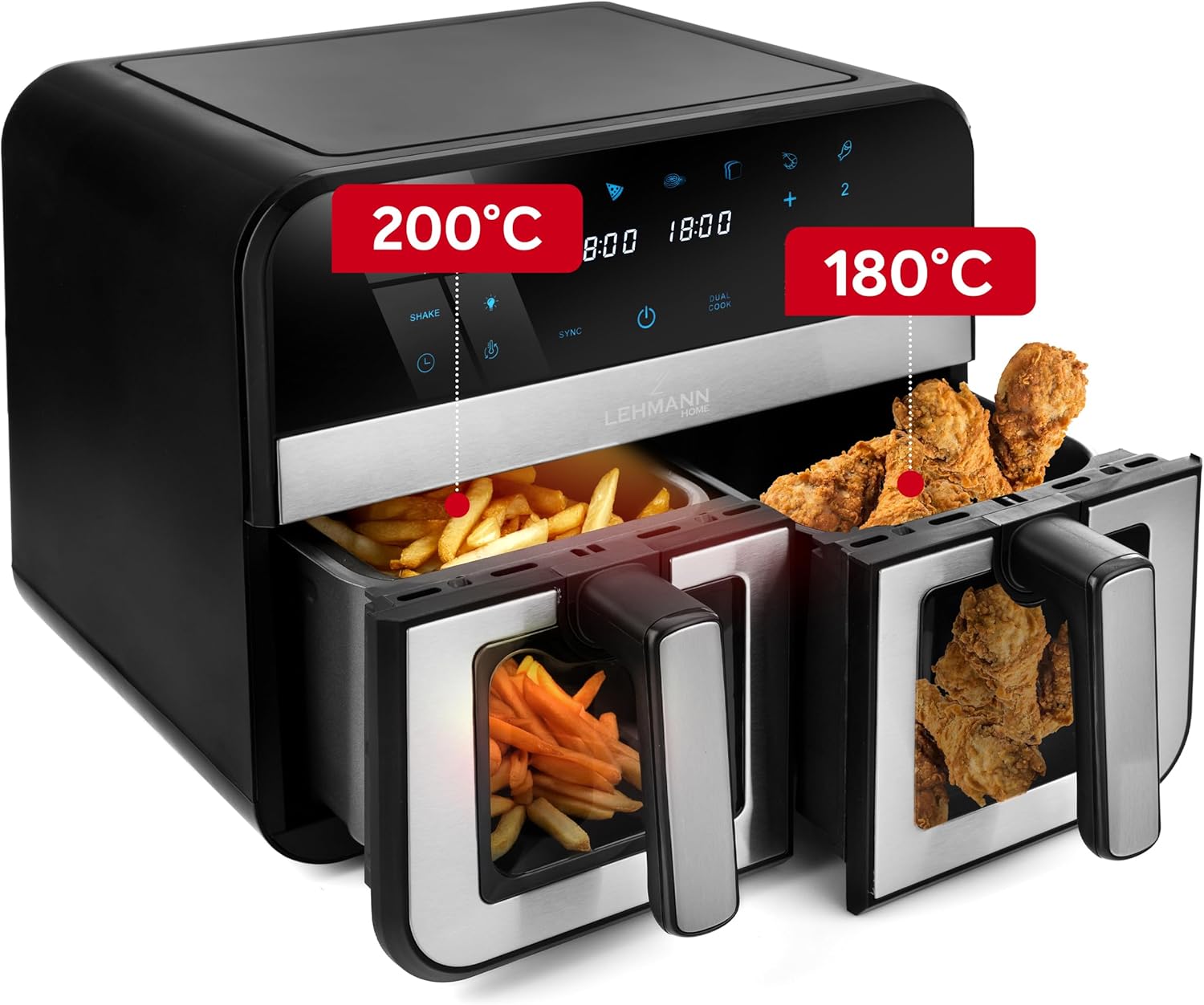
Ọgụgụ 4.2: Ọpụample of dual zone cooking with different foods and temperature settings.
- SYNC Function: To ensure both baskets finish cooking at the same time, set the cooking parameters for each basket. Then, press the SYNC button. The air fryer will automatically adjust the cooking times to synchronize completion.
- DUAL COOK Function: If you want to cook the same food in both baskets with identical settings, set the parameters for one basket, then press the DUAL COOK button. This will copy the settings to the second basket.
Njikọ WiFi 4.4
Control your air fryer remotely using the dedicated smartphone app.

Figure 4.3: Controlling the air fryer via the smartphone application.
- Download the LEHMANN Home app from your smartphone's app store.
- Follow the in-app instructions to pair your air fryer with your device. Ensure your air fryer is powered on and your phone is connected to a 2.4GHz WiFi network.
- Once connected, you can remotely start, stop, adjust settings, and monitor the cooking process.
5. Atụmatụ nri
- Na-ekpo ọkụ: Maka nsonaazụ kacha mma, kpochaa fryer ikuku maka nkeji 3-5 tupu ịtinye nri.
- Na-ama jijiji: For even cooking and crispiness, shake the baskets halfway through the cooking time, especially for smaller items like fries or nuggets. The air fryer may have a built-in 'Shake' reminder.
- Mmanụ: While air frying requires little to no oil, a small amount of oil (1 tablespoon) can enhance crispiness for some foods.
- Ebe nri: Arrange food in a single layer in the basket to allow hot air to circulate effectively. Avoid overcrowding.
- Imecha: Cooking times may vary based on food type, quantity, and desired crispiness. Always check food for doneness.

Figure 5.1: Illustration of the rapid hot air circulation technology for even cooking.
6. Nhicha na mmezi
Nhicha mgbe niile na-eme ka arụmọrụ dị mma ma gbasaa ogologo ndụ nke fryer ikuku gị.
6.1 Cleaning the Baskets and Crisper Plates
- Kwupuo fryer ikuku ma kwe ka ọ dị jụụ kpamkpam tupu ihicha ya.
- Remove the baskets and crisper plates. They are dishwasher safe, or you can wash them by hand with hot water, dish soap, and a non-abrasive sponge.
- For stubborn food residue, soak the baskets in warm, soapy water for about 10 minutes before cleaning.
- Gbaa mbọ hụ na akụkụ niile akpọọla nke ọma tupu achịkọta ma ọ bụ chekwaa ya.
6.2 ihicha ngalaba isi
- Jiri mgbasa ozi hichapụ mpụta fryer ikukuamp akwa . Ejila ihe mkpocha abrasive ma ọ bụ ihe nchacha.
- Jiri mgbasa ozi hichaa ime ngwa ahụamp cloth. If necessary, a mild detergent can be used.
- Ejila akụkụ isi na mmiri ma ọ bụ mmiri mmiri ọ bụla ọzọ.
7. Nchọpụta nsogbu
Ọ bụrụ na ị hụ nsogbu ọ bụla na igwe eji esi nri ikuku gị, lee tebụl dị n'okpuru maka nsogbu na ngwọta ndị a na-ahụkarị.
| Nsogbu | Ihe nwere ike ime | Ngwọta |
|---|---|---|
| Ngwa anaghị agbanwuo. | A naghị etinye ya; okwu mgbapụta ike. | Gbaa mbọ hụ na etinyere eriri ọkụ na ebe nchekwa na-arụ ọrụ. |
| A naghị esi nri nke ọma. | Baskets overcrowded; food not shaken. | Do not overcrowd baskets. Shake food halfway through cooking. |
| Nri adịghị crispy. | Mmanụ ezughi oke (maka ụfọdụ nri); okpomọkụ dị oke ala; oge esi nri dị mkpụmkpụ. | Lightly brush food with oil. Increase temperature or cooking time. |
| Anwụrụ ọkụ na-acha ọcha na-abịa site na ngwa. | Grease residue from previous use; fatty food. | Clean baskets and crisper plates thoroughly. Remove excess fat from food. |
| WiFi connection fails. | Incorrect network; app issue. | Ensure your phone is on a 2.4GHz WiFi network. Restart the app and air fryer. Refer to the app's help section. |
8. Nka na ụzụ nkọwa
Detailed specifications for the LEHMANN 9L XXL Dual Basket Air Fryer.

Figure 8.1: Product dimensions of the air fryer.
| Nkọwapụta | Uru |
|---|---|
| Ụdị | LEHMANN |
| Nlereanya | LHODF-2811 |
| Ike | 9 lita |
| Wattage | 2400 Watt |
| Voltage | 230 volts |
| Oke okpomọkụ | 80°C - 200°C |
| Akụkụ (L x W x H) | 40.5 x 40.5 x 38.5 cm |
| Ibu | 7.3 kilogram |
| Ihe onwunwe | Ọla, plastik |
| Atụmatụ pụrụ iche | Temperature Control, Dual Zone Functionality, Non-stick Coating, Timer, WiFi Control |
9. Akwụkwọ ikike na nkwado ndị ahịa
A na-emepụta ngwaahịa LEHMANN n'ọkwa dị elu. Maka ozi gbasara mkpuchi akwụkwọ ikike, biko lee kaadị akwụkwọ ikike dị na nzụta gị ma ọ bụ gaa na LEHMANN gọọmentị. websaịtị.
If you have any questions, require technical assistance, or need to report an issue, please contact LEHMANN customer support through the contact information provided in your product packaging or on the official LEHMANN website. Please have your model number (LHODF-2811) and purchase details ready when contacting support.


