Okwu mmalite
This manual provides detailed instructions for the installation, operation, and maintenance of your Carro Smart Ceiling Fan. The Tilbury 52-inch smart ceiling fan is designed to provide efficient cooling and lighting for large indoor and outdoor living spaces. It features a modern design with a white finish, elegant plywood blades, and an integrated 4000K LED cool light. This fan incorporates remote control, Wi-Fi app control, Siri Shortcut, and voice control technology, compatible with Amazon Alexa and Google Home Assistant, to customize your fan preferences.
Ozi nchekwa
Please read all safety instructions carefully before installation and use. Failure to follow these instructions may result in electric shock, fire, or personal injury.
- Gbaa mbọ hụ na agbanyụrụ ọkụ na mgbanyụ sekit tupu echichi ma ọ bụ ọrụ.
- Waya niile ga-adịrịrị na koodu eletriki nke obodo na nke mpaghara.
- Kpọtụrụ onye na-ahụ maka ọkụ eletrik ma ọ bụrụ na ịmaghị maka usoro waya.
- Mount the fan to a structurally sound ceiling capable of supporting the fan's weight.
- Wepụ aka, ntutu isi na uwe ka agụba fan mgbe ị na-arụ ọrụ.
- Anwala ịrụkwa ma ọ bụ gbanwee fan ahụ n'onwe gị. Kpọtụrụ nkwado ndị ahịa maka enyemaka.
Ntọala na nwụnye
The Carro Smart Ceiling Fan is designed for straightforward installation. The process typically takes about 20 minutes to replace your current ceiling fan.
- Wepu akụrụngwa: Jiri nlezianya wepụ akụkụ niile dị na ngwugwu ahụ. Hụ na ihe niile dị na ya dịka ndepụta ngwugwu si dị.
- Ịkwụsị ike: Before beginning installation, ensure the power supply to the fan location is turned off at the main circuit breaker.
- Nwụnye bracket: Securely attach the mounting bracket to the ceiling junction box. Ensure the junction box is rated for ceiling fan support.
- Njikọ waya: Connect the fan's electrical wires to the household wiring according to the provided wiring diagram. Ensure all connections are secure and properly insulated.
- Mgbakọ Fans: Attach the fan motor assembly to the mounting bracket. Install the fan blades and light kit as per the instructions.
- Mweghachi ike: Once installation is complete, restore power at the circuit breaker and test the fan's operation.

Foto: Ofeview of Carro Smart Ceiling Fan components and general installation steps.
Ntuziaka ọrụ
Your Carro Smart Ceiling Fan offers multiple control methods for convenience and customization.
1. Usoro nchịkwa
The fan can be controlled via the included remote, a mobile app, or voice commands through smart home assistants.
- Njikwa anya: Use the dedicated remote to adjust fan speed, light settings, and turn the fan on/off. This ensures control even without a Wi-Fi connection.
- Ngwa mkpanaaka: Download the Carro Home app to customize settings remotely. The app allows for advanced control and scheduling.
- Njikwa olu: The fan is compatible with Amazon Alexa, Siri, and Google Assistant. Use voice commands such as "Alexa, set the white ceiling fan in the bedroom to speed 8, turn the yellow light to 75%, and adjust the white light to 36%."

Image: Remote control and mobile phone app interface for fan operation.

Image: Demonstrates voice control functionality with Amazon Alexa, Google Assistant, and Siri Shortcuts.
2. Fan Operation (DC Motor)
The fan is equipped with an efficient DC motor, offering quiet operation and energy savings.
- Ntọala ọsọ: Choose from 10 adjustable wind speeds, ranging from a maximum airflow of 4500 CFM to a minimum of 980 CFM.
- Ikuku ikuku nwere ike ịtụgharị: The reversible function allows you to change the direction of airflow. Use the downward airflow for cooling in summer and upward airflow to circulate warm air in winter.
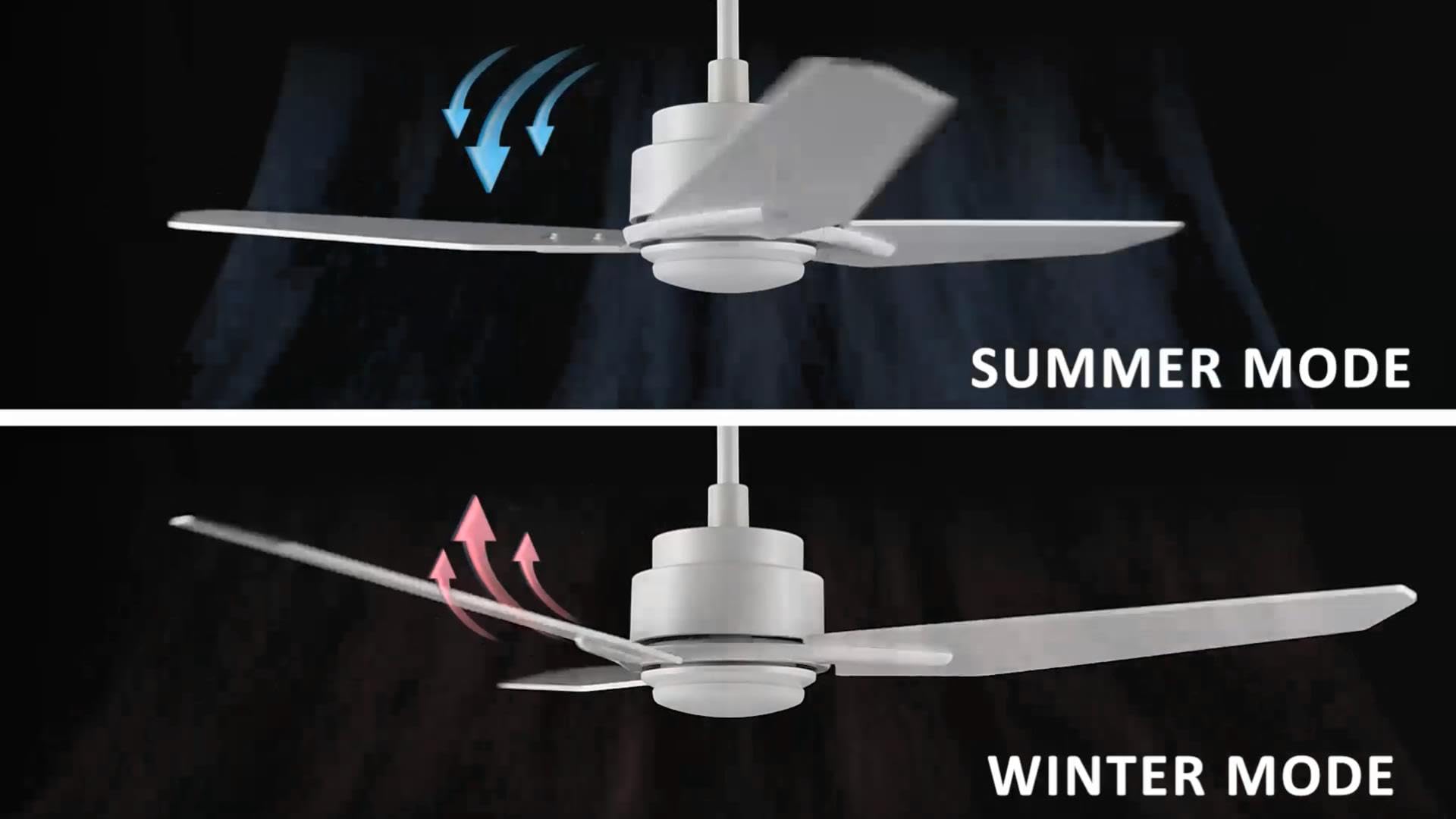
Image: Illustration of summer mode (downward airflow) and winter mode (upward airflow) for optimal air circulation.
3. Adjustable Dimmable LED Lights
Control the fan's lighting independently with ease.
- Nhọrọ okpomọkụ agba: Select from three light colors: 4000K (cool light), 3000K (bright light), and 2700K (warm light).
- arụrụ arụrụ arụ: The LED lights are dimmable from 1% to 100%, allowing you to adjust brightness for any situation.
- Smart Grouping: Group the LED lights with the fan or other smart devices for unified control via the app or voice commands.

Image: Visual representation of the three dimmable light color options: Cool Light (4000K), Natural Light (3000K), and Warm Light (2700K).
4. Timer and Scheduling Options
Utilize the scheduling feature through the mobile app to automate fan and light operations.
- Set Routines: Program the fan to activate at specific times, with desired light and fan settings, for different areas of your home.
- ExampLe: Program the living room fan to turn on daily at 18:00 with both yellow and white lights. Set the study fan to turn on at 21:00 from Monday to Friday, illuminating only the yellow light.
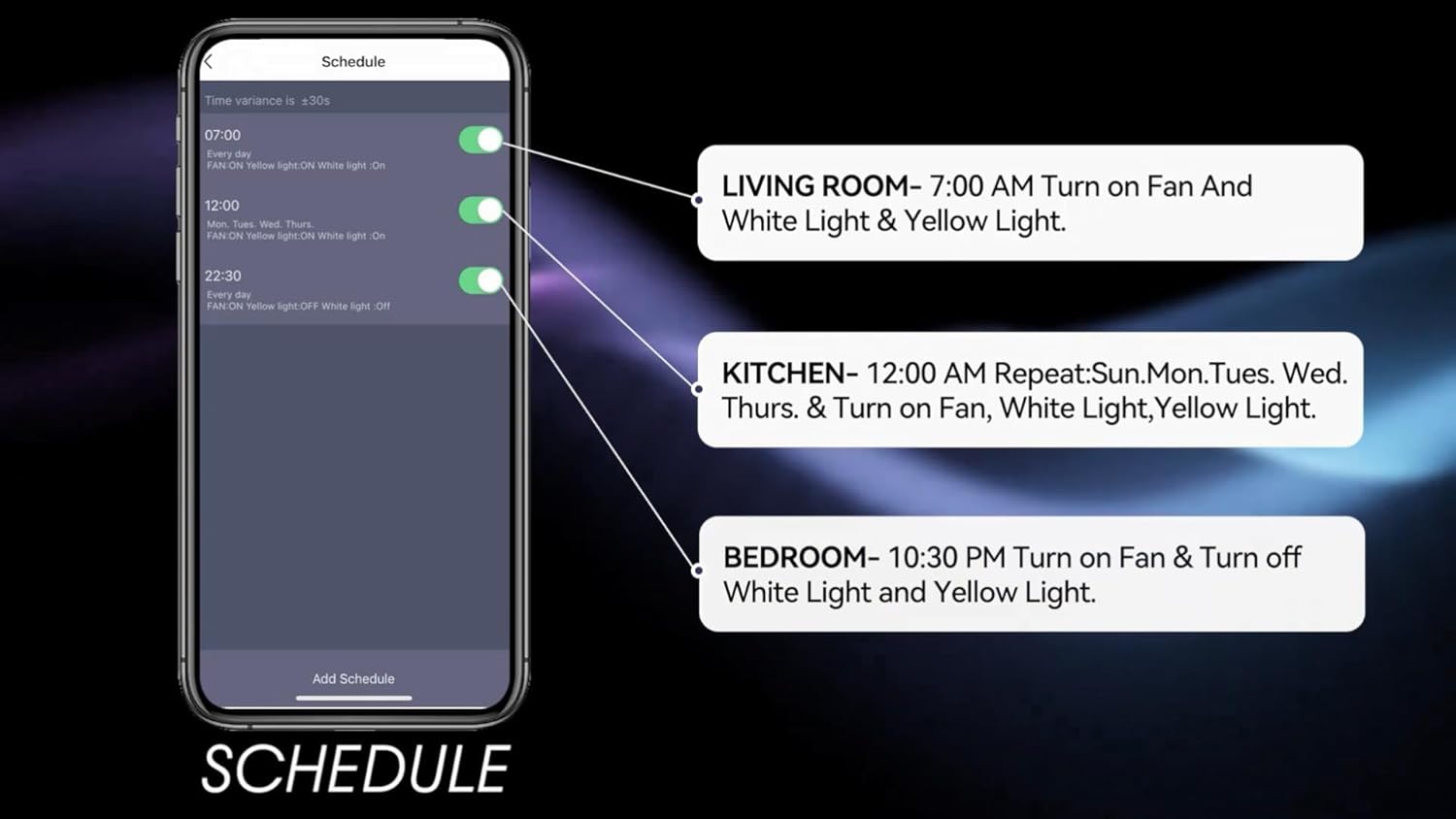
Image: Screenshot of the mobile app's scheduling interface, demonstrating how to set routines for different rooms.
Nlekọta
Nlekọta anya mgbe niile na-eme ka arụmọrụ kacha mma na ogologo ndụ nke onye na-akwado uko ụlọ gị.
- Nhicha: Jiri ihe dị nro na-efesa agụba fan na ụlọ moto, damp akwa . Ejila ihe nchacha abrasive ma ọ bụ ihe mgbaze.
- Ike Agụba: Check blade screws annually to ensure they are secure. Loose blades can cause wobbling and noise.
- Ngwa ọkụ: The integrated LED light source is designed for long life and typically does not require replacement. If issues arise, contact customer support.
- Gbanyụọ: Gbanyụọ ike mgbe niile na ihe na-agbaji sekit tupu ị rụọ ọrụ nhicha ma ọ bụ ndozi ọ bụla.
Nchọpụta nsogbu
If you encounter issues with your Carro Smart Ceiling Fan, refer to the following common problems and solutions:
| Nsogbu | Ihe nwere ike ime | Ngwọta |
|---|---|---|
| Onye ofufe anaghị ebido | Enweghị ike maka onye ofufe; Njikọ waya rụrụ arụ; Batrị njikwa anya dị ala. | Lelee ihe mgbawa sekit; Hụ na njikọ waya niile dị nchebe; Dochie batrị njikwa dịpụrụ adịpụ. |
| Fans na-ama jijiji | Skrọs agụba ndị na-adịghị ike; Agụba ndị na-adịghị ike; ihe nkwado e ji etinye ihe. | Tighten all blade screws; Use a balancing kit (not included) to balance blades; Ensure mounting bracket is securely fastened. |
| Ìhè anaghị arụ ọrụ | No power to the light kit; Loose wire connections; Light setting off. | Check power supply; Verify light kit wiring; Ensure light is turned on via remote, app, or voice control. |
| Njikwa anya anaghị arụ ọrụ | Batrị dị ala; Ejikọtaghị ihe dị n'ime ime. | Replace remote battery; Refer to pairing instructions in the full manual (if applicable). |
| Enweghị ike ijikọ na Wi-Fi/App | Paswọọdụ Wi-Fi na-ezighi ezi; Rawụta dị oke elu; Emelitebeghị ngwa ahụ. | Verify Wi-Fi password; Move router closer or use a Wi-Fi extender; Update the Carro Home app to the latest version. |
Nkọwapụta ngwaahịa
| Njirimara | Nkọwapụta |
|---|---|
| Ụdị | Carro |
| Nlereanya | 52" White |
| Agba | Ọcha |
| Igwe ọkụ eletrik | N'uko Fan |
| Isi Iyi Ike | AC/DC |
| Ụdị | Oge a |
| Akụkụ ngwaahịa | 52"D x 52"W x 13.4"H |
| Ụdị ụlọ | Bedroom, Dining Room, Home Office, Living Rooms, Study Room |
| Njirimara Pụrụ Iche | Enwere ike ime mmemme |
| Eji akwadoro | Mgbasa ikuku |
| Ọnụọgụ agụba | 3 |
| Ike ikuku | 4500 Cubic Feet kwa nkeji |
| Ogologo agụba | 22.7 sentimita asatọ |
| Voltage | 120 volts |
| Ngwa gụnyere | Ceiling fan X1 |
| Nkọwapụta Met | ETL |
| Usoro njikwa | Olu, Ime Ime Obodo, Ngwa |
| Ibu Ibu | 15.7 pound |
| Ụdị nkwụnye | Ugwu Downrod |
Ozi akwụkwọ ikike
Carro products are manufactured to the highest quality standards. This product comes with a limited warranty against defects in materials and workmanship. Please refer to the warranty card included in your product packaging or visit the official Carro websaịtị maka nkọwa na usoro akwụkwọ ikike.
Nkwado ndị ahịa
For technical assistance, troubleshooting, or warranty claims, please contact Carro customer support:
- Websaịtị: Visit the official Carro websaịtị maka FAQ na akụrụngwa nkwado.
- Email: Refer to your product packaging for customer service email.
- Ekwentị: Gaa na ngwugwu ngwaahịa gị maka nọmba ekwentị ọrụ ndị ahịa.
Please have your model number (52" White) and purchase date ready when contacting support.


