1. Okwu mmalite
Thank you for choosing the BAOFENG K5Plus Two-Way Radio. This device is a high-performance communication tool designed for reliable long-range communication, featuring advanced functions such as GPS positioning, Type-C charging, DTMF signaling, and NOAA weather reception. This manual provides essential information for the safe and efficient operation of your radio. Please read it thoroughly before use.
2. Ozi nchekwa
- Nchekwa batrị: Use only the specified Lithium-Ion battery pack. Do not short-circuit, incinerate, or disassemble the battery. Dispose of batteries properly.
- Nchekwa antenna: Do not touch the antenna during transmission. Avoid using the radio with a damaged antenna, as it may cause minor burns.
- Nchedo Ntị: Keep the volume at a comfortable level. Prolonged exposure to loud volumes may cause hearing damage.
- Gburugburu ebe mgbawa: Turn off your radio in potentially explosive atmospheres (e.g., near gas pumps, chemical storage areas).
- Nguzogide mmiri: Ngwaọrụ a bụ Ọ BỤGHỊ ihe na-eguzogide mmiri. Avoid exposure to water or moisture.
- Ntinye aka: Turn off your radio when instructed to do so in hospitals or aircraft.
3. Ihe ngwugwu
Biko lelee ngwugwu ahụ nke ọma ka ị hụ na ihe niile dị:
- 1 x Portable Radio (BAOFENG K5Plus)
- 1 x 2500mAh batrị Li-ion
- 1 x Antten
- 1 x Ụdị-C USB
- 1 x eriri eriri
- 1 x Lanyard
- 1 x Akwụkwọ ntuziaka ngwaahịa (akwụkwọ a)
- 1 x eriri mmemme
4. Ngwaahịa gafereview
The BAOFENG K5Plus features a 1.77-inch TFT large screen, a full keypad for direct frequency input and menu navigation, and a robust design for outdoor use. Key components include the antenna connector, PTT (Push-to-Talk) button, speaker, microphone, and Type-C charging port.
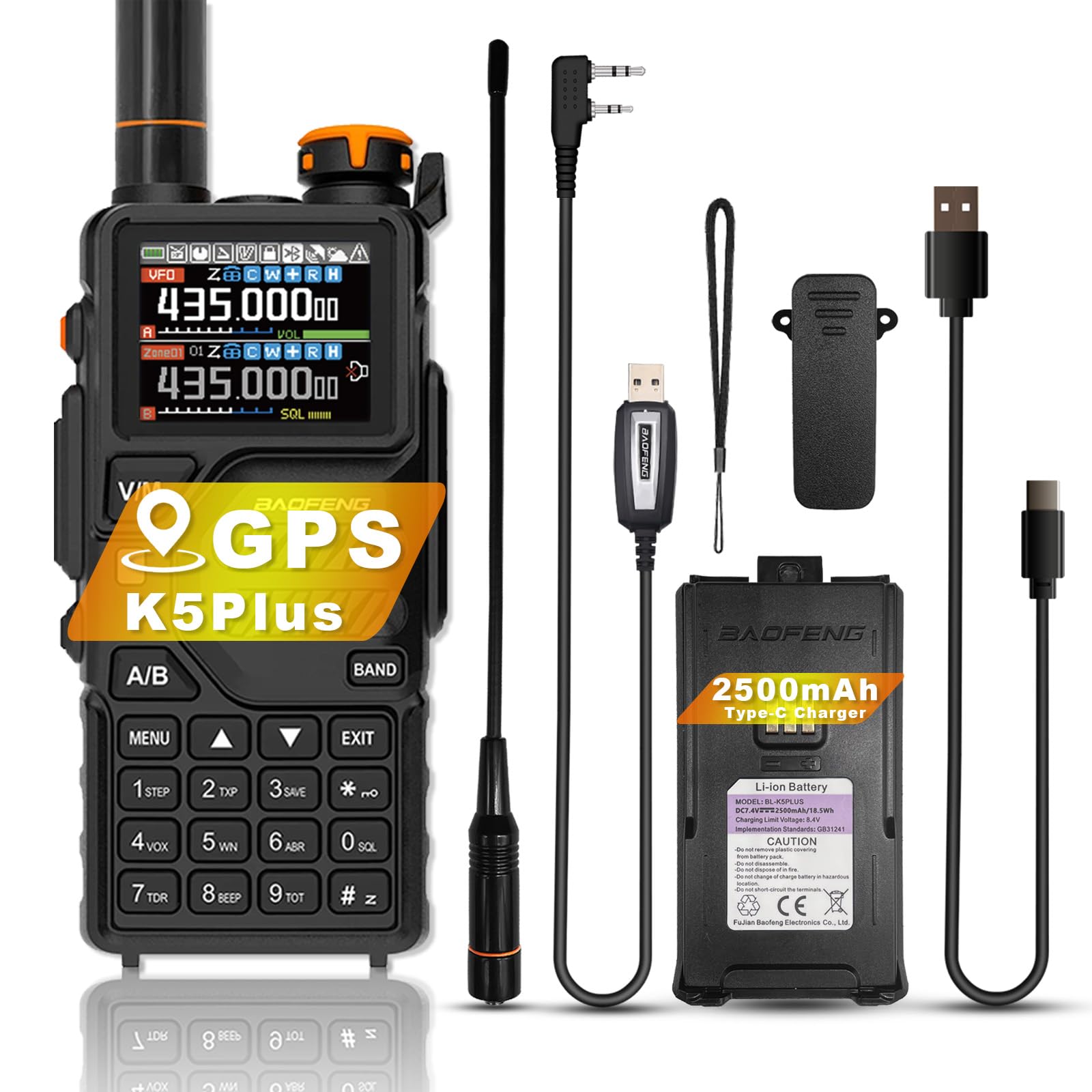
Foto 1: N'ihu view of the BAOFENG K5Plus Two-Way Radio, showing the display, keypad, and speaker.
5. Nhazi
5.1. Ntinye batrị
- Gbaa mbọ hụ na agbanyụrụ redio.
- Align the battery pack with the compartment on the back of the radio.
- Malite batrị n'ime ebe ruo mgbe ọ pịrị na nchekwa.
5.2. Ịchaji batrị
The BAOFENG K5Plus supports convenient Type-C USB charging.
- Ensure your radio is turned OFF.
- Plug the Type-C USB cable into the Type-C USB charging port on your battery pack.
- Connect the other end of the Type-C cable to a compatible USB power source (e.g., wall adapter, computer USB port).
- An empty battery will typically be fully charged in approximately 4 hours. The battery meter on the LCD will indicate charging status.
5.3. Mgbakwụnye antenna
- Screw the antenna clockwise onto the connector on top of the radio until it is finger-tight. Do not overtighten.
5.4. Belt Clip and Lanyard Attachment
Attach the belt clip to the designated slot on the back of the radio for easy carrying. The lanyard can be attached to the top or side loop for added security.
6. Ntuziaka ọrụ
6.1. Gbanyụọ / gbanyụọ na njikwa olu
- Ike Na: Rotate the power/volume knob clockwise until you hear a click.
- Gbanyụọ: Rotate the power/volume knob counter-clockwise until you hear a click.
- Ndozi olu: Tụgharịa mkpịsị ugodi ike/olu ka ịhazie olu ege ntị.
6.2. Nhọrọ ọwa
The radio supports up to 640 named memory channels. You can select channels using the keypad or the up/down navigation buttons.
- Direct Entry: Enter the channel number directly using the keypad.
- Ụdị nyocha: Activate scan mode to automatically search for active channels.
6.3. Na-ebufe na ịnata
- Ịnata: When a signal is detected on the current channel, the radio will automatically open the squelch and you will hear the transmission.
- Mgbasa Press and hold the PTT (Push-to-Talk) button on the side of the radio. Speak clearly into the microphone. Release the PTT button to stop transmitting and return to receive mode.
6.4. GPS Function
The BAOFENG K5Plus includes an optional GPS function for location sharing and requesting. This feature requires hardware support and specific settings.
- Nkwalite: Access the position system menu to enable/disable GPS, set time zone, and GPS mode.
- ViewEbe: Press and hold the designated key (refer to your radio's specific key mapping) to view your current location information.
- Sharing/Requesting Location: This is a DTMF calling application. Ensure radios are on the same frequency/channel and main frequency band. Refer to the "Signaling Calls" section in the radio's on-screen menu for setting call codes, names, and local IDs.
- Mara: Na ọnọdụ GPS, naanị ị nwere ike view location information. To make normal voice calls, you must exit GPS mode.
6.5. DTMF Function
DTMF (Dual-Tone Multi-Frequency) is an in-band signaling method used for various applications, including signaling calls and GPS location requests.
- The radio supports DTMF encoder and DTMF manual dial.
- Refer to the radio's menu for specific DTMF settings and usage for signaling calls.
6.6. NOAA Weather Forecast
The BAOFENG K5Plus can receive 10 channels of America NOAA weather forecasts, providing timely weather alerts for the United States and Canada.
- Access the NOAA weather forecast menu to select and monitor weather channels.
6.7. VOX (Voice Activated Transmit)
VOX allows for hands-free operation by automatically transmitting when it detects your voice. Adjust VOX sensitivity in the radio's menu.
6.8. Ọrụ mkpu
The radio includes an alarm function for emergency situations. Consult the menu for activation and settings.
6.9. Mmemme
The BAOFENG K5Plus is PC programmable. Use the included programming cable and compatible software (available from BAOFENG's official website or authorized dealers) to customize channels, frequencies, and other advanced settings.
7. Atụmatụ
- 1.77” TFT large screen, full keypad, fully open menu operation
- Built-in input method for editing channel names
- 10 Channels America NOAA weather forecast reception
- Type-C direct charging and charging stand compatibility
- Ihe mkpuchi DTMF na ọkpụkpọ aka DTMF
- VOX (nfefe na-arụ ọrụ olu)
- Ọrụ mkpu
- 50 CTCSS ụda na 105 DCS Koodu
- 10 zones storage, up to 640 named memory channels
- Display illumination programmable via keypad
- High or low power selectable
- Function beep on the keyboard
- Ọrụ ịchekwa batrị
- Programmable repeater offset
- Ụdị nyocha
- Ngụ oge nkwụsị nnyefe
- Built-in CTCSS/DCS tones
- Mkpọchi ọwa nọ n'aka
- PC nwere ike ime
- Cross band nnabata
- Ọkwa iri (10) nke mmezi Squelch
- One touch search frequency
- End of transmission tone (Roger Beep)
- Analog signaling DTMF, 2TONE, 5TONE, BDC1200 codecs
- GPS positioning function, location sharing and requesting location information from others
8. Nkọwapụta
| Njirimara | Nkọwapụta |
|---|---|
| Nọmba nlereanya | K5Plus |
| Frequency Range F1 (RX/TX) | 136-174MHz |
| Frequency Range F2 (RX/TX) | 220-260MHz |
| Frequency Range F3 (RX) | 400-520MHz |
| Frequency Range F3 (TX) | 400-480MHz |
| Frequency Range F4 (AM RX) | 108-136MHz |
| Frequency Range F5 (Police RX) | 350-390MHz |
| Frequency Range F6 (FM RX) | 65-108MHz |
| Ọnụọgụ nke ọwa | 640 |
| Ụdị batrị | 1 Lithium Ion battery (2500mAh) |
| Ndụ batrị | Up to 48 Hours (typical use) |
| Nchaji ọdụ ụgbọ mmiri | -Dị-C USB |
| Ibu Ibu | 1.06 pound (ihe dị ka 16.93 ounces) |
| Akụkụ ngwaahịa | 1.57 x 2.54 x 4.92 sentimita (D x W x H) |
| Oke Okwu Kachasị | Maịlụ 6.21 (n'okpuru ọnọdụ kacha mma) |
| Ọkwa Nguzogide mmiri | Ọ bụghị mmiri na-eguzogide |
9. Nlekọta
- Nhicha: Jiri nwayọọ, damp akwa iji hichaa mputa redio. Ejila kemịkalụ siri ike ma ọ bụ ihe mgbaze.
- Nlekọta batrị: Store the battery in a cool, dry place when not in use. Avoid fully discharging the battery for extended periods.
- Antenna: Ensure the antenna is securely attached. Do not bend or force the antenna.
- Nchekwa: If storing the radio for a long time, remove the battery.
10. Nchọpụta nsogbu
- Redio anaghị agbanye: Check if the battery is properly installed and charged. Ensure the power/volume knob is turned on.
- Enweghị ike ịnyefe ma ọ bụ nata: Verify that the antenna is attached. Check the selected frequency/channel. Ensure the battery has sufficient charge. Adjust squelch level.
- Ogo ọdịyo adịghị mma: Check volume level. Ensure the antenna is secure. Move to an area with better signal reception.
- GPS anaghị arụ ọrụ: Ensure GPS function is enabled in the menu. Move to an open outdoor area for better satellite reception.
- Radio is unresponsive: Try removing and reinserting the battery to perform a soft reset.
11. Akwụkwọ ikike na nkwado
The BAOFENG K5Plus comes with a 1-afọ akwụkwọ ikike provided exclusively through "Shiqun Electronics Co., Ltd". Please retain your proof of purchase for warranty claims.
For technical support, troubleshooting assistance beyond this manual, or warranty inquiries, please contact the seller or an authorized BAOFENG service center.


